


More Filterscape VA (just a touch of reverb added)
https://dandelionaudio.com/sound/F-VA-59.mp3
https://dandelionaudio.com/sound/F-VA-60.mp3
https://dandelionaudio.com/sound/F-VA-61.mp3
Filterscape 1.5.0 public preview 14785
-
- KVRist
- 332 posts since 11 Jan, 2022
Just a thought:
Wouldn't it be better to show a DICE icon instead of RND?
Again, just a thought.
-

- KVRAF
- 27005 posts since 3 Feb, 2005 from in the wilds
-
- KVRAF
- 2082 posts since 13 Dec, 2016
The lock function is not working at all. No matter which parameter I lock, after hitting the RND button the state is changing.
Its over for Bitwig--CUBASE WON !!!!!!!!!!!!!!!!!!!!!!!!!!!!!!!!!
-

- u-he
- 30253 posts since 8 Aug, 2002 from Berlin
-
- KVRAF
- 2082 posts since 13 Dec, 2016


Its over for Bitwig--CUBASE WON !!!!!!!!!!!!!!!!!!!!!!!!!!!!!!!!!
-
tasmaniandevil tasmaniandevil https://www.kvraudio.com/forum/memberlist.php?mode=viewprofile&u=62450
- KVRAF
- Topic Starter
- 2182 posts since 22 Mar, 2005 from a planet called u-he
Lock was a function developed to lock parameters while switching presets.enCiphered wrote: Tue Aug 15, 2023 1:53 pm The lock function is not working at all. No matter which parameter I lock, after hitting the RND button the state is changing.
That QA guy from planet u-he.
-
- KVRAF
- 27005 posts since 3 Feb, 2005 from in the wilds
-
- KVRAF
- 27005 posts since 3 Feb, 2005 from in the wilds
F-VA again... using the snapshot eq to shape the sound... it's a remarkable tool!
https://dandelionaudio.com/sound/F-VA-69.mp3
https://dandelionaudio.com/sound/F-VA-69.mp3
-
News From The Sky News From The Sky https://www.kvraudio.com/forum/memberlist.php?mode=viewprofile&u=241844
- KVRist
- 186 posts since 20 Oct, 2010
Seems like it could be useful for a constrained random patch generator: generate patches using a particular wavetable, or filter, or envelope shape.tasmaniandevil wrote: Tue Aug 15, 2023 2:20 pmLock was a function developed to lock parameters while switching presets.enCiphered wrote: Tue Aug 15, 2023 1:53 pm The lock function is not working at all. No matter which parameter I lock, after hitting the RND button the state is changing.
-

- KVRist
- 480 posts since 17 Jul, 2015
Yes! This would be great, if lock can be expanded to apply to randomization, we could create presets with different sections locked and make randomization much more specific.News From The Sky wrote: Wed Aug 16, 2023 11:09 pmSeems like it could be useful for a constrained random patch generator: generate patches using a particular wavetable, or filter, or envelope shape.tasmaniandevil wrote: Tue Aug 15, 2023 2:20 pmLock was a function developed to lock parameters while switching presets.enCiphered wrote: Tue Aug 15, 2023 1:53 pm The lock function is not working at all. No matter which parameter I lock, after hitting the RND button the state is changing.
-
tasmaniandevil tasmaniandevil https://www.kvraudio.com/forum/memberlist.php?mode=viewprofile&u=62450
- KVRAF
- Topic Starter
- 2182 posts since 22 Mar, 2005 from a planet called u-he
As Urs already said, this will be possible with the next beta.daily patcher wrote: Wed Aug 16, 2023 11:47 pm Yes! This would be great, if lock can be expanded to apply to randomization, we could create presets with different sections locked and make randomization much more specific.
That QA guy from planet u-he.
-
- u-he
- 30253 posts since 8 Aug, 2002 from Berlin
-
Andreya_Autumn Andreya_Autumn https://www.kvraudio.com/forum/memberlist.php?mode=viewprofile&u=553235
- KVRian
- 512 posts since 21 Feb, 2022
First of all: This seems absolutely stellar to me so far. Great job and congrats on the soon-to-be release.
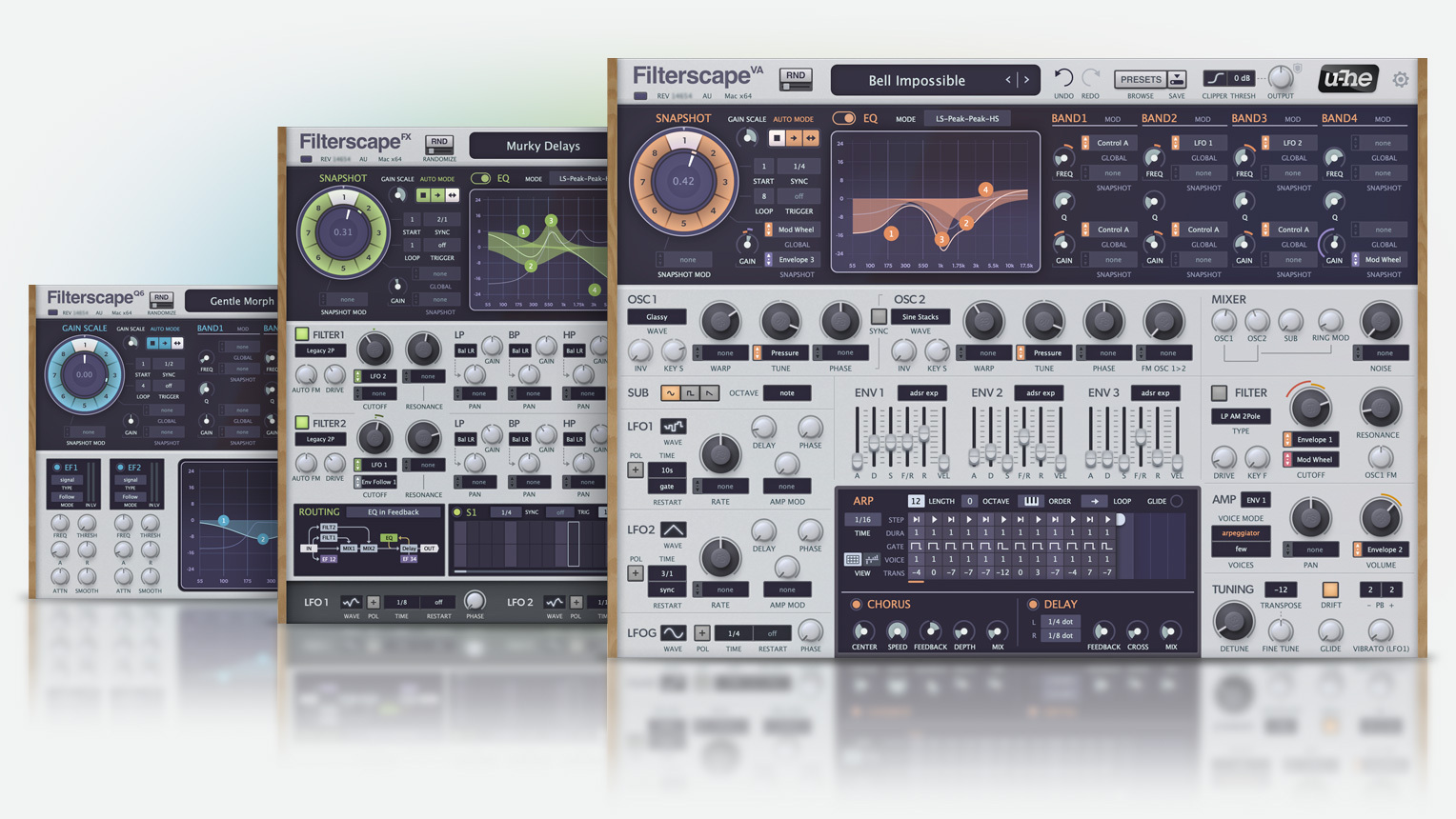
Second: The EQ version says "Gain Scale" over the snapshot wheel, where I reckon it's meant to say "Snapshot".
Third: In the FX version, the delay time would benefit from a "near instant" time option. 1ms max, or 0.1ms or something like that. That way you could still use the EQ as just an EQ, when it's in the feedback path. Or the filters of course, but if I'm not mistaken, the routings this would open up with the filters in the FB path are achievable elsewise. In the currently fastest mode, the 64th note latency is enough to be an issue unless the tempo is pretty high. I expect you'll say this might make feedback much more volatile. But it's already very sensitive at the 64th note mode, so evidently that's ok.
(As an aside, what I'd really love is a non-synced option with a milliseconds dial, sane for the LFOs and everywhere else. But I understand that'd be a much bigger change.)
Fourth: Also about the routing. When disabled, filter one outputs dry audio but filter two outputs silence. This difference is unnecessary in my opinion. It would be more intuitive if they behaved the same, and ideally like filter one. If you want silence you can just close the filter. EDIT: Oh, I see this may have been fixed in the RC? Nice if so. EDIT AGAIN: Never Mind, still the same.
Second: The EQ version says "Gain Scale" over the snapshot wheel, where I reckon it's meant to say "Snapshot".
Third: In the FX version, the delay time would benefit from a "near instant" time option. 1ms max, or 0.1ms or something like that. That way you could still use the EQ as just an EQ, when it's in the feedback path. Or the filters of course, but if I'm not mistaken, the routings this would open up with the filters in the FB path are achievable elsewise. In the currently fastest mode, the 64th note latency is enough to be an issue unless the tempo is pretty high. I expect you'll say this might make feedback much more volatile. But it's already very sensitive at the 64th note mode, so evidently that's ok.
(As an aside, what I'd really love is a non-synced option with a milliseconds dial, sane for the LFOs and everywhere else. But I understand that'd be a much bigger change.)
Fourth: Also about the routing. When disabled, filter one outputs dry audio but filter two outputs silence. This difference is unnecessary in my opinion. It would be more intuitive if they behaved the same, and ideally like filter one. If you want silence you can just close the filter. EDIT: Oh, I see this may have been fixed in the RC? Nice if so. EDIT AGAIN: Never Mind, still the same.
Last edited by Andreya_Autumn on Thu Aug 17, 2023 2:44 pm, edited 1 time in total.
-
- KVRAF
- 27005 posts since 3 Feb, 2005 from in the wilds
Gain Scale is correct. That parameter will scale the gain values of the 4 nodes. So if node 2 is set to +12db and node 3 is set to -12db, setting gain scale knob to 50 then the values will be half. Setting gain scale knob to -100 will invert the curveAndreya_Autumn wrote: Thu Aug 17, 2023 1:56 pm
Second: The EQ version says "Gain Scale" over the snapshot wheel, where I reckon it's meant to say "Snapshot".