


If you have, can you share a preset file, or point me to anywhere online that explains how to do it? (I have not been able to find anything.) TW recognises the controller, because it shows up under midi controllers, in TW's configuration section, yet the keybed and pads on my Oxygen Pro Mini are not working in TW.
I noticed there was a thread on this exact subject here, a couple of years ago; one responder said he had done it, after much effort, but the details were beyond my comprehension. M-Audio's documentation provides no clear help on this. The user manual on M-Audio's preset editor program is too cryptic and unclear for me. It seems that TW is one major DAW that M-Audio didn't include a preset for, and I gather M-Audio's customer support is unresponsive.
M-Audio Oxygen Pro Mini (MIDI controller): has anyone got it working with TW?
-
- KVRist
- Topic Starter
- 345 posts since 7 Mar, 2023
Thanks, Imv; I've been unable to implement MIDI Learn, because the key bed and pads don't work at all in TW (so far, at least).lmv wrote: Sat Aug 26, 2023 12:04 am Have you tried using MIDI learn to build your own working configuration?
I've been trying to get the controller's drum pads to work with the MPC Beats64 plugin, supplied with the controller. That plugin has a Learn function of its own, but since there is apparently no signal of any kind reaching TW from the controller's drum pads or keys, MIDI-learning isn't happening.
The M-Audio Oxygen Pro Mini is a class-compliant device, i.e. it doesn't require any drivers to be installed. The controller's key bed and pads do work in the 'MiniGrand' standalone app supplied with the controller. They just don't work within TW.
Last edited by Ally007 on Sat Aug 26, 2023 12:09 pm, edited 13 times in total.
-
- KVRist
- Topic Starter
- 345 posts since 7 Mar, 2023
PS - As I don't have a great deal of MIDi experience, I'm finding this mind-boggling. I've been at it for many hours, and still haven't figured it out, after reading the manuals, searching online, etc.
Last edited by Ally007 on Sat Aug 26, 2023 2:45 pm, edited 2 times in total.
-
Peter Widdicombe Peter Widdicombe https://www.kvraudio.com/forum/memberlist.php?mode=viewprofile&u=336849
- KVRian
- 1205 posts since 29 Aug, 2014
From a quick setup video, it looks like there is a companion setup program for the keyboard, and you might want to look into that. There are several options for both MIDI data and for controls. MIDI for keyboard and pads are generally "easier" to get working; control is more difficult. Get keys working first.
You probably see several MIDI devices, which can be used to keep separate keyboard, pads, and control data. Try all settings with a full-range VST ; although when selected for input you should see "input" on the left chevron if you have MIDI data coming in from that selected device channel.
PS - make sure the keyboard is plugged in and ready BEFORE you load Waveform, or you won't see it at all.
You probably see several MIDI devices, which can be used to keep separate keyboard, pads, and control data. Try all settings with a full-range VST ; although when selected for input you should see "input" on the left chevron if you have MIDI data coming in from that selected device channel.
PS - make sure the keyboard is plugged in and ready BEFORE you load Waveform, or you won't see it at all.
Waveform 13; Win10 desktop/8 Gig; Win11 Laptop; MPK261; VFX+disfunctional ESQ-1
-
- KVRist
- Topic Starter
- 345 posts since 7 Mar, 2023
Thanks, Peter. Yes, I would expect the keyboard keys at least, to do something, but I seem to get no signal from the keys, inside TW or Reaper.Peter Widdicombe wrote: Sat Aug 26, 2023 2:01 pm From a quick setup video, it looks like there is a companion setup program for the keyboard, and you might want to look into that. There are several options for both MIDI data and for controls. MIDI for keyboard and pads are generally "easier" to get working; control is more difficult. Get keys working first.
You probably see several MIDI devices, which can be used to keep separate keyboard, pads, and control data. Try all settings with a full-range VST ; although when selected for input you should see "input" on the left chevron if you have MIDI data coming in from that selected device channel.
PS - make sure the keyboard is plugged in and ready BEFORE you load Waveform, or you won't see it at all.
I tried using an inspection utility called MidiView, which showed signals coming from the controller's pots and sliders, via Midi-in 3, but it didn't register any signals from the keys or pads.
By "companion program" did you mean the M-Audio Preset Editor software? I tried using that, but couldn't get any joy from that, either. I tried three different USB cables; same result with each. But the keys and pads do work when using a standalone piano program, outside of a DAW, so perhaps the problem is some sort of routing configuration thing.
I tried setting up a Custom Control Surface in TW's settings, with input device set to Oxygen Mini Pro, Midi-in 3 (as done by Edwin Duineveld in a July 2021 post), but that didn't help, either.
Last edited by Ally007 on Sat Aug 26, 2023 4:39 pm, edited 3 times in total.
-
- KVRian
- 501 posts since 3 Dec, 2021
Just to double check the very basics, Does the keyboard show in Midi Devices? If so is it enabled and set to default? On the edit page can you insert it as an input? Is it armed and is 'Enable Input Monitoring' checked? If so, when you press a key does it show green on the keyboard on screen and does the input icon show any signal?
-
- KVRist
- Topic Starter
- 345 posts since 7 Mar, 2023
Thanks, Dysjoint....
Does the keyboard show in Midi Devices? : Yes
If so is it enabled and set to default? : Yes
On the edit page can you insert it as an input? : Yes
Is it armed and is 'Enable Input Monitoring' checked? : Yes
If so, when you press a key does it show green on the keyboard on screen : No
and does the input icon show any signal? : No
Does the keyboard show in Midi Devices? : Yes
If so is it enabled and set to default? : Yes
On the edit page can you insert it as an input? : Yes
Is it armed and is 'Enable Input Monitoring' checked? : Yes
If so, when you press a key does it show green on the keyboard on screen : No
and does the input icon show any signal? : No
Last edited by Ally007 on Sat Aug 26, 2023 7:14 pm, edited 1 time in total.
-
Peter Widdicombe Peter Widdicombe https://www.kvraudio.com/forum/memberlist.php?mode=viewprofile&u=336849
- KVRian
- 1205 posts since 29 Aug, 2014
What MIDI devices does it show up under? Typically controller keyboards show up under several names concurrently, as in MIDI-in3, midi-in2, and M-audio ? One video implies Oxygen Pro Mini. Try to see if any of these gives you note input.
Note - make sure the arpeggio isn't on on the Oxygen, initially. It may not send note events if it's not getting MIDI clock; if arpeggiator is turned on .
Note - make sure the arpeggio isn't on on the Oxygen, initially. It may not send note events if it's not getting MIDI clock; if arpeggiator is turned on .
Waveform 13; Win10 desktop/8 Gig; Win11 Laptop; MPK261; VFX+disfunctional ESQ-1
-
- KVRist
- Topic Starter
- 345 posts since 7 Mar, 2023
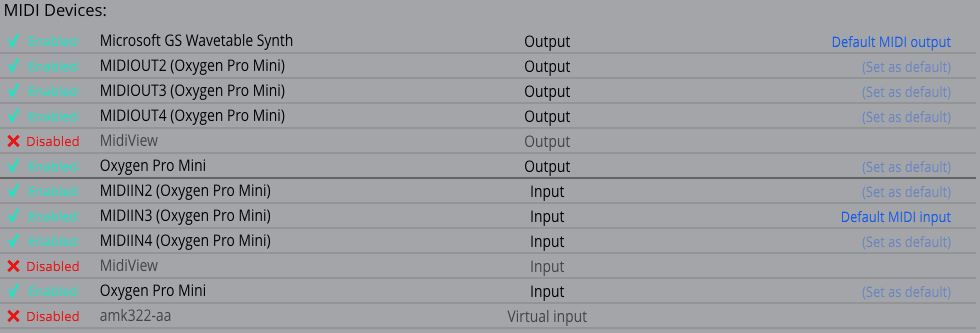
Yes, the controller appears with 4 different input names (see screencap below). I tried each name variant, one by one, as the 'default input device', and none of them produces an audible or visible input signal. The arpeggiator switch has never been turned on. Anyway, thanks for the suggestions!Peter Widdicombe wrote: Sat Aug 26, 2023 5:21 pm What MIDI devices does it show up under? Typically controller keyboards show up under several names concurrently, as in MIDI-in3, midi-in2, and M-audio ? One video implies Oxygen Pro Mini. Try to see if any of these gives you note input. Note - make sure the arpeggio isn't on on the Oxygen, initially. It may not send note events if it's not getting MIDI clock; if arpeggiator is turned on .
-
- KVRist
- Topic Starter
- 345 posts since 7 Mar, 2023
Could my problem be anything to do with Control Surfaces (in Settings)? The TW user manual doesn't explain this feature, but I see that TW comes with various Control Surfaces pre-installed (Oxygen Pro Mini, not being one of them). I did try setting up a Custom Control Surface for my Oxygen Pro Mini, but it didn't help. I also set up the Mackie one to use the Oxygen Pro Mini, but that didn't help either. Of course, I may have missed some important setting, or something.
Also, I've been connecting to my PC via the USB cable. I just noticed that there is also a 3.5mm MIDI OUT jack on the back. I'm wondering if connecting this to my PC (in addition to the USB cable, which is needed for power) would produce any different results. However, I'm not sure HOW to use that socket to connect to a PC. Can anyone clarify?
Also, I've been connecting to my PC via the USB cable. I just noticed that there is also a 3.5mm MIDI OUT jack on the back. I'm wondering if connecting this to my PC (in addition to the USB cable, which is needed for power) would produce any different results. However, I'm not sure HOW to use that socket to connect to a PC. Can anyone clarify?
-
Peter Widdicombe Peter Widdicombe https://www.kvraudio.com/forum/memberlist.php?mode=viewprofile&u=336849
- KVRian
- 1205 posts since 29 Aug, 2014
You shouldn't need to connect the MIDI out to the PC normally. For that you would then need an external MIDI input/output adapter, which the USB provides anyway.
Try deleting the control surface you have created, or simply set "no input" to it. When you set up a control surface, depending on how it communicates it can "steal" any MIDI input that happens to get assigned to a function in the control surface definition, and use it for "control" communications (i.e. assign low C to be PLAY, and low C will not work as a note if that controller definition is enabled). You can enable it later once you have the keys and "essential stuff" working.
PS - what definition under DAW setting on the Oxygen are you using? It can make a difference.
Try deleting the control surface you have created, or simply set "no input" to it. When you set up a control surface, depending on how it communicates it can "steal" any MIDI input that happens to get assigned to a function in the control surface definition, and use it for "control" communications (i.e. assign low C to be PLAY, and low C will not work as a note if that controller definition is enabled). You can enable it later once you have the keys and "essential stuff" working.
PS - what definition under DAW setting on the Oxygen are you using? It can make a difference.
Waveform 13; Win10 desktop/8 Gig; Win11 Laptop; MPK261; VFX+disfunctional ESQ-1
-
- KVRist
- Topic Starter
- 345 posts since 7 Mar, 2023
BLESS YOU, Peter!!!Peter Widdicombe wrote: Sun Aug 27, 2023 3:05 pmTry deleting the control surface you have created, or simply set "no input" to it. When you set up a control surface, depending on how it communicates it can "steal" any MIDI input that happens to get assigned to a function in the control surface definition, and use it for "control" communications (i.e. assign low C to be PLAY, and low C will not work as a note if that controller definition is enabled). You can enable it later once you have the keys and "essential stuff" working.PS - what definition under DAW setting on the Oxygen are you using? It can make a difference.
 Deleting those custom control surfaces seems to have been the answer!! Now the keys, pads and the pitch and mod wheels are all working in TW! (That's all I have tested at this point, but it's enough!!) I am so relieved!! I was becoming resigned to sending the controller back, after more than two full days of exasperation!
 Thank you sooo much, my good friend!!!
-
Peter Widdicombe Peter Widdicombe https://www.kvraudio.com/forum/memberlist.php?mode=viewprofile&u=336849
- KVRian
- 1205 posts since 29 Aug, 2014
if you have a bad USB connection, it's very unforgiving. A brief disconnection, wiggling the USB cable, (or possibly even changing the interface type no the keyboard) may "break" the connection, and the only recovery is to shut down and restart Waveform. This is one that *I* would really like to see fixed - where you could rescan MIDI devices and "get them back" or better still, be able to plug one in and scan for it.
Waveform 13; Win10 desktop/8 Gig; Win11 Laptop; MPK261; VFX+disfunctional ESQ-1