

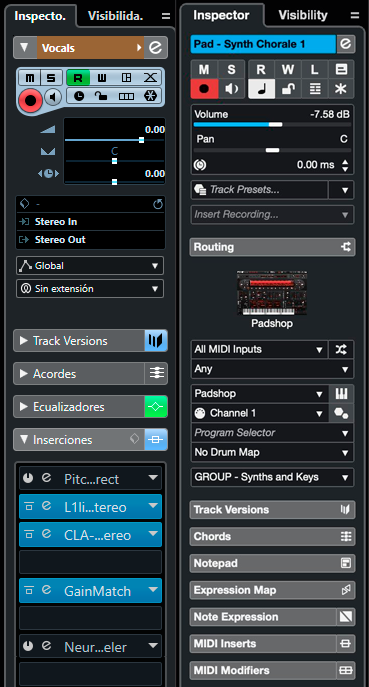
Agree, love the new look.Sahul wrote: Fri Sep 15, 2023 10:21 am It's curious how tastes differ. I much prefer the new look, especially seeing it in context:
Where is Cubase 12.5 or 13? [Update: It's here C13 is released!]
-

- KVRAF
- 2960 posts since 9 Dec, 2011 from falling
Bitwig Certified Trainer
-
- KVRAF
- 2960 posts since 9 Dec, 2011 from falling
RANGE TOOL: now in Key Editorrageix wrote: Fri Sep 15, 2023 3:16 pmI agree with you that generally speaking the Piano Roll in Ableton does suck compared to most DAWs out there, but it does do some things right. Like it has range select! Which I'm glad to see coming in Cubase 13 because honestly the way you have to copy and paste midi notes in Cubase is terrible.bysbox1 wrote: Fri Sep 15, 2023 3:04 pm I hope not. Automation Lanes and Piano Roll in Ableton to me is a PITA and the biggest reason why I don't use it (and I got a Live Suite license laying around collecting dust).
I think their automation lanes are fine.
But the automation lanes are way better in Ableton. If I want to get a clean automation lane in Ableton all I have to do is click on the parameter I want to automate, and wala! In Cubase if I want a clean automation lane I have to click the write button, start playback, click the parameter I want to automate, stop playback, then Ctrl+z to undo what it just wrote. It makes zero sense, and harder than basically any DAW I've ever used. It's very annoying.
This should solve the note copy paste issue in the key editor so you can copy and paste a range, like in Ableton Live
Bitwig Certified Trainer
-
- KVRist
- 124 posts since 28 Apr, 2006
As far as automation we'll have to agree to disagree. It may be a Mac thing with automation lanes, but it's so buggy and fidgety in Ableton (On MacOS). I just stopped using automation until the last minute in mixing. While not perfect, I like Cubase's implementation much better.rageix wrote: Fri Sep 15, 2023 3:16 pmI agree with you that generally speaking the Piano Roll in Ableton does suck compared to most DAWs out there, but it does do some things right. Like it has range select! Which I'm glad to see coming in Cubase 13 because honestly the way you have to copy and paste midi notes in Cubase is terrible.bysbox1 wrote: Fri Sep 15, 2023 3:04 pm I hope not. Automation Lanes and Piano Roll in Ableton to me is a PITA and the biggest reason why I don't use it (and I got a Live Suite license laying around collecting dust).
I think their automation lanes are fine.
But the automation lanes are way better in Ableton. If I want to get a clean automation lane in Ableton all I have to do is click on the parameter I want to automate, and wala! In Cubase if I want a clean automation lane I have to click the write button, start playback, click the parameter I want to automate, stop playback, then Ctrl+z to undo what it just wrote. It makes zero sense, and harder than basically any DAW I've ever used. It's very annoying.
-
- KVRAF
- 3220 posts since 23 Dec, 2002
I want to record instruments direct to audio inputs without sending or routing through groups,
-
- KVRAF
- 35671 posts since 11 Apr, 2010 from Germany
In Artist and Elements, it's not possible at all, IIRC...Scotty wrote: Fri Sep 15, 2023 3:37 pm I want to record instruments direct to audio inputs without sending or routing through groups,
-

- KVRian
- 755 posts since 20 Nov, 2000 from Valencia, Spain
I've been testing Patchwork a lot. It' a great plugin chainer and can be a good solution to use VST2 plugins as VST3 (also Kushview Element is), but they are not exactly wrappers in the sense that jBridge was.bysbox1 wrote: Fri Sep 15, 2023 3:10 pmThere is one. Blue Cat Audio Patchwork. It has a bunch of functionality and does chains as well. Pretty good product.Sahul wrote: Wed Sep 13, 2023 8:53 amWhat surprises me is that, at this point, and knowing in advance that Steinberg would remove VST2 support in two years, still a transparent VST2>VST3 wrapper hasn't been released by any third-party developer.thebutler wrote: Wed Sep 13, 2023 8:26 amLeave all anxieties aside...felis wrote: Tue Sep 12, 2023 10:48 pm Jan. 19, 2022 - official statement:
https://helpcenter.steinberg.de/hc/en-u ... scontinued
:....Moreover, within the next 24 months, Steinberg's host applications and plug-ins across macOS and Windows will offer VST 3 compatibility only...."
I've got three vst2 left. everything else is vst3. The one I'm most nervous about is impOSCar2 which is due to be updated. I hope they hurry up.
1. Cubase 12 will keep working the same if you update (it doesn't get uninstalled/replaced)
2. try to hold off updating straight away, see what others are saying - difficult one I know...!
-
- KVRAF
- 2772 posts since 28 Mar, 2007
By "instruments",do you mean internal VST instruments? Or external hardware synth instruments?Scotty wrote: Fri Sep 15, 2023 3:37 pm I want to record instruments direct to audio inputs without sending or routing through groups,
-
- KVRAF
- 8677 posts since 24 May, 2002 from Tutukaka, New Zealand
Agreed. Automation in Cubase could be improved in so many ways. It's so convoluted from new, though OK for existing automation. I generally try to find ways of controlling softsynths via cc/wheels etc rather than automation just because of the PITAness of setting it up. Too many steps involved. Any hints of then bettering automation in 13?rageix wrote: Fri Sep 15, 2023 3:16 pmI agree with you that generally speaking the Piano Roll in Ableton does suck compared to most DAWs out there, but it does do some things right. Like it has range select! Which I'm glad to see coming in Cubase 13 because honestly the way you have to copy and paste midi notes in Cubase is terrible.bysbox1 wrote: Fri Sep 15, 2023 3:04 pm I hope not. Automation Lanes and Piano Roll in Ableton to me is a PITA and the biggest reason why I don't use it (and I got a Live Suite license laying around collecting dust).
I think their automation lanes are fine.
But the automation lanes are way better in Ableton. If I want to get a clean automation lane in Ableton all I have to do is click on the parameter I want to automate, and wala! In Cubase if I want a clean automation lane I have to click the write button, start playback, click the parameter I want to automate, stop playback, then Ctrl+z to undo what it just wrote. It makes zero sense, and harder than basically any DAW I've ever used. It's very annoying.
-

- KVRAF
- 26033 posts since 20 Oct, 2007 from gonesville
Cubase automation suits me, although it was a little bit more hassle with instruments plugged directly into it; see, I've hosted >99% of instruments in VE Pro for... most of my time doing this stuff. I had to do it the old way because my first full composition/production this year relied on Absynth in its first stage, which in VE Pro at the time was impossible at least with my patches, one note brought the system to its knees. In for a penny in for a pound, I just didn't bother with VE Pro. And Absynth 5 performed great on my M1 Mac. Now for the first time the project is all Silicon with VE Pro and it's a relief (I actually find it relaxing or meditative to set it up) to have that back (obv if I go with Absynth it's Rosetta time).
That project had 24 instruments plugged in, which for me is not terribly massive but the project looks ridiculous. IE: with VE Pro I have 1-4 instruments with 1-4 stereo channels each as far as Cubase is concerned (Submixes, I like that mixer's visual far better).
To me *automation* = Host Automation and it's all points drawn in lanes; whatever I have VE Pro learn shows up immediately in Cubase with the actual plugin & parameter names. I call CC or the other MIDI control "CC" [or Pitch Bend, et al] and it's in Key Editor because I want to see the curves of instruments' control specifically in there.
I bought a controller once which I figured should have been assignable to these (Generic or Mackie Universal paradigm), but it didn't work. NanoControl 2 or something by Korg. Shopping for these things is too boring, and I'm not sure 'tactility' would amount to real improvement, all things considered. I did like a controller for MIDI.
That project had 24 instruments plugged in, which for me is not terribly massive but the project looks ridiculous. IE: with VE Pro I have 1-4 instruments with 1-4 stereo channels each as far as Cubase is concerned (Submixes, I like that mixer's visual far better).
To me *automation* = Host Automation and it's all points drawn in lanes; whatever I have VE Pro learn shows up immediately in Cubase with the actual plugin & parameter names. I call CC or the other MIDI control "CC" [or Pitch Bend, et al] and it's in Key Editor because I want to see the curves of instruments' control specifically in there.
I bought a controller once which I figured should have been assignable to these (Generic or Mackie Universal paradigm), but it didn't work. NanoControl 2 or something by Korg. Shopping for these things is too boring, and I'm not sure 'tactility' would amount to real improvement, all things considered. I did like a controller for MIDI.
-
- KVRAF
- 26033 posts since 20 Oct, 2007 from gonesville
There's one or two things that occur to me immediately that this really has needed to be the case since the beginning (besides that it's basically wacky to require a group like that, and was never not outdated). I mean the 'generators' in Reaktor like Space Drone or Metaphysical Function, which otherwise has no function in a project. Weird how we get used to an absurdity like this.Scotty wrote: Fri Sep 15, 2023 3:37 pm I want to record instruments direct to audio inputs without sending or routing through groups,
-
- KVRian
- 679 posts since 29 Dec, 2019
I totally disagree.cptgone wrote: Fri Sep 15, 2023 2:29 pmI agree.enroe wrote: Fri Sep 15, 2023 9:04 amMmmmhhh, well, I think the left side looks better. The content is easierSahul wrote: Fri Sep 15, 2023 8:01 am They also modernized some parts that still remained from the Cubase SX era, such as the upper Inspector area.

to grasp and is easier on the eye.
Am I the only one who feels this way?
1. Tab Header Text is cut off
2. The font is clearly not as good
3. Button sizing is more optimized in the new version (most are smaller in the current version)
4. There is a better set of functions exposed in the new version.
5. Fields for Adjusting Volume, Panning and Offset are clearly superior in the new version: Wider Sizing (easier to make smaller adjustments), Better Font, Better Contrast, Better Adjustment Handles, etc.
I am sure there are people who will like the old version better, as is usually the case. There always exists some contrarians that have to disagree with any change made in an application.
Objectively, the new version is clearly superior from both a usability and ergonomics standpoint.
In Cubase 12, there are too many clashing design languages just in the Inspector alone. It's actually amazing that they allowed this to persist so long, considering how obvious it is.
And while some people bemoan the "trend" of flatness, overuse of high contrasting elements all over an application UI tends to put people off, as they find it very distracting. There are more effective ways to introduce contrast than faux bevels, faux shine, etc. If all that stuff were better, I doubt we'd see so many developers moving into that direction. Why give up a perfectly legitimate selling point (and I mean selling point for a factorable number of people, not a dozen KVR Forum posters
 ).
).If I said you are blocked, I won't see your posts. Please kindly refrain from quoting or replying to me.
"Notifications for Nothing" are annoying. Blocking me in return is a good way to avoid this.
-
- KVRAF
- 3339 posts since 19 Mar, 2008 from germany
No, no - you may argue about fashions and visuall integrity. But all that is NOT the point.Trensharo wrote: Sat Sep 16, 2023 4:07 am Objectively, the new version is clearly superior from both a usability and ergonomics standpoint.
The important point is another: If you step back and then take a quick look at the track
inspector, you will notice: The individual elements can be perceived much more quickly
by the eye - and are more clearly distinguishable from each other. When working quickly,
the brain is less concerned with registering individual buttons - and can concentrate
more and better on the song itself.
This is exactly a question of visual ergonomics. And that's where Cubase is now taking a
step back. OK - they also take a step back with VST2. I think the motto now is: “One step
back”! "We're getting EVEN worse now!"
free mp3s + info: andy-enroe.de songs + weird stuff: enroe.de
-
- KVRist
- 124 posts since 28 Apr, 2006
I won't have a weird feeling we may not see a vst2 wrapper like jbridge. The defacto answer seems to be to run Cubase (or any other DAW) in rosetta mode. But we'll see.Sahul wrote: Fri Sep 15, 2023 3:59 pm I've been testing Patchwork a lot. It' a great plugin chainer and can be a good solution to use VST2 plugins as VST3 (also Kushview Element is), but they are not exactly wrappers in the sense that jBridge was.
2 other sleepers are DDMF Metaplugin and Superplugin. The great thing about both of those it they let you run any plugin in with oversampling.
-
- KVRian
- 755 posts since 20 Nov, 2000 from Valencia, Spain
Never had much success while testing both DDMF plugins. For some reason, they refused to work correctly in my Windows 11 computer with Cubase 12. However, Kushview Element is the one I'd recommend at this point. It's currently being actively developed again after some months of pause, and it also features oversampling.bysbox1 wrote: Sat Sep 16, 2023 5:27 am 2 other sleepers are DDMF Metaplugin and Superplugin. The great thing about both of those it they let you run any plugin in with oversampling.
-
- KVRAF
- 35671 posts since 11 Apr, 2010 from Germany
I really wonder how these accidents like the one on Steinberg's Cubase websites happen. One of the web designers tests something, and then accidentally puts the page online, and accidentally leaves it there?
Isn't that how leaks usually work? You just "accidentally" leak infos on your site, or an employee "accidentally" gives the infos to an influencer?
Crazy times we live in. Where a rudimentary piece of info is deliberately leaked, and everyone can guess when the release date is, and what will be in the package. I rather preferred hard info on the day of release, but, I guess that's how people roll these days. Mystery and guesswork.
Isn't that how leaks usually work?
You just "accidentally" leak infos on your site, or an employee "accidentally" gives the infos to an influencer?Crazy times we live in. Where a rudimentary piece of info is deliberately leaked, and everyone can guess when the release date is, and what will be in the package. I rather preferred hard info on the day of release, but, I guess that's how people roll these days. Mystery and guesswork.