


Hello
Here is my question that I`m have since last year. → I want to know where the 1-2 step / command function is, like other DAW`s to duplicating audio clips / MIDI notes, as example of 30 pieces with distance between..
Example, first bar = first audio clip → second + third bar = empty → fourth bar = second audio clip → fifth + sixth = empty → and so forth. Do you know what I mean?
In Waveform all techniques I`ve found to duplicating audio clips / MIDI notes are copy the clip, and paste it rightafter the original clip, without distance between. That`s very frustrating.
I have search in all Tracktion video tutorials + videos from "@AudioTechTV" (Zane) and others + read the manual + searched in the DAW settings, I`ve found nothing.
I`m really hope that you have an tip for me. Best regards, Marcus
duplicating audio clips with distance ???
-
- KVRer
- 10 posts since 25 Sep, 2022
Last edited by Marcus Wasser on Sun Oct 08, 2023 3:23 pm, edited 1 time in total.
-
- KVRian
- 500 posts since 3 Dec, 2021
My workaround method for this has always been to add an extra track, insert an empty clip and make it the desired length (like a spacer) Then I lasso the spacer clip and all the other desired clips and duplicate. I do this a lot, as I mainly convert everything to audio and chop and manipulate from there.
-

- KVRist
- 147 posts since 22 Oct, 2016
If I could understand you correctly, are you trying to copy multiple audio tracks at the same time?
To the left of each track, there is a place where the name of the track itself is located, by clicking the mouse cursor in this place, you will not select the contents of the track (files), but the entire track, by clicking the right mouse button, you can duplicate it (starting from version 11.5, if memory serves me correctly), all the contents including plugins and settings. You can also select several tracks with the Ctrl key, I would advise you to use the menu and pack the tracks you need into a folder and duplicate the folder with all the contents as and how much is convenient for you.
If suddenly, you had in mind the selection of clips scattered along the tracks without the usual cursor selection function, then you need to select the first clip you need (audio\midi no difference) and use the Shift key to add the rest to it in any direction of the workspace, most of the clips between the first and last selected will be selected. Then, as usual, using the Ctrl key, you can adjust the selection by canceling or adding the remaining ones. There will be a duplicate if you try to move the selected amount of clips with the Ctrl key pressed.
I duplicate the parts of the track, usually choosing the upper left and lower right, adding or removing a very small amount.
To the left of each track, there is a place where the name of the track itself is located, by clicking the mouse cursor in this place, you will not select the contents of the track (files), but the entire track, by clicking the right mouse button, you can duplicate it (starting from version 11.5, if memory serves me correctly), all the contents including plugins and settings. You can also select several tracks with the Ctrl key, I would advise you to use the menu and pack the tracks you need into a folder and duplicate the folder with all the contents as and how much is convenient for you.
If suddenly, you had in mind the selection of clips scattered along the tracks without the usual cursor selection function, then you need to select the first clip you need (audio\midi no difference) and use the Shift key to add the rest to it in any direction of the workspace, most of the clips between the first and last selected will be selected. Then, as usual, using the Ctrl key, you can adjust the selection by canceling or adding the remaining ones. There will be a duplicate if you try to move the selected amount of clips with the Ctrl key pressed.
I duplicate the parts of the track, usually choosing the upper left and lower right, adding or removing a very small amount.
цвет волшебства
-
- KVRer
- Topic Starter
- 10 posts since 25 Sep, 2022
@dysjoint
Yeahhhhh..... To add an extra track + "spacer", is an GREAT idea, because so simple and works fine. Thanks for your answer, I wish you the best!
Yeahhhhh..... To add an extra track + "spacer", is an GREAT idea, because so simple and works fine. Thanks for your answer, I wish you the best!
-
- KVRer
- Topic Starter
- 10 posts since 25 Sep, 2022
@Maarid
Sorry, I have mean, I want to duplicating an audio clip with distance between the copies, in one (the same) single track, not "to copy multiple audio tracks at the same time". But your answer will help us in another way in the future. Thanks!
Sorry, I have mean, I want to duplicating an audio clip with distance between the copies, in one (the same) single track, not "to copy multiple audio tracks at the same time". But your answer will help us in another way in the future. Thanks!
-
- KVRAF
- 2456 posts since 9 Oct, 2008 from UK
If you want a clip that can be placed as copies in various positions you could create an Edit that contains only that audio (or more if you wish) and then drag and drop it into those positions in your main Edit.Marcus Wasser wrote: Sun Oct 08, 2023 4:29 pm @Maarid
Sorry, I have mean, I want to duplicating an audio clip with distance between the copies, in one (the same) single track, not "to copy multiple audio tracks at the same time". But your answer will help us in another way in the future. Thanks!
[W10-64, T5/6/7/W8/9/10/11/12/13, 32(to W8)&64 all, Spike],[W7-32, T5/6/7/W8, Gina16] everything underused.
-
- KVRist
- 147 posts since 22 Oct, 2016
ctrl+C, ctrl+V moving the cursor by pressing outside the tracks?Marcus Wasser wrote: Sun Oct 08, 2023 4:29 pm @Maarid
Sorry, I have mean, I want to duplicating an audio clip with distance between the copies, in one (the same) single track, not "to copy multiple audio tracks at the same time". But your answer will help us in another way in the future. Thanks!
The clip you have selected also indicates the selected track to insert, into another track see above as
цвет волшебства
-
- KVRer
- Topic Starter
- 10 posts since 25 Sep, 2022
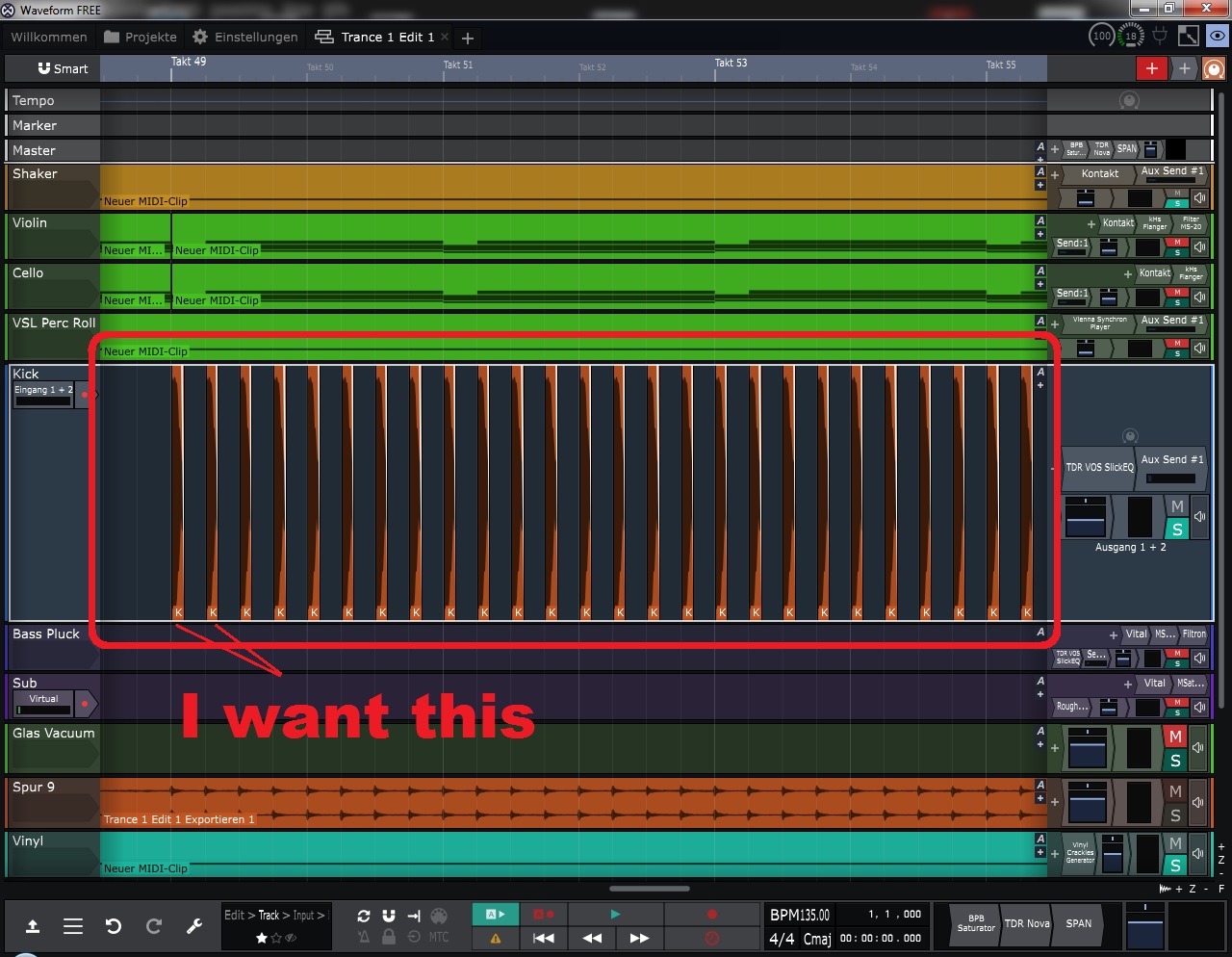
↑↑↑ That was what I want. ↑↑↑
I use the little trick from "@dysjoint", because it`s the simplest.
-
- KVRist
- 147 posts since 22 Oct, 2016
What a horror, I don't remember anywhere from the programs where this is not done manually, as you personally indicated in the first post.
I repeat what I told you above - insert the sample in the first place, hold down the ctrl button, drag the second file to the desired distance, at the moment when the file is duplicated, release ctrl, so that the binding to the guides is activated again or do not release, if desired, setting the second sample to the desired distance, hold ctrl and select the first by clicking we drag it again already two files, now using shift we select two more to two and so repeat increasing exponentially the number of files.
I'll italicize it to try to reach you - duplicating several files by dragging with the ctrl button ALWAYS keeps the distance of the captured files between each other, do you understand?
Unfortunately, for me, after the rest of the daws, working with files in this way was understandable as a matter of course, this is the only thing that can be explained, not using the built-in microdrum sampler plugin for repetitive sounds.
цвет волшебства
-

- KVRist
- 80 posts since 9 May, 2006 from Finland
In a case like that, if it's just a single file always repeating at a regular interval, I would just use looping. Much simpler to set up and handle when it's a single clip... Just hit the L button in the clip header, adjust the length of the clip to cover the desired area, and then adjust the length of the loop segments to be appropriate by dragging one of the white lines that mark the loop points.
Artist name Ben Enkindle. I (try to) make electronic music with Linux software.
-

- KVRAF
- 4891 posts since 3 Jan, 2003 from Vancouver
Whoa. I had no idea that was possible to do and so easy. I don't usually loop short samples in that way. I would most likely drag the sample into a sampler and trigger it via MIDI. But doing a 4 beat kick pattern is dead simple this way.elcalen wrote: Tue Oct 10, 2023 2:29 pm In a case like that, if it's just a single file always repeating at a regular interval, I would just use looping. Much simpler to set up and handle when it's a single clip... Just hit the L button in the clip header, adjust the length of the clip to cover the desired area, and then adjust the length of the loop segments to be appropriate by dragging one of the white lines that mark the loop points.
1. Drag an audio file into the Edit. 2. Click the L button and expand the clip. 3. Drag the first white line to get the timing right.
You do not have the required permissions to view the files attached to this post.
Surely there must be consensus by now...
-
Peter Widdicombe Peter Widdicombe https://www.kvraudio.com/forum/memberlist.php?mode=viewprofile&u=336849
- KVRian
- 1205 posts since 29 Aug, 2014
Yeah, it's like Waveform is a toolbox. Many different tools (ways) to accomplish the same thing. Which works more logically for you...
Waveform 13; Win10 desktop/8 Gig; Win11 Laptop; MPK261; VFX+disfunctional ESQ-1
-
- KVRist
- 80 posts since 9 May, 2006 from Finland
Looping like this is a pretty basic feature that a lot of DAWs do these days. But that said, I also vastly prefer samplers for making beats. Doing a simple loop might be fast, but you have so much more control over the sound with a sampler, not to mention the ability to very easily switch sounds if the first one turns out to not be perfect...
Though to briefly get back to the original topic, I do wish the duplicate action in Waveform was a little more powerful and context aware... Like, for instance, it would be nice to be able to simply select a segment of time and duplicate the entirety of it, including any empty parts before and after clips/notes... I've found it particularly annoying in the midi editor. If I'm duplicating, say, a bar's worth of notes, I almost always want them to fall on the same beats in the next bar. But that doesn't really work in Waveform unless the last of the duplicated notes comes right up to the end of the bar, and I often end up needing to reposition the new notes after duplicating... It's a pretty small thing in the grand scheme of things, but every little thing to make the workflow faster and more intuitive adds up and helps...
Though to briefly get back to the original topic, I do wish the duplicate action in Waveform was a little more powerful and context aware... Like, for instance, it would be nice to be able to simply select a segment of time and duplicate the entirety of it, including any empty parts before and after clips/notes... I've found it particularly annoying in the midi editor. If I'm duplicating, say, a bar's worth of notes, I almost always want them to fall on the same beats in the next bar. But that doesn't really work in Waveform unless the last of the duplicated notes comes right up to the end of the bar, and I often end up needing to reposition the new notes after duplicating... It's a pretty small thing in the grand scheme of things, but every little thing to make the workflow faster and more intuitive adds up and helps...
Artist name Ben Enkindle. I (try to) make electronic music with Linux software.
-
- KVRist
- 147 posts since 22 Oct, 2016
awesome, I didn't know it was possible to do that, thank you very much
also, there are difficulties if the tempo and pitch of the source file are changed, adding from either side of the selected fragment leads to constant location errors.elcalen wrote: Tue Oct 10, 2023 5:56 pmIf I'm duplicating, say, a bar's worth of notes, I almost always want them to fall on the same beats in the next bar.
I usually use several cut fragments, regardless of the spaces between them, select and select "merge" in the menu, thereby getting a single unique clip, but with the end of the edge of the last clip, unfortunately.
By the way, it also works with loop fragments and most importantly with midi loop fragments, which then allows you to humanize the entire instrument part along the entire composition.
цвет волшебства
-
- KVRer
- Topic Starter
- 10 posts since 25 Sep, 2022
@elcalen
Yes, that`s what I have mean → "it would be nice to be able to simply select a segment of time and duplicate the entirety of it, including any empty parts before and after clips/notes.."
@ALL
You can see this on Youtube in the video from "EDM Tips - Why David Guetta Blew Up" from minute 09:40 - 09:51 + 13:55 - 14:02.
He also makes this with audio clips in one track.
Yes, that`s what I have mean → "it would be nice to be able to simply select a segment of time and duplicate the entirety of it, including any empty parts before and after clips/notes.."
@ALL
You can see this on Youtube in the video from "EDM Tips - Why David Guetta Blew Up" from minute 09:40 - 09:51 + 13:55 - 14:02.
He also makes this with audio clips in one track.