Analog Lab Pro?

VST, AU, AAX, CLAP, etc. Plugin Virtual Instruments Discussion
RELATED
PRODUCTS
Analog Lab Pro$199.00Buy

Post

noiseboyuk wrote: Tue Oct 31, 2023 8:59 pm ....Analog Lab Play - no idea what that is....
https://www.arturia.com/products/softwa ... oglab/free

There's a comparison chart towards the bottom of the page.

Last edited by felis on Wed Nov 01, 2023 5:44 pm, edited 1 time in total.

Post

Zipede wrote: Tue Oct 31, 2023 7:39 pm I'm seeing an upgrade price of €199 for Analog Lab Pro, I have all their software so that seems pricey.
What is the advantage over Analog Lab V, other than 2000 presets, the new browser and UI.
Here it's much cheaper ;)

viewtopic.php?t=603017

- Mario

Post

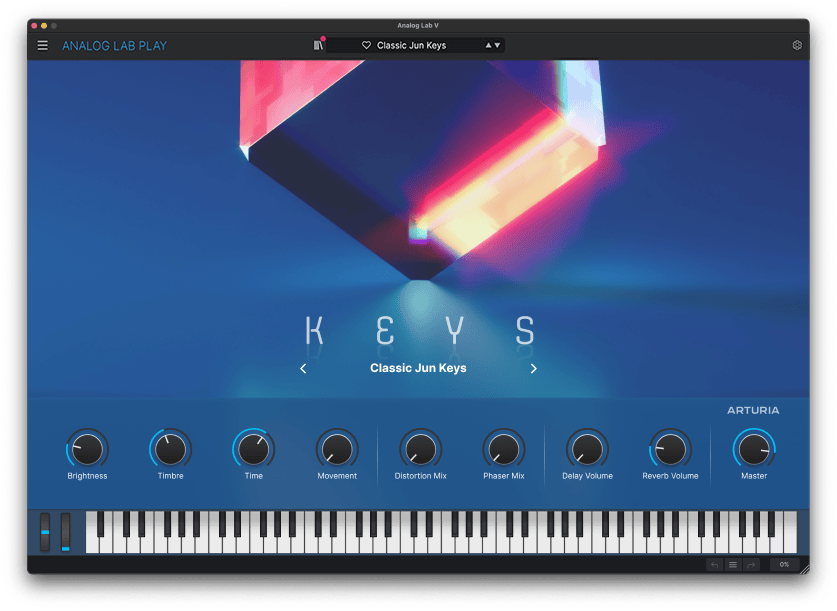
noiseboyuk wrote: Tue Oct 31, 2023 9:38 pm Hey I found Main View!

Image

It's really weird. It's a pretty graphic to represent the category the patch is in, the macros, an additional simple patch name with arrows for next and previous and that's it - designed for the new free Play version I think. There's no apparent way to get out of it and into the main interface, but the top browser remains intact. If you click the library graphic button next to the patch name - voila, the old Analog Lab is back. Similarly, there's no obvious way to get to into in the first place, but the X button next to the main patch name (that usually just clears the search box) jumps you into it.

Did I mention it is pretty? It is. It looks lovely. And it does nothing at all.
You don't seem to get that view with Pro though, pity, I quite like it aesthetically even though functionally it's still just the same macros

Post

aMUSEd wrote: Wed Nov 01, 2023 8:37 amYou don't seem to get that view with Pro though, pity, I quite like it aesthetically even though functionally it's still just the same macros
You do get it in Pro - just follow my instructions. The screengrab is theirs not mine so it says Play in the corner, but I did it in Pro.

What they've done is a really silly arrangement in my view. You've always had the three different views top left - Home, Explore, Store - but Main is not there. It would be far better to have all the different views on the permanent bar at the top, and add the different Edit modes to the list. So Home, Main, Explore, Store, Edit Mix, Edit Part 1 (and things like Screen for the Synclavier etc could appear as a final tab). That would be quite transformative workflow-wise.
http://www.guyrowland.co.uk
http://www.sound-on-screen.com
W11, Ryzen 7900, 64gb RAM, RME Babyface, 1050ti, PT 2024 Ultimate, Cubase Pro 14
Macbook Air M2 OSX 10.15

Post

+1 The current UI is a mess. Some permanent tabs to directly switch views would work better.

Could also perhaps make better use of the 'pretty' screen because it serves no purpose. Perhaps add option to quick select and step through specific sound types/banks.

Post

db3 wrote: Wed Nov 01, 2023 8:55 amCould also perhaps make better use of the 'pretty' screen because it serves no purpose. Perhaps add option to quick select and step through specific sound types/banks.
That's a very good idea. You could put arrows either side of the category type which flicks between them, then the patch names would cycle through only patches in that category. Crude, but it does at least do something.
http://www.guyrowland.co.uk
http://www.sound-on-screen.com
W11, Ryzen 7900, 64gb RAM, RME Babyface, 1050ti, PT 2024 Ultimate, Cubase Pro 14
Macbook Air M2 OSX 10.15

Post

...in fact it could become actually useful if they added a third box in Main view, which would default to, say, styles, but you could right click to be instrument, genre or designer or what have you. Would still be pretty minimalist, but then serve a practical function. Then you go to your new tabs at the top and one-click to edit the instrument. I'd quite like to browse in that way.

Are Arturia interested in user feedback? What's the best way to go about it if so?
http://www.guyrowland.co.uk
http://www.sound-on-screen.com
W11, Ryzen 7900, 64gb RAM, RME Babyface, 1050ti, PT 2024 Ultimate, Cubase Pro 14
Macbook Air M2 OSX 10.15

Post

Yes, the main view could be a very clean way of auditioning presets with simple selectors verses more detailed list/edit views. Given the high number of presets they could even go a step further an employ something like XO has to step through similar sounds (based on their preset tagging system).

Post

I don't know what I did, but yesterday when I tried to install the free Play version to check it out, it wasn't working correctly. I uninstalled it and reinstalled Analog Lab Intro, and now Intro works with it's 500 presets (versus the 100 in Play) but it has the appearance of Analog Lab Play.

EDIT: I just saw this in the description for it:

"Existing users of the full software and Analog Lab Intro will also receive an update, granting them access to the 'Play View' interface of Analog Lab Play."
Last edited by Examigan on Wed Nov 01, 2023 10:09 pm, edited 2 times in total.

Post

db3 wrote: Wed Nov 01, 2023 8:55 am Some permanent tabs to directly switch views would work better.
Permanent tabs would be great.

I like the new look though and the mixer/FX section is a nice addition.

Post

paramita123 wrote: Tue Oct 31, 2023 11:27 pm So if we have Analog Lab basic/elements (whatever the small one is called) is it worth downloading AL Play or is it the same? Confused haha!
If you have any version of Analog Lab you automatically have also Play, if you just update it. At least if you have Analog Lab V. No idea if that introduces presets which were not there before or not. I have V collection so I can't count them any more.

Also I don't understand why people are always complaining, it looks nice and it does not take away anything. But yeah, it is KVR after all ...

Post

mudi1974 wrote: Thu Nov 02, 2023 9:15 am If you have any version of Analog Lab you automatically have also Play, if you just update it. At least if you have Analog Lab V. No idea if that introduces presets which were not there before or not. I have V collection so I can't count them any more.

Also I don't understand why people are always complaining, it looks nice and it does not take away anything. But yeah, it is KVR after all ...
I don't know where Intro fits into the new paradigm, if at all. If I recall it was cheap but not free, right? Or bundled with hardware?

As to the second point, I see it more as frustrating than something to complain about per se. The new Main view is gorgeous but functionally useless, and it has added one more layer on top of a UI that is already quite messy. Main view could, with few changes, be something really useful and they could also bite the bullet and make that header the way to logically navigate the whole thing. I think thank version would be something of a game-changer.

It would be great if these were transition versions, and Analog Lab VI would usher in a cleaner and more practical overhaul.
http://www.guyrowland.co.uk
http://www.sound-on-screen.com
W11, Ryzen 7900, 64gb RAM, RME Babyface, 1050ti, PT 2024 Ultimate, Cubase Pro 14
Macbook Air M2 OSX 10.15

Post

Just to expand on the above, let me illustrate the steps of tweaking the preset you open with - in this example Mixed Voices 4 - Male 1.

First, by default AL Pro opens in Main view (you can change this). It looks gorgeous, a picture of a bird and the word VOCALS. There is a simple patch name and arrows to cycle through my 13,000 presets one by one. But there's no way to see anything else at all until in desparation you click a small blue library button next to the patch name in the header. But this time you are landed in Home, not the library as you might hope, with lots of pretty pictures of products where you can't see your preset, still less edit it.

Where's the librarian? Well, there is the word Explore, top of the left hand pane, and boom - that gives you a list of presets. But not necessarily including the one you are currently on. That you need to edit.

But good news - there is a new RIGHT hand pane that has showed up. There is a pretty picture of the type of preset - VOCALS - overlaid with the instrument itself - "this is an Emulator II Factory preset" it helpfully tells me. At the bottom of that, there is a blue EDIT PRESET button. Now we're in business!

Well, not quite actually. Rather than the expected full Emulator, you get a load of effects pedals. What's that? Oh we seem to be in a preset mix and effects view. Now the picture of the Emulator has switched to a new LEFT hand pane, named Part 1. Guess these presets are in two parts (in fact the vast majority seem to be Part 1 only). Below that picture is a small "Open" button.

Ta da! There is it, finally, and the Emulator II looks gorgeous - not least because it's obliterated everything else, taking up the whole screen except the top bar which has the patch name - lovely, but I've lost all my navigation again. But hey, I can tweak the front panel settings. Now, how do I get to the detailed stuff on the screen? Up in the top menu bar, there is a screen button, and now I'm zoomed right into the screen and can edit everything at will. Once I've edited, the only way out is a back button on the far right of the menu bar, taking me back to that mixer and effects view.

Now what? There's no apparent way back to your Explore page or main view. Ah, wait, that Back button is still there. Click and now I'm in explore.

Where's the Main view gone now? There's no Main option in that left hand pane with all the different views. Eventually I notice a blue cross next to the patch name in the top menu, and - finally we're back where we started.

Or...

Put EVERYTHING in tabs in that top menu bar. Move the patch name so it's more on the left hand side to give us some room. Then you have:

MAIN, HOME, EXPLORE, STORE, EDIT MIX, PART 1. If there's a 2nd layer, or Screen or Advanced, that appears too. And in fact you can have all these as icons to make it pretty.

All in the same place wherever you are.

One click for everything.

Then if that Main view had its Style - Classic, Simple, Warm etc - and changed the logic so you could carousel through all the vocal presets of that style, finding similar patches for a quick way to audition.

Or am I just crazy?
http://www.guyrowland.co.uk
http://www.sound-on-screen.com
W11, Ryzen 7900, 64gb RAM, RME Babyface, 1050ti, PT 2024 Ultimate, Cubase Pro 14
Macbook Air M2 OSX 10.15

Post

noiseboyuk wrote: Thu Nov 02, 2023 10:15 am
mudi1974 wrote: Thu Nov 02, 2023 9:15 am If you have any version of Analog Lab you automatically have also Play, if you just update it. At least if you have Analog Lab V. No idea if that introduces presets which were not there before or not. I have V collection so I can't count them any more.

Also I don't understand why people are always complaining, it looks nice and it does not take away anything. But yeah, it is KVR after all ...
I don't know where Intro fits into the new paradigm, if at all. If I recall it was cheap but not free, right? Or bundled with hardware?
It was free (and may still be) if you sign up for a free "Sounds Better" account, and it is included with some hardware. It has 500 presets versus the 100 in the free version on the Arturia site. Also there are free banks Arturia has that you can download that work with it.

Sometimes people here give away their license for AL Intro in the Buy and Sell forum.
Last edited by Examigan on Thu Nov 02, 2023 2:05 pm, edited 1 time in total.

Post

noiseboyuk wrote: Thu Nov 02, 2023 10:57 am Or am I just crazy?
You are not crazy !
I completely get you :hihi: :tu: :tu:
You're breaking down realistic UX. Many brands sadly overlook UX in favour of looks or sounds.
May your voice be heard ..!!

Post Reply

Return to “Instruments”