
How do I specify the soundfont to sf2 player LV2 plugins?

Discussion about: tracktion.com
Post Reply New Topic
RELATED
PRODUCTS

Post

I am trying to use fluidsynth-based sf2 player plugins like Calf Fluidsynth or Fluida.lv2 in Waveform 12. For the life of me, I can't figure out how to specify the actual sound font file to those plugins. There seems to be no UI for doing that whatsoever.

It seems that the plugin UI that Waveform presents me with is not the native UI of those plugins. Here is e.g. how Fluida's UI appears in Waveform:

fluida.png

Compare with Fluida's native UI screenshot from the plugin's GitHub readme:
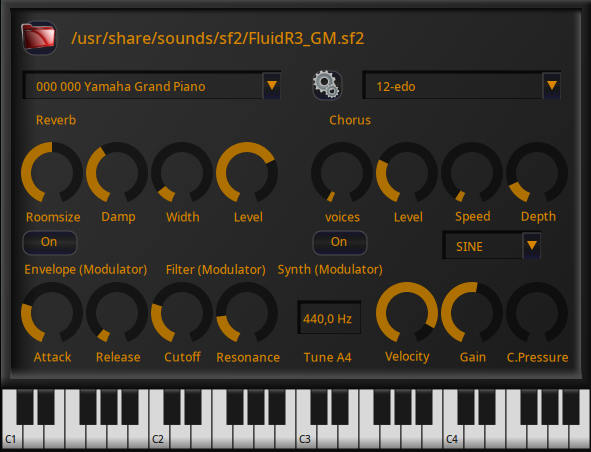
Image

How do I overcome this?
You do not have the required permissions to view the files attached to this post.

Post

Calf plugins won't show GUI in Waveform, and there is no any control button to specify a filepath via generic GUI.
Fluida.lv2 works fine for me:
Screenshot_20231217_140522.png
Also you can load SF2 in the bundled Waveform Sampler.
You do not have the required permissions to view the files attached to this post.

Post

Might be a daft question, but did you try clicking the selection arrows one way or the other?
[W10-64, T5/6/7/W8/9/10/11/12/13, 32(to W8)&64 all, Spike],[W7-32, T5/6/7/W8, Gina16] everything underused.

Post Reply

Return to “Tracktion”