


Recently, in the latest release version of Maize Sampler 2.10, .VST3 plugins are not being generated correctly in Maize for Windows.
Here's an example of what it looks like inside macOS, and the same thing happens when the player .dll and .VST3 are generated in Maize Sampler for Windows.
I have other plugins created in previous versions of Maize Sampler, such as version 2.95 and I have never had any problems creating plugins for macOS on Windows and vice versa.
However, in the last update I have noticed that in fact the servers are not generating the .VST3 files for. Windows correctly, causing DAWs to end up not scanning or displaying .VST3 plugins generated for Windows.
Any solution for this problem?
Compatibility issue with exported version of Maize Sampler for Windows VST3
-
homestudio7rec homestudio7rec https://www.kvraudio.com/forum/memberlist.php?mode=viewprofile&u=406132
- KVRer
- 3 posts since 12 Oct, 2017 from Ferraz de Vasconcelos - SP - Brazil
You do not have the required permissions to view the files attached to this post.
Wesley Henriques - Home Studio 7 Records
-

- KVRist
- 315 posts since 13 Jun, 2009
Hi, haven't used Maize in a long while.... Looking at the pic I think you might try this (until it's resolved):
Folder with instruments should be named "NAME.instruments" and instrument "NAME.vst3"
Try renaming those parts in the names after dot.
Speaking of windows OS
p.s. Does Maize still exports vst2 files? I really hate Steinberg move to cripple a good thing
Folder with instruments should be named "NAME.instruments" and instrument "NAME.vst3"
Try renaming those parts in the names after dot.
Speaking of windows OS
p.s. Does Maize still exports vst2 files? I really hate Steinberg move to cripple a good thing
-
Digital coconut Digital coconut https://www.kvraudio.com/forum/memberlist.php?mode=viewprofile&u=451709
- KVRist
- 93 posts since 22 Nov, 2019
People are noticing the same problem. Xiang has already been notified about this problem and is definitely taking action. I believe it will soon be resolved.homestudio7rec wrote: Wed May 29, 2024 3:57 pm Recently, in the latest release version of Maize Sampler 2.10, .VST3 plugins are not being generated correctly in Maize for Windows.
Here's an example of what it looks like inside macOS, and the same thing happens when the player .dll and .VST3 are generated in Maize Sampler for Windows.
Captura de Tela 2024-05-29 às 12.51.43.png
I have other plugins created in previous versions of Maize Sampler, such as version 2.95 and I have never had any problems creating plugins for macOS on Windows and vice versa.
However, in the last update I have noticed that in fact the servers are not generating the .VST3 files for. Windows correctly, causing DAWs to end up not scanning or displaying .VST3 plugins generated for Windows.
Any solution for this problem?
-
homestudio7rec homestudio7rec https://www.kvraudio.com/forum/memberlist.php?mode=viewprofile&u=406132
- KVRer
- Topic Starter
- 3 posts since 12 Oct, 2017 from Ferraz de Vasconcelos - SP - Brazil
Unfortunately, still no solution. So far, even though the default Players generated by Maize Sampler do not work on Windows.Digital coconut wrote: Thu May 30, 2024 10:19 amPeople are noticing the same problem. Xiang has already been notified about this problem and is definitely taking action. I believe it will soon be resolved.homestudio7rec wrote: Wed May 29, 2024 3:57 pm Recently, in the latest release version of Maize Sampler 2.10, .VST3 plugins are not being generated correctly in Maize for Windows.
Here's an example of what it looks like inside macOS, and the same thing happens when the player .dll and .VST3 are generated in Maize Sampler for Windows.
Captura de Tela 2024-05-29 às 12.51.43.png
I have other plugins created in previous versions of Maize Sampler, such as version 2.95 and I have never had any problems creating plugins for macOS on Windows and vice versa.
However, in the last update I have noticed that in fact the servers are not generating the .VST3 files for. Windows correctly, causing DAWs to end up not scanning or displaying .VST3 plugins generated for Windows.
Any solution for this problem?
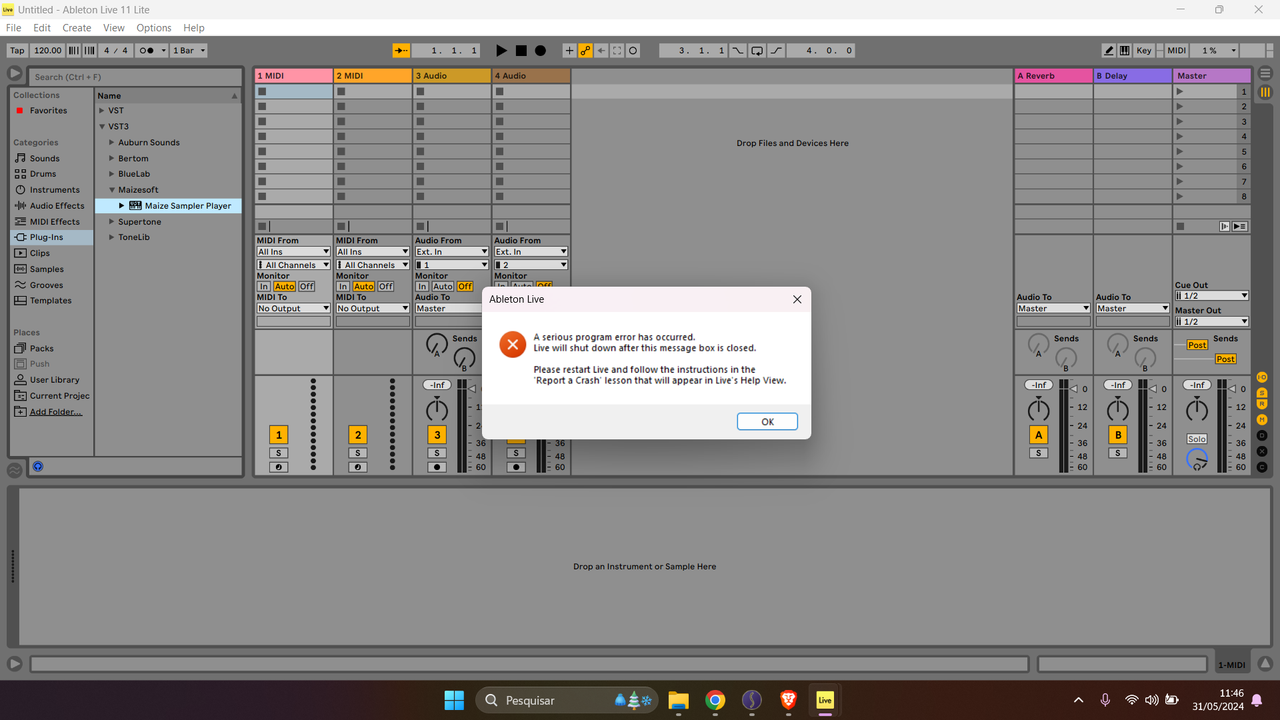
Inside Ableton Live, when dragging the Maize VST3 plugin it crashes, and the DLL is not even recognized. In REAPER both do not appear.
Wesley Henriques - Home Studio 7 Records
-

- KVRist
- 34 posts since 4 Oct, 2023
Was this resolved?
-
- KVRist
- 33 posts since 30 Mar, 2020
Also interested to know the latest on this, as I have been holding out on updating to the latest version of Mazie and exports before we know everything works across the board (i.e works on different DAWs and operating systems correctly)