


Not seeing that here. I think this comes with fonts. Did you install them? Running a non-100% scaling option?EvilDragon wrote: Sun Sep 01, 2024 7:17 pm @plugmon: Maybe there is some bug in the update? On the bottommost panel, it now says Priorit, MicroTunin, VC, Transien. Last letter is missing.
MONA - New GUI for Diva
-
Funkybot's Evil Twin Funkybot's Evil Twin https://www.kvraudio.com/forum/memberlist.php?mode=viewprofile&u=116627
- KVRAF
- 12443 posts since 16 Aug, 2006
-

- KVRist
- Topic Starter
- 395 posts since 3 Mar, 2015 from Japan
Fixed most of the issues now (v1.1.1). Thanks for your report!EvilDragon wrote: Sun Sep 01, 2024 7:17 pm @plugmon: Maybe there is some bug in the update? On the bottommost panel, it now says Priorit, MicroTunin, VC, Transien. Last letter is missing.
...
EDIT: Looks like the suggestions to increase the font size from this post aren't working anymore? Wonder if this is a bug on u-he side... The browser really has too small fonts at 100% zoom...
EDIT #2: In Preset Info panel, it is impossible to read the path to the preset, the text is completely blending with the background making it basically invisible. Maybe makes sense to add some backdrop to it if the color of that label cannot be changed? EDIT #3: OK I found it, you CAN change this color, line 11303 is Mono29 color which is way too dark. I changed it to Mono49 and it is instantly way better!
Upper/Lower case issue and dropping text issues were only present on "Larger Font" customization images, it happened when I enlarged the labels. (That's why Funkybot's Evil Twin didn't encounter this)
The font size for preset browser has become complicated.
u-he seems to drop out the support for "mLabelTextSize" and "LabelTextSize" parameter, which is why the font size in MONA get so much smaller. It's caused by the latest Diva, not new MONA.
I managed to find the solution for preset selector—"Font Size" parameter is available for the preset selector. But this doesn't work for preset folder list.
So in the updated MONA, preset list is now much more readable, while preset folders are still tiny

Anyway I added "Font Size" option to the preset folder view, hoping that u-he will in the future update the system so the folder view also reacts to this parameter.

-

- KVRAF
- 24411 posts since 7 Jan, 2009 from Croatia
You rock 
-
- KVRer
- 17 posts since 7 Aug, 2017
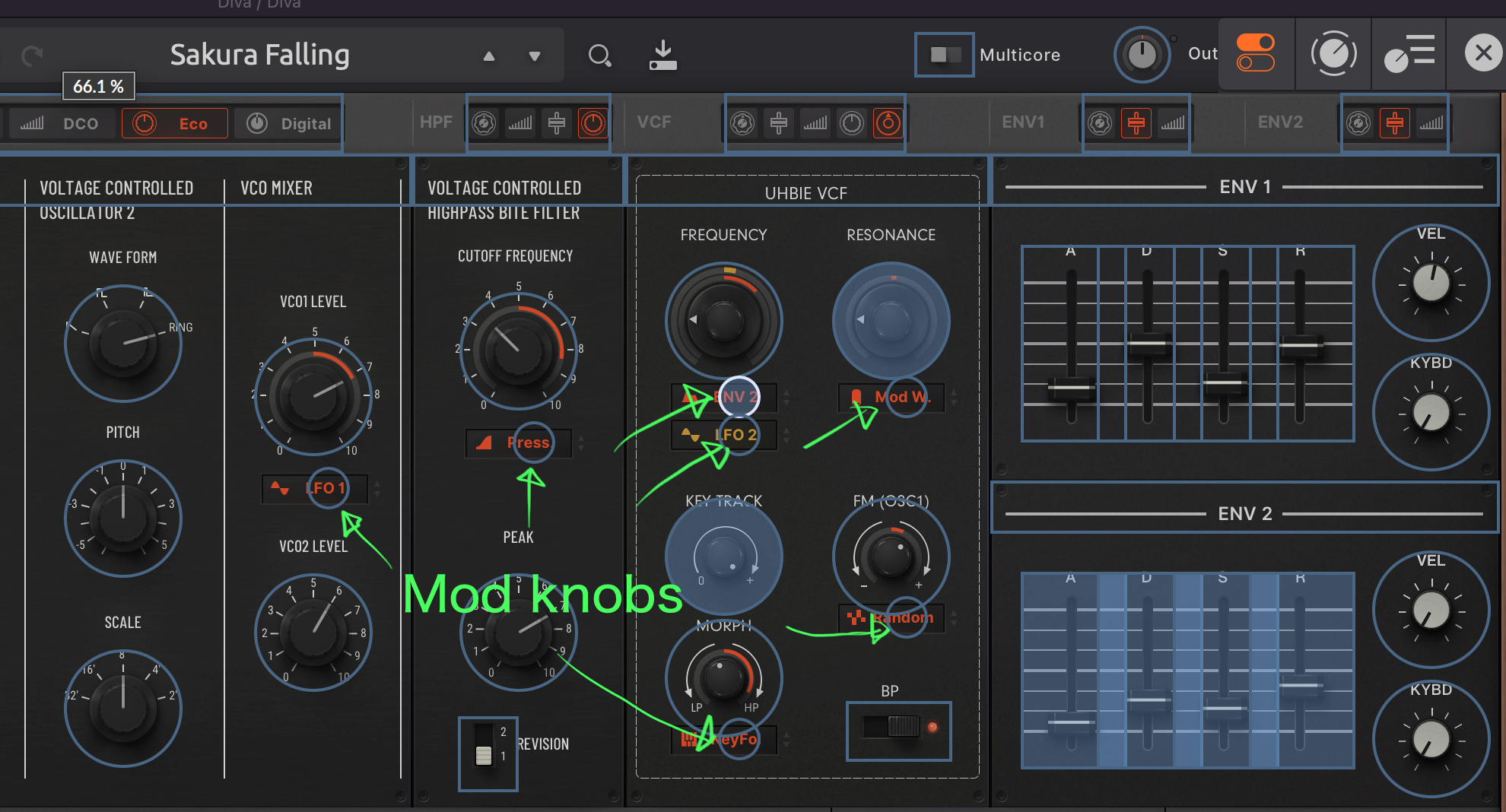
Hello! I just got MONA and like it a lot. Unfortunately I am missing the mod depth knobs in the filter section, which I use a lot. I understand, that your modulation system is a feature of the skin, but is there any chance, that we can get the knobs back? I find it harder to use automation in DAW when there is no mod depth knob and I also have it mapped to a controller.
-
- KVRist
- Topic Starter
- 395 posts since 3 Mar, 2015 from Japan
Mmm...I don't get it. Though the mod boxes in MONA look like menu boxes, they are functionally no different from knobs. If you touch one, say cutoff mod, DAWs like Ableton Live shows "FreqModDepth" in the automation lane, and you should be able to assign MIDI CC just like ordinary knobs.phelios2063 wrote: Mon Sep 02, 2024 7:04 pm Hello! I just got MONA and like it a lot. Unfortunately I am missing the mod depth knobs in the filter section, which I use a lot. I understand, that your modulation system is a feature of the skin, but is there any chance, that we can get the knobs back? I find it harder to use automation in DAW when there is no mod depth knob and I also have it mapped to a controller.
-
- KVRist
- 60 posts since 30 Nov, 2023
Hi,plugmon wrote: Mon Sep 02, 2024 3:31 am Fixed most of the issues now (v1.1.1). Thanks for your report!
Thanks for making this awesome skin! I'm just writing to let you know there's a slight bug with the text on Dual VCO panel (both in the normal grey and special red versions of the skin) for the Larger Fonts for Smaller Displays variants.

The word "Waveform" is truncated to "Wavefor"
Kind regards!
-
- KVRist
- Topic Starter
- 395 posts since 3 Mar, 2015 from Japan
Wooooh still another bug there....oscillik wrote: Mon Sep 23, 2024 4:20 pm Thanks for making this awesome skin! I'm just writing to let you know there's a slight bug with the text on Dual VCO panel (both in the normal grey and special red versions of the skin) for the Larger Fonts for Smaller Displays variants.
The word "Waveform" is truncated to "Wavefor"
Kind regards!
I fixed it and updated the package (v1.1.2). Thanks!!
-
- KVRist
- 60 posts since 30 Nov, 2023
That was quick! Thank you so much!plugmon wrote: Tue Sep 24, 2024 5:06 amWooooh still another bug there....oscillik wrote: Mon Sep 23, 2024 4:20 pm Thanks for making this awesome skin! I'm just writing to let you know there's a slight bug with the text on Dual VCO panel (both in the normal grey and special red versions of the skin) for the Larger Fonts for Smaller Displays variants.
The word "Waveform" is truncated to "Wavefor"
Kind regards!
I fixed it and updated the package (v1.1.2). Thanks!!
-

- KVRAF
- 2061 posts since 3 May, 2014
right click the diva logo top left or any where on that top sectionMrMore wrote: Sun Oct 20, 2024 8:17 am Great product! Love the feel.
Quick question: how do I resize the GUI? Can't find it in the manual...
-

- KVRist
- 407 posts since 24 Aug, 2004 from under the big oak tree
Hi
I Have just bought Mona.
How do I resize gui? the oscillator section alone take up my whole macbook screen,
please dont say its on the bottom right that cannot be accesses.
There is no button to switch back to normal theme. I would post a screen shpot but cant work out how to do it here
I Have just bought Mona.
How do I resize gui? the oscillator section alone take up my whole macbook screen,
please dont say its on the bottom right that cannot be accesses.
There is no button to switch back to normal theme. I would post a screen shpot but cant work out how to do it here
-

- u-he
- 30188 posts since 8 Aug, 2002 from Berlin
Just right-click into empty space, and change the UI size. This is temporary. Then, in the preferences section, set it to a usable size.
-
- KVRist
- Topic Starter
- 395 posts since 3 Mar, 2015 from Japan
-
- KVRist
- 407 posts since 24 Aug, 2004 from under the big oak tree
Thanks very much. I am loving thisUrs wrote: Mon Dec 29, 2025 12:30 pm Just right-click into empty space, and change the UI size. This is temporary. Then, in the preferences section, set it to a usable size.
