


Toneboosters Equalizer Pro
-

- KVRAF
- 3722 posts since 21 Nov, 2015
Normally the Developer is very open to suggestions and also steadily updating and implementing new features. I have no worries that this will also happen with Equalizer Pro and would love to see the EQ4 - Saturation added somewhere in the future.
You can be creative in any right place on Earth, and not only in the wealthiest cities. Bring the world feelings from everywhere, and not only feelings of capitalistic or jail environment.
― Aleksey Vaneev
https://linuxdaw.org
― Aleksey Vaneev
https://linuxdaw.org
-

- KVRAF
- 8695 posts since 29 Sep, 2010 from Maui
Hmm, the cursor, snap to curve seems mostly consistent for me, there are times when the cursorkmonkey wrote: Sun Sep 22, 2024 8:29 amThat's what I want. It is impossible unless I go way out of bounds. Look at the animation above and think about it. Here I made another one with multiple points. I can not select them, it makes another bell instead even after the fact I ensured crosshair should not add another point (whenever you want to add another filter a small white dot appears on a horizontal line, if there is no dot no filter should be added - white dot you'll see it it when I move mouse left or right above bands).pekbro wrote: Sun Sep 22, 2024 7:34 am You can select multiple points by dragging out a box selection. I guess that's not what you want?
This was not the case in the previous version. I could select peaking filters easily. Now instead of left-click and dragging to select it adds yet another band unless you go further away. Well, how much further and why do I need to think about it when this was not the case in the previous version at all? That is my issue with it.
If he could add "Disable one-click adding filter" I guess one would be able to return to the initial workflow.,
does not change to reflect it's mode correctly, which might be a bug. In any event I don't see why
there couldn't be an option to turn off the snap. You should email him about it, ime he's always
been pretty reasonable. In the least he should have some rationale for it, if it's not a bug.
-

- KVRAF
- 8089 posts since 9 Jan, 2003 from Saint Louis MO
I have never had trouble selecting things in this plugin 
My only UI complaint is how the detail box always follows the frequency. It (A) can't be moved out of the way somewhere else to see what's behind it, and (B) starts flying around madly if you use parameter automation on the frequency.
My only UI complaint is how the detail box always follows the frequency. It (A) can't be moved out of the way somewhere else to see what's behind it, and (B) starts flying around madly if you use parameter automation on the frequency.
-
- KVRist
- 154 posts since 5 May, 2005
-

- KVRAF
- 5395 posts since 25 Jan, 2014 from The End of The World as We Knowit
Gliss sounds so nice!
I like how Voxengo's design focuses on listening carefully, see the Gliss & the Primary user guides.
{ I use TB FIX and EQ4 but they're so different from Vox }
F E E D
Y O U R
F L O W
Y O U R
F L O W
-
- KVRAF
- 5200 posts since 17 Aug, 2004
That is all fine for you. Please don't be like "I don't have this problem so it doesn't exist". I mean you aren't contributing to the issue being reported here. I would feel otherwise if you told me "Look, stop making a drama out of this there's an option to turn it off" but this isn't the case. Clearly, after the upgrade the product starts behaving differently in the workflow.
I purchased it solely based on the workflow. I even initially expressed my amazement at the workflow itself. Now in the update, this is completely ruined.
If you look at my gif it very clearly demonstrates it does have a problem in selecting bands.
Look again at my gif.
1. focus on the three peaking filters (ignore shelving on the right screen)
2. instead of selecting three filter bands with left-click and drag (three dots), it adds a fourth one
2.1 In the animation I even ensured that there was no little white dot just below crosshair which is usually a visual indicator that one will not add a band with left click and drag - yet it adds a band
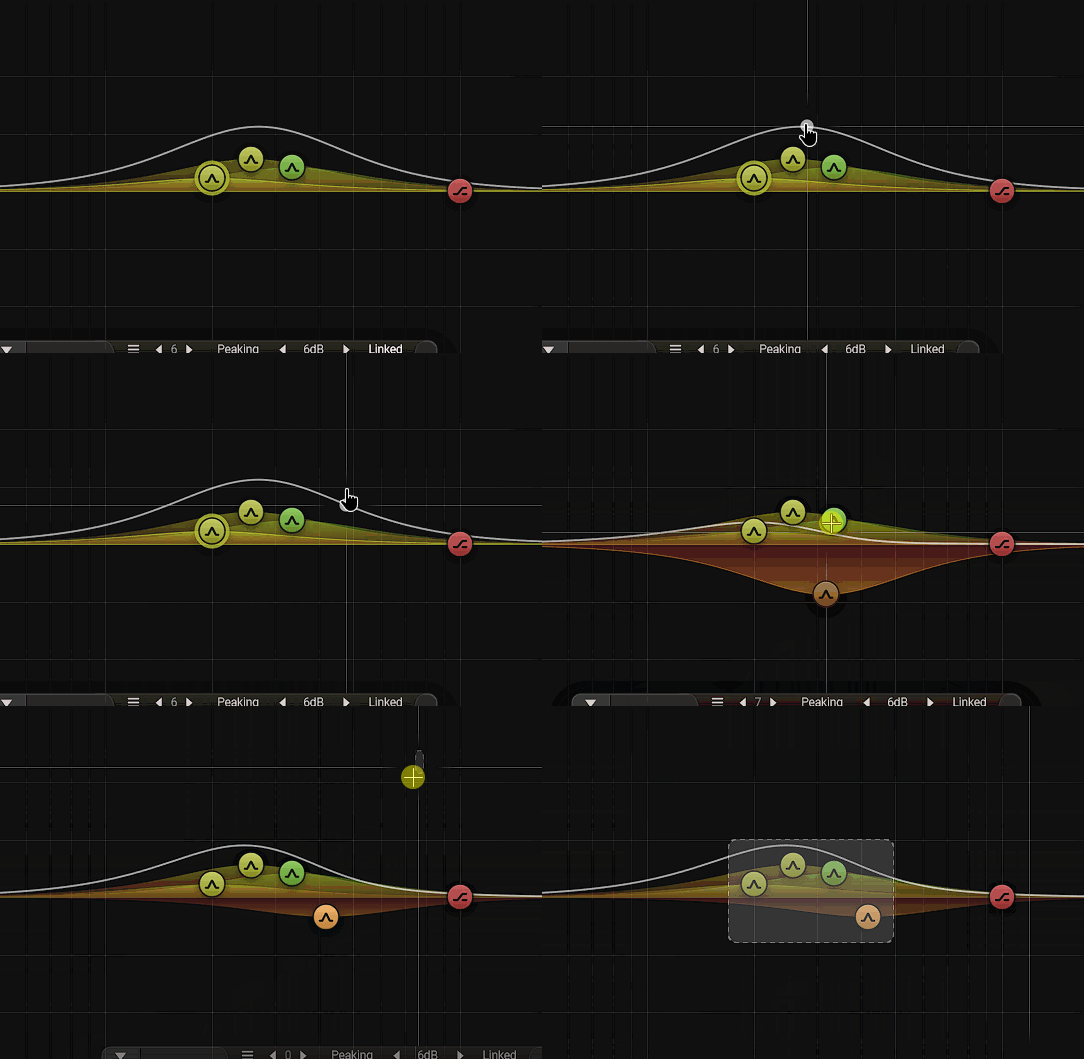
Like I said I am able to select all three bands if I reach further with the crosshair but it is inconsistent. How much further do I need to go above or below? Why do I need to stare at the screen and visually aim where to click in order to not add another peaking filter - that is my issue - which hasn't happened before this update. It is a pretty workflow-killing issue, especially to the eyes.
Most definitely this wasn't happening before I upgraded to the latest version. In the latest version, he added this silly feature let me name it "one click to add a peaking filter" which causes this issue/behavior and can not be turned off.
Why change the workflow of a product?
-
- KVRAF
- 3185 posts since 10 Jan, 2005
Maybe it's just a bug and / or needs refinement. Is there something peculiar on your system that can trigger this problem (maybe non standard dpi settings or so)? Is it the same in all versions (vst3, etc.)?kmonkey wrote: Mon Sep 23, 2024 5:21 amThat is all fine for you. Please don't be like "I don't have this problem so it doesn't exist". I mean you aren't contributing to the issue being reported here. I would feel otherwise if you told me "Look, stop making a drama out of this there's an option to turn it off" but this isn't the case. Clearly, after the upgrade the product starts behaving differently in the workflow.
I purchased it solely based on the workflow. I even initially expressed my amazement at the workflow itself. Now in the update, this is completely ruined.
If you look at my gif it very clearly demonstrates it does have a problem in selecting bands.
Look again at my gif.
1. focus on the three peaking filters (ignore shelving on the right screen)
2. instead of selecting three filter bands with left-click and drag (three dots), it adds a fourth one
2.1 In the animation I even ensured that there was no little white dot just below crosshair which is usually a visual indicator that one will not add a band with left click and drag - yet it adds a band
Like I said I am able to select all three bands if I reach further with the crosshair but it is inconsistent. How much further do I need to go above or below? Why do I need to stare at the screen and visually aim where to click in order to not add another peaking filter - that is my issue - which hasn't happened before this update. It is a pretty workflow-killing issue, especially to the eyes.
Most definitely this wasn't happening before I upgraded to the latest version. In the latest version, he added this silly feature let me name it "one click to add a peaking filter" which causes this issue/behavior and can not be turned off.
Why change the workflow of a product?
Last edited by mabian on Mon Sep 23, 2024 8:58 am, edited 1 time in total.
-

- KVRAF
- 6213 posts since 25 Dec, 2004
i can agree here, in general. I won't be upgrading.
this "Pro" version has too many workflow annoyances.
Even just the little interface box with most of the knobs on it, in v4 it's possible to move it out of the way, in v5, if you're doing deep subtractive work - the box is fully in the way and can't be moved.
Maybe some of these things become clearer when reading the manual, but as far as this user experience goes - the plugin is a big step backward in my view.
this "Pro" version has too many workflow annoyances.
Even just the little interface box with most of the knobs on it, in v4 it's possible to move it out of the way, in v5, if you're doing deep subtractive work - the box is fully in the way and can't be moved.
Maybe some of these things become clearer when reading the manual, but as far as this user experience goes - the plugin is a big step backward in my view.
sketches... http://soundcloud.com/onesnzeros
some artists i support... https://bandcamp.com/spectraselecta
some artists i support... https://bandcamp.com/spectraselecta
-
- KVRist
- 285 posts since 14 Sep, 2006
It's called a bugkmonkey wrote: Sun Sep 22, 2024 7:09 am So I updated and can't believe how a seemingly perfect EQ just got ruined by stupid features. I certainly didn't see this one coming from an established and experienced dev as Jeroen is.
 thanks for reporting, we'll fix this soon. It will also help if you contact us directly to report bugs instead of (or in addition to) posting bug reports on a forum so we can get to it even quicker = we don't read all forums every day; thanks!
Last edited by djeroen on Mon Sep 23, 2024 9:51 am, edited 1 time in total.
-
- KVRAF
- 5444 posts since 15 Feb, 2020

-
- KVRAF
- 3722 posts since 21 Nov, 2015
You can drag the detail box around actually, still a little sub optimal workflow wise.foosnark wrote: Sun Sep 22, 2024 1:31 pm I have never had trouble selecting things in this plugin
My only UI complaint is how the detail box always follows the frequency. It (A) can't be moved out of the way somewhere else to see what's behind it, and (B) starts flying around madly if you use parameter automation on the frequency.
You can be creative in any right place on Earth, and not only in the wealthiest cities. Bring the world feelings from everywhere, and not only feelings of capitalistic or jail environment.
― Aleksey Vaneev
https://linuxdaw.org
― Aleksey Vaneev
https://linuxdaw.org
-
- KVRAF
- 8089 posts since 9 Jan, 2003 from Saint Louis MO
I can't, but apparently there was a 1.1.0 update so I'll give that a try (I had 1.0).El°HYM wrote: Mon Sep 23, 2024 7:36 pm You can drag the detail box around actually, still a little sub optimal workflow wise.
-
- KVRAF
- 1716 posts since 27 Apr, 2012
I had an issue with mouse tracking while dragging EQ nodes in Ableton Live and Jeroen had it fixed within five days.kPere wrote: Mon Sep 23, 2024 6:47 pm Maaan, you didnt even contact support about that? They're highly responsive and surely would help and fix the issue - its hard to have a bug-free product on day 1.
Some days you're the chicken, and some days you're the nugget.
- Sun Tzu
- Sun Tzu
-
- KVRAF
- 3722 posts since 21 Nov, 2015
Ah, sorry man. 
You can drag the window in EQ4 not the new Pro. That one just allows collapse and close, yet still sub optimal somehow.
You can drag the window in EQ4 not the new Pro. That one just allows collapse and close, yet still sub optimal somehow.
You can be creative in any right place on Earth, and not only in the wealthiest cities. Bring the world feelings from everywhere, and not only feelings of capitalistic or jail environment.
― Aleksey Vaneev
https://linuxdaw.org
― Aleksey Vaneev
https://linuxdaw.org