Popup Menus for Params Defined in Script

Official support for: bluecataudio.com
Post Reply New Topic
RELATED
PRODUCTS

Post

Hello, again - With Blue Cat Plug 'n' Script I have been having some trouble getting the same behavior to occur for input params that have been defined in my DSP script vs. those that are defined in the script's associated KUIML file.

Specifically, my enumerated parameter defined in script does not respect the default value I specify for it and does not provide access to a popup menu. On the other hand, a param defined in the KUIML does both of these things. Note that I am including params.as from LetiMix to simplify the addition of params.

Please have a look at my minimal example below and let me know whether this is expected and how I may overcome it. Note that the value for Custom Param is 1 and clicking the icon beside it does nothing, whereas the value of GUI Param defaults to 3 and clicking the icon displays a popup menu of valid enum values.

test.cxx

Code: Select all

#include "../library/params.as"

int inst_trigger;

void initialize() {
    inst_trigger = ip("param0", "1;2;3;4;5", "3");
}
test.kuiml

Code: Select all

<SKIN>
  <ROW>
    <TEXT value="Custom Param:" />
    <PARAM_TEXT param_id="custom_param0" />
    <IMAGE_PARAM_MENU_BUTTON param_id="custom_param0" image="$THEME_PATH$/toolbar/zoom.png" opaque_mouse_mask="true" cursor="system::hand" />
  </ROW>

  <ROW>
    <PARAM id="gui_param0" type="enumeration" enum_values="1;2;3;4;5" default="3" />
    <TEXT value="GUI Param:" />
    <PARAM_TEXT param_id="gui_param0" />
    <IMAGE_PARAM_MENU_BUTTON param_id="gui_param0" image="$THEME_PATH$/toolbar/zoom.png" opaque_mouse_mask="true" cursor="system::hand" />
  </ROW>

</SKIN>
Thanks in advance!

Post

Hi,

I am not familiar with Letimix's script, but in order to have a popup menu, you need to make sure that the number of steps for the parameter are defined. Regarding the default value, it is only used when right clicking on the knob to set to default. The value of a parameter is not modified when loading a script.

Post

Thanks for the quick reply.

The explanation about the default value makes sense. I'm pretty sure the LetiMix script takes care of calculating and populating the steps, but I will rewrite my example in "longhand" to see if I get the same results. I will let you know shortly how that goes.

Post

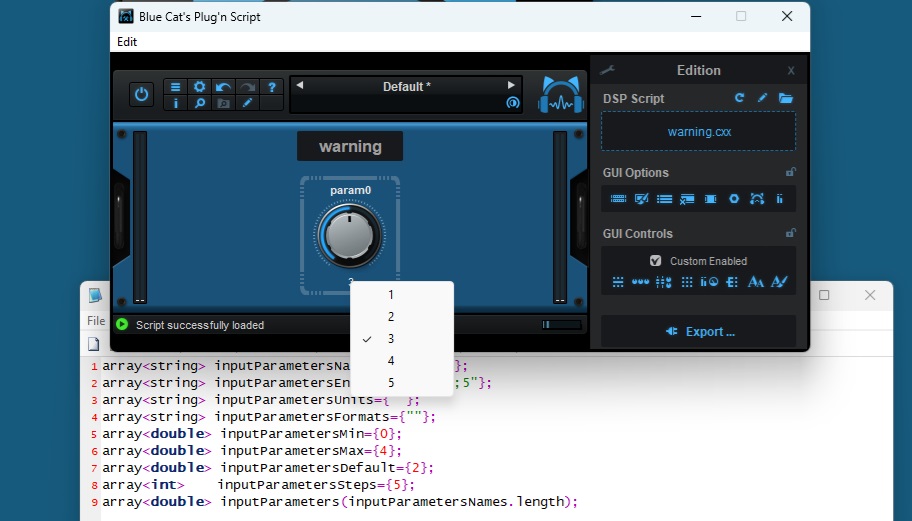
Hmm - I'm afraid that I get the same result when I avoid using the LetiMix script.

My test.cxx code now looks like this:

Code: Select all

array<string> inputParametersNames={"param0"};
array<string> inputParametersEnums={"1;2;3;4;5"};
array<string> inputParametersUnits={""};
array<string> inputParametersFormats={""};
array<double> inputParametersMin={0};
array<double> inputParametersMax={4};
array<double> inputParametersDefault={2};
array<int>    inputParametersSteps={5};
array<double> inputParameters(inputParametersNames.length);
The popup menu resolutely refuses to appear. When I load the LetiMix debug skin I can see that the input param and it's properties are mapped in the way that I would anticipate. In fact, a screenshot of the same debug skin I took while using the LetiMix script for defining the param shows exactly the same mapping and values as the above code. In it, we can see that the steps property does indeed appear to be set correctly:

Image

Post

I cannot reproduce the problem here: with the exact same script, clicking on the parameter value below the knob properly displays a popup menu:

Image

Post

Thanks for taking the time to try that and reply. I agree it works with the default skin, but when using the test.kuiml (as included in my original post) the failure to respond occurs.

This seems to indicate, then, either an issue in how I am using or referencing the parameter in the kuiml or in how the parameter is treated when using a kuiml file. I'd like to think it's the former, but I haven't yet been able to determine what I may be doing wrong.

Post

Hello there!

The thing is "steps" is in fact not an attribute of a PARAM, but another parameter, which has to be applied to particular control in the GUI as"positions_count" attribute. You can see how both in default an LM Skin this "steps" attribute is linked to "positions_count" attribute using ≤PARAM_LINK from="....steps" to="...positions_count”> in the auto-layoit.

But when you do your own kuiml you have to link that yourself!

Post

AH! - now that helps me get a little closer to understanding more of what is going on between the script and the kuiml, Ilya. Thank you so much!

It had been my assumption that a kuiml PARAM would be configured appropriately based on the properties specified in the varous inputParametersxxxx arrays. I see now, though, the documentation for the positions_count property.

I think I have to do a little more reading of the various skins before it sinks in completely, but for now I can confirm that if I manually add the positions_count property to line 5 of my test.kuiml I get the exact result I was looking for. To be sure, adding an appropriate PARAM_LINK will be preferable but all I needed for my minimum test case was to satisfy myself that I was on the right track.

Thanks again :)

Post

OK, Ilya - it IS becoming clearer now.

My actual use case makes use of your LP_DROPDOWN_PARAM template and I have found that by adding ID's to the IPMB elements as follows:

Code: Select all

<IPMB id="ipmb_$param_name$" param_id="$param_name$" reverse="$reverse$" />
...and:

Code: Select all

<IPMB id="ipmb_icon_$param_name$" param_id="$param_name$" reverse="$reverse$" />
...and then adding the necessary PARAM_LINKS:

Code: Select all

<PARAM_LINK from="$param_name$_steps" to="ipmb_$param_name$.positions_count" />
<PARAM_LINK from="$param_name$_steps" to="ipmb_icon_$param_name$.positions_count" />
...I get the behavior I had been hoping for.

Thanks again!

Post

The custom param exposed to the GUI is indeed a bit special as it uses the information from the script (including positions count) to update its own properties dynamically. However the links are already defined in the main skin so you should not have to add anything special to your on KUIML.

Also, when exporting a plug-in, the DSP parameters should already have all the appropriate properties (as they are statically defined upon build).

BTW you do not need to link the steps count to the control positions count. When a parameter has a specific number of positions defined (integers typically), the menu should use them directly.

Post Reply

Return to “Blue Cat Audio”