

Pummel - an aggressive bass and drum synth from ijo audio
Ableton Live | Max for Live | M4L | AMXD
-
 thecontrolcentre thecontrolcentre https://www.kvraudio.com/forum/memberlist.php?mode=viewprofile&u=76240
 - KVRAF
- 37261 posts since 27 Jul, 2005 from Scottish Borders
-

- KVRian
- Topic Starter
- 1417 posts since 14 Apr, 2008 from velvet noise
▒▒░░▒▒▓▓▒▒░░▓▓▒▒░░▒▒▒▒▒▒░
Last edited by noiseresearch on Sat Dec 07, 2024 7:16 pm, edited 1 time in total.
It refuses description, allowing only the vague approach of adjectives: dark, light, raw, angelic. Who or what is making these noises? Where are they coming from and what do they point to? What kind of entity can leave such a troubling sonic remnant?
-
- KVRAF
- 3389 posts since 7 Aug, 2008
Link to the store: https://snakeshaky.gumroad.com/thecontrolcentre wrote: Wed Dec 04, 2024 12:43 am Pummel - an aggressive bass and drum synth from ijo audio
-
- KVRAF
- 2311 posts since 24 Jun, 2006 from London, England
If I have lots from the same developer/company I stick them all in a folder with that company's name. For devices I only have a few of from that developer I stick them in one of these other four:noiseresearch wrote: Wed Dec 04, 2024 5:12 pm @all: what's your approach to organize Max for Live devices and presets you might create? Separate folders in the user library for each device? Do you place them somewhere externally? I'm about to re-structure my library and wonder how others take care of their M4L-Library
-Instruments
-Sequencers and Midi Effects
-Audio Effects
-Video
Probably a much better method, but that's what I've been doing.....
-

- Beware the Quoth
- 35430 posts since 4 Sep, 2001 from R'lyeh Oceanic Amusement Park and Funfair
For M4L devices that dont get installed via Packs, I have a _M4L_Devices folder in User Library and then folders inside that for different categories of devices, ie effects, instruments, modulators, sequencers, other midi devices, hardware front-ends, video tools, and extensions (ie tools/addons that extend Live itself). Thinking about putting devices by the same dev into a subfolder of the category to tidy things up, if the folder is 'busy'noiseresearch wrote: Wed Dec 04, 2024 5:12 pm @all: what's your approach to organize Max for Live devices and presets you might create? Separate folders in the user library for each device? Do you place them somewhere externally? I'm about to re-structure my library and wonder how others take care of their M4L-Library
Plus, in L12, custom browser tags that correspond to the same categories, but also applied to M4L devices that were installed via Packs.
An idiot on Set Theory:
"In some cases there is an object called red that contains everything that is red. In much the same way a pot is a plate."
"In some cases there is an object called red that contains everything that is red. In much the same way a pot is a plate."
-

- KVRian
- 783 posts since 16 Jun, 2022
Second batch of midi tools by manifest audio :
7 MIDI Tool Generators
Converser
Hexaline
Metagraph
Metapulse
Navigator
Percotope
Typewriter
6 MIDI Tool Transformations
Chronoflex
Intershift
Remapper
Syncopator
Vector
Transcoder
7 MIDI Tool Generators
Converser
Hexaline
Metagraph
Metapulse
Navigator
Percotope
Typewriter
6 MIDI Tool Transformations
Chronoflex
Intershift
Remapper
Syncopator
Vector
Transcoder
I make electronic music - DAW of choice : Live 12 
-
thecontrolcentre thecontrolcentre https://www.kvraudio.com/forum/memberlist.php?mode=viewprofile&u=76240
- KVRAF
- 37261 posts since 27 Jul, 2005 from Scottish Borders
Knobs by Abletunes

Three free plugins that will liven up your production workflow!
We’ve carefully selected, blended and mapped several parameters to one knob for your convenience, as in some cases we don’t need to dig deep but act fast instead. All three work best as channel insert, though you may try Space Knob on return track setting it 100% and playing with the send level.
So please welcome - Abletunes Knobs: DRIVE, SPACE and ATTACK.
DRIVE KNOB
Distortion unit that delivers some nasty wide-band distortion (stereo). Great for when you quickly want to add some tone and color to your sound. Sounds good on drum groups and percussion tracks, adds grit to bass lines, leads, keys, you name it.
Try automating its level on transitions, try automating its ON/OFF switch to add extra vibe and chopping pulsation couple of bars before the drop.
ATTACK KNOB
Simplified transient shaper (stereo) with only ATTACK section of the waveform being affected. Adds bite to the drum loops, enhances percussive transients, makes guitar solos sound more solid and confident to name a few applications examples.
But stay moderate with it if you just want to slightly accent the transient (or go nuts with 100% just to see how it sounds).
SPACE KNOB
Mid-sized room reverb (stereo). Pretty bright one, creating a mid-sized space, somewhere in between a large room and a small hall. Works well on almost anything, from percussion to synths and acoustic guitars.
https://abletunes.com/product/plugins/knobs
-
- KVRian
- Topic Starter
- 1417 posts since 14 Apr, 2008 from velvet noise
▒▒░░▒▒▓▓▒▒░░▓▓▒▒░░▒▒
Last edited by noiseresearch on Sat Dec 07, 2024 7:16 pm, edited 1 time in total.
It refuses description, allowing only the vague approach of adjectives: dark, light, raw, angelic. Who or what is making these noises? Where are they coming from and what do they point to? What kind of entity can leave such a troubling sonic remnant?
-
- KVRAF
- 5200 posts since 17 Aug, 2004
guys max for the live search function (on their website) is sometimes useless.
What I am looking for is probably weird. IS there a Max For Live device that could be able to save "screenshots" of Ableton Live 12 screens, like differently sized mixer panels or different zooms, and all this recallable on a mappable keyboard button?
Also is there any sort of "floating" mixer within MaxFor Live? Like where you see al your tracks in detached windows. I am not speaking about Ableton's second screen feature, just the mixer being detached. I remember years ago someone did it, but the graphic was a nightmare. Tried to find "mixer" in their library but I am getting results unrelated to the mixer.
Thanks
What I am looking for is probably weird. IS there a Max For Live device that could be able to save "screenshots" of Ableton Live 12 screens, like differently sized mixer panels or different zooms, and all this recallable on a mappable keyboard button?
Also is there any sort of "floating" mixer within MaxFor Live? Like where you see al your tracks in detached windows. I am not speaking about Ableton's second screen feature, just the mixer being detached. I remember years ago someone did it, but the graphic was a nightmare. Tried to find "mixer" in their library but I am getting results unrelated to the mixer.
Thanks
-
thecontrolcentre thecontrolcentre https://www.kvraudio.com/forum/memberlist.php?mode=viewprofile&u=76240
- KVRAF
- 37261 posts since 27 Jul, 2005 from Scottish Borders
-
- KVRian
- Topic Starter
- 1417 posts since 14 Apr, 2008 from velvet noise
Please keep this thread on topic. This is for Max/MSP respectively Max for Live.
It refuses description, allowing only the vague approach of adjectives: dark, light, raw, angelic. Who or what is making these noises? Where are they coming from and what do they point to? What kind of entity can leave such a troubling sonic remnant?
-
- KVRian
- 783 posts since 16 Jun, 2022
Max for live device emulating the SH-101 by Monomono : https://isotonikstudios.com/product/mon ... -monomono/
I make electronic music - DAW of choice : Live 12
-
- KVRian
- 783 posts since 16 Jun, 2022
Very simple yet effective Midi transformer tool : Reduce... it reduces the density of midi notes in a clip.  https://h1data.gumroad.com/l/m4l-reduce
https://h1data.gumroad.com/l/m4l-reduceI make electronic music - DAW of choice : Live 12
-
- KVRAF
- 1875 posts since 8 Jan, 2022
M2TM Notes is pretty damn awesome.
It's a pretty comprehensive text based generator for chords, arps, progressions.
There's even a prompt included for ChatGPT so it can give you chord sequences, melodies in M2TM format.
It's a pretty comprehensive text based generator for chords, arps, progressions.
There's even a prompt included for ChatGPT so it can give you chord sequences, melodies in M2TM format.
-
thecontrolcentre thecontrolcentre https://www.kvraudio.com/forum/memberlist.php?mode=viewprofile&u=76240
- KVRAF
- 37261 posts since 27 Jul, 2005 from Scottish Borders
This looks cool ... haven't tried it yet.
Redwood by ijo audio devices
a Max for Live audio effect inspired by Radiohead and live audio mangling (ala the Kaoss Pad)
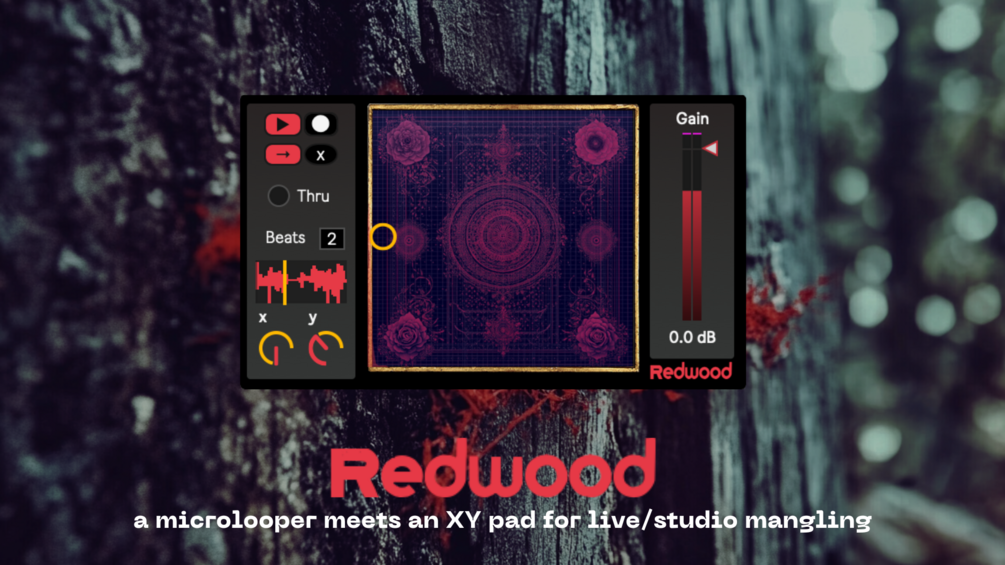
Redwood is a micro-looper attached to an XY pad which adjusts the loop's pitch and length in musical ratios. Redwood was inspired by Radiohead performances in the early 2000s around the time that Kid A came out.
https://snakeshaky.gumroad.com/l/redwood
Redwood by ijo audio devices
a Max for Live audio effect inspired by Radiohead and live audio mangling (ala the Kaoss Pad)
Redwood is a micro-looper attached to an XY pad which adjusts the loop's pitch and length in musical ratios. Redwood was inspired by Radiohead performances in the early 2000s around the time that Kid A came out.
https://snakeshaky.gumroad.com/l/redwood