


That’s a good point.Scotty wrote: Sat Jan 11, 2025 2:09 am The only reasonable option in that list is the FAIR or GOOD category. TSN Nics and Swiches and Ultra Low Latency Nics and Switches are very expensive. If we want audio over ethernet and have that kind of budget then we're looking at Dante.
BlueCat Connector Latency 1024 samples (Can I do better?)
-

- KVRAF
- 7030 posts since 19 Apr, 2002 from Utah
Vendor‑Dependent Copy Protection: Customers lose. Pirates win.
(Also: I'm Accused of lying about Linux—it boots, runs my pro audio workflow, stays stable, updates--though yearly dismissed as “niche”. Yet I'm the deluded one.)
(Also: I'm Accused of lying about Linux—it boots, runs my pro audio workflow, stays stable, updates--though yearly dismissed as “niche”. Yet I'm the deluded one.)
-
- KVRAF
- Topic Starter
- 3220 posts since 23 Dec, 2002
Another update with some good news.
I applied several tweaks to both of my Realtek 1Gb network cards (sending and receiving computers) with good results. I am still testing on my X99 Xeon Systems going from Cubase 14.10 Pro to Cubase 14.10 Pro.
First the Results: The over all stability of transferring audio streams improved. I have been able to set both physical audio interfaces to 128 buffers and send four audio streams with no compression reliablly at 1024 buffers (21 ms latency (or a bit less according to Bluecat ) set in each of the 4 connectors without drop outs When I used the first audio compression setting with is "Lossless" I was able to go to 768 buffer settings in the receiving 4 connectors and it worked reliably. In general the audio compression settings seem to have the intended effect on the latency settings now that the tweaks have been made. They made little difference previously. I only tested "None" and "Lossless" as I won't be streaming lossy audio. Lower buffer settings on the physical audio interfaces (RME and Expert Sleepers) was not reliable . 128 buffer settings on each is the sweet spot on my systems. Both computers are running Windows 10 with the latest updates applied.
Summary: In short it is now reliable for transferring 4 audio streams with lossless audio at 44.1K and 48K without dropouts at both 1024 and 768 buffers on the receiving connectors.
Note: It is important to mention that my receiving computer is fully maxed out with over 30 USB connections, all four PCIe slots filled. Multiple monitors etc. 4 adat convertors all sync'd and all audio input ports defined and in use. About 12 outputs are also defined. I suspect a more basic audio setup would be do better with Connector. I am pushing that box.
First the tweaks that were available to me:
1. Flow Control Disabled
2. Interrupt Disrupt Disabled.
3. Priority and VLan Disabled
4. Speed and Duplex 1.0 GB Full Duplex (was set to auto negotiation)
5. The Receive and Transport Buffers were already maxed at 512 and 128 respectively.
Not Applied or Not Available:
1)Jumbo Frame Size: Setting not available in my RealTek Network Cards.
2)Energy Efficient Ethernet (EEE): Setting not available - (Both computers already optimized using modified high powered scheme and almost all tweaks suggested by Pictus.)
3. Any comments relative to switches didn't seem applicable to me. I am using a router.
4. Crossover cable not attempted: I don't have a long enough crossover cable and I won't buy one as I will be connected to internet to authenticate my software and update software etc.
5. Any other Network Cards suggestions such as Disabling TCP segmentation were not available on the either RealTek network cards.
I applied several tweaks to both of my Realtek 1Gb network cards (sending and receiving computers) with good results. I am still testing on my X99 Xeon Systems going from Cubase 14.10 Pro to Cubase 14.10 Pro.
First the Results: The over all stability of transferring audio streams improved. I have been able to set both physical audio interfaces to 128 buffers and send four audio streams with no compression reliablly at 1024 buffers (21 ms latency (or a bit less according to Bluecat ) set in each of the 4 connectors without drop outs When I used the first audio compression setting with is "Lossless" I was able to go to 768 buffer settings in the receiving 4 connectors and it worked reliably. In general the audio compression settings seem to have the intended effect on the latency settings now that the tweaks have been made. They made little difference previously. I only tested "None" and "Lossless" as I won't be streaming lossy audio. Lower buffer settings on the physical audio interfaces (RME and Expert Sleepers) was not reliable . 128 buffer settings on each is the sweet spot on my systems. Both computers are running Windows 10 with the latest updates applied.
Summary: In short it is now reliable for transferring 4 audio streams with lossless audio at 44.1K and 48K without dropouts at both 1024 and 768 buffers on the receiving connectors.
Note: It is important to mention that my receiving computer is fully maxed out with over 30 USB connections, all four PCIe slots filled. Multiple monitors etc. 4 adat convertors all sync'd and all audio input ports defined and in use. About 12 outputs are also defined. I suspect a more basic audio setup would be do better with Connector. I am pushing that box.
First the tweaks that were available to me:
1. Flow Control Disabled
2. Interrupt Disrupt Disabled.
3. Priority and VLan Disabled
4. Speed and Duplex 1.0 GB Full Duplex (was set to auto negotiation)
5. The Receive and Transport Buffers were already maxed at 512 and 128 respectively.
Not Applied or Not Available:
1)Jumbo Frame Size: Setting not available in my RealTek Network Cards.
2)Energy Efficient Ethernet (EEE): Setting not available - (Both computers already optimized using modified high powered scheme and almost all tweaks suggested by Pictus.)
3. Any comments relative to switches didn't seem applicable to me. I am using a router.
4. Crossover cable not attempted: I don't have a long enough crossover cable and I won't buy one as I will be connected to internet to authenticate my software and update software etc.
5. Any other Network Cards suggestions such as Disabling TCP segmentation were not available on the either RealTek network cards.
-
- KVRAF
- 7030 posts since 19 Apr, 2002 from Utah
Great news! So you are getting 21ms of latency for the transfer? How is that latency affecting your playing? Are you playing it realtime? It seems that 21ms is better than before, but still seems a bit much. I use a Linux host and plan to use a Windows guest. Dante is not an option for me. That's why I was considering the expensive Thunderbolt to ethernet options. Apparently, Thunderbolt adapters use better technology and are inherently much faster and lower latency than USB because they have direct DMA access. I wish these adapters weren't so expensive! What make/model of NICs are you using? Or are they built in to your systems? I don't know why, but I at first thought you were using Macs....
If the router is out of the picture, and you use NIC to NIC with crossover cable, you will shave off some additional milliseconds. What make/model of NICs are you using? It appears that what hardware is used is very important to succeed at this.
If the router is out of the picture, and you use NIC to NIC with crossover cable, you will shave off some additional milliseconds. What make/model of NICs are you using? It appears that what hardware is used is very important to succeed at this.
Last edited by audiojunkie on Wed Jan 15, 2025 6:06 pm, edited 4 times in total.
Vendor‑Dependent Copy Protection: Customers lose. Pirates win.
(Also: I'm Accused of lying about Linux—it boots, runs my pro audio workflow, stays stable, updates--though yearly dismissed as “niche”. Yet I'm the deluded one.)
(Also: I'm Accused of lying about Linux—it boots, runs my pro audio workflow, stays stable, updates--though yearly dismissed as “niche”. Yet I'm the deluded one.)
-
- KVRAF
- 7030 posts since 19 Apr, 2002 from Utah
The best Thunderbolt 3.0 to ethernet adapter that I've found (for Linux, at least), is:
Sonnet Technologies Solo 10G Thunderbolt 3 to 10GBASE-T Ethernet Fanless Adapter (SOLO10G-TB3)
It requires no special drivers as long as one is using Linux kernel 5.x or higher.
I don't know if it has any configurable options or not, but it appears to be very, very fast and it is supposedly low latency as well. The problem is that it is (as of today's prices) $200 each. That's really too high for me. I am investigating further but I don't see too many Thunderbolt options. Since Dante is not an option for Linux users, it remains a viable option for low latency transfers for Linux users. I'm still looking for a cheaper solution though.
Sonnet Technologies Solo 10G Thunderbolt 3 to 10GBASE-T Ethernet Fanless Adapter (SOLO10G-TB3)
It requires no special drivers as long as one is using Linux kernel 5.x or higher.
I don't know if it has any configurable options or not, but it appears to be very, very fast and it is supposedly low latency as well. The problem is that it is (as of today's prices) $200 each. That's really too high for me. I am investigating further but I don't see too many Thunderbolt options. Since Dante is not an option for Linux users, it remains a viable option for low latency transfers for Linux users. I'm still looking for a cheaper solution though.
Vendor‑Dependent Copy Protection: Customers lose. Pirates win.
(Also: I'm Accused of lying about Linux—it boots, runs my pro audio workflow, stays stable, updates--though yearly dismissed as “niche”. Yet I'm the deluded one.)
(Also: I'm Accused of lying about Linux—it boots, runs my pro audio workflow, stays stable, updates--though yearly dismissed as “niche”. Yet I'm the deluded one.)
-
- KVRAF
- Topic Starter
- 3220 posts since 23 Dec, 2002
I am using Realtek 1gb network cards which are built into the motherboards. They are performing very closely to their maximum rated specifications when testing using file transfers so there is nothing inherently wrong with them or how they are configured. Integrated Realtek network cards are very common.
I can transfer 4 stereo audio channels at 18 ms using 768 buffers on the receiving connector instances and 512 packet size on the sending connector instances. The transfers are smooth with no dropouts which is much better than before. About 50% of the time I would get dropouts before doing those tweaks.
I’ve been careful to document my steps so if you read through my posts you should be able to make sense of my findings for this testing. As before, I transferred the stereo drum, synth, pads and master busses from a Cubase demo project to Cubase running on the other machine.
I can get lower latencies if I am only real-time playing one or two instruments on the sending computer but I can give better data later today. I would imagine that playing the instruments via keyboard should give similar results meaning I would expect to be able to play 4 instruments at 18ms latency and better than that if playing one or two instances but I’ll confirm.
Crossover cable is not an option for me. I might buy a 1gb switch as they are inexpensive just to test it against the router. It would be nice if Bluecat was following the thread and offering insight and suggestions on how to optimize the performance beyond what I’ve done here.
I can transfer 4 stereo audio channels at 18 ms using 768 buffers on the receiving connector instances and 512 packet size on the sending connector instances. The transfers are smooth with no dropouts which is much better than before. About 50% of the time I would get dropouts before doing those tweaks.
I’ve been careful to document my steps so if you read through my posts you should be able to make sense of my findings for this testing. As before, I transferred the stereo drum, synth, pads and master busses from a Cubase demo project to Cubase running on the other machine.
I can get lower latencies if I am only real-time playing one or two instruments on the sending computer but I can give better data later today. I would imagine that playing the instruments via keyboard should give similar results meaning I would expect to be able to play 4 instruments at 18ms latency and better than that if playing one or two instances but I’ll confirm.
Crossover cable is not an option for me. I might buy a 1gb switch as they are inexpensive just to test it against the router. It would be nice if Bluecat was following the thread and offering insight and suggestions on how to optimize the performance beyond what I’ve done here.
audiojunkie wrote: Wed Jan 15, 2025 5:52 pm Great news! So you are getting 21ms of latency for the transfer? How is that latency affecting your playing? Are you playing it realtime? It seems that 21ms is better than before, but still seems a bit much. I use a Linux host and plan to use a Windows guest. Dante is not an option for me. That's why I was considering the expensive Thunderbolt to ethernet options. Apparently, Thunderbolt adapters use better technology and are inherently much faster and lower latency than USB because they have direct DMA access. I wish these adapters weren't so expensive! What make/model of NICs are you using? Or are they built in to your systems? I don't know why, but I at first thought you were using Macs....
If the router is out of the picture, and you use NIC to NIC with crossover cable, you will shave off some additional milliseconds. What make/model of NICs are you using? It appears that what hardware is used is very important to succeed at this.
-
- KVRAF
- 7030 posts since 19 Apr, 2002 from Utah
Apparently, there is a new (as of August 2024) realtek chip (RTL8157) that allows up to 5Gbps on a USB 3.2 that WisdPi is making that only costs $40. It supports Jumbo Frame sizes which should lower latency significantly. That and a 5Gbps switch might drop the milliseconds quite nicely. That might be in my price range. It's not as fast as Thunderbolt 3, but it's not 4 times as much the cost.
Vendor‑Dependent Copy Protection: Customers lose. Pirates win.
(Also: I'm Accused of lying about Linux—it boots, runs my pro audio workflow, stays stable, updates--though yearly dismissed as “niche”. Yet I'm the deluded one.)
(Also: I'm Accused of lying about Linux—it boots, runs my pro audio workflow, stays stable, updates--though yearly dismissed as “niche”. Yet I'm the deluded one.)
-
- KVRAF
- Topic Starter
- 3220 posts since 23 Dec, 2002
This morning I am doing some more tests. I am still testing the limits and optimizing my X99 Xeon systems with Connector.
1. I am going to setup identical demo projects In Cubase 14.10 on each computer. I am going to use the Venus Theory Demo Projects. Computer A - xeon X99 56 Core - I'll be muting 4 or more stereo busses in the receiving project and sending the missing busses from the other computer B (X99 Xeon 28 core) .
I'll record those missing streams in Computer A; testing for drop outs and seeing if the automatic delay compensation of Cubase combined with the best drift settings in the Connector instances will automatically align the audio. I should be able to do that at 18 ms latency as I did yesterday with lossless audio. or 21 ms with no audio compression at all. I'll also see what happens if I use all 6 of the audio compression settings just to know where the limits are.
2. I'll repeat the test in the other direction : Computer A will be sender and Computer B will be the receiver running the same Venus Theory demo project following the same methods. I've not tried this yet in the reverse direction and it will be good to see if there is any differences in performance due to the more powerful computer sending via Connector vs receiving.
3. Real Time Instruments: I'll test sending midi from Computer A. (Xeon 56 core) triggering VSTs with effects on Computer B and sending it back to Computer A via connector. I'll test polyphony (gradually increasing) to see if the data density is a factor on one stream. I'll be looking for the best latency under each condition . Then I'll add other identical VST chain(s) to see how many streams I can trigger and at what latency. To be useable to me in this context I need somewhere around 12 to 13 ms maximum. 9 ms or lower would be outstanding. I'll be using the Venus theory demo project for this as well.
1. I am going to setup identical demo projects In Cubase 14.10 on each computer. I am going to use the Venus Theory Demo Projects. Computer A - xeon X99 56 Core - I'll be muting 4 or more stereo busses in the receiving project and sending the missing busses from the other computer B (X99 Xeon 28 core) .
I'll record those missing streams in Computer A; testing for drop outs and seeing if the automatic delay compensation of Cubase combined with the best drift settings in the Connector instances will automatically align the audio. I should be able to do that at 18 ms latency as I did yesterday with lossless audio. or 21 ms with no audio compression at all. I'll also see what happens if I use all 6 of the audio compression settings just to know where the limits are.
2. I'll repeat the test in the other direction : Computer A will be sender and Computer B will be the receiver running the same Venus Theory demo project following the same methods. I've not tried this yet in the reverse direction and it will be good to see if there is any differences in performance due to the more powerful computer sending via Connector vs receiving.
3. Real Time Instruments: I'll test sending midi from Computer A. (Xeon 56 core) triggering VSTs with effects on Computer B and sending it back to Computer A via connector. I'll test polyphony (gradually increasing) to see if the data density is a factor on one stream. I'll be looking for the best latency under each condition . Then I'll add other identical VST chain(s) to see how many streams I can trigger and at what latency. To be useable to me in this context I need somewhere around 12 to 13 ms maximum. 9 ms or lower would be outstanding. I'll be using the Venus theory demo project for this as well.
-
- KVRAF
- 7030 posts since 19 Apr, 2002 from Utah
I've found an even better ethernet adapter:
https://www.newegg.com/wavlink-uhp505-u ... 008P-000B2
This one is currently only $25, and it supports 5G! It uses the realtek chip (RTL8157) and uses USB. It's getting great ratings! Oh, and it works with Windows/Mac/Linux without additional drivers. Plug-n-play.
WAVLINK USB C to Ethernet Adapter 5Gbps, Driver-free RJ45 Gigabit Ethernet Network Adapter for Laptops, Computers and More, Grey Aluminum Case for Windows 10/11, Mac OS 11 or Later, Linux and More
Make: Wavelink
Ports: 1x USB-C compliant with USB3.2,1x RJ45 10/100/1000Mbps/2.5G/5Gbps Ethernet
LEDs: Power/Activity
Model #: WL-NWU340G
https://www.newegg.com/wavlink-uhp505-u ... 008P-000B2
This one is currently only $25, and it supports 5G! It uses the realtek chip (RTL8157) and uses USB. It's getting great ratings! Oh, and it works with Windows/Mac/Linux without additional drivers. Plug-n-play.
WAVLINK USB C to Ethernet Adapter 5Gbps, Driver-free RJ45 Gigabit Ethernet Network Adapter for Laptops, Computers and More, Grey Aluminum Case for Windows 10/11, Mac OS 11 or Later, Linux and More
Make: Wavelink
Ports: 1x USB-C compliant with USB3.2,1x RJ45 10/100/1000Mbps/2.5G/5Gbps Ethernet
LEDs: Power/Activity
Model #: WL-NWU340G
Vendor‑Dependent Copy Protection: Customers lose. Pirates win.
(Also: I'm Accused of lying about Linux—it boots, runs my pro audio workflow, stays stable, updates--though yearly dismissed as “niche”. Yet I'm the deluded one.)
(Also: I'm Accused of lying about Linux—it boots, runs my pro audio workflow, stays stable, updates--though yearly dismissed as “niche”. Yet I'm the deluded one.)
-
- KVRAF
- Topic Starter
- 3220 posts since 23 Dec, 2002
-
- KVRAF
- Topic Starter
- 3220 posts since 23 Dec, 2002
Scotty wrote: Thu Jan 16, 2025 8:25 pm It would be great if BlueCat would let us know if that would make a difference. He implied that 100mbps would be adequate for low latency audio and I am on 1gbps now (10X) now with several hours of testing. Just a hint or a nod from the dude would be appreciated. We don't now how many streams and for what duration his testing entailed or the computer optimizations. Just a blank slate. I'll update my results in a couple of hours.
audiojunkie wrote: Thu Jan 16, 2025 7:55 pm I've found an even better ethernet adapter:
https://www.newegg.com/wavlink-uhp505-u ... 008P-000B2
This one is currently only $25, and it supports 5G! It uses the realtek chip (RTL8157) and uses USB. It's getting great ratings! Oh, and it works with Windows/Mac/Linux without additional drivers. Plug-n-play.
WAVLINK USB C to Ethernet Adapter 5Gbps, Driver-free RJ45 Gigabit Ethernet Network Adapter for Laptops, Computers and More, Grey Aluminum Case for Windows 10/11, Mac OS 11 or Later, Linux and More
Make: Wavelink
Ports: 1x USB-C compliant with USB3.2,1x RJ45 10/100/1000Mbps/2.5G/5Gbps Ethernet
LEDs: Power/Activity
Model #: WL-NWU340G
-
- KVRAF
- 7030 posts since 19 Apr, 2002 from Utah
I found a nice priced 10G switch that has fantastic ratings:
https://www.amazon.com/dp/B09CYNHL4S/?c ... _lig_dp_it
TP-Link TL-SX105 | 5 Port 10G/Multi-Gig Unmanaged Ethernet Switch | Desktop/Wall-Mount | Plug & Play | Fanless | Sturdy Metal Casing | Speed Auto-Negotiation
$300
I'm mostly noting these things down, in case I need them in the future.
https://www.amazon.com/dp/B09CYNHL4S/?c ... _lig_dp_it
TP-Link TL-SX105 | 5 Port 10G/Multi-Gig Unmanaged Ethernet Switch | Desktop/Wall-Mount | Plug & Play | Fanless | Sturdy Metal Casing | Speed Auto-Negotiation
$300
I'm mostly noting these things down, in case I need them in the future.
Vendor‑Dependent Copy Protection: Customers lose. Pirates win.
(Also: I'm Accused of lying about Linux—it boots, runs my pro audio workflow, stays stable, updates--though yearly dismissed as “niche”. Yet I'm the deluded one.)
(Also: I'm Accused of lying about Linux—it boots, runs my pro audio workflow, stays stable, updates--though yearly dismissed as “niche”. Yet I'm the deluded one.)
-
- KVRAF
- 7030 posts since 19 Apr, 2002 from Utah
From what I understand, speed helps with latency--especially there are QoS settings and if jumbo sized frames are sent. We'll never need this much data throughput, but it should help with the over all latency.Scotty wrote: Thu Jan 16, 2025 8:27 pmScotty wrote: Thu Jan 16, 2025 8:25 pm It would be great if BlueCat would let us know if that would make a difference. He implied that 100mbps would be adequate for low latency audio and I am on 1gbps now (10X) now with several hours of testing. Just a hint or a nod from the dude would be appreciated. We don't now how many streams and for what duration his testing entailed or the computer optimizations. Just a blank slate. I'll update my results in a couple of hours.
audiojunkie wrote: Thu Jan 16, 2025 7:55 pm I've found an even better ethernet adapter:
https://www.newegg.com/wavlink-uhp505-u ... 008P-000B2
This one is currently only $25, and it supports 5G! It uses the realtek chip (RTL8157) and uses USB. It's getting great ratings! Oh, and it works with Windows/Mac/Linux without additional drivers. Plug-n-play.
WAVLINK USB C to Ethernet Adapter 5Gbps, Driver-free RJ45 Gigabit Ethernet Network Adapter for Laptops, Computers and More, Grey Aluminum Case for Windows 10/11, Mac OS 11 or Later, Linux and More
Make: Wavelink
Ports: 1x USB-C compliant with USB3.2,1x RJ45 10/100/1000Mbps/2.5G/5Gbps Ethernet
LEDs: Power/Activity
Model #: WL-NWU340G
Vendor‑Dependent Copy Protection: Customers lose. Pirates win.
(Also: I'm Accused of lying about Linux—it boots, runs my pro audio workflow, stays stable, updates--though yearly dismissed as “niche”. Yet I'm the deluded one.)
(Also: I'm Accused of lying about Linux—it boots, runs my pro audio workflow, stays stable, updates--though yearly dismissed as “niche”. Yet I'm the deluded one.)
-
 Blue Cat Audio Blue Cat Audio https://www.kvraudio.com/forum/memberlist.php?mode=viewprofile&u=39981
 - KVRAF
- 6336 posts since 8 Sep, 2004 from Paris (France)
Wow for some reason KVR stopped sending notifications about this thread... It looks like I am late to the party!! Please find my answers and comments first. Will post more info about my own experience in another post.
What UPnP does is simply open ports on a router, which is required when connecting from the outside (WAN port on the router). It does not change anything to the latency, but if both computers are on the same LAN, this should definitely not be necessary. Are both computers on the same side of the router?UpNp Redirect: No matter the router (I've tried 3 now) I always have to use the uPnP redirect to establish communication between the sending and receiver plugins on the two computers. Is that adding some latency that I can avoid? I am unclear if this should be necessary or desirable. Can you shed more light on this?
Drop outs will actually sound quite different from bypassed plug-in. Also, what matters is audio dropouts count on the receiver side> as long as it remains to 0 no packet has been lost.One unfortunate aspect of the the demo version of the software is that it deliberately inserts silence as part of the demo restrictions. That makes it difficult for someone to know if the software is working well on their machines before buying it.
The purpose of Connector and software-based network audio is to avoid the need for dedicated switches, routers and audio interfaces used for Dante or AVB. "standard" switches should do the job pretty well.The only reasonable option in that list is the FAIR or GOOD category. TSN Nics and Swiches and Ultra Low Latency Nics and Switches are very expensive. If we want audio over ethernet and have that kind of budget then we're looking at Dante.
That's old school (and painful to configure with static IPs), but it may indeed help diagnose any network infrastructure issue.Yes, try a crossover cable!
That's getting better, but it's still pretty high latency for a local network! That's the typical latency I would get for an Internet fiber connection on a single audio stream.Summary: In short it is now reliable for transferring 4 audio streams with lossless audio at 44.1K and 48K without dropouts at both 1024 and 768 buffers on the receiving connectors.
Have these tweaks made any difference? After 5 years using Connector on many platforms/networks, I usually found not much difference while tweaking network cards settings. Connector forces the network card to push packets as soon as they are ready (to avoid extra buffering that causes tons of jitter), so increasing the frame size should just increase the bitrate (frames are stuffed with empty data if the audio data is smaller).First the tweaks that were available to me:
1. Flow Control Disabled
2. Interrupt Disrupt Disabled.
3. Priority and VLan Disabled
4. Speed and Duplex 1.0 GB Full Duplex (was set to auto negotiation)
5. The Receive and Transport Buffers were already maxed at 512 and 128 respectively.
Faster switches/router indeed usually have lower jitter as they are expected to be able to operate faster. Latency on a LAN is not the issue, it's jitter that forces you to increase the buffer size.From what I understand, speed helps with latency--especially there are QoS settings and if jumbo sized frames are sent. We'll never need this much data throughput, but it should help with the over all latency.
-
Blue Cat Audio Blue Cat Audio https://www.kvraudio.com/forum/memberlist.php?mode=viewprofile&u=39981
- KVRAF
- 6336 posts since 8 Sep, 2004 from Paris (France)
Now a bit more feedback based on my experience. Connector (then Fader Hub) has been running in the Blue Cat Audio lab for 5 years now, so I have been able to try quite a few things.
Typical latencies observed
1. Minimal Latency
In the best scenarios I was able to go down to 64/128 samples buffering on a LAN between two PCs or between a PC and a Mac, with full duplex operation (1 stereo stream coming from each PC).
I used Blue Cat Audio host applications for this purpose, such as Axiom, PatchWork or Fader Hub. They might be a bit more reliable than some DAWs as they are very lightweight and the audio thread is 100% realtime (more on that later).
To achieve such low buffering latencies, both computers were running at 32 samples per frame (64 samples latency) or 64 samples per frame (128 samples latency). If the host application is stable enough and calls the audio processing routine without too much jitter, using a receiving buffer with twice the size of the audio buffer is usually enough.
I don't use fancy network cards or routers, just regular USB Gigabit ethernet cards for laptops and the buit-in motherboard card for workstations.
Drift Compensation is enabled on the receiver side, and lossless compression is enabled on the sender side (it uses a bit of CPU but drastically reduces the amount of data travelling on the network).
2. Multi Computer Setup
I have also been using Fader Hub as a network recording console in the studio lately. A typical session would be 4 sending computers (guitar/bass/keyboards/drums) and a receiving computer with Fader Hub running and recording all tracks + the master in real time.
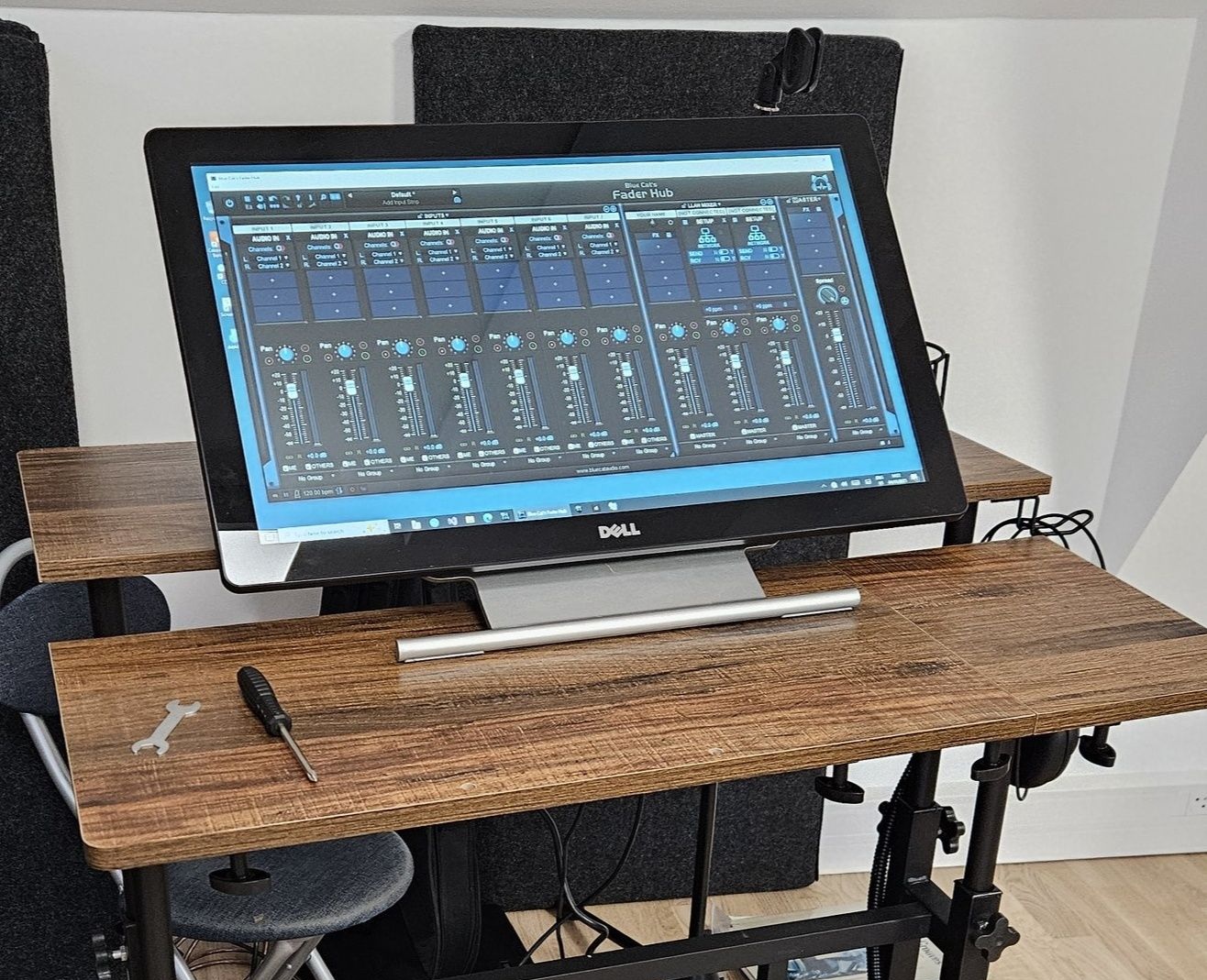
In this scenario latency is not a problem as the receiver is there only for recording (no monitoring). However you do not want to drop a single frame, so stability is key.
Senders: using a mix of Mac and Windows laptops of all ages (the oldest one being a 5th or 4th gen core i5 running Windows 10), with various audio interfaces. Audio buffers ranging from 32 samples to 128 samples depending on the age of the device and the quality of the audio interfaces. All using PatchWork, Fader Hub or Axiom at 44100Hz, depending on the instrument played, with Connector inserted in the last slot.
Receiver: an old Dell Workstation with a Xeon processor and a hard drive for recording (not even a SSD!). Audio interface set to 64 samples buffer, and receiving buffer set to 512 samples for safety.
As before, drift Compensation is enabled on the receiver side, and lossless compression is enabled on the sender side.
I can record multitrack audio with this setup for hours without a single dropout. I could probably reduce the latency even more, but since you do not need direct monitoring (every instrument already has "local" low-latency monitoring), who cares?
Some Theory & Principles
1. JITTER
As said earlier, the reason why you need a buffer on the receiver side is because of JITTER (the variation of the delay between two frames received via the network). This can be caused either by the network, OR by the host application that calls Connector's (or Fader Hub's/Freeceiver's) audio processing routine.
I have observed that many times on a local network, the principal cause of Jitter was often the host application and not the network(!). Some hosts have very strange ways of calling the audio processing routine, which can cause random dropouts. Typically in Cubase you want to avoid any type of extra buffering such as ASIO Guard or other pre-roll pre-processing. There are also special modes in Studio One or Logic with similar principles that can mess up with audio processing jitter.
Some other hosts such as Reaper or Cakewalk would sometimes generate dropouts upon transport playback start but not later. So that's not a big deal as long as the receiver can accommodate fast enough to re-buffer before audio playback actually starts. But Connector will report dropouts, which can be annoying to monitor the connection.
Another cause can be audio dropouts already happening on the sender or receiver machines because of the audio interface or because there are too many plug-ins in the host session (CPU overload), or because there are interrupt conflicts (Windows). On Windows I now try to force the graphics driver, the audio interface and the network adapter to work on separate cores when possible, as explained here.
One way to find out where the jitter comes from is to connect both apps on the same machine (requires two audio interfaces though) in "localhost" mode, and see if there is any difference compared to network mode.
Sometimes changing the priority of the app (this can be done in the task manager on Windows) can also help getting lower jitter.
2. NETWORK
Regarding the network, if you are using a gigabit router/switch there should not be much problems on this side. However a simple a reliable way to check for jitter is to use the ping command and have it run in the background for a while. If you see random peaks in ping then there is something causing jitter on the network:
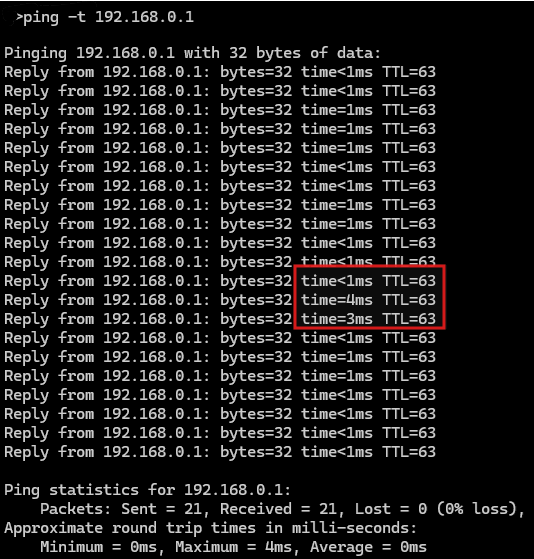
I have found that most of the network problems are often due to the operating system or other apps / devices randomly overloading the network with requests (but most often it is on the same device). Typically Windows Update will kill your system and especially the network connection, causing instant dropouts anytime it launches requests. On some version of MacOS, I have observed constant pings to the update servers that cause the network interface to be completely locked for small amounts of time, a disaster!
Of course you want to make sure that no other app using the network is running on the machine (especially web browsers). Beware that most web browsers will launch dozens of processes upon startup without the app having being launched. You may have to kill them in the activity monitor/task manager. Also Google Chrome's update service is close the virus when it comes to network jitter (I have banned this browser from all real-time audio devices).
I have also noticed a Network printer driver ("Brother") that would almost constantly send requests on the network and cause audio dropouts, especially when on another network than its printer.
So in general you want to keep an eye on CPU & network activity in case you have problems.
3. PACKET SIZE
On a local network I would recommend NOT using the packet size on the sender side. In this case you definitely want the sender to send packets as fast as possible, anytime the host is processing audio.
Packet size is mainly useful over long distance / low bandwidth connections to reduce the bandwidth. In combination with audio compression it contributes to getting a smoother connection in these cases, but on a LAN it just add complexity without much benefits.
I hope this helps!
Typical latencies observed
1. Minimal Latency
In the best scenarios I was able to go down to 64/128 samples buffering on a LAN between two PCs or between a PC and a Mac, with full duplex operation (1 stereo stream coming from each PC).
I used Blue Cat Audio host applications for this purpose, such as Axiom, PatchWork or Fader Hub. They might be a bit more reliable than some DAWs as they are very lightweight and the audio thread is 100% realtime (more on that later).
To achieve such low buffering latencies, both computers were running at 32 samples per frame (64 samples latency) or 64 samples per frame (128 samples latency). If the host application is stable enough and calls the audio processing routine without too much jitter, using a receiving buffer with twice the size of the audio buffer is usually enough.
I don't use fancy network cards or routers, just regular USB Gigabit ethernet cards for laptops and the buit-in motherboard card for workstations.
Drift Compensation is enabled on the receiver side, and lossless compression is enabled on the sender side (it uses a bit of CPU but drastically reduces the amount of data travelling on the network).
2. Multi Computer Setup
I have also been using Fader Hub as a network recording console in the studio lately. A typical session would be 4 sending computers (guitar/bass/keyboards/drums) and a receiving computer with Fader Hub running and recording all tracks + the master in real time.
In this scenario latency is not a problem as the receiver is there only for recording (no monitoring). However you do not want to drop a single frame, so stability is key.
Senders: using a mix of Mac and Windows laptops of all ages (the oldest one being a 5th or 4th gen core i5 running Windows 10), with various audio interfaces. Audio buffers ranging from 32 samples to 128 samples depending on the age of the device and the quality of the audio interfaces. All using PatchWork, Fader Hub or Axiom at 44100Hz, depending on the instrument played, with Connector inserted in the last slot.
Receiver: an old Dell Workstation with a Xeon processor and a hard drive for recording (not even a SSD!). Audio interface set to 64 samples buffer, and receiving buffer set to 512 samples for safety.
As before, drift Compensation is enabled on the receiver side, and lossless compression is enabled on the sender side.
I can record multitrack audio with this setup for hours without a single dropout. I could probably reduce the latency even more, but since you do not need direct monitoring (every instrument already has "local" low-latency monitoring), who cares?
Some Theory & Principles
1. JITTER
As said earlier, the reason why you need a buffer on the receiver side is because of JITTER (the variation of the delay between two frames received via the network). This can be caused either by the network, OR by the host application that calls Connector's (or Fader Hub's/Freeceiver's) audio processing routine.
I have observed that many times on a local network, the principal cause of Jitter was often the host application and not the network(!). Some hosts have very strange ways of calling the audio processing routine, which can cause random dropouts. Typically in Cubase you want to avoid any type of extra buffering such as ASIO Guard or other pre-roll pre-processing. There are also special modes in Studio One or Logic with similar principles that can mess up with audio processing jitter.
Some other hosts such as Reaper or Cakewalk would sometimes generate dropouts upon transport playback start but not later. So that's not a big deal as long as the receiver can accommodate fast enough to re-buffer before audio playback actually starts. But Connector will report dropouts, which can be annoying to monitor the connection.
Another cause can be audio dropouts already happening on the sender or receiver machines because of the audio interface or because there are too many plug-ins in the host session (CPU overload), or because there are interrupt conflicts (Windows). On Windows I now try to force the graphics driver, the audio interface and the network adapter to work on separate cores when possible, as explained here.
One way to find out where the jitter comes from is to connect both apps on the same machine (requires two audio interfaces though) in "localhost" mode, and see if there is any difference compared to network mode.
Sometimes changing the priority of the app (this can be done in the task manager on Windows) can also help getting lower jitter.
2. NETWORK
Regarding the network, if you are using a gigabit router/switch there should not be much problems on this side. However a simple a reliable way to check for jitter is to use the ping command and have it run in the background for a while. If you see random peaks in ping then there is something causing jitter on the network:
I have found that most of the network problems are often due to the operating system or other apps / devices randomly overloading the network with requests (but most often it is on the same device). Typically Windows Update will kill your system and especially the network connection, causing instant dropouts anytime it launches requests. On some version of MacOS, I have observed constant pings to the update servers that cause the network interface to be completely locked for small amounts of time, a disaster!
Of course you want to make sure that no other app using the network is running on the machine (especially web browsers). Beware that most web browsers will launch dozens of processes upon startup without the app having being launched. You may have to kill them in the activity monitor/task manager. Also Google Chrome's update service is close the virus when it comes to network jitter (I have banned this browser from all real-time audio devices).
I have also noticed a Network printer driver ("Brother") that would almost constantly send requests on the network and cause audio dropouts, especially when on another network than its printer.
So in general you want to keep an eye on CPU & network activity in case you have problems.
3. PACKET SIZE
On a local network I would recommend NOT using the packet size on the sender side. In this case you definitely want the sender to send packets as fast as possible, anytime the host is processing audio.
Packet size is mainly useful over long distance / low bandwidth connections to reduce the bandwidth. In combination with audio compression it contributes to getting a smoother connection in these cases, but on a LAN it just add complexity without much benefits.
I hope this helps!
-
- KVRAF
- Topic Starter
- 3220 posts since 23 Dec, 2002
Bluecat please see next post.
Last edited by Scotty on Tue Jan 21, 2025 10:42 am, edited 1 time in total.