


Thanks for clarifying. Is it possible to customise a rack and set it to default when opening a new rack for each type of track?MuTools wrote: Wed Feb 12, 2025 5:35 pm Yes.
These events can be used in a MUX that processes the audio events.
And if you don't want these events you can filter them away.
MuLab 10.0.85
-
- KVRist
- 469 posts since 20 Aug, 2010
-
- KVRist
- 84 posts since 11 Jul, 2011
Hello!
Thanks for your new update that makes the work with RACK module GIU more consistent and predictable.
But I still have some notes on this item.
Please look at this picture:
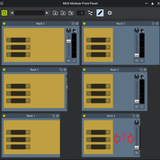
It's the MUX-module Front Panel (FP) that integrates the FP's of RACK-modules which have Rack Panels (yellow field) of two different widths.
As long as the width of RACK-module FP's, set in MUX-module Front Panel editor, is large enough, the behavior of the components inside looks absolutely normal (see the top row).
Now let's make RACK-module FP's a bit more narrow (see the 2-nd row).. The slider in the left MUX gets half-trimmed and this is normal since there's not enough space for it now.
The slider in the right MUX remains visible and this is also normal, since there is still enough space for it.
Now let's make RACK-module FP's even more narrow (see the 3-rd row). The slider in the left MUX gets trimmed completely and that's also normal.
The slider in the righn MUX gets half-trimmed and that seems odd, since there's still enough space for it. I think it should automatically move to the left into the empty space marked with red arrows.
What do you think of this note?
Thank you!
Thanks for your new update that makes the work with RACK module GIU more consistent and predictable.
But I still have some notes on this item.
Please look at this picture:
It's the MUX-module Front Panel (FP) that integrates the FP's of RACK-modules which have Rack Panels (yellow field) of two different widths.
As long as the width of RACK-module FP's, set in MUX-module Front Panel editor, is large enough, the behavior of the components inside looks absolutely normal (see the top row).
Now let's make RACK-module FP's a bit more narrow (see the 2-nd row).. The slider in the left MUX gets half-trimmed and this is normal since there's not enough space for it now.
The slider in the right MUX remains visible and this is also normal, since there is still enough space for it.
Now let's make RACK-module FP's even more narrow (see the 3-rd row). The slider in the left MUX gets trimmed completely and that's also normal.
The slider in the righn MUX gets half-trimmed and that seems odd, since there's still enough space for it. I think it should automatically move to the left into the empty space marked with red arrows.
What do you think of this note?
Thank you!
-

- KVRAF
- Topic Starter
- 13896 posts since 24 Jun, 2008 from Europe
Yes!focusrite wrote: Wed Feb 12, 2025 7:33 pm Thanks for clarifying. Is it possible to customise a rack and set it to default when opening a new rack for each type of track?
Thanks to MuLab 10's Modular Racks you now have full control over a rack and you can make a rack preset that filters away any note events at the rack's event input.
Save the rack preset in User/Library/MUX/Racks/New Rack Templates
Or if it's your main new rack template save it as User/Library/MUX/Racks/New Rack.Mux
-
- KVRAF
- Topic Starter
- 13896 posts since 24 Jun, 2008 from Europe
I assume you're requesting an automatic resize of FPs.ortseam wrote: Wed Feb 12, 2025 9:34 pm Hello!
Thanks for your new update that makes the work with RACK module GIU more consistent and predictable. But I still have some notes on this item.
Please look at this picture...
...
The slider in the righn MUX gets half-trimmed and that seems odd, since there's still enough space for it. I think it should automatically move to the left into the empty space marked with red arrows.
That's indeed not supported and is very complex because an FP can be full of components, some resizable, others not.
If you think i'm missing your point please share the MUX preset of the bottom-right picture so i can doublecheck it.
-
- KVRist
- 84 posts since 11 Jul, 2011
Let me try to reformulate my question. Maybe then I'll be more clear. Check up this video please:MuTools wrote: Wed Feb 12, 2025 10:19 pm If you think i'm missing your point please share the MUX preset of the bottom-right picture so i can doublecheck it.
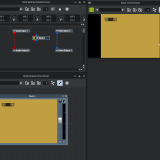
Here I show both MUX FP editor and integrated RACK FP editor at once to show how they affect one another. First half of my video demonstrates the normal behavior. The slider is stuck to the right edge of RACK FP and moves with it while I change the width of it. After that in the second half of the video the slider stops and no more follows the edge of RACK FP. This leads to the problem shown in the end of the video. I can't make RACK FP and slider situated compactly and both visible in MUX FP, though the frame has enough room for both.
My MUX preset sent to your e-mail.
Thank you!
-
- KVRAF
- Topic Starter
- 13896 posts since 24 Jun, 2008 from Europe
-
- KVRist
- 388 posts since 28 Oct, 2002
I'm having a problem with the new Mulab beta being deleted/removed by Bitdefender I've contacted and Jo and Bitdefender support . Jo suggested I also post here and see if anyone has a solution.
Bitdefender reports
K:\MuLab 9 (64 bit)\MuLab.exe tried to load a malicious resource detected as Gen:Variant.Lazy.650832 and was blocked. Your device is safe
Any ideas?
Bitdefender reports
K:\MuLab 9 (64 bit)\MuLab.exe tried to load a malicious resource detected as Gen:Variant.Lazy.650832 and was blocked. Your device is safe
Any ideas?
-
- KVRAF
- Topic Starter
- 13896 posts since 24 Jun, 2008 from Europe
For precision: You're talking about the MuLab App 9.5.34 exe file, right?
Length = 14239744 bytes
MD5 = E936EF851260F590BB086FA20893DB29
SHA256 = 9EF9C5DC9DC5E8ED5488C6AE332C90F98419BEEE9E57809C896B116E0D9ED2E8
Length = 14239744 bytes
MD5 = E936EF851260F590BB086FA20893DB29
SHA256 = 9EF9C5DC9DC5E8ED5488C6AE332C90F98419BEEE9E57809C896B116E0D9ED2E8
-
- KVRist
- 388 posts since 28 Oct, 2002
Well, I cant open anything now to do with the beta, it all seems screwed up. The last thing I did with Mulab was copy and paste the latest M10-0-39 files I'd downloaded into my Mulab folder and Bitdefender went daft. Mulab 9 has just been deleted by Bitdefender now as I was checking versions . I think I'd best do some tidying up with my system and run some diagnostics, , , any one want to buy a used Pc? 
-
- KVRAF
- Topic Starter
- 13896 posts since 24 Jun, 2008 from Europe
1) You don't have to launch MuLab to calculate its hash value.
2) This has nothing to do with the virus warning you get but note that it is not ok to put the MuLab 10 beta into an existing MuLab 9 folder. Always use separate folders for the main versions of MuLab!
Not only because the main versions may use different resource files, but also because you may still need MuLab 8 and 9, ... to upgrade project and preset files to make them compatible with newer MuLab versions.
2) This has nothing to do with the virus warning you get but note that it is not ok to put the MuLab 10 beta into an existing MuLab 9 folder. Always use separate folders for the main versions of MuLab!
Not only because the main versions may use different resource files, but also because you may still need MuLab 8 and 9, ... to upgrade project and preset files to make them compatible with newer MuLab versions.
-
- KVRist
- 84 posts since 11 Jul, 2011
Hello!
Excuse me for being annoying with my GUI-oriented questions. But this time it's a small one.
In v10 I get the next message from time to time:
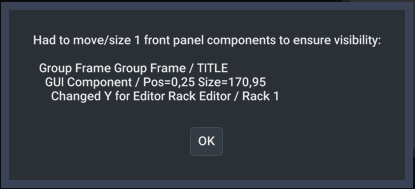
It appears when I reopen Front Panel Editor after successful previous editing. Clicking OK destroys things I was happy with. Is there a way to switch this option off? I tried to find the one in preferences but haven't succeed.
Thank you!
Excuse me for being annoying with my GUI-oriented questions. But this time it's a small one.
In v10 I get the next message from time to time:
It appears when I reopen Front Panel Editor after successful previous editing. Clicking OK destroys things I was happy with. Is there a way to switch this option off? I tried to find the one in preferences but haven't succeed.
Thank you!
Last edited by ortseam on Thu Feb 13, 2025 6:39 pm, edited 1 time in total.
-
- KVRist
- 388 posts since 28 Oct, 2002
Yes Jo, we are talking about Mulab 10, I also have Mulab 9 and Mulab 8 in different folders on the same drive and it looks like I'm going to have to look into retiring Bitdefender. Oh well, these things "come to try us".
-
- KVRAF
- Topic Starter
- 13896 posts since 24 Jun, 2008 from Europe
Please email me the MUX preset that causes this popup question.ortseam wrote: Thu Feb 13, 2025 4:42 pm Excuse me for being annoying with my GUI-oriented questions. But this time it's a small one.
In v10 I get the next message from time to time:
It appears when I reopen Front Panel Editor after successful previous editing. Clicking OK destroys things I was happy with. Is there a way to switch this option off? I tried to find the one in preferences but haven't succeed.
-
- KVRist
- 84 posts since 11 Jul, 2011
I'll do it next time this message appears, since ATM I can't find the guaranteed way to call it outMuTools wrote: Thu Feb 13, 2025 8:21 pm Please email me the MUX preset that causes this popup question.