


Hi All,
I've got Superior Drummer loaded on an instrument track with a midi clip and have set the outputs in the SD mixer and have added the missing chains so I can see them in the BW mixer.
I'm trying to create a setup that gives me the best control for each drum type with effects processing, amp envelopes, and using the same midi clip to layer other drum samples.
- I can do effects processing on the individual output chains themselves so that's good.
- I know I can do the amp envelopes in SD itself but I'd like to be able to have a better graph with editable nodes (such as LFO tool) to be able to have finer control. To do this I think I need each midi note in the clip (e.g C1 for kick, D1 for snare etc) to trigger separate instances of LFO tool so I can shape the amp envelope for each type of hit, but this doesn't work if I put LFO tool on the individual output chains (I think this is because it needs to be triggered by the midi from the clip?). Not sure how to set up tracks and how route to get this to work.
- Also I'd like to be able to use the same midi clip to be able to layer other drums samples without having to create separate clips to trigger the layered drums. Would this involve a note receiver on a new track?
Hopefully this makes sense. Can anyone help me on how I can go about setting this up so I can do all three when using SD with multi out's?
Many Thanks
Superior Drummer routing for best control of each drum type
-
- KVRist
- 120 posts since 28 Jan, 2021
A note receiver (with SD midi track as input) with a midi filter should do the trick.
-
- KVRist
- Topic Starter
- 95 posts since 4 Oct, 2009
Thanks! I was reading about using the midi filter in another post somewhere. Is this known as note filter in the note fx list?
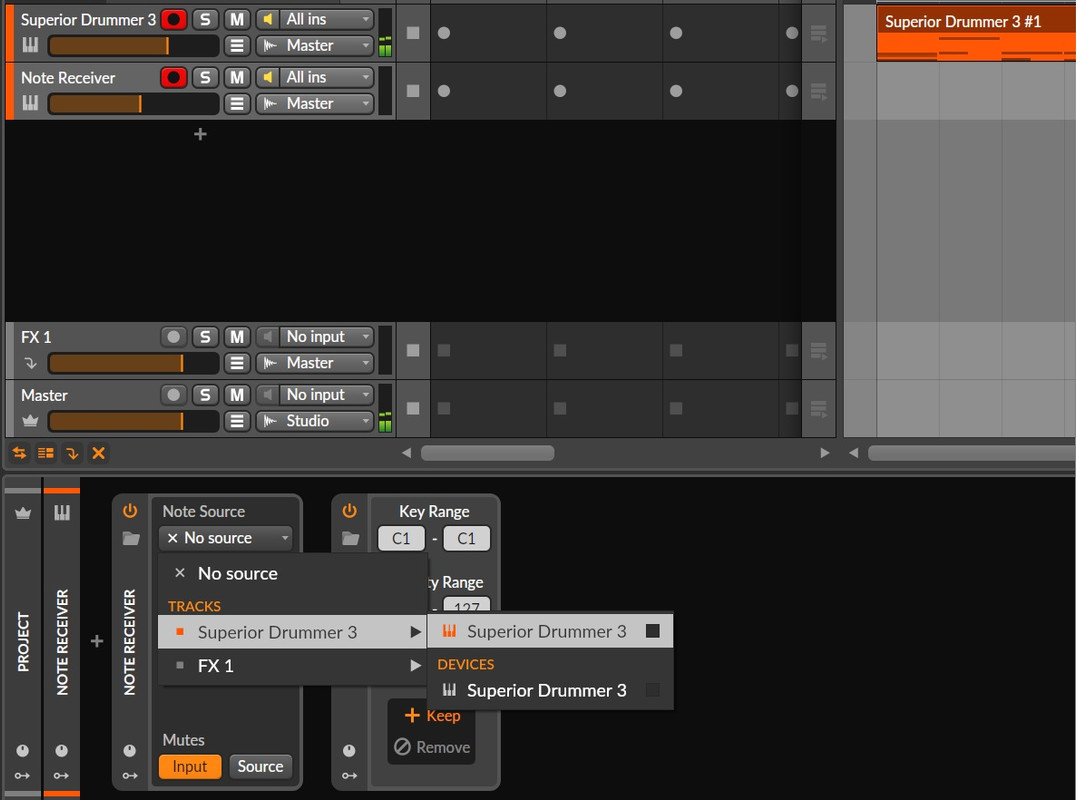
Sorry if this is basic but I have added an instrument track with the note receiver followed by the note filter (set to C1 - C1 kick only). When choosing the note receiver input if I go to tracks > SD3 I get the orange and white symbol options but neither are displaying the input indicators lighting up. I assume I should be seeing the input light lighting up to see the midi input.
Do I need to adjust the track routing? Or what am I missing?
Thanks
Sorry if this is basic but I have added an instrument track with the note receiver followed by the note filter (set to C1 - C1 kick only). When choosing the note receiver input if I go to tracks > SD3 I get the orange and white symbol options but neither are displaying the input indicators lighting up. I assume I should be seeing the input light lighting up to see the midi input.
Do I need to adjust the track routing? Or what am I missing?
Thanks
Windows 11 / Ryzen 9 7900X / MSI MAG B650M MORTAR / 32GB Corsair DDR5 / EVGA RTX2070 / Bitwig Studio DAW / Audient ID14 MK2 / KRK VXT6 Monitors
-
- KVRist
- Topic Starter
- 95 posts since 4 Oct, 2009
Ah not to worry, I've realised I needed to group the SD3 plugin into an instrument layer to get the midi through.
Windows 11 / Ryzen 9 7900X / MSI MAG B650M MORTAR / 32GB Corsair DDR5 / EVGA RTX2070 / Bitwig Studio DAW / Audient ID14 MK2 / KRK VXT6 Monitors