
MuLab 10.0.85

Official support for: mutools.com
Post Reply New Topic
RELATED
PRODUCTS

Post

ortseam wrote: Mon Apr 07, 2025 5:07 pm ... and one more question (please watch the attached video):
Image
If I insert some Plugin with a sidechain input into a Rack_Module and create an additional Audio_Input wired to it in Rack Modular_Area, then each move of this Plugin from one slot to another results in automatic creation of a new Audio_Input while a previous wire connection gets lost. Was it meant to behave this way? I find it a bit inconvenient since you can't simply reorder the FX chain from Rack front panel without loosing a sidechain wiring. Moreover even after you remove a multiinput plugin all created inputs still remain as a useless garbage.

I'd so much appreciate if you let me know your point on that. Thank you!
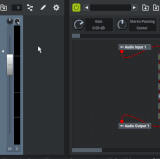
Please re-evaluate using MuLab 10.0.48.
Isn't this all resolved?
If not please let me know.

By the way: Please write "Rack Module" instead of "Rack_Module", and "Audio Input" instead of "Audio_Input", etc. The underscores make it a bit more difficult to read. Just a little request. Thx.

Post

Hello!

Thank you so much. Updating and trying. Will come again asap!

Post

So, I'm back! Everything seem to work fine!
It really looks like a pure magic, thank you! :tu:

The only little 'spot on the Sun' is that modular_area rectangular symbols of inputs/outputs, wired to additional slotted plugin pins, always jump to upper left corner of modular_area with every plugin move, which makes all of them overlay and get hidden one behind other. It's not functionally critical, but a bit inconvenient for the graphs to work with.

Apart from that, everything seems to be just great!! :love:

Post

ortseam wrote: Thu Apr 10, 2025 4:18 pm So, I'm back! Everything seem to work fine!
It really looks like a pure magic, thank you! :tu:
Thank You for spotting and reporting those modular rack related issues :tu:
The only little 'spot on the Sun' is that modular_area rectangular symbols of inputs/outputs, wired to additional slotted plugin pins, always jump to upper left corner of modular_area with every plugin move, which makes all of them overlay and get hidden one behind other. It's not functionally critical, but a bit inconvenient for the graphs to work with.
Will be fixed in the next update.

Post

MuTools wrote: Thu Apr 10, 2025 12:18 pm What you here is the stretching algorithm applied on the full sample as you seemed to have created an Audio Sequence without slicing.
If you tell MuLab to slice the dropped sample into an Audio Sequence then each slice will be stretched individually and that will sound much better, much more like you expect.
See these 2 preferences: "Auto Create Transient Markers" and "Auto Snap New Audio Sequence Length".
Okay. Sorry for the noise, likely face palms, and seizures.

Post

Here's another weird behaviour that I don't understand. I've got two Event Monitor windows open connected to a single Note Dispatcher module set to 2 outputs, Round Robin, No special key. I'd been seeing "strange things happen", so I added the event monitors on each output.

Simply switching focus between the event monitors causes event output - that can't be right, can it?
https://peter.drealm.info/media/NoteDes ... rdness.mp4

Post

Please email me that project, as simplified as possible, but still repeating the issue. Thx.

Post

MuTools wrote: Sat Apr 12, 2025 1:43 pm Please email me that project, as simplified as possible, but still repeating the issue. Thx.
I can send the whole RPP file but simplifying it would take days -- it took weeks to put together.

...
EDIT: And exiting and reloading made the problem go away anyway :(

Post

I suspect that there was some mismatch in the note on-off pairs sent by Reaper To MuLab.
Did you happen to do a Panic in Reaper or MuLab at some point?

If there is a note on-off mismatch then it could be that upon clicking the Event Monitors MuLab switches the MIDI Focused Target Module, supposed you have enabled the "Activate Module Editor Auto MIDI Focuses Module" preference, and that when MuLab resets the previous MIDI Focused Target Module and send the relevant note-offs to it, that this is what you see.

That would also explain why reloading the project clears the issue as the note on-off counters were reset too.

Could this clarify what you encountered?

Post

No, no panic or anything. But that preference was on. I don't remember ever seeing it before. Did the default change from On to Off at some point?

And it started happening again. I've quite a lot of nesting going on, both in Reaper and MuLab, with Event Monitors, Note Mappers, Dispatchers and Filters. I've attached the RPP with everything in (except the Sforzando text files and samples - they shouldn't be relevant).
You do not have the required permissions to view the files attached to this post.

Post

Ugh... and sometimes the round robin just seems to stop doing the round robin switching... I've tried to ensure it should only receive events that it should switch between but sometimes it just gets stuck. Adding a new module to the MUX seems to reset it, so it's really hard to diagnose.

(It's getting to the point it's going to be faster to try to script it all in Reaper JSFX with custom code for each trigger handler. I don't like JSFX much...)

Post

pljones wrote: Sat Apr 12, 2025 2:51 pm No, no panic or anything. But that preference was on. I don't remember ever seeing it before. Did the default change from On to Off at some point?
Yes. Roughly about a year (or 2? time flies) ago.
And it started happening again. I've quite a lot of nesting going on, both in Reaper and MuLab, with Event Monitors, Note Mappers, Dispatchers and Filters. I've attached the RPP with everything in (except the Sforzando text files and samples - they shouldn't be relevant).
So which precise steps do i have to take to repeat the issue starting from that RPP?

Post

pljones wrote: Sat Apr 12, 2025 3:05 pm Ugh... and sometimes the round robin just seems to stop doing the round robin switching...
Can you define "sometimes"?
Do you have a repeatable pattern for it?

Post

NB: FYI: The project level received note on-off counters can be visualized by doing MuLab -> Project menu -> Monitor MIDI Input Notes.

Post

Um - so if I've got a MIDI Note Mapper after the MIDI Input, then the project level received note on-off counters are not going to be correct? I could use a MuLab plugin in place of the MUX, right, and use the plugin's counters and they'd be separate, right? The counters aren't shared by all instances, are they?

> Roughly about a year (or 2? time flies) ago.
Well, I tend to port all my settings, so that'd do it anyway.

> which precise steps do i have to take to repeat the issue starting from that RPP?
I'm not sure. I had lots of Event Monitor windows open - about five, across three different plugin instances. I was working on the Snare L and R mappings, and checking they were working again. Every so often, I was going around clearing the Event Monitor displays, so I could more clearly see when an event arrived at a particular point and what it had mapped to. I'd just cleared the L and R and switched to another window when I saw a Note Off appear in the "R" window without anything on the input windows. Switching L and R windows kept repeating the Note Off in the window that had had focus.

> Do you have a repeatable pattern for it?
Unfortunately not. "After some time". On first load, in fact, it seems most likely to be wrong. If I plug in an event monitor, that fixes it...

Post Reply

Return to “MuTools”