

The thing is - no software should ever simply delete something without asking for confirmation. This is what Cubase is doing with the automation data. It should be possible to change to another VSTi and back without loosing automation.
I guess the workaround to also keep sidechain stuff is:
- Copy instrument track A to B
- Change instrument in track A
- Identify the parameters for automation
- Selectively copy automation data from B to A
- Finally delete track B
It would be easier if Cubase would not delete the automation, but allow users to remap stuff manually.
GPT told me that Ableton and Bitwig allow that.
Maybe one more reason to try one of those DAWs.
I like the idea of clips, but this was not enough of a reason for a change yet.

Steinberg has released Cubase 14
-
- KVRAF
- 5144 posts since 3 Oct, 2013
let's say I never dared to use mixer snapshots because of that awkward question: 'Recalling a MixConsole snapshot will delete any Insert Automation. Do you want to continue?”' Then I realized this should be the real question: 'Any insert automation for plugins that have been moved to another slot or are no longer present in the newly loaded snapshot will be lost permanently. Do you want to continue?'' - https://forums.steinberg.net/t/what-is- ... t/133370/4 
"Where we're workarounding, we don't NEED features." - powermat
-
- KVRist
- 199 posts since 30 Mar, 2020 from Germany
<rant>Still too many pitfalls when working with Cubase. Don't dare to disable and reenable a track using sidechain in the FX. The same happens when freezing a track of course.</rant>
-
- KVRAF
- 5101 posts since 27 Jul, 2004
You shouldn´t believe what a BS wannabe AI tells you...andi75 wrote: Mon May 05, 2025 12:11 pm ...
It would be easier if Cubase would not delete the automation, but allow users to remap stuff manually.
GPT told me that Ableton and Bitwig allow that.
Maybe one more reason to try one of those DAWs.
I like the idea of clips, but this was not enough of a reason for a change yet.
The only DAW (from the usual candidates) which doesn´t delete automation automatically when deleting a plugin is FL Studio because automation is handled like a seperate instrument...it deletes the link to the plugin´s parameter(s) but not the automation clip itself...
All other DAWs no matter what you take has the exact same behaviour:
Delete the plugin = delete the automation ... period
If you don´t want that you have to first insert an alternative plugin and copy/paste automation manually to a new parameter on the new plugin before deleting the old...
This has always been this way and it will (probably) never change...
Ableton and Bitwig (like now Cubase as well) just allow you to automate i.e. a macro control instead of the real parameter and then map the Macro control to the wished plugin parameter(s)...
This way just the link to the plugin parameter(s) get deleted when you delete the plugin but you keep the automation and can link the Macro to the new plugin´s parameter(s)
But as said since Cubase 14 this works just as good there too and represents just a different workflow but not that any DAW would allow more or different than the other...
-
- KVRAF
- 5144 posts since 3 Oct, 2013
...but CC (for ex MIDI CC 1 : Modulation Wheel ) works too, and you can even put those into clips...And then there's that poor track version thing that even supports this — while it completely ignores regular automation.
let's say dunno the status of this
“MIDI 2.0
With support for high resolution velocity, CC, aftertouch, pitch bend, and poly pressure data, Cubase 13 is ready for the widespread adoption of MIDI 2.0.”
let's say dunno the status of this
“MIDI 2.0
With support for high resolution velocity, CC, aftertouch, pitch bend, and poly pressure data, Cubase 13 is ready for the widespread adoption of MIDI 2.0.”
"Where we're workarounding, we don't NEED features." - powermat
-
- KVRist
- 199 posts since 30 Mar, 2020 from Germany
Thanks, this is exactly what GPT told me about Bitwig and Ableton. I am fine with modulating Macro controls, the important fact is that your "IP" isn't simply deleted by the DAW. So, this works in Cubase as well now? First thing I need to try back home...Trancit wrote: Tue May 06, 2025 7:33 amYou shouldn´t believe what a BS wannabe AI tells you...andi75 wrote: Mon May 05, 2025 12:11 pm ...
It would be easier if Cubase would not delete the automation, but allow users to remap stuff manually.
GPT told me that Ableton and Bitwig allow that.
Maybe one more reason to try one of those DAWs.
I like the idea of clips, but this was not enough of a reason for a change yet.
The only DAW (from the usual candidates) which doesn´t delete automation automatically when deleting a plugin is FL Studio because automation is handled like a seperate instrument...it deletes the link to the plugin´s parameter(s) but not the automation clip itself...
All other DAWs no matter what you take has the exact same behaviour:
Delete the plugin = delete the automation ... period
If you don´t want that you have to first insert an alternative plugin and copy/paste automation manually to a new parameter on the new plugin before deleting the old...
This has always been this way and it will (probably) never change...
Ableton and Bitwig (like now Cubase as well) just allow you to automate i.e. a macro control instead of the real parameter and then map the Macro control to the wished plugin parameter(s)...
This way just the link to the plugin parameter(s) get deleted when you delete the plugin but you keep the automation and can link the Macro to the new plugin´s parameter(s)
But as said since Cubase 14 this works just as good there too and represents just a different workflow but not that any DAW would allow more or different than the other...
-
- KVRAF
- 5101 posts since 27 Jul, 2004
Cubase 14 has introduced it´s modulators which include a Macro knob as well...andi75 wrote: Tue May 06, 2025 8:40 am ...So, this works in Cubase as well now? First thing I need to try back home...
-
- KVRist
- 199 posts since 30 Mar, 2020 from Germany
Hmm, but then I don't see how this could be used for automation tasks? I don't want to apply static modulation, but actually complex automation curves....Trancit wrote: Tue May 06, 2025 1:45 pm Cubase 14 has introduced it´s modulators which include a Macro knob as well...
-

- KVRian
- 745 posts since 15 May, 2003 from R'lyeh
When you are sending automation to a plugin, Cubase is not looking at it as 'send automation data to Filter Cutoff'. Its 'send this data to Parameter 13'. MIDI CC's are set in stone by the MIDI spec itself, plugin parameters are not even remotely 'regulated' in any way. One devs 'Filter Cutoff' might be the next dev's "Frequency". Did they label resonance as resonance? Or does it say 'Feedback' or maybe 'Q'?
You swap out one plugin with another. What is parameter 13 mapped to on the new plugin? You might be modulating the filter on Pigments, switch it out with a Roland Cloud synth, and now you're modulating the chorus's rate instead, or the amplifier's attack stage. Not only does this ruin your track, but it would then STILL require you to manually copy and paste your automation around on the new track. DAW's don't use the name the developer assigns to the parameter number, which can be ANYTHING the developer wants to use. Everything goes by the numbers themselves.
What happens if the new plugin you're inserting doesn't have a parameter 13?
You swap out one plugin with another. What is parameter 13 mapped to on the new plugin? You might be modulating the filter on Pigments, switch it out with a Roland Cloud synth, and now you're modulating the chorus's rate instead, or the amplifier's attack stage. Not only does this ruin your track, but it would then STILL require you to manually copy and paste your automation around on the new track. DAW's don't use the name the developer assigns to the parameter number, which can be ANYTHING the developer wants to use. Everything goes by the numbers themselves.
What happens if the new plugin you're inserting doesn't have a parameter 13?
-
- KVRist
- 60 posts since 14 Mar, 2010
If your workflow works with having the same automation curve applied between your different VST's, then using the Macro Knob, as Trancit says, will work.andi75 wrote: Tue May 06, 2025 4:50 pmHmm, but then I don't see how this could be used for automation tasks? I don't want to apply static modulation, but actually complex automation curves....Trancit wrote: Tue May 06, 2025 1:45 pm Cubase 14 has introduced it´s modulators which include a Macro knob as well...
Look at this video that describes the Macro Knob modulator.
Then know that if you create an automation lane for the Macro Knob and draw in your complex automation, this Macro Knob and automation lane will not be deleted when you change instrument on that track.
What will disappear is the connection(s) that the Modulation Knob is connected to, of course. You'll have to assign them to the parameters you wish that modulation to apply to in the new instrument.
-
- KVRist
- 199 posts since 30 Mar, 2020 from Germany
I thought it was clear that this is not what I expect, because I know that this is not possible reliably. Even though an AI trained on the most regular parameter names could at least suggest something useful as a start. But I am fine with manually remapping params.mothra wrote: Tue May 06, 2025 6:27 pm What happens if the new plugin you're inserting doesn't have a parameter 13?
Using the macro knob, as DoktorTenma pointed out, is something I could imagine as a workaround, even though the initial assignment of the automation is not as simple as hitting the record button and turning a knob. It would be great if Cubase could automatically create a macro knob then.
-
- KVRAF
- 5144 posts since 3 Oct, 2013
^^^ should prioritize plugin developers who support the context menu VST extensions or Cubase’s natives — that way, your workflow stays fast.
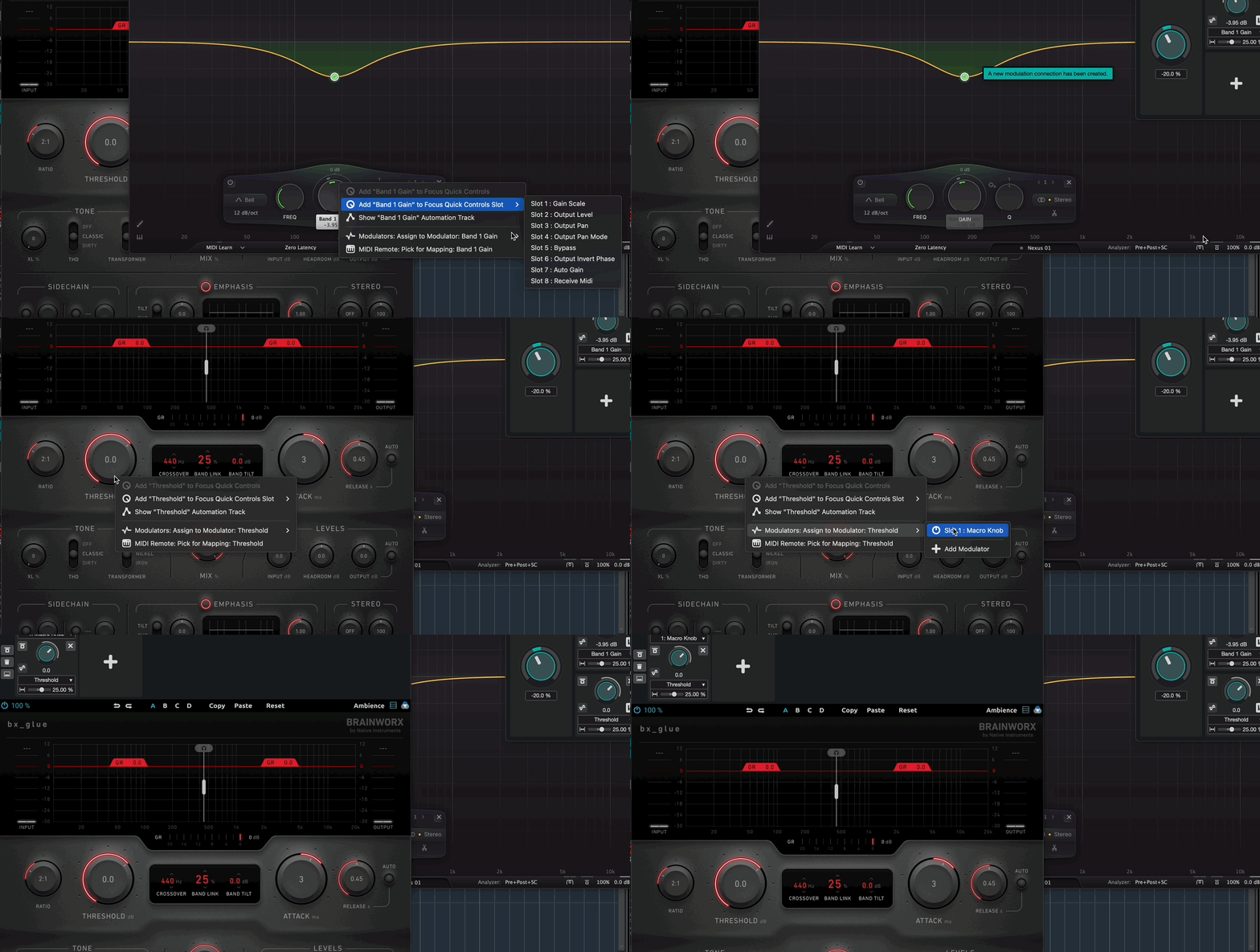
bx, fabs ... dunno
bx, fabs ... dunno
"Where we're workarounding, we don't NEED features." - powermat
-
- KVRist
- 199 posts since 30 Mar, 2020 from Germany
Looks good, thx!xbitz wrote: Wed May 07, 2025 8:47 am ^^^ should prioritize plugin developers who support the context menu VST extensions or Cubase’s natives — that way, your workflow stays fast.
-
- KVRAF
- 5144 posts since 3 Oct, 2013
^^^ + Cubase 14 got a shortcut for collapsing and expanding individual mixer insert plugins.
Mixer - Insert 01: Open/Close Editor for Selected Track/Channel
Mixer - Insert 02: Open/Close Editor for Selected Track/Channel
etc...not mapped by default
the full new shorktey list can be found here, https://forums.steinberg.net/t/c14-the- ... c/949344/2
Mixer - Insert 01: Open/Close Editor for Selected Track/Channel
Mixer - Insert 02: Open/Close Editor for Selected Track/Channel
etc...not mapped by default
the full new shorktey list can be found here, https://forums.steinberg.net/t/c14-the- ... c/949344/2
"Where we're workarounding, we don't NEED features." - powermat
-
- KVRAF
- 5101 posts since 27 Jul, 2004
One question:
I didn´t try this when demoing Cubase 14... can a by the new Modulators modulated parameter still be automated or does Modulation/Automation completely take over like it was in Ableton before?
I didn´t try this when demoing Cubase 14... can a by the new Modulators modulated parameter still be automated or does Modulation/Automation completely take over like it was in Ableton before?