


This was allready possible using the files section of the project panel but using alias clips you can use side browser instead of win/mac/linux file explorer. More comfortable for sure.pdxindy wrote: Sat Aug 30, 2025 10:49 pmAnother use someone else mentioned, is when they have a bunch of copies of the same audio clip in Arrange, they can use the Merge Duplicates command which turns all copies of that clip into aliases, then the can replace the audio event and all the clips update. A fast way to replace a bunch of iterations of the same sample.stamp wrote: Sat Aug 30, 2025 10:20 pmMmmh.. that's a good use for alias clips. Thanks for showing me another perspective.gulugulufish wrote: Sat Aug 30, 2025 9:02 pm I get it, I didn't think I would want to use them either, but I've discovered it's super handy for refactoring projects without having to go back and copy things. Namely because it can automatically detect duplicates and turn them into aliases which means I can use the feature only when I need to do a mass update of something I've decided to change.
Bitwig 6
-

- KVRian
- 1209 posts since 10 Sep, 2014
-
- KVRian
- 1075 posts since 17 Mar, 2005 from Bay Area
"From a game theory perspective" lol rad! Lets bring DoD sociopathy into bug reporting methodology, since it works so well as US foreign policy!


-
- KVRian
- 773 posts since 26 Sep, 2007
That's ok, everyone works differently. As a former FL Studio user, alias clips are so natural to my workflow that I actually installed the Bitwig 6 beta over Bitwig 5 after a short trial. There's no going back for me.stamp wrote: Sat Aug 30, 2025 8:55 pm Personally I see hardly any benefit for alias clips in my workflow.
Yes, by far. I prefer working with individual clips, they're easier to handle and modify later than long stretches of a single looped clip.I mean if I want a 1 bar clip to extend for 8 bars extending it the ''old'' way is just faster. Do you really prefer having to duplicate it 7 times or doubling content 3 times?
I've only ever read of such issues in forums, never experienced them myself. I assume it's just a different way of thinking about how your music is organised. Keep in mind that in DAWs like FL, alias clips are the default.Another negative imo is that you have to keep track of what is aliased and if you mess up you will have a clip somewhere that is changing without you even knowing and maybe the old version of that clip was just better in that context.
I didn't feel more creative in Bitwig 5 when I spent ages brainlessly copying a fundamental change to my main loop across the entire project.I don't know. It's just one more opportunity for your brain to switch in a more technical and less creative state and we all know how hard sometimes it is to get in that creative state and how easy it is to get lost in technicalities.
To me, the key workflow that alias clips enable is to be able to block out an entire dummy arrangement in the early stages, while still being able to easily change anything going on inside of the clips later. To me, this is a killer feature and helps me finish tracks and get into "full song mode" earlier, without having to fully commit to an unpolished musical idea.
-

- KVRist
- 214 posts since 15 Jul, 2020
This is why it was my no. 1 FR. A lot of small clips scattered across the arrangement. You can change one and have updates everywhere.Dionysos wrote: Sun Aug 31, 2025 6:52 am To me, the key workflow that alias clips enable is to be able to block out an entire dummy arrangement in the early stages, while still being able to easily change anything going on inside of the clips later.
Only paper clip icon could be better like chain, lock, or single line paper clip.
-
- KVRian
- 906 posts since 25 Jan, 2014
Is there a list of known features that doesn't work yet somewhere ...or a list of known bugs ?
Because I see that we cannot bounce in place a clip in a group track anymore and I'm a bit worried...
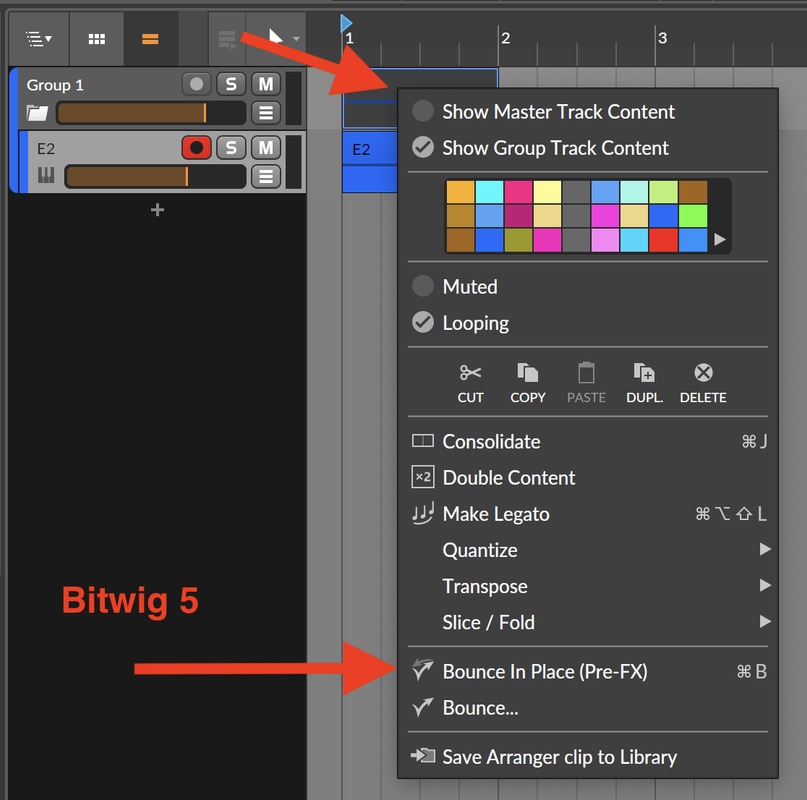
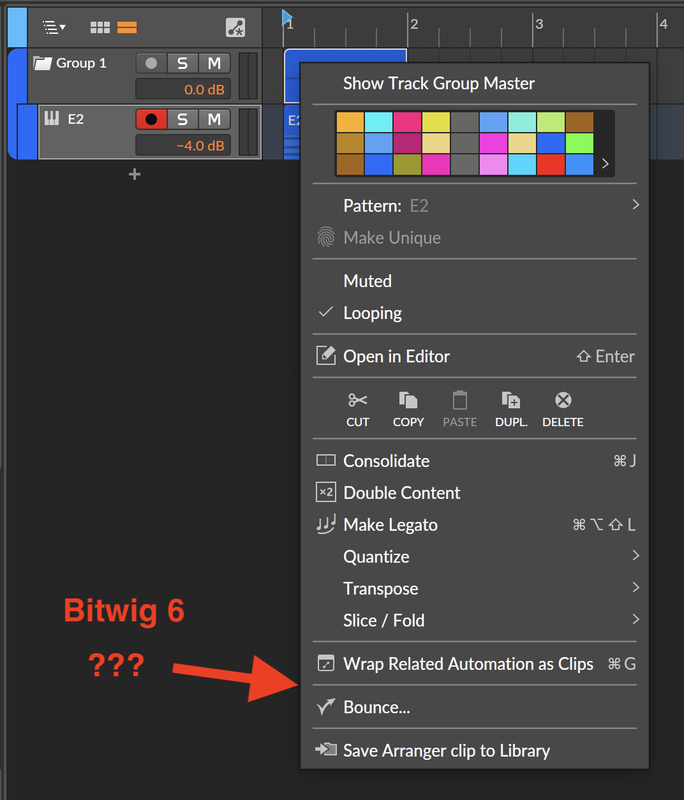
Because I see that we cannot bounce in place a clip in a group track anymore and I'm a bit worried...
-

- KVRAF
- 27007 posts since 3 Feb, 2005 from in the wilds
In Bitwig 6, select Show Track Group Master - then a Group Master track shows up as a track in the Group. You can bounce-in-place in the Group Master track as expected.Jolaff wrote: Sun Aug 31, 2025 12:31 pm Is there a list of known features that doesn't work yet somewhere ...or a list of known bugs ?
Because I see that we cannot bounce in place a clip in a group track anymore and I'm a bit worried...
-
- KVRian
- 906 posts since 25 Jan, 2014
This is extra steps. Is there a way to save the "master audio clip" (Save arranger clip to Library) as before which will recall all the tracks inside the group ? It doesn't seam to work....pdxindy wrote: Sun Aug 31, 2025 12:49 pmIn Bitwig 6, select Show Track Group Master - then a Group Master track shows up as a track in the Group. You can bounce-in-place in the Group Master track as expected.Jolaff wrote: Sun Aug 31, 2025 12:31 pm Is there a list of known features that doesn't work yet somewhere ...or a list of known bugs ?
Because I see that we cannot bounce in place a clip in a group track anymore and I'm a bit worried...

-
- KVRAF
- 27007 posts since 3 Feb, 2005 from in the wilds
I haven't tried saving a clip... that would be a bummer of that is not possible anymore. Please send an email about it to the beta email.Jolaff wrote: Sun Aug 31, 2025 1:11 pmThis is extra steps. Is there a way to save the "master audio clip" (Save arranger clip to Library) as before which will recall all the tracks inside the group ? It doesn't seam to work....pdxindy wrote: Sun Aug 31, 2025 12:49 pmIn Bitwig 6, select Show Track Group Master - then a Group Master track shows up as a track in the Group. You can bounce-in-place in the Group Master track as expected.Jolaff wrote: Sun Aug 31, 2025 12:31 pm Is there a list of known features that doesn't work yet somewhere ...or a list of known bugs ?
Because I see that we cannot bounce in place a clip in a group track anymore and I'm a bit worried...
-
- KVRian
- 1209 posts since 10 Sep, 2014
pdxindy wrote: Sun Aug 31, 2025 12:49 pm In Bitwig 6, select Show Track Group Master - then a Group Master track shows up as a track in the Group. You can bounce-in-place in the Group Master track as expected.

-
- KVRAF
- 2514 posts since 28 Sep, 2012
Strawman.Milkman wrote: Sun Aug 31, 2025 2:38 am"From a game theory perspective" lol rad! Lets bring DoD sociopathy into bug reporting methodology, since it works so well as US foreign policy!
-
- KVRian
- 906 posts since 25 Jan, 2014
Saving a group clip doesn't work anymore. It only saves the first track of the group. An not being able to bounce it before saving it is also a bummer because having the audio file of the clip allows the browser to preview the loop instantly without having to load all plugins of the tracks which always creates a delay... anyway ... email is sent...pdxindy wrote: Sun Aug 31, 2025 2:29 pmI haven't tried saving a clip... that would be a bummer of that is not possible anymore. Please send an email about it to the beta email.Jolaff wrote: Sun Aug 31, 2025 1:11 pmThis is extra steps. Is there a way to save the "master audio clip" (Save arranger clip to Library) as before which will recall all the tracks inside the group ? It doesn't seam to work....pdxindy wrote: Sun Aug 31, 2025 12:49 pmIn Bitwig 6, select Show Track Group Master - then a Group Master track shows up as a track in the Group. You can bounce-in-place in the Group Master track as expected.Jolaff wrote: Sun Aug 31, 2025 12:31 pm Is there a list of known features that doesn't work yet somewhere ...or a list of known bugs ?
Because I see that we cannot bounce in place a clip in a group track anymore and I'm a bit worried...
-
- KVRAF
- 27007 posts since 3 Feb, 2005 from in the wilds
Thanks for sending an email... hopefully they address this!Jolaff wrote: Sun Aug 31, 2025 5:39 pm Saving a group clip doesn't work anymore. It only saves the first track of the group. An not being able to bounce it before saving it is also a bummer because having the audio file of the clip allows the browser to preview the loop instantly without having to load all plugins of the tracks which always creates a delay... anyway ... email is sent...

-
- KVRian
- 1075 posts since 17 Mar, 2005 from Bay Area
Caveman.perpetual3 wrote: Sun Aug 31, 2025 2:35 pmStrawman.Milkman wrote: Sun Aug 31, 2025 2:38 am"From a game theory perspective" lol rad! Lets bring DoD sociopathy into bug reporting methodology, since it works so well as US foreign policy!
-
- KVRist
- 427 posts since 6 Apr, 2014
Milkman! Sorry

-
- KVRist
- 70 posts since 10 Mar, 2022
thats exactly what I was trying to say, in a different way. (EDIT: though I didn't mean just samples, thanks for explaining that as it's particularly handy to know)pdxindy wrote: Sat Aug 30, 2025 10:49 pmAnother use someone else mentioned, is when they have a bunch of copies of the same audio clip in Arrange, they can use the Merge Duplicates command which turns all copies of that clip into aliases, then the can replace the audio event and all the clips update. A fast way to replace a bunch of iterations of the same sample.stamp wrote: Sat Aug 30, 2025 10:20 pmMmmh.. that's a good use for alias clips. Thanks for showing me another perspective.gulugulufish wrote: Sat Aug 30, 2025 9:02 pm I get it, I didn't think I would want to use them either, but I've discovered it's super handy for refactoring projects without having to go back and copy things. Namely because it can automatically detect duplicates and turn them into aliases which means I can use the feature only when I need to do a mass update of something I've decided to change.