
Ample Sound releases Ample Guitar v4 with Guitar promotion

Official support for: amplesound.net
RELATED
PRODUCTS

Post

Ample Sound Releases Ample Guitar v4, featuring 14 upgraded guitar instruments, The Ample Guitar LP Fingerstyle library is also newly released.

Image

Image

New Features in Ample Guitar v4:
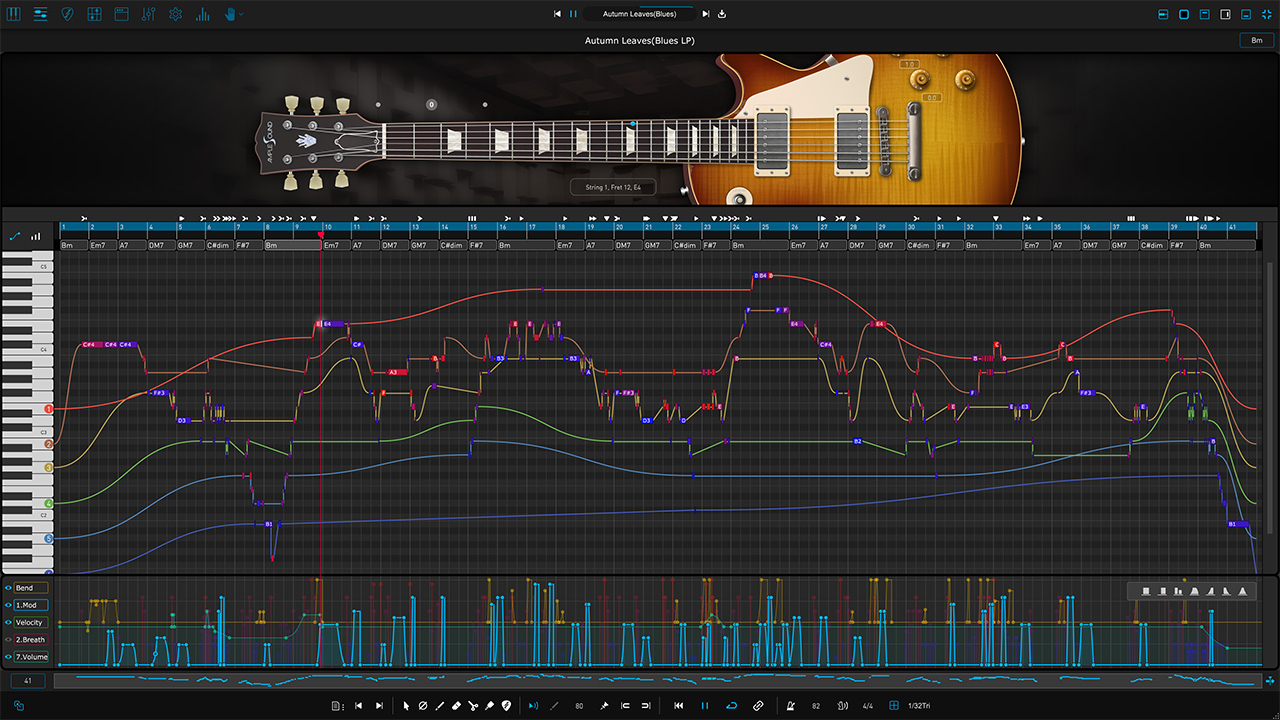
  • Riffer 4: A MIDI editor tailored for plucked string instruments.
- All-new Strumming and Chord System: The innovative "Strum Note" treats multiple sub-notes within a chord as a single editable object, allowing unified control over strum time, velocity gradient, and legato parameters. Combined with authentic guitar fingering settings, this makes strum creation more intuitive and efficient, delivering results that are closer to real performance.

- Dual View Modes: Seamless real-time switching between Piano Roll and Guitar Tab views — a first of its kind, offering two perspectives for reviewing and editing the compositions.

- String Visualization System: Strings are now visualized within the Piano Roll, enabling MIDI writing that adheres to authentic plucked instrument techniques — automatically preventing polyphony on the same string and intelligently assigning fingering. The result is MIDI that sounds closer to real performance.

- Intuitive Technique Editing: Easily program fingering, articulation, legato, and expression — no need for cumbersome key switches or complicated MIDI CC programming.

- New MIDI CC and Velocity Editors: View and edit multiple MIDI CC lanes simultaneously with different colors and transparency. One-click CC curve presets allow fast and expressive automation.

- Full MIDI Import/Export Compatibility: Whether import external MIDI files or export from Riffer to DAW's MIDI or instrument track, the playback result remains identical and accurate.

- Extensive Riff Library: Hundreds of brand-new guitar riffs to spark creativity and accelerate the workflow.
  • Tab Reader 4: Compatible with Guitar Pro formats from GP3 to GP8. Capable of importing full guitar tracks into Riffer with all fingering, articulations, and performance data preserved.
  • Ample Sound v4 Engine: Improved audio processing performance and efficiency.
  • Brand New 5K UI Design.
  • Completely Remade Presets: All presets have been redesigned for a more mature, polished tone. Each preset is paired with a Riffer demo for quick audition and inspiration.
Sampling and Other Upgrades
  • AGLP: Added a new fingerstyle sample library, recorded with a Gibson LP R9 electric guitar, adding 3.6 GB of new samples.
  • AGSC: All four pickup position libraries now include new samples such as raking and slide FXs.
  • AMH: Added Strummer.
  • AME: Chord fingerings in Riffer and Strummer have been remade for consistent compatibility with other guitars.
System Requirements
  • Mac: macOS 10.15 or later.
  • Windows: Windows 7 to Windows 11 (64-bit).
  • Plugin Formats: VST2, VST3, AU, AAX, and standalone host (Rectangles).
  • Disk Space: Over 20 GB, SSD is recommended.
  • CPU: Intel i5 or higher.
Demo Videos


Availability and Promo
This upgrade is free for all existing users. Users can log in to the MyAmpleSound page to download.

Ample Sound is also running a Guitar Promotion until October 9. All single products and related bundles are available at a 25% discount, and existing customers can enjoy an additional discount on top of that.

Post

Great work guys! I've tried the updated SC and it sounds even more alive, and the riffer looks great! Thank you for all these nice improvments!

P.s Just have to ask: Is the v4 files in the main download section the same as in the update section? i first went to the "updates" section in the user area and downloaded all the V4 stuff. And after installing that, i noticed that something sounded wrong. Ops, so i went and downloaded all the v4 sound libraries. And now it's all good.

Post

Can you confirm that midi channel information is still missing when dragged from Riffer v4 to DAW - or have you put it back in?
Thanks.
Mac Studio M1, 32Gb, Logic 12.2.2, Tahoe 26.2.4

Post

FALSE ADVERTISING!! This is NOT 5K compatible AT ALL. WHY did you get rid of the UI Scale in the settings?!?!? You did this for all the Bass plugins, and now did it for the Guitars. Are you trying to make people like me go blind??? The UI Scale option was perfect on v3, now the plugins are TINY on a Mac ... can barely read the text. How f'n annoying!! FIX THIS!!
ample2.jpg
You do not have the required permissions to view the files attached to this post.

Post

We have upgraded the libraries for AGLP and AGSC.

AGLP: Added a new fingerstyle sample library, recorded with a Gibson LP R9 electric guitar, adding 3.6 GB of new samples.

AGSC: All four pickup position libraries now include new samples such as raking and slide FXs.

Therefore, AGLP and AGSC users need to re-download and install the updated libraries, while users of other guitars do not need to re-download the libraries.
Charlie Firpo wrote: Mon Sep 08, 2025 8:59 pm Great work guys! I've tried the updated SC and it sounds even more alive, and the riffer looks great! Thank you for all these nice improvments!

P.s Just have to ask: Is the v4 files in the main download section the same as in the update section? i first went to the "updates" section in the user area and downloaded all the V4 stuff. And after installing that, i noticed that something sounded wrong. Ops, so i went and downloaded all the v4 sound libraries. And now it's all good.

Post

Hello,

In Guitar v4, you can export MIDI with channel information.
Chrismat52 wrote: Mon Sep 08, 2025 9:41 pm Can you confirm that midi channel information is still missing when dragged from Riffer v4 to DAW - or have you put it back in?
Thanks.
You do not have the required permissions to view the files attached to this post.

Post

ADAM EIZOR wrote: Tue Sep 09, 2025 2:19 am FALSE ADVERTISING!! This is NOT 5K compatible AT ALL. WHY did you get rid of the UI Scale in the settings?!?!? You did this for all the Bass plugins, and now did it for the Guitars. Are you trying to make people like me go blind??? The UI Scale option was perfect on v3, now the plugins are TINY on a Mac ... can barely read the text. How f'n annoying!! FIX THIS!!

ample2.jpg
Hello Greg,

Thank you for your feedback.

We may consider adding back a 100–200% UI scale control in a future update, so you will have more flexibility over the interface size.

Please note that Ample Guitar v4 already follows Apple’s official Retina / 5K UI design standard. This means all graphics, icons, and curves are produced at 2–4 times the actual display resolution and then scaled down (e.g., 50%), ensuring maximum clarity and smoothness.

The key issue in your case is the display resolution setting. Running your 27-inch 4K monitor at its full 3840 resolution in macOS will make all system elements—including Finder, menus, and software UIs—extremely small. Apple itself recommends using “Best for Display” or scaled modes (1920 or 2560), which is also what most users do. At those settings, the Retina UI will look clear and comfortable.

We hope this helps clarify the situation, and we really appreciate your support.

Post

When can we expect a video with a full tutorial on the new Riffer update?

Post

So ... Instead of addressing the issue and trying to resolve the problem, you blame me and tell me my screen resolution is the wrong size. Is this costumer service?? Blame the customer?!!? Why don't you try it YOURSELF and see how well that works??? Attached is a screenshot of YOUR solution. When I change the monitor resolution, EVERYTHING IS HUGE. Yeah, I can see the V4 interface now, but it's almost larger than my entire DAW ... and my folders are the size of Pokemon cards!!!! THIS IS WHY you need a UI Scale setting!!! You DO realize that 99.9% of other plugins have a UI Scale parameter, right?????
1920x1080.jpg
You do not have the required permissions to view the files attached to this post.

Post

I already mentioned the UI Scale problem when you released the Bass V4 plugins and ABSOLUTELY NOTHING happened. Crickets. We can we expect a FIX for the UI Scale????

Post

Awesome update, very happy to see that importing and exporting midi from the new Riffer works as intended in Ableton 12 as before it would import and Riffer would compress the midi into 2 bars no matter the source material. I tested this again with Bass 4.0.1 and the problem still occurs. Will there be another bass update soon to fix this hopefully?? :pray: :pray:

Post

Yes, we’ll be bringing some of the new guitar features and fixes — such as the new chord setting system — into Ample Bass and releasing an update.
nahmama wrote: Tue Sep 09, 2025 10:46 pm Awesome update, very happy to see that importing and exporting midi from the new Riffer works as intended in Ableton 12 as before it would import and Riffer would compress the midi into 2 bars no matter the source material. I tested this again with Bass 4.0.1 and the problem still occurs. Will there be another bass update soon to fix this hopefully?? :pray: :pray:

Post

Hello, here’s the latest review from Hifimidi:

warwickbassist25 wrote: Tue Sep 09, 2025 7:08 pm When can we expect a video with a full tutorial on the new Riffer update?

Post

How do I update just download the latest version and it replaces the old one?

Post

Ample Sound wrote: Tue Sep 09, 2025 3:28 am Hello,

In Guitar v4, you can export MIDI with channel information.

Can you be specific; is that "export" when you drag from Riffer to DAW? Because Bass Riffer v4 does not do that. Are they different now?
Mac Studio M1, 32Gb, Logic 12.2.2, Tahoe 26.2.4

Post Reply

Return to “Ample Sound”