
Uhbik 2.0 RC2 Revision 19684 (updated to RC2)

Official support for: u-he.com
RELATED
PRODUCTS

Post

Hi everyone,

time flies when you're busy working on Zebra 3, but we haven't forgotten about Uhbik 2.0.
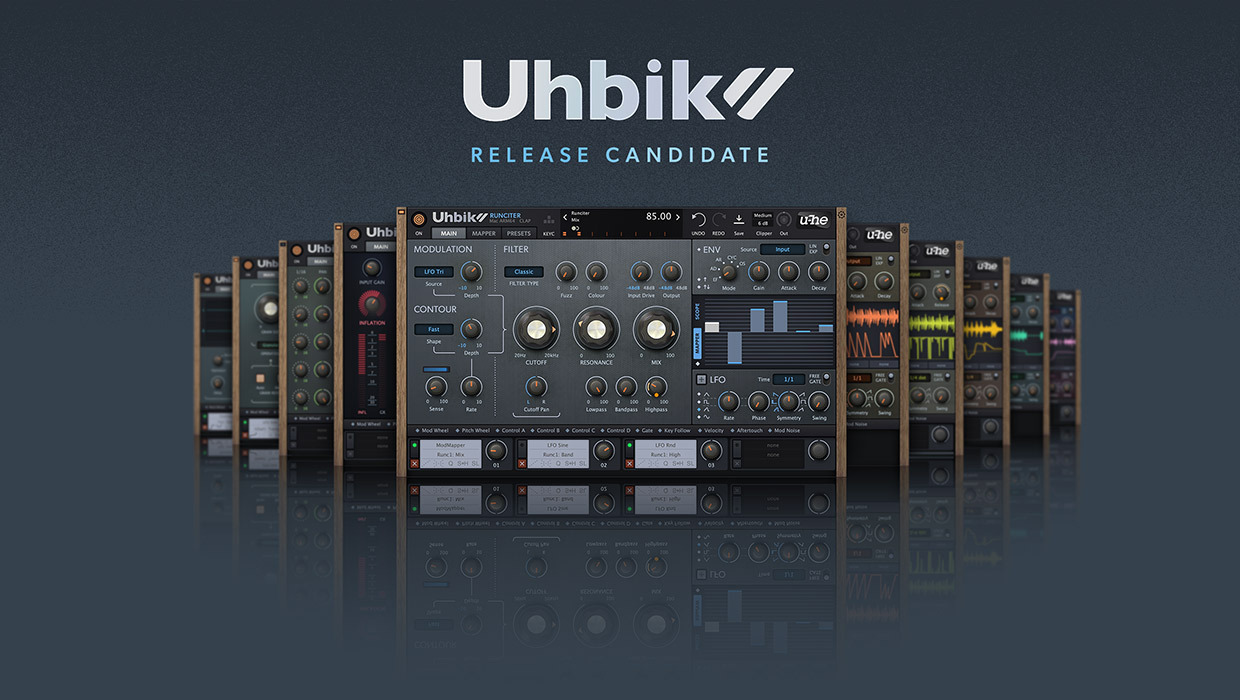
Image

A lot has happened since the last beta (proof is in the changelog), and a first release candidate is now ready for inspection.
We hope to release the 2.0 update in about two weeks, if no showstoppers emerge during the next few days.

This might be your last chance to get Uhbik for the old price (149,- €), as it will go up to 199,- € on release day. :!:

Downloads:

Uhbik 2.0 RC2 19684 Mac Updated to RC2, October 10, 2025
Uhbik 2.0 RC2 19684 Win Updated to RC2, October 10, 2025
Uhbik 2.0 RC2 19684 Linux Updated to RC2, October 10, 2025

Lots of bugs have been squashed, surround support was refined some more, and we added a few improvements here and there.

You can now scale Uhbik's GUI up to 300%. Let us know if everything looks OK on large displays with a high resolution.

New preferences for improved mouse and touchpad support have been added. Please report if anything feels odd or doesn't work as expected. Some of these improvements will not work on Linux yet. We'll tackle this for the next update.


Changes since the last beta (revision 18517):

Improvements:

* multiple GUI tweaks
* User guide updated
* Factory library updated
* Control C/D modulation sources added
* Mod assigner pane now permanently visible
* Compressor: added Input Gain and Wet Gain parameters
* Grainshift: improved performance of phase vocoder mode
* More surround support improvements
* Improved MIDI Gate behaviour
* Improved S&H trigger source behaviour
* CLAP parameter modulation support added
* Improved mouse and touchpad support (new preferences)

Fixed Bugs:

* Fixed: random crash while switching or saving presets
* Fixed: crash in Reaper during offline rendering
* Fixed: audio dropouts when using bypass in Cubase
* Fixed: audio glitches when modulating parameters
* Fixed: EQ was displaying wrong frequencies in data display
* Fixed: Compressor Attack parameter was fighting mouse control
* Fixed: Flanger could click on playback start
* Fixed: multiple mod matrix issues
* Fixed: Tracktion Waveform could not detect channel count
* Fixed: bypass state was saved with presets
* Fixed: Delay's Input Gain and Wet Gain values were not set correctly in old projects
* Fixed: FL Studio causing sound glitches in some Uhbiks
* Fixed: text scaling issues in data display
* Fixed: Scope slots not working if first slots were unused
* Fixed: modulation depth ring was not appearing when MIDI sources were used
* Fixed: plugins were not remembering last state when reopening GUI
* Fixed: Shifter was falling silent if input signals were too loud
* Fixed: channel offset was not reset properly in some Uhbiks
* Fixed: output clipper wasn't bypassed
* Fixed: sound glitch in Grainshift
* And some more ...

Known Issues:

* FL Studio: VST3 GUI glitches when using mod assigner drag & drop
* FL Studio 2025: text entry issues using VST3 or CLAP (Image Line Issue)
* Cubase: the host bypass option is not working (use the plugin's own bypass)
* Logic: surround and sidechain features require Logic 11 or newer
* Some parameter IDs changed, breaking automation in projects that used alpha or beta builds
* Some mouse preferences not working on Linux yet

If you stumble over any issues, please let us know asap.

Cheers,
Tas
That QA guy from planet u-he.

Post

Lovely!

Post

Just tested each of the Uhbik effect plugins [both CLAP & VST3 formats] at various internal scaling settings, within Windows 11 (and also internal 100% scaling combined with different OS scaling values) in FL Studio 25.1.6.4997.

The new 300% internal scaling setting for these plugins looks and performs great on my UHD 4K display.
Much easier to read and work with these plugins now at these higher resolutions.

* Fixed: text scaling issues in data display = Also confirmed.
^ This is fixed and no longer presents an issue for me at the various different scaling and OS scaling settings within this RC1.
All text remains legible within the data display, at these various scaling scenarios.

This Uhbik release candidate feels a lot more polished and solid. :tu:

Great work!

Post

Great improvements to the first beta!
An issue that still concerns me, is it possible to reduce the color noise of the big knobs and to make them look cleaner/clearer like the smaller encoders and the rest of the GUI? So the color scheme of all elements looks more unified. Thanks!

Post

Bug report MacOS 15.7, Live 12 last, VST3.

Screenshot attached.

Ambient and Flanger are affected.
You do not have the required permissions to view the files attached to this post.
Murderous duck!

Post

david.beholder wrote: Thu Oct 02, 2025 1:02 am Ambient and Flanger are affected.
Hmm, there are remnants of an earlier version's GUI being loaded.
Not sure why this happens, as this is usually not a problem on Mac.
Do you remember which revision number you had installed before updating to this RC?

What you can do is to delete the following folder in the system library:

Code: Select all

/Library/Application Support/u-he/Uhbik
Then run the RC installer once more. This should fix it.
That QA guy from planet u-he.

Post

tasmaniandevil wrote: Thu Oct 02, 2025 4:48 am
What you can do is to delete the following folder in the system library:

Code: Select all

/Library/Application Support/u-he/Uhbik
Then run the RC installer once more. This should fix it.
My version was 18148 but I have VST2s from last version of Uhbik with VST2 support.

I checked and see that VST2s are crashing Ableton too.

And since Ableton doesn't have IPluginCompatibility support this make situation a bit complicated.
I think this situation with resources/resource folders may be rethought.
Last edited by david.beholder on Thu Oct 02, 2025 5:56 am, edited 1 time in total.
Murderous duck!

Post

I guess now I have question what was the last VST2 version?
Murderous duck!

Post

david.beholder wrote: Thu Oct 02, 2025 5:53 am I guess now I have question what was the last VST2 version?
The last version that included VST2 support was the old 2019 revision 9629 alpha version.

Newer betas didn't include the VST2 anymore, and it's expected that the six year old VST2 doesn't work anymore after updating to the new version. Please delete that old VST2 version.

Your screenshot also shows that the new VST3 is loading a part of that six year old alpha version.

I could update from the old 2019 rev. 9629 alpha to the 18148 beta to the current 19679 RC and then load the VST3 without issues on Mac, using Live 12. So I am not sure why this happened on your side. It's possible that Live still had those old graphics cached, especially if you ran the update installer while Live was active, or if you first tried to load the old VST2 before loading the new VST3. But that's just a guess.

We are in contact with Ableton and asked them to consider implementing IPluginCompatibility. But it might help if users also ask them for this. After all, there is no reason for them to implement this if users do not ask for it.

In the meantime, please follow the steps I mentioned to fix your GUI loading issue. And either remove the old and outdated VST2 version to avoid those crashes. Or keep using the old version, and update to 2.0 once your host supports IPluginCompatibility.
That QA guy from planet u-he.

Post

tasmaniandevil wrote: Thu Oct 02, 2025 6:53 am The last version that included VST2 support was the old 2019 revision 9629 alpha version.
You're right about version tho. Found it in thrash of my mac.
tasmaniandevil wrote: Thu Oct 02, 2025 6:53 amPlease delete that old VST2 version.
Of course I wouldn't.
tasmaniandevil wrote: Thu Oct 02, 2025 6:53 amWe are in contact with Ableton and asked them to consider implementing IPluginCompatibility. But it might help if users also ask them for this. After all, there is no reason for them to implement this if users do not ask for it.
If you give me an idea how, I would definitely contact them and ask about it. Others may join too.
tasmaniandevil wrote: Thu Oct 02, 2025 6:53 amYour screenshot also shows that the new VST3 is loading a part of that six year old alpha version.

I could update from the old 2019 rev. 9629 alpha to the 18148 beta to the current 19679 RC and then load the VST3 without issues on Mac, using Live 12. So I am not sure why this happened on your side. It's possible that Live still had those old graphics cached, especially if you ran the update installer while Live was active, or if you first tried to load the old VST2 before loading the new VST3. But that's just a guess.
No I was installing with non running live.
tasmaniandevil wrote: Thu Oct 02, 2025 6:53 amIn the meantime, please follow the steps I mentioned to fix your GUI loading issue. And either remove the old and outdated VST2 version to avoid those crashes. Or keep using the old version, and update to 2.0 once your host supports IPluginCompatibility.
Looks like 9629 is my only choice for now. But is it possible to do something during install so if vst2 is still there uhbik vst3 have different folder for resources?
Murderous duck!

Post

david.beholder wrote: Thu Oct 02, 2025 7:15 am If you give me an idea how, I would definitely contact them and ask about it. Others may join too.
I am sure Ableton got a support form somewhere on their website, or an official support forum. Just ask them to please consider adding support for IPluginCompatibility so VST3 plugins can automatically replace the VST2 versions in old projects.
david.beholder wrote: Thu Oct 02, 2025 7:15 am Looks like 9629 is my only choice for now. But is it possible to do something during install so if vst2 is still there uhbik vst3 have different folder for resources?
We included the old version 1.3.1 graphics for users who are still dependent on the old VST2 version, so they can continue working on old projects, while at the same time use the new VST3 or AU in new projects. This wasn't easy, but we found a way.
We could only do this for the old version 1.3.1 though, not for the rev. 9629 alpha.
This means you can still use that 9629 alpha VST2 in old projects, but it will load with the graphics of the previous version 1.3.1 (revision 3899), not the alpha 9629 graphics.
This works in Live on Mac.
I suspect your VST2 was crashing because something went wrong during the update.
So please, I ask you once again, delete the application support folder I mentioned earlier. It includes all the GUI files and scripts.
Once deleted, install the RC version once more, it will install the new GUI as well as the files of the old version 1.3.1 GUI.
You should then be able to load the new VST3 or AU in parallel to the old VST2 version.

If you can't manage to get it done without the VST2 crashing, please contact our support, so we can help you fix this.
That QA guy from planet u-he.

Post

I purchased uhbik 2 in the early beta stage. I'm extremely satisfied and can recommend this plugin collection. I only discovered u-he when there was the Zebra 2 offer (Z2 with the upgrade option to Z3). Since then, I've purchased several u-he products. All of the plugins are sensationally good in my opinion. One more thing: I know there is a lot of work to do with Z3, but for me as a costumer it's important that older plugins will be improved. This was also a reason for purchasing uhbik 2! Maybe there will be a refresh for Diva in 2026/27? Gottfried

Post

same GUI problems with VST3 and AU. I deleted the old VST versions. Is there a way to include that in the installer? clean up old files
You do not have the required permissions to view the files attached to this post.

Post

Screenshot 2025-10-02 at 17.59.24.png
Can't turn off Uhbik FX on Cubase insert slot on Mixer page. VST3 Cubase 14 latest Mac 15.7
You do not have the required permissions to view the files attached to this post.
Mac Studio M4
15.7.3
Cubase 15, Ableton Live 12

Post

woodsdenis wrote: Thu Oct 02, 2025 5:01 pm Can't turn off Uhbik FX on Cubase insert slot on Mixer page. VST3 Cubase 14 latest Mac 15.7
That is probably what's mentioned as a Know Issue in the OP:
* Cubase: the host bypass option is not working (use the plugin's own bypass)
We are not able to fix this for now IIRC because bypassing the plug-ins would change latency and then Cubase would stutter. We have to address this another time, and for now the only Bypass is in the plug-in's own editor window.

Post Reply

Return to “u-he”