

other polls at other sites have different results:
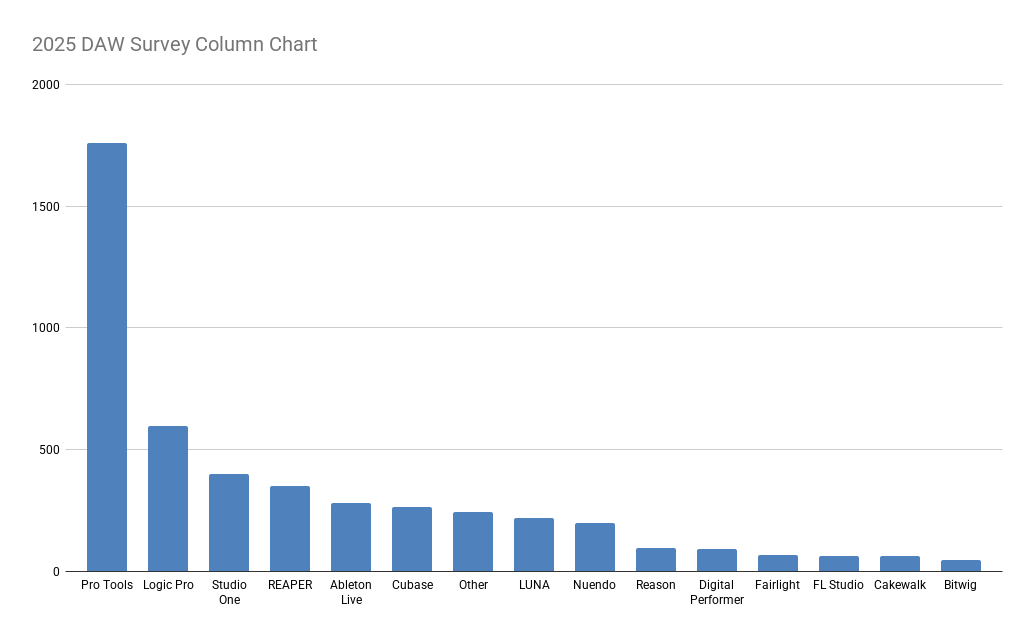
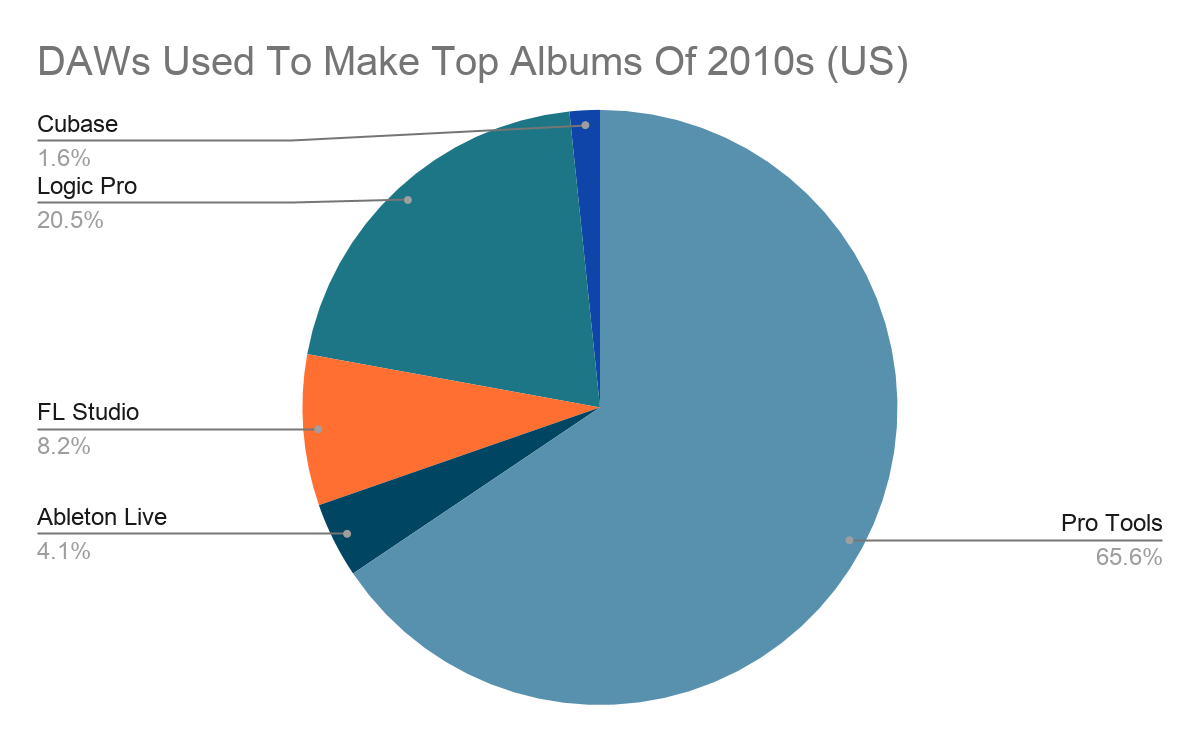
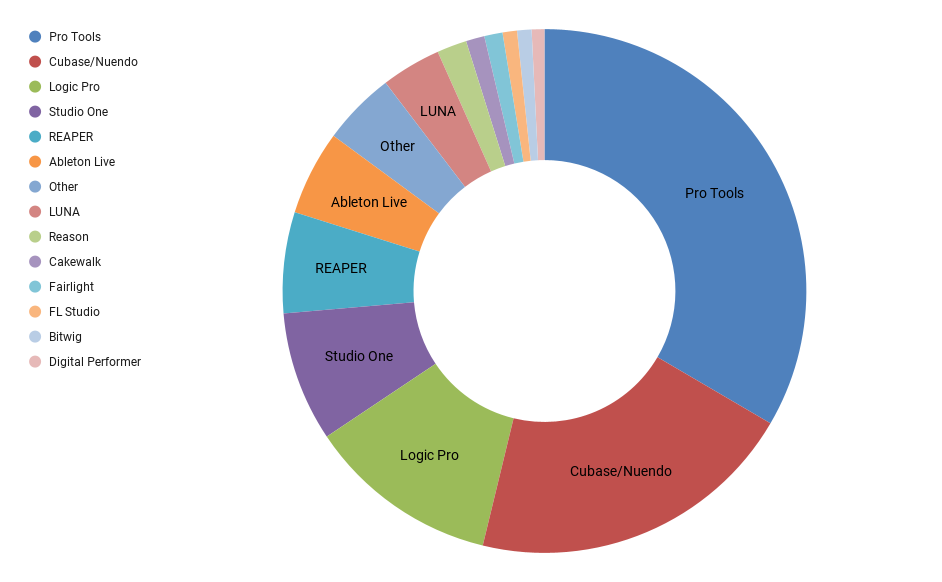
Comparing them all, it seems Pro Tools is still very popular in commercial production settings..


Of course they are and they know it. Why else would you still be prattling on about it? You clearly feel insecure in your choice or you'd have been happy to let this go two pages ago. But no, you clearly feel you have to justify your choice. That tells me that, deep down, you know you really just cheaped out and got the one you could afford, not the one you really wanted.
Like who?Reaper, like other DAWs gets the job done. Figured out by those who have utilized it.
On a track? That's the wrong window, my friend. You mix with the mixer, you don't want to be moving your focus all over the place. And if you have to do something to make it work, then it will interrupt your workflow. It's exactly the kind of thing that puts me off.You can select parameters and have them be displayed on a track.
Again, an inelegant solution that takes you away from the project your are working on. All those little bits and pieces add up over the course of a session. I'm sure that if you had nothing better to do with your time, you could f**k around with Reaper until you got a usable set-up but I'm much happier with an out of the box set-up that works without any fuss.Open the project with said track, copy and paste to the other project.
I think Reaper's price makes it a good first step into the world of DAWs, until you get enough experience/confidence to spend some money on a more professional application. It also seems like a decent choice for geeky people who like to noodle about but don't care if they ever get anything done. But yeah, if you have experience with Cubase or Logic, I don't think Reaper is ever going to cut it for you. I'm sure it will get the job done, but it won't be a whole lotta fun.EnGee wrote: Tue Jan 06, 2026 11:31 pmIf someone started on Cubase/Logic some 20 years ago or more, just forget about Reaper!
It's kinda weird how that seems to work with "industry standard" tools. I spend all day at work using Adobe's "industry standard" tools and they are f**king awful compared to some of the other alternatives out there.
Why? Why would I waste time doing that when I can choose an alternative that doesn't require extra, non music-related, effort? You sound like you think everyone should want to use Reaper but the best reason you can come up with for that is one nobody gives a flying f**k about.jojoB3 wrote: Wed Jan 07, 2026 12:27 am Ok so you (and so many here) should put a note on the fridge or bong that says "Hey, read the manual".

That's what I do if I want it to float, double click on it. What is it you're looking for, to have a plugin's window float everytime you click on the FX button? I am unsure of how to do that. You'd have to Google it.VitaminD wrote: Wed Jan 07, 2026 1:44 pm .You can float the GUI, but you have to select it every time you want that?
Not really in this case. You just have to go to the options menu at the top and select "SHOW FX INSERTS IN TCP" (TCP means Track Control Panel).The fact that you have to 'just stick to the basics' tells me it's overcomplicated..
Those who've said Reaper is modular is a good way to look at it. It's a modular DAW that appears like any other typical DAW and so one expects it to behave a certain standard way. This is where things get annoying and frustrating.It seems to do a lot though if you're a power user.
If by this you mean you don't want to have the sent tracks going to the master out as well, just make sure to go to the routing window (click the routing button) and uncheck "Master send channels from/to" at the top left. Or ALT left-click on the routing button for a shortcut.it seems to default the bus output in Parallel which is incorrect behavior.
Yep. I like it. But what if you have a shitload of tracks and you want to group a few tracks set in the middle or very top? Now you have to shift them to the bottom where empty space is exposed.With Cubase its just shift clicking the tracks you want (for the bus) then right clicking on an empty space and selecting send to Group. Done. Cubase auto creates the bus track and the correct routing for you.
You don't have to shift anything; Keep your tracks in place and control click on each.VOODOO U wrote: Wed Jan 07, 2026 11:48 pmYep. I like it. But what if you have a shitload of tracks and you want to group a few tracks set in the middle or very top? Now you have to shift them to the bottom where empty space is exposed.With Cubase its just shift clicking the tracks you want (for the bus) then right clicking on an empty space and selecting send to Group. Done. Cubase auto creates the bus track and the correct routing for you.
Because it's fun annoying you with my Reaper fanaticism.BONES wrote: Wed Jan 07, 2026 11:13 pm Of course they are and they know it. Why else would you still be prattling on about it?
There is no perfect DAW so nothing to feel insecure about. Especially since I get work done and that's without any A.I. assistance.You clearly feel insecure in your choice or you'd have been happy to let this go two pages ago.
Wasn't it you who started an A.I. thread? How many threads have you gone in to justify the use of A.I.?But no, you clearly feel you have to justify your choice.
Oh ok. So tell me, which is the DAW i really want?That tells me that, deep down, you know you really just cheaped out and got the one you could afford, not the one you really wanted.
By those who've utilized it.Like who?
No the wrong window is the A.I. prompt screen.On a track? That's the wrong window, my friend.
I mix with my ears. I coukd care less if it's a standard mixer view or not.You mix with the mixer,
There are scenarios where you may have to do something to get things to work but as long as it's a one-shot deal I'm cool with it.And if you have to do something to make it work, then it will interrupt your workflow. It's exactly the kind of thing that puts me off
You keep saying this over and over and over. You know what this tells me? You're insecure in the choice you made. You bought a DAW that fit your intelligence level but deep inside you want to have the ability to go modular.I'm much happier with an out of the box set-up that works without any fuss.
Yeah either way works. It can be done quickly in both apps in their own way. It's just a workflow preference.VitaminD wrote: Thu Jan 08, 2026 12:01 amYou don't have to shift anything; Keep your tracks in place and control click on each.VOODOO U wrote: Wed Jan 07, 2026 11:48 pmYep. I like it. But what if you have a shitload of tracks and you want to group a few tracks set in the middle or very top? Now you have to shift them to the bottom where empty space is exposed.With Cubase its just shift clicking the tracks you want (for the bus) then right clicking on an empty space and selecting send to Group. Done. Cubase auto creates the bus track and the correct routing for you.
After that you can either scroll down to a blank area to get to the context menu or you can set up a key command if scrolling is too much of a bother. There is an option for that in the Mixer settings of the key commands "Add tracks to selected: Group channel"
But in 13 years of Cubase usage, I've never had to do that. The middle mouse button is up/down scroll by default, so its really really quick to flick the middle mouse wheel down.
As I said, you have to think this shows how insecure they are about their choice. They constantly have to prove to themselves that it was the right one by coming to Reaper's defence every time there is the slightest critical comment about it. It might be amusing if it wasn't so pathetic.Trancit wrote: Wed Jan 07, 2026 12:32 pmIt would be just nice, if there wouldn´t come so many "Reaperneers" out of their corners always wanting to lecture the rest of the world what a genius piece of software it would be...
Then why didn't you show us a screenshot of it instead of that hideous dog's breakfast? The contrast colours are way over-saturated and that floating window looks like it's a different application window altogether. There's no width in the arrangement window, which makes no sense at all. I don't know how I'd get anything done if that's what I had to stare at all day.
I think that's probably the same for most of us. Sometimes it might be three for me but the thing is, it is something I might only do half-a-dozen times in the 100+ hours I spend on a song. Saving three seconds in 100 hours hardly seems relevant, does it?EVERY plugin I use (maybe 500) is just TWO mouse clicks away (ie 0.5 seconds) from being inserted onto a track.
As opposed to you, with three songs on your Bandcamp page, all from 2021, recorded live. That's hardly a great advertisement for Reaper, is it? Your stuff reminds me a bit of Rema-Rema, mixed with some late '70s WIre B-sde experimentation. At least those guys had the excuse of recording their material 45+ years ago. Can I assume you are a fan of early Wolfgang Press? If not, I think you'd like them.You guys don't know what you're waffling about. Gotta laugh at all these ignorant chumps who've hardly used it saying how crap it is.
What a hideous, undifferentiated mess that is. Couldn't you at least colour code the buttons or something so you can find things? Even if you've organised them n some way that makes sense for you, it's still going to be a royal PITA to find what you're looking for in a hurry. Studio One provides multiple ways of organising things in the browser that makes it easy to find what you're looking for. That thing of yours looks like a nightmare.writheuk wrote: Wed Jan 07, 2026 3:11 pmBut now I have a button on the top toolbar (the blue star) which when pressed opens up a massive toolbar with all my most-used plugins listed in grid fashion. Click on one of them and they're immediately inserted into the selected track. So 2 clicks, that's it...
I bet it does, time you could have been spending on actual music production.The thing is it takes a bit of time setting up
In Studio One you can favourite things you use all the time, that show in a separate list, you get a list of recently used effects and you can hide things you never use any more, but need to keep around for old projects.but once you're done there's no looking back. And selecting which plugins to put in there helps wheedle out all those in your FX Browser that are no longer of much use to you.
Nice one!
Classic!writheuk wrote: Wed Jan 07, 2026 7:19 pmYou sound like the kind of guy who's got 3 flying ducks on his bathroom wall... (and thinks it's art.)
Floating windows is the mind killer. You should be able to see every relevant thing in a single view. Obviously you do sometimes need to float an instrument or effect GUI but if you look at my screenshot from a few pages ago, you'll see how I leave a nice, big space so that my floating windows aren't obscuring anything else. That way, which ever track/channel I am working on automagically displays the instrument/effects for that track but I can still access the mixer and arrangement without having to move or close anything. It's perfect for tweaking things as you refine your mix (which is probably 90% or more of my production process).VOODOO U wrote: Wed Jan 07, 2026 11:48 pmThat's what I do if I want it to float, double click on it.
... and then spend another two seconds dragging them to where you want them. Hardly the end of the world.Yep. I like it. But what if you have a shitload of tracks and you want to group a few tracks set in the middle or very top? Now you have to shift them to the bottom where empty space is exposed.

It's basically the same in Reaper.BONES wrote: Thu Jan 08, 2026 12:20 am Studio One provides multiple ways of organising things in the browser that makes it easy to find what you're looking for.
[...]
In Studio One you can favourite things you use all the time, that show in a separate list, you get a list of recently used effects and you can hide things you never use any more, but need to keep around for old projects.

It's mostly about how you work at this point. Some people only draw in notes in a MIDI editor, some play then quantize. Different DAWs have different strengths. A friend of mine is a huge fan of Melodyne, not at all just for vocal tuning, so a DAW with ARA is almost a must for him.BONES wrote: Thu Jan 08, 2026 6:50 am Yeah, I figured. It's basically all the same in every DAW these days. They copy one another until there is nothing left to differentiate one from another, other than the way they look, which makes picking the prettiest looking one about the only choice left.
I don't get that at all. If you're flicking between different DAWs, you're never going to be fluent with any of them. I think you need to pick and stick and get as good as you can get with one application. Any perceived strengths and weaknesses are going to be subtle, at best, and being a guru with the one you choose is going to be far more beneficial overall. If I encountered unworkable issues with Studio One, I'd be looking for something else to use permanently, not just for the things Studio One gave me problems with (and I definitely wouldn't be looking at Reaper).machinesworking wrote: Thu Jan 08, 2026 8:44 amTo be fair to Reaper a buddy of mine loves both Studio One and Reaper, and uses Reaper most of the time because for things like film scoring Studio One can get wonky.
Submit: News, Plugins, Hosts & Apps | Advertise @ KVR | Developer Account | About KVR / Contact Us | Privacy Statement
© KVR Audio, Inc. 2000-2026