


That'll change in the next beta. I already posted a video with an initial solution for this.
Zebra 3 Public Beta Revision 20399
-

- u-he
- Topic Starter
- 30255 posts since 8 Aug, 2002 from Berlin
-
- u-he
- Topic Starter
- 30255 posts since 8 Aug, 2002 from Berlin
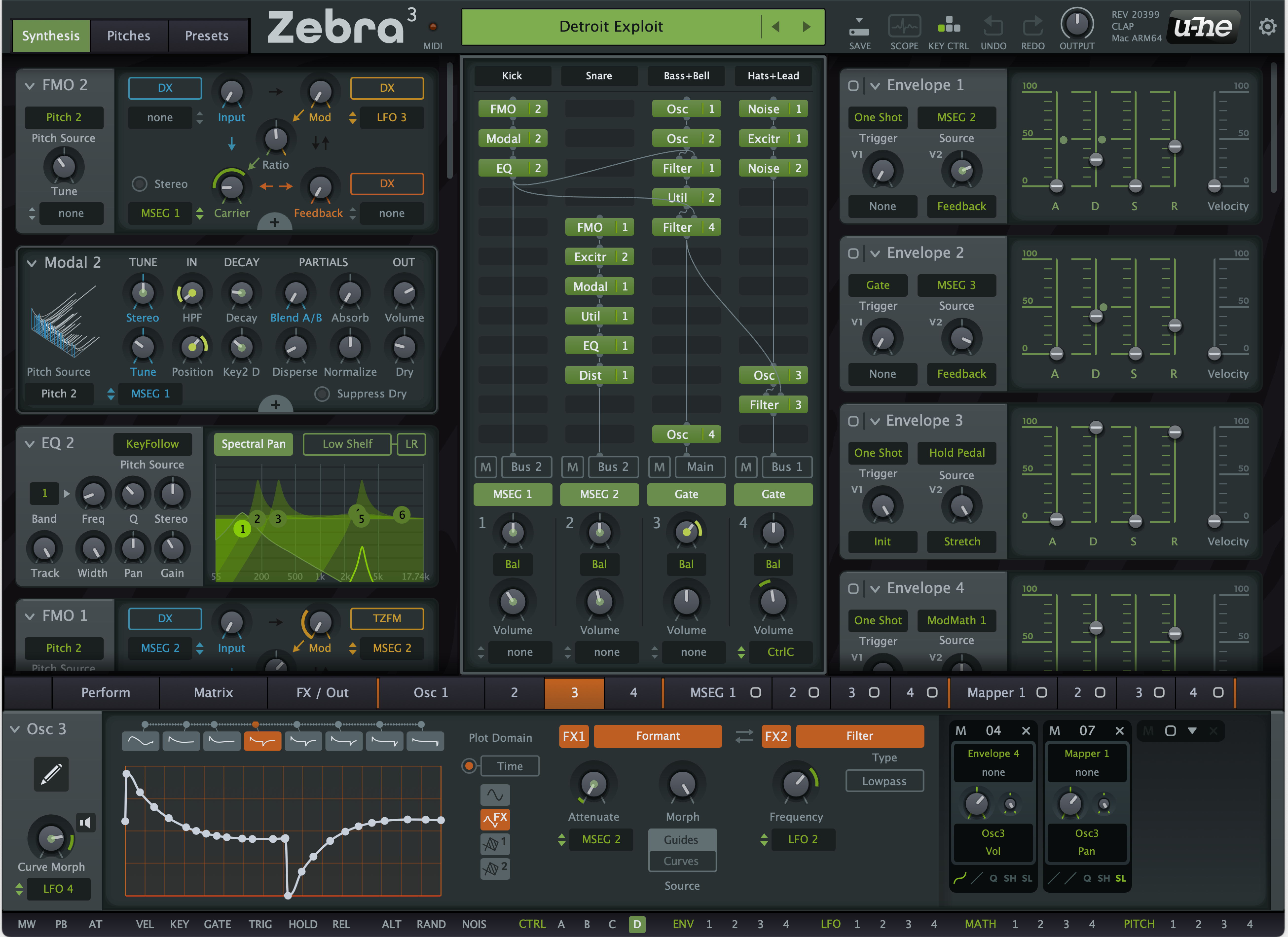
We are trying to detect whether Outputs 3/4, 5/6 or 7/8 are connected in the DAW and then automatically run Busses 1, 2 or 3 respectively to these instead of returning to main.ffx wrote: Fri Jan 09, 2026 8:38 am I am really missing individual outputs... For example, using the very nice preset "Detroit Exploit", it's a multilayer drum loop. Now I would like to process the hihats individually, outside Zebra. Not possible.
So I would like to suggest that you also can select output 1/2, 3/4, 5/6, 7/8 here:
Bildschirmfoto 2026-01-09 um 09.37.37.png
And here:
Bildschirmfoto 2026-01-09 um 09.37.44.png
-
- u-he
- Topic Starter
- 30255 posts since 8 Aug, 2002 from Berlin
-
- KVRist
- 255 posts since 4 Apr, 2020
I did not know Natural Gate, sounds fantastic!Funky40 wrote: Thu Jan 08, 2026 2:14 amOhh, you have Natural Gates !...i have some too. LOVE it.
Now this would be awesome to get a SW equivalent to the Natural gate.
As a VCV Rack Module.......from U-He ? "hint-hint"
a single plugin, or within Zebra 3
I downloaded their manual, it explains the basics of what's going on and, more importantly, their sonic goals.
I think recreating a Natural Gate like effect is a perfect task for me to improve my Zebra3 understanding (and pimp analog-y sounds).
Last edited by stippenstoh on Fri Jan 09, 2026 12:39 pm, edited 1 time in total.
-
- KVRAF
- 2301 posts since 23 May, 2012 from London
Yeah my bad, I just blindly copied the post above with SEND depicted...

Always Read the Manual!
-
Funkybot's Evil Twin Funkybot's Evil Twin https://www.kvraudio.com/forum/memberlist.php?mode=viewprofile&u=116627
- KVRAF
- 12516 posts since 16 Aug, 2006
I don't know if anyone suggested this, but what about adding space for short Ctrl A, B, C, D labels? Ugly mockup job below:

-

- KVRAF
- 1904 posts since 14 Jul, 2018
yesffx wrote: Fri Jan 09, 2026 8:44 am Regarding the modulation overview, if you start with "Detroit Exploit", you actually see zero modulation connection, what is modulating what. IMHO this is not very good UX so far,.........
+1
+1
+1
-

- KVRer
- 5 posts since 1 Apr, 2023
urs, just wanted to drop in here and say Zebra 3 is amazing!! It sounds soooo good!!! Amazing job team uhe!
-
- KVRist
- 45 posts since 25 Feb, 2020
Urs, any chance of bringing the Overload knob from Zebra2's XMF somewhere in Zebra3? It was so useful to bring "oomf" into certain sounds. "Over" knob would amplify weak signals so well, sometimes you can discover unexpected things. I don't know if it was always done in the context of a filter or a separate algorithm.
I can already imagine what Overload and Wedge can do in certain patches, especially those that involve the Modal module. One can hope.
I can already imagine what Overload and Wedge can do in certain patches, especially those that involve the Modal module. One can hope.

-

- KVRist
- 396 posts since 3 Mar, 2015 from Japan
As for modulation UX, what’s missing in current Zebra is a very simple indication that “this parameter is being modulated by something”, something like this:
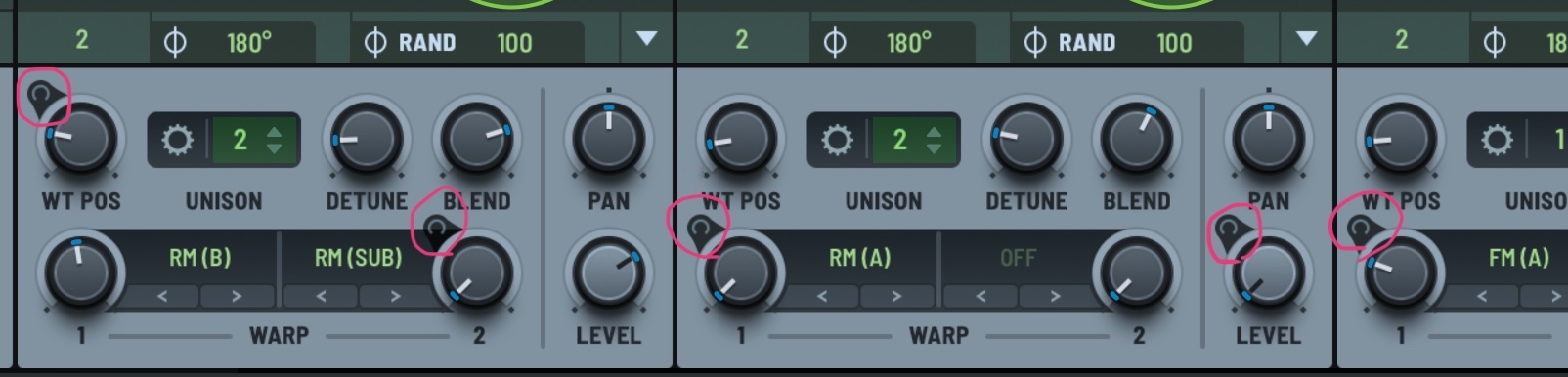
This indicator needs to be visible at a glance, without any clicking. Even if detailed routing information is available via right-click, without this kind of indicator you don’t even know which knobs are worth clicking in the first place.
If Zebra were to adopt a similar approach, one possible solution would be to always show dimmed modulation dots at all time.
This indicator needs to be visible at a glance, without any clicking. Even if detailed routing information is available via right-click, without this kind of indicator you don’t even know which knobs are worth clicking in the first place.
If Zebra were to adopt a similar approach, one possible solution would be to always show dimmed modulation dots at all time.

-
- u-he
- Topic Starter
- 30255 posts since 8 Aug, 2002 from Berlin
-
- u-he
- Topic Starter
- 30255 posts since 8 Aug, 2002 from Berlin
I don't exactly recall how overload worked, but I think it was something akin to a macro control for gain staging. Like, input drive + make up gain for the output, and possibly in several stages. My hunch is, this works as long as it is one filter type (or, as in the XMF a set of identical algorithms that differ only in their non-linear behaviour). But it I don't think it'll work in filters with high variety of algorithms, such as Zebra 3's. Not sure.Rnaroth wrote: Sat Jan 10, 2026 6:16 am Urs, any chance of bringing the Overload knob from Zebra2's XMF somewhere in Zebra3? It was so useful to bring "oomf" into certain sounds. "Over" knob would amplify weak signals so well, sometimes you can discover unexpected things. I don't know if it was always done in the context of a filter or a separate algorithm.
I can already imagine what Overload and Wedge can do in certain patches, especially those that involve the Modal module. One can hope.
I still toy with the idea of adding one or more of the XMF types to Zebra's new filter. However, if it happens, it can only happen in a subsequent update.
For now we need a final set of parameters and options so the UI ceases to be a moving target. So the UI team can work on the final UI.
-
- u-he
- Topic Starter
- 30255 posts since 8 Aug, 2002 from Berlin
Not exactly. An animated display would probably freeze the UI on many systems because the filters also scroll.jtsterays wrote: Sat Jan 10, 2026 9:14 am I assume the filter modules will have visualization like Hive's?
So we've planned to visualise the filter curve in a static graphic.
If next year we succeed to go hardware acceleration on all platforms, we might switch to animated displays.
-
- KVRist
- 396 posts since 3 Mar, 2015 from Japan
Wow — exactly this!
Yep, that’s precisely what I meant. Looks like I didn’t need to say anything
