If you had to stick to one DAW, which one would it be?

Audio Plugin Hosts and other audio software applications discussion
Post Reply New Topic

If you had to stick to one DAW, which one would it be?

Ableton Live
188
16%
ACID Pro
1
0%
Bitwig Studio
172
15%
Cakewalk
20
2%
Cubase
167
14%
Digital Performer
14
1%
FL Studio
57
5%
Logic Pro
95
8%
Mixbus
1
0%
Mixcraft
10
1%
MuLab
18
2%
Pro Tools
13
1%
Reaper
204
17%
Reason
30
3%
Samplitude
4
0%
Studio One
120
10%
Tracktion
16
1%
Other...
48
4%
 
Total votes: 1178

Post

jens wrote: Sat Jan 10, 2026 11:55 amHow so? I thought patterns were a different kind of (as compared to the piano-roll) per-track MIDI-sequence?
A pattern is like a master MIDI clip - you can duplicate it across a project but, unlike a normal MIDI clip, when you change the master (the Pattern), all the duplicates are also updated. It also has a number of other little tricks, like probability, that you don't get in a normal MIDI clip but I couldn't see any value in any of them, beyond them seeming really cool in a demo.
machinesworking wrote: Sat Jan 10, 2026 8:20 pmI still don't get why you would even choose a DAW that used Clips as a main writing tool, then be not interested in learning clips?
What's to learn, it's not rocket science? It's that I've never felt like I needed a "writing tool", there is plenty of freedom in any arrangement window to play around with ideas. Having come from Orion, I still work in a pattern based way in the timeline, I don't see how a clip launcher makes that kind of workflow any better. The more things I can do in a single window, the better as far as I'm concerned, which is why I gave up on scratch pads. I wish Studio One had the ability to edit MIDI directly in the timeline, like you can in Cubase, then I'd almost never need a piano roll window.

Oh, and I chose Bitwig because it works with both 32 and 64 bit plugins, which would have made it a lot easier to port all our songs over from Orion.
NOVAkILL : Legion GO, AMD Z1x, 16GB RAM, Win11 | Audient EVO 8 | Lumi Keys | Studio Pro 8
Korg Odyssey, bx-oberhausen, Proxima, PolyMax, GR8, JP6K, Union, Atomika,
Invader 2, Flow Motion, Olga, TRK 01, Thorn, Spire, VG Iron

Post

I did it again... nevermind... :tu:

Post

machinesworking wrote: Sat Jan 10, 2026 7:12 pm
jens wrote: Sat Jan 10, 2026 9:56 am
machinesworking wrote: Sat Jan 10, 2026 4:27 am It sounds more like Blocks looking at some youtuber using them are super concise easy to use containers for for parts of a project, not really that similar to Chunks, which are more like complete sequences.
Nope, as I said each Block is a complete timeline that goes from bar zero to bar n - you could theoretically have a different song with a completely different set of tracks and plugins on each of the 32 Bocks - but that wouldn't be very practical at all; for starters as all of them would share both the same tempo-time and time signature and they'd also share same total number of tracks which you'd have to constantly scroll back and forth through because each Block doesn't even have its own scrolling position for the track-headers not to mention individual track-height settings.
Yeah they still are subsets of a project if they don't have their own timeline and tempo. This seems to be the difference between Blocks and Chunks, Blocks are set up to work with a song, Chunks are more like complete separate songs, you can drag Chunks into other Chunks but for my and most users the use is more about setting up separate versions of the same song, a printed to audio version of a song with VI's etc. In the case of Chunks you can literally have every song in your repertoire with it's own time signature, VSTs, tempo, movie etc. in the same project.

For what it's worth the way I see people working in Blocks is far more elegant than anything you could do with Chunks in terms of dragging them into the open sequence, since it's the same as dragging an entire song into another song. If DP copied Blocks it wouldn't get in the way of Chunks. To put it simply most Chunks are Sequence Chunks, i.e. entire projects in the same project, with a slight (or long), delay when switching Sequence Chunks.

Blocks seem more like a subsequence which in terms of rearranging a song is a better idea, in terms of setting up a live show with separate songs or encapsulating versions of the same song in the same project file, Chunks.
Ah, got you now - when we say "own timeline" we both mean different things - I assume your definition includes independent tempo and time-signature settings, while I merely referred to a (n unlimited) range of bars.

B.t.w.: I was wrong/short-sighted in regards to Blocks not having that. One would have to use tempo-automation for that, just as you'd do for such changes within the same songs in basically all DAWs (that support it) however this tempo-map clip could be within/part of the Block and thus the Blocks can indeed have their own timeline even according to your definition (if I got you right) - in fact you could even have tempo and/or time-signature changes within the Block (so that they automatically happen whenever the Block is being used - again unless you overwrite it in the main timeline of course.

I still wouldn't use the Blocks to store complete songs in them, but it's absolutely possible.

Post

BONES wrote: Sun Jan 11, 2026 1:09 pm
jens wrote: Sat Jan 10, 2026 11:55 amHow so? I thought patterns were a different kind of (as compared to the piano-roll) per-track MIDI-sequence?
A pattern is like a master MIDI clip - you can duplicate it across a project but, unlike a normal MIDI clip, when you change the master (the Pattern), all the duplicates are also updated. It also has a number of other little tricks, like probability, that you don't get in a normal MIDI clip but I couldn't see any value in any of them, beyond them seeming really cool in a demo.
Now I see what you mean... well, Reason doesn't actually have individual ghost/alias/linked clips - thanks to Blocks it's not that big of a deal but would be nice to have. Rather than single Blocks can be any assortment of clips - just like the arranger items in Studio One. (Of course a Block could therotically consist of a single clip, but there wouldn't really be a point in that.)

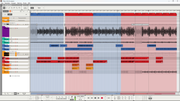
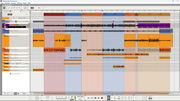
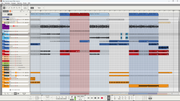
The major advantage of Blocks over everything else is still that they can/will be overwritten by any clip that sits on top of them in the main timeline. I think perhaps it's time to show some screenshots in an attempt to make this better understood:


Image Image Image

All the greyed out stuff are Blocks... some of it muted here and there (hatched) and some stuff is overwritten in the main timeline (coloured clips)... also some Blocks loop (horizontal line within the Block clip on top of the timeline) while others don't but instead are copied. (Maybe because I also used them as scratchpads and thus couldn't loop them or whatever...)

Post

BONES wrote: Sun Jan 11, 2026 1:09 pm Oh, and I chose Bitwig because it works with both 32 and 64 bit plugins, which would have made it a lot easier to port all our songs over from Orion.
Yeah that makes sense, Bitwigs plugin sandboxing is pretty amazing, that 100% is the best feature, you can run x86 VST plugins in Apple Silicon and I do not doubt that they're working on running windows x86 in MS's Arm machines. Plus it doesn't take much CPU at all here. It's too bad other DAWs haven't caught up to Bitwig there.

AFA Clips are concerned it's user preference. You're OK with dragging parts of a song around, or at least that's not an issue with how you write.

Post

jens wrote: Sun Jan 11, 2026 7:49 pm Ah, got you now - when we say "own timeline" we both mean different things - I assume your definition includes independent tempo and time-signature settings, while I merely referred to a (n unlimited) range of bars.

B.t.w.: I was wrong/short-sighted in regards to Blocks not having that. One would have to use tempo-automation for that, just as you'd do for such changes within the same songs in basically all DAWs (that support it) however this tempo-map clip could be within/part of the Block and thus the Blocks can indeed have their own timeline even according to your definition (if I got you right) - in fact you could even have tempo and/or time-signature changes within the Block (so that they automatically happen whenever the Block is being used - again unless you overwrite it in the main timeline of course.

I still wouldn't use the Blocks to store complete songs in them, but it's absolutely possible.
Yeah I would say again that Blocks seem like subsequences, whereas Chunks are complete sequences or projects within projects. It's in the same, the type of "Chunk" that is the open sequence you're working in is called a Sequence Chunk. For instance with Sequence Chunks you either use them as versions of a song or as mixdowns, that's my preferred method, one Chunk with MIDI and VI's, one that's all printed audio tracks for mixing. Since each Chunk is a separate project every VST/AU in that Chunk is separate as well, so the whole "Song" window in DP can get tricky if you don't manage resources, hence the other types of separate from any project "Chunk" the Virtural or V-Rack.

Definitely Blocks are much better for rearranging songs by moving them around in the open project whereas Chunks are good for loading an entire live performance of 8-50 songs into a single project. A good amount of people running the backing tracks for people like Roger Waters, Beyonce etc. are using DP with dozens of Chunks etc.

Post

jens wrote: Sun Jan 11, 2026 8:21 pmThe major advantage of Blocks over everything else is still that they can/will be overwritten by any clip that sits on top of them in the main timeline.
Yeah, I got that from one of the videos I watched. I don't really like the idea of things sitting over one another, I'd rather cut, paste and glue to keep everything in one layer/place, so that when I go back to the song 10 years later, when we decide to resurrect it for a live show, it's not too confusing for my tiny brain.
machinesworking wrote: Sun Jan 11, 2026 10:04 pmYeah that makes sense, Bitwigs plugin sandboxing is pretty amazing, that 100% is the best feature, you can run x86 VST plugins in Apple Silicon and I do not doubt that they're working on running windows x86 in MS's Arm machines. Plus it doesn't take much CPU at all here. It's too bad other DAWs haven't caught up to Bitwig there.
How many DAWs will actually run with Windows on ARM? I know they have an abstraction layer, like Rosetta in macOS or WINE in Linux, but I think I'd want it to be running natively.
AFA Clips are concerned it's user preference. You're OK with dragging parts of a song around, or at least that's not an issue with how you write.
Much like organising quotes in my posts, re-arranging things is just what I do. Studio One makes it so freakin' easy that any tools that might be there to assist seem totally redundant to me -
"3" selects knife tool, cut once, cut twice, "Delete" gets rid of the bit between (selected by default), "1" goes back to the multi-tool. From there you do what it was you wanted to do, then select the new clip and the clips either side, press "G" to glue it all back together and you're done. If it's a whole section you want to move/remove, you just cut through all the tracks, instead of just one. "G" will only join clips on the same track. The Knife and Glue are just about my most used tools over the course of a project. I do a lot of trimming a few bars here, adding another two bars there, adding or removing a chorus, etc. to get the songs flowing the way we want them to.
NOVAkILL : Legion GO, AMD Z1x, 16GB RAM, Win11 | Audient EVO 8 | Lumi Keys | Studio Pro 8
Korg Odyssey, bx-oberhausen, Proxima, PolyMax, GR8, JP6K, Union, Atomika,
Invader 2, Flow Motion, Olga, TRK 01, Thorn, Spire, VG Iron

Post

Luna and Reaper are both daws you can edit inside the midi clip/item. I forgot there are really no tools that come to mind in Reaper outside of an edited toolbar, except the Razor tool. Hard to keep up with this thread, especially with at least 50% being pure Reaper hate. It's whatever. I don't need to defend sh*t. I'll eventually go back and read more of Bones' stuff that I feel could use a sincere response; but I don't care to convince anyone of anything Reaper unless there is a real curiosity (which I miscalculated). Still enjoyable though talking about Reaper.

Post

BONES wrote: Sun Jan 11, 2026 10:28 pm
machinesworking wrote: Sun Jan 11, 2026 10:04 pmYeah that makes sense, Bitwigs plugin sandboxing is pretty amazing, that 100% is the best feature, you can run x86 VST plugins in Apple Silicon and I do not doubt that they're working on running windows x86 in MS's Arm machines. Plus it doesn't take much CPU at all here. It's too bad other DAWs haven't caught up to Bitwig there.
How many DAWs will actually run with Windows on ARM? I know they have an abstraction layer, like Rosetta in macOS or WINE in Linux, but I think I'd want it to be running natively.
Just checked, Bitwig is native on Arm Windows, it runs 32-64 Intel plugins, obviously sandboxed. Have to give the Bitwig guys credit here, touch screen Windows Arm support looks like a solid experience, especially running pretty much any Windows plugin, (that doesn't have x86 dependent CP like iLok etc.)

It is both the disadvantage and advantage of Mac OS that it moves quickly to solve issues like software support on Arm, MS always has to beg everyone to go along, so transitions to new architecture take twice as long.

Post

The big difference, and it really is a very big difference, is that Apple creates those problems for all of its users, so it bears all the responsibility to fix them. Microsoft lets users choose whichever they prefer and puts in a lot of effort to support their customers' desires, rather than forcing their customers to do what is expedient for them. For all the things I hate about Microsoft, you gotta give 'em that.
NOVAkILL : Legion GO, AMD Z1x, 16GB RAM, Win11 | Audient EVO 8 | Lumi Keys | Studio Pro 8
Korg Odyssey, bx-oberhausen, Proxima, PolyMax, GR8, JP6K, Union, Atomika,
Invader 2, Flow Motion, Olga, TRK 01, Thorn, Spire, VG Iron

Post

dellboy wrote: Fri Jan 09, 2026 12:49 pmI sort of get it. We now have a cheap means to achieve that aim if we want. At the end of the day a laptop can be turned into a musical instrument with the ability to record if you wish to. Does that mean we have to become a composer?
Yes, that's exactly what it f**king means! Now get off your arse and get stuck in!
NOVAkILL : Legion GO, AMD Z1x, 16GB RAM, Win11 | Audient EVO 8 | Lumi Keys | Studio Pro 8
Korg Odyssey, bx-oberhausen, Proxima, PolyMax, GR8, JP6K, Union, Atomika,
Invader 2, Flow Motion, Olga, TRK 01, Thorn, Spire, VG Iron

Post

Actually, I believe that there are different kind of composing music (just like there are different ways to paint). No restriction in Arts and music because I believe this would kill the inspiration or/and creativity.

Tools might be a great motivation/inspiration for creating, but you can compose everything in your mind first or on papers if you can read/write notation fluently. But in the end you need instruments to make these ideas happen.

For me, I find it easier to keep the ideas flowing when I have many different instruments and many ready presets. I think most users agree that Studio One is from the easiest DAWs to use (if not the friendliest). Easy to use tools is very important when composing IMO. I rarely hear good results from complex settings or instruments, like generative style from very complex patching in Bitwig Grid. But that’s for me! I know some people love that style, so Bitwig is a big fit for them.

The main reason that I haven’t chosen S1 and stuck with it (I use it on and off since v1.6) is the different bugs that stopped me from using it several times. In the end I decided to stick with it and ignore the bugs (or trying to find a workaround). However, I still didn’t abandon Cubase and Live, although I’m seeing that mostly S1 will be the dominant and only DAW on my Windows PC (which I’m using 95% of the times nowadays!).
Both, Apple and Microsoft are greedy bustards! This is the way with capitalism! So, just use the tools that serve you better 😉
Using: Cubase Pro 15, Reason 13, Tascam US-4x4HR, MODX6, DM12D, LaunchKey 49, Yamaha guitar(Pacifica 612v) and bass (BB234) and some virtual instruments and synths.

Post

BONES wrote: Mon Jan 12, 2026 8:33 am The big difference, and it really is a very big difference, is that Apple creates those problems for all of its users, so it bears all the responsibility to fix them. Microsoft lets users choose whichever they prefer and puts in a lot of effort to support their customers' desires, rather than forcing their customers to do what is expedient for them. For all the things I hate about Microsoft, you gotta give 'em that.
It's also the achilles heal, as we see these new Arm laptops with almost no software support. Apple has changed architecture three times and complete OS once in the same time that MS has just now started to shift to Arm, and each time IMO as I think we all witness, they intentionally drag out the pain, OS upgrades that break things have coincided with announcements months later of chip changes, this isn't Apple being rude for no reason, it's forcing minor improvements now that make porting from x86 to Arm easier, it sucks for developers, but it means you aren't seeing super powerful Arm computers without any native software support, since the transition is "easier" if they tweaked things for previous OS updates. I think that's a reasonable but forceful way to get to their own chips.

Where they just royally suck compared to Microsoft is fast adoption of new standards, Firewire ditched for Thunderboit, TB2 ditched for 3-4 USB-C, then in Tahoe Firewire is gone, no driver at the kernel level. I'm pretty sure you can still install a firewire driver on Windows 11. I'm not going to be upgrading Sequoia for at least Windows XP levels of years. :lol:

Post

EnGee wrote: Mon Jan 12, 2026 8:41 pm Easy to use tools is very important when composing IMO. I rarely hear good results from complex settings or instruments,
IMO this is where you lose me. Complexity is not the enemy, bad ergonomics are.

Example, I switched to Logic right before Apple bought them, I was luckily already on Mac, but in a few years changes to the DAW were getting in the way of my workflow. Apple and a few other developers of software have this idea that if something is complicated it's not going to be adopted and people will not use it. Logic had a reputation pre buyout of being overtly complex, and when looking at both Logic and Cubase as a replacement for DP which was exhibiting a bug I overblew into a nightmare of epic proportions, I was stuck, Cubase was simple, but buggy on OS9 and Logic was rock solid, but had it's own workflow you needed to invest time into to use. Someone pointed out that DAWs are not toasters and I buckled down and went with Logic.

After learning Logic my workflow from 4 to 8 was about the best of any DAW I've used, but around 8 they started Apple-izing Logic, if a track was hidden in the Arrangement it was hidden in the Mixer. I don't know about you, but I have almost zero interest in seeing aux tracks in the arrangment window, and zero interest in seeing most MIDI tracks in a mixer. This was my queue to leave back to DP. The workflow I had was being replaced by "ease of use" meaning no calls from new users about why they don't see the same tracks in both windows etc.

Mostly simple will slow you down, if it's done right complex gives you enough choices to move quickly.

Post

machinesworking wrote: Mon Jan 12, 2026 9:54 pm
Mostly simple will slow you down, if it's done right complex gives you enough choices to move quickly.
Maybe for you, but for me, the simpler the tool to use, the more productive I am. Anyway, simple or easy to use synth might produce very complex sound that complex synths (FM and Additive for example) struggle to replicate!

I like FM and Additive sounds! Don't get me wrong, but I like easy to use FM/Additive synths because I don't want to spend long time in learning them. For example, I much prefer to use Razor and Prism than to use Reaktor components to build my own synths. I also don't like modular synths. For me, I'm fine with synths like Razor, Prism and GForce subtractive synths, for example.

Logic might be complex, but I'm using the parts that the same complexity with Studio One. So, I don't find it complex because my usage is simple. Cubase is the same, but I feel more comfortable with Studio One because it has easier workflow overall than Logic or Cubase.
I don't see the benefits of using complex techniques or workflow. I usually record midi into the instrument track using a (modified or ready) preset by others or by me and editing what I recorded if necessary. That's it for 90% of what I do! I arrange then glue the pieces together and using some automation if necessary with necessary effects if needed.

I don't need to concentrate on the complexity of the tools during composition because I want to concentrate mostly on the melody/harmony and how all sound.
Using: Cubase Pro 15, Reason 13, Tascam US-4x4HR, MODX6, DM12D, LaunchKey 49, Yamaha guitar(Pacifica 612v) and bass (BB234) and some virtual instruments and synths.

Post Reply

Return to “Hosts & Applications (Sequencers, DAWs, Audio Editors, etc.)”