

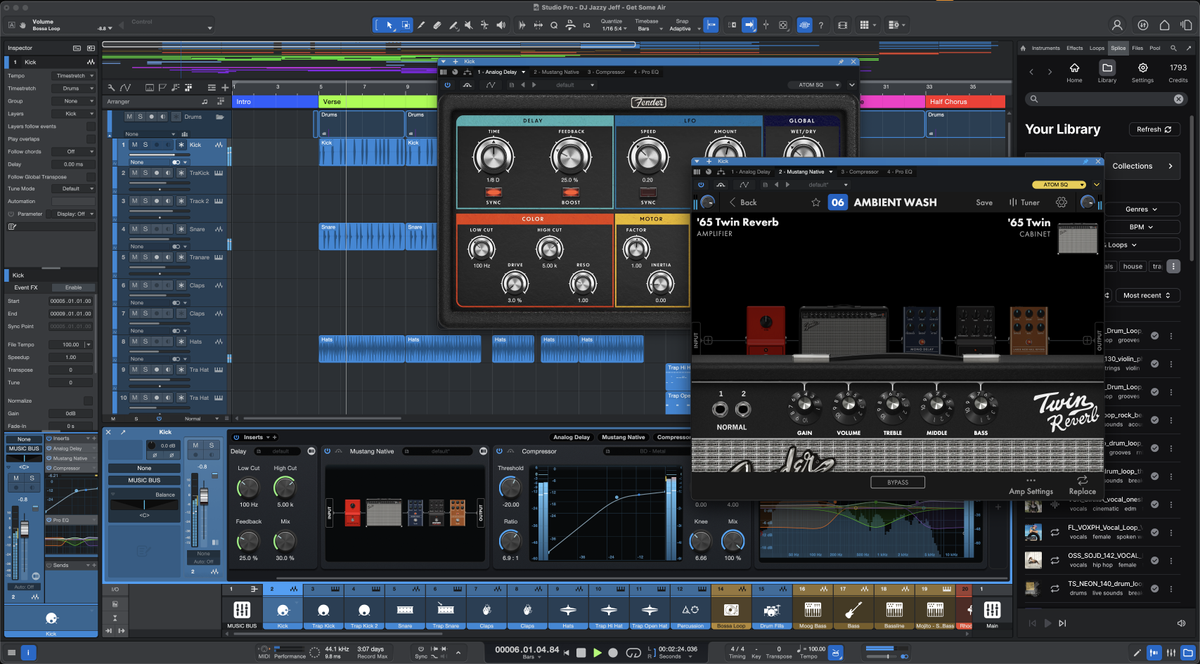
Fender Studio Pro 8 Released
-
- KVRAF
- 3496 posts since 30 Dec, 2014
KVR S1-Thread | The Intrancersonic-Design Source > Program Resource | Studio One Resource | Music Gallery | 2D / 3D Sci-fi Art | GUI Projects | Animations | Photography | Film Docs | 80's Cartoons | Games | Music Hardware |
-
qtheerearranger qtheerearranger https://www.kvraudio.com/forum/memberlist.php?mode=viewprofile&u=325452
- KVRian
- 922 posts since 26 Mar, 2014 from Denver, Co
holy smokes guys - a bug thats been there since version 2 on mac side is finally fixed! the qwerty keyboard bug when adjusting a parameter of a vst synth would cause hanging notes is gone! This was a huge reason i left studio one.
also ive seen some videos - just really want to emphasize you can right click a sample in the sample one text list and slice it. Then you want to make sure when you get your slices in the way you want you click to process the slices then you get per sample control of all the slices to fine tune.
i may be coming back to s1 soon. Really enjoying this update on a quick whirl.
also ive seen some videos - just really want to emphasize you can right click a sample in the sample one text list and slice it. Then you want to make sure when you get your slices in the way you want you click to process the slices then you get per sample control of all the slices to fine tune.
i may be coming back to s1 soon. Really enjoying this update on a quick whirl.
Bitwig 6 • Diva, Dune, Serum, and UVI Falcon are my Daily Drivers • Drum Machines • Harrison 32c + DSM 3 + American Class A Enjoyer • Apple M4 Max • Apollo User • DJ • Dance Music is life
-
- KVRAF
- 3125 posts since 6 Dec, 2002 from Ljubljana/ Slovenia
-
- KVRian
- 596 posts since 28 Apr, 2004 from not where I want to be...
I think this was fixed in one of the v7 updates.qtheerearranger wrote: Fri Jan 16, 2026 7:50 am holy smokes guys - a bug thats been there since version 2 on mac side is finally fixed! the qwerty keyboard bug when adjusting a parameter of a vst synth would cause hanging notes is gone! This was a huge reason i left studio one.
-
- KVRAF
- 12084 posts since 2 Dec, 2004 from North Wales
Any real world feedback on V8?
Upgrade slightly cheaper here than in my account
https://www.thomann.co.uk/fender_studio ... pgrade.htm
Upgrade slightly cheaper here than in my account
https://www.thomann.co.uk/fender_studio ... pgrade.htm
X32 Desk, i9 PC, S88MK3, S1, BWS, Live + PUSH 3, Osmose, RedShift 6 Pro3, Tempera, Syntakt, Digitone II, OP1-F, OPXY, Eurorack, TD27 Drums, Guitars, Basses, Amps and of course lots of pedals!
-
- KVRist
- 410 posts since 9 Oct, 2013 from uk
Go via AudioDeluxe and apply the promotion discount (10% off). You should see $90.00 US for the upgrade - which in the uk, current exchange rate means £67 GBP.SLiC wrote: Fri Jan 16, 2026 10:56 am Any real world feedback on V8?
Upgrade slightly cheaper here than in my account
https://www.thomann.co.uk/fender_studio ... pgrade.htm
Now, previous purchases from them (using payment through PayPal) meant that was the price I paid (current Xchange rate). No other taxes added... Don't know about this particular one; still deciding...
YMMV...
System 1 - Win11; i9 13900HK miniPC; 64Gb; Iris XE graphics; Cubase 15.0.10; Studio Pro v8.0.3;UR44 i/o
System 2 - Win10; i7 4790; 16Gb; GTX750Ti; Cubase v14.0.41; WLab Pro v12.0.51; StudioOne v6.6.4
System 2 - Win10; i7 4790; 16Gb; GTX750Ti; Cubase v14.0.41; WLab Pro v12.0.51; StudioOne v6.6.4
-
- KVRist
- 392 posts since 6 Aug, 2021
Well, I created a ticket to Presonus/Fender support.
Saying I that I paid for 4 major upgrades but only got 3 mid-level upgrades throughout my one year (bought SO7 in October 2024), and then I told them I also bought Quantum HD8 in November 2024 and got my one year of Studio One Plus, but not the perpetual license at the end of the subscription that I was promised when I bought HD8.
When buying, I thought I'd have two separate perpetual licenses, and I could sell one of them. I created a ticket to support back then, saying will I get the second perpetual license, and they told me that I would get it when the subscription ends.
After two days of waiting reply from support, just now I got this:
But I don't think they were entitled to do this. It's a nice gesture from them.
Now, what I wonder is will I be able to get only minor bug fixes (8.0.1) or also “major” updates (8.1). Or both? Or none?
Saying I that I paid for 4 major upgrades but only got 3 mid-level upgrades throughout my one year (bought SO7 in October 2024), and then I told them I also bought Quantum HD8 in November 2024 and got my one year of Studio One Plus, but not the perpetual license at the end of the subscription that I was promised when I bought HD8.
When buying, I thought I'd have two separate perpetual licenses, and I could sell one of them. I created a ticket to support back then, saying will I get the second perpetual license, and they told me that I would get it when the subscription ends.
After two days of waiting reply from support, just now I got this:
Well, I was kind of expecting this because I felt swindled.Hi Fornicras,
Thanks for reaching out!
I've deposited a Fender Studio Pro 8 license in your account as a one-time accommodation for the registration of your Quantum HD 8.
But I don't think they were entitled to do this. It's a nice gesture from them.
Now, what I wonder is will I be able to get only minor bug fixes (8.0.1) or also “major” updates (8.1). Or both? Or none?
-

- KVRAF
- 7026 posts since 19 Apr, 2002 from Utah
Why not email them directly, mention what they promised, and ask them to make it right? Maybe they will give you the new version, or give you a coupon for a discounted upgrade? If they made certain promises and didn't keep them, there is room for them to make it right.Fornicras wrote: Wed Jan 14, 2026 5:10 amI doubt they will do it but I’ll wait a a few days before I pay for the upgrade just in case.
Another sad thing is that people that have SO5 and SO7 pays the same price for the update. I’d be happier if I paid $79 instead of $99 as a SO7 user.
EDIT: LOL!! Wow!! What horrible timing with my post!!!
 I'm glad you got taken care of!!!
Last edited by audiojunkie on Fri Jan 16, 2026 5:13 pm, edited 2 times in total.
Vendor‑Dependent Copy Protection: Customers lose. Pirates win.
(Also: I'm Accused of lying about Linux—it boots, runs my pro audio workflow, stays stable, updates--though yearly dismissed as “niche”. Yet I'm the deluded one.)
(Also: I'm Accused of lying about Linux—it boots, runs my pro audio workflow, stays stable, updates--though yearly dismissed as “niche”. Yet I'm the deluded one.)
-
- KVRAF
- 7026 posts since 19 Apr, 2002 from Utah
Write them. It could be an oversightFornicras wrote: Wed Jan 14, 2026 5:23 pmWhat’s strange to me is that I bought Quantum HD8 November 24 and registered and got 1 year of plus subscription (when I already have the perpetual) with it but I still don’t have the “gift” in my account.Vocalpoint Studios wrote: Wed Jan 14, 2026 3:05 pmAll these "free" folks seemed to have acquired their licences via hardware purchases. Does not apply to 99.99% of us.Digivolt wrote: Wed Jan 14, 2026 3:01 pm https://www.reddit.com/r/StudioOne/comm ... er_studio/
Seems a bit of a mess for who got the "gift" and who got the "we're just not going to say anything about the 3rd update to v7 whose features we held for the rebrand"
As far as the "rebrand" goes - it's here and the door was officially closed yesterday on any more gripes etc about v7 and that goofy schedule they laid out.
No point in continuing to go on about that.
VP
EDIT: Ignore me!! I see that you got the problem resolved.
Vendor‑Dependent Copy Protection: Customers lose. Pirates win.
(Also: I'm Accused of lying about Linux—it boots, runs my pro audio workflow, stays stable, updates--though yearly dismissed as “niche”. Yet I'm the deluded one.)
(Also: I'm Accused of lying about Linux—it boots, runs my pro audio workflow, stays stable, updates--though yearly dismissed as “niche”. Yet I'm the deluded one.)
-
- KVRian
- 693 posts since 21 Nov, 2000 from somewhere over the rainbow
Downgrade back to v7. It‘s not (yet?) possible to choose favorite behavior.Pidaras wrote: Fri Jan 16, 2026 8:45 pm How can I get back double-clicking to open a plugin? It's really weird to use right now.
-

- GRRRRRRR!
- 17719 posts since 14 Jun, 2001 from Somewhere you're not!
You could do that in Orion 20-odd years ago. I think I used it once, to see how it worked.qtheerearranger wrote: Fri Jan 16, 2026 7:50 amjust really want to emphasize you can right click a sample in the sample one text list and slice it. Then you want to make sure when you get your slices in the way you want you click to process the slices then you get per sample control of all the slices to fine tune.
Orion had that 20 years ago, too. It just takes up precious screen real estate for no benefit.
Yeah, that's going to do my head in for a while but I'm sure we'll get used to it again.Pidaras wrote: Fri Jan 16, 2026 8:45 pmHow can I get back double-clicking to open a plugin? It's really weird to use right now.
NOVAkILL : Legion GO, AMD Z1x, 16GB RAM, Win11 | Audient EVO 8 | Lumi Keys | Studio Pro 8
Korg Odyssey, bx-oberhausen, Proxima, PolyMax, GR8, JP6K, Union, Atomika,
Invader 2, Flow Motion, Olga, TRK 01, Thorn, Spire, VG Iron
Korg Odyssey, bx-oberhausen, Proxima, PolyMax, GR8, JP6K, Union, Atomika,
Invader 2, Flow Motion, Olga, TRK 01, Thorn, Spire, VG Iron
-
- KVRAF
- 3125 posts since 6 Dec, 2002 from Ljubljana/ Slovenia
Dunno. It's not mandatory to use it. Quicker than f3 and looking at the channel. Even inspector, when open and taking up space, doesn't give you that much info at once.
I like it so far. In theory at least. Will give it a go in following weeks to see if the real life follows the theory.
You could be right.
-
- GRRRRRRR!
- 17719 posts since 14 Jun, 2001 from Somewhere you're not!
My default view is to see the whole project. To me that simply makes the most sense. With the "zoom extent" or whatever it's called button, you can zoom in whenever you need to and be back out to the full arrangement in the blink of an eye. What might be helpful is a zoom toggle, where you go between the latest two zoom states, but I can live just fine without it.
I never use the Inspector either, it is a complete waste of space. I don't even understand why it exists, it doesn't actually do anything you can't do somewhere else. OK, there might be one or two arcane type things but it ain't worth having that whole panel visible for. Those things could go into a right-click menu or something. I've always assumed it is something that has been in Cubase forever, that was probably useful at some point, and people got used to working with it. But I don't see the point of having it now, it feels like pointless duplication.
I never use the Inspector either, it is a complete waste of space. I don't even understand why it exists, it doesn't actually do anything you can't do somewhere else. OK, there might be one or two arcane type things but it ain't worth having that whole panel visible for. Those things could go into a right-click menu or something. I've always assumed it is something that has been in Cubase forever, that was probably useful at some point, and people got used to working with it. But I don't see the point of having it now, it feels like pointless duplication.
NOVAkILL : Legion GO, AMD Z1x, 16GB RAM, Win11 | Audient EVO 8 | Lumi Keys | Studio Pro 8
Korg Odyssey, bx-oberhausen, Proxima, PolyMax, GR8, JP6K, Union, Atomika,
Invader 2, Flow Motion, Olga, TRK 01, Thorn, Spire, VG Iron
Korg Odyssey, bx-oberhausen, Proxima, PolyMax, GR8, JP6K, Union, Atomika,
Invader 2, Flow Motion, Olga, TRK 01, Thorn, Spire, VG Iron
-
- KVRAF
- 3496 posts since 30 Dec, 2014
It's purpose was to provide easy access to properties such as Event FX settings that were not available anywhere else. When you place an effect on an event, you can choose to have that effect rendered to that event or allowed to play un-effected and potentially use more CPU cycles. That's what I used it for mainly. There was no other place for this to be found in the GUI.BONES wrote: Sat Jan 17, 2026 1:03 am My default view is to see the whole project. To me that simply makes the most sense. With the "zoom extent" or whatever it's called button, you can zoom in whenever you need to and be back out to the full arrangement in the blink of an eye. What might be helpful is a zoom toggle, where you go between the latest two zoom states, but I can live just fine without it.
I never use the Inspector either, it is a complete waste of space. I don't even understand why it exists, it doesn't actually do anything you can't do somewhere else. OK, there might be one or two arcane type things but it ain't worth having that whole panel visible for. Those things could go into a right-click menu or something. I've always assumed it is something that has been in Cubase forever, that was probably useful at some point, and people got used to working with it. But I don't see the point of having it now, it feels like pointless duplication.
It just makes things easier, just like having a properties panel in Cinema 4D every time you click on an object.
KVR S1-Thread | The Intrancersonic-Design Source > Program Resource | Studio One Resource | Music Gallery | 2D / 3D Sci-fi Art | GUI Projects | Animations | Photography | Film Docs | 80's Cartoons | Games | Music Hardware |