


Hi.
For Live Mode,
could we please add Channel (with Omni as a possibility also) for the driving notes?
IOW, only notes on the specified Channel (or all channels if Omni is selected) would drive the Live Mode.
This will help to best accommodate various setups with different sources, desired keyboard splits. etc. Thanks!
RapidComposer 6 beta feedback and discussion
-

- KVRian
- 1177 posts since 13 Mar, 2017
Hi once more <g>.
More control of Live Mode stop action would be very helpful.
Most flexible I think would be both of:
1. Respond to MIDI Stop message [On / Off] Since many controllers already offer the sending of this on a dedicated button in order to command DAWs etc.
2. Allow definition of (at least one, or potentially more than one) arbitrary incoming MIDI message to act as Stop. The user could then use whatever CC or Note or other message desired to have the stop control be always easily accessible in performance. In my case, I would want this not to be a Note, because I like the idea of a defined set of Notes (e.g. a particular octave/channel) to be the "do it" triggers for Live Mode playback without possibility of accidentally hitting a Stop when not intended. Some folks though may explicitly want exactly that, so flexibility of definition is desirable here. This operation should also have an [On / Off] switch.
Thanks again!
P.S. And as mentioned elsewhere, being able to click on the RC Stop button in the UI would be desirable too (if possible).
More control of Live Mode stop action would be very helpful.
Most flexible I think would be both of:
1. Respond to MIDI Stop message [On / Off] Since many controllers already offer the sending of this on a dedicated button in order to command DAWs etc.
2. Allow definition of (at least one, or potentially more than one) arbitrary incoming MIDI message to act as Stop. The user could then use whatever CC or Note or other message desired to have the stop control be always easily accessible in performance. In my case, I would want this not to be a Note, because I like the idea of a defined set of Notes (e.g. a particular octave/channel) to be the "do it" triggers for Live Mode playback without possibility of accidentally hitting a Stop when not intended. Some folks though may explicitly want exactly that, so flexibility of definition is desirable here. This operation should also have an [On / Off] switch.
Thanks again!
P.S. And as mentioned elsewhere, being able to click on the RC Stop button in the UI would be desirable too (if possible).
-
crossovercable crossovercable https://www.kvraudio.com/forum/memberlist.php?mode=viewprofile&u=329708
- KVRian
- 576 posts since 26 May, 2014
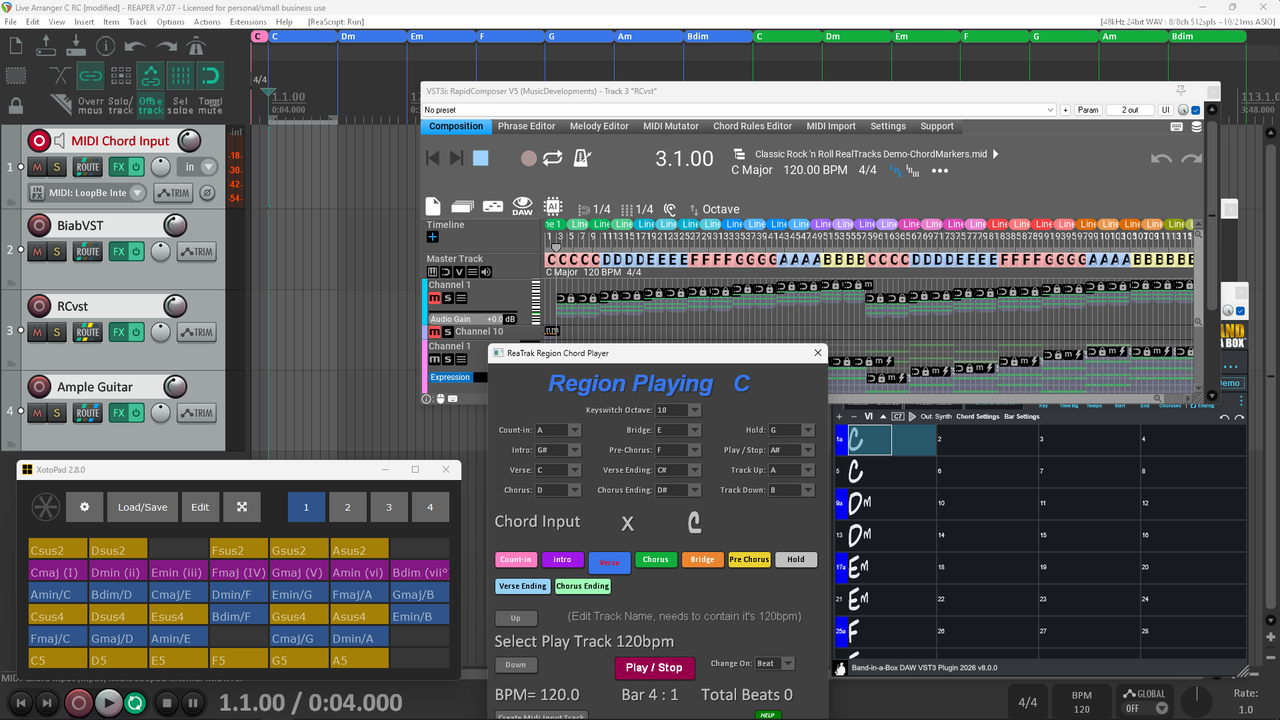
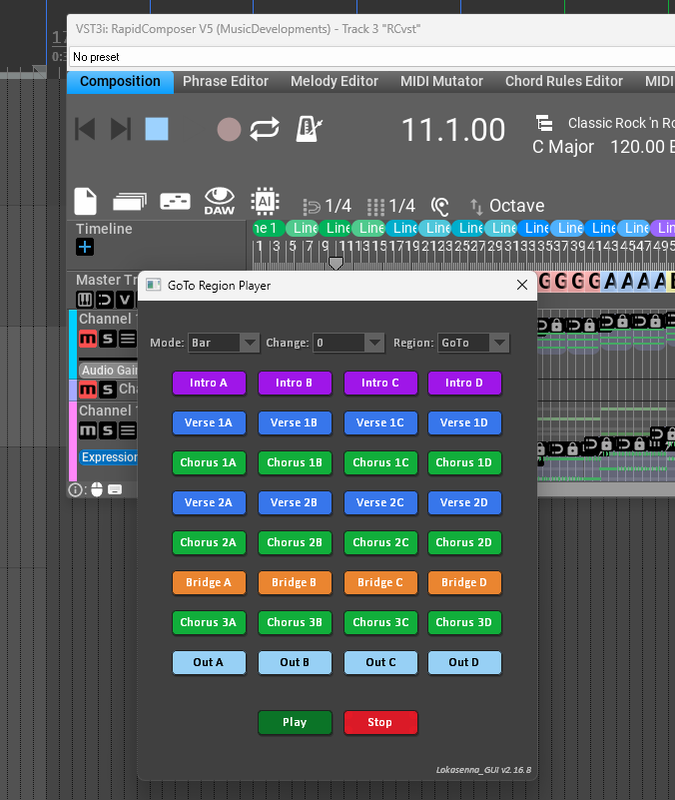
The easiest way to get total control of anything I want to do with RC is load the RCvst into Reaper the same as I have the Band in a Box vst loaded in Reaper in the previous example, this way you can script Reaper to do anything you like with RC. I remember making a section player GUI in Reaper that you just click the buttons but I could adapt midi note input to it. I think there are so many user scripts to do this sort of thing that could take advantage of all the great capabilities of RC. I'm not sure if AutoHotkey works with RC but I could run AHK scripts from Reaper to control Band in a Box functions. I even scripted it to load Biab files instantly and directly into Reaper without having to render to wave files.
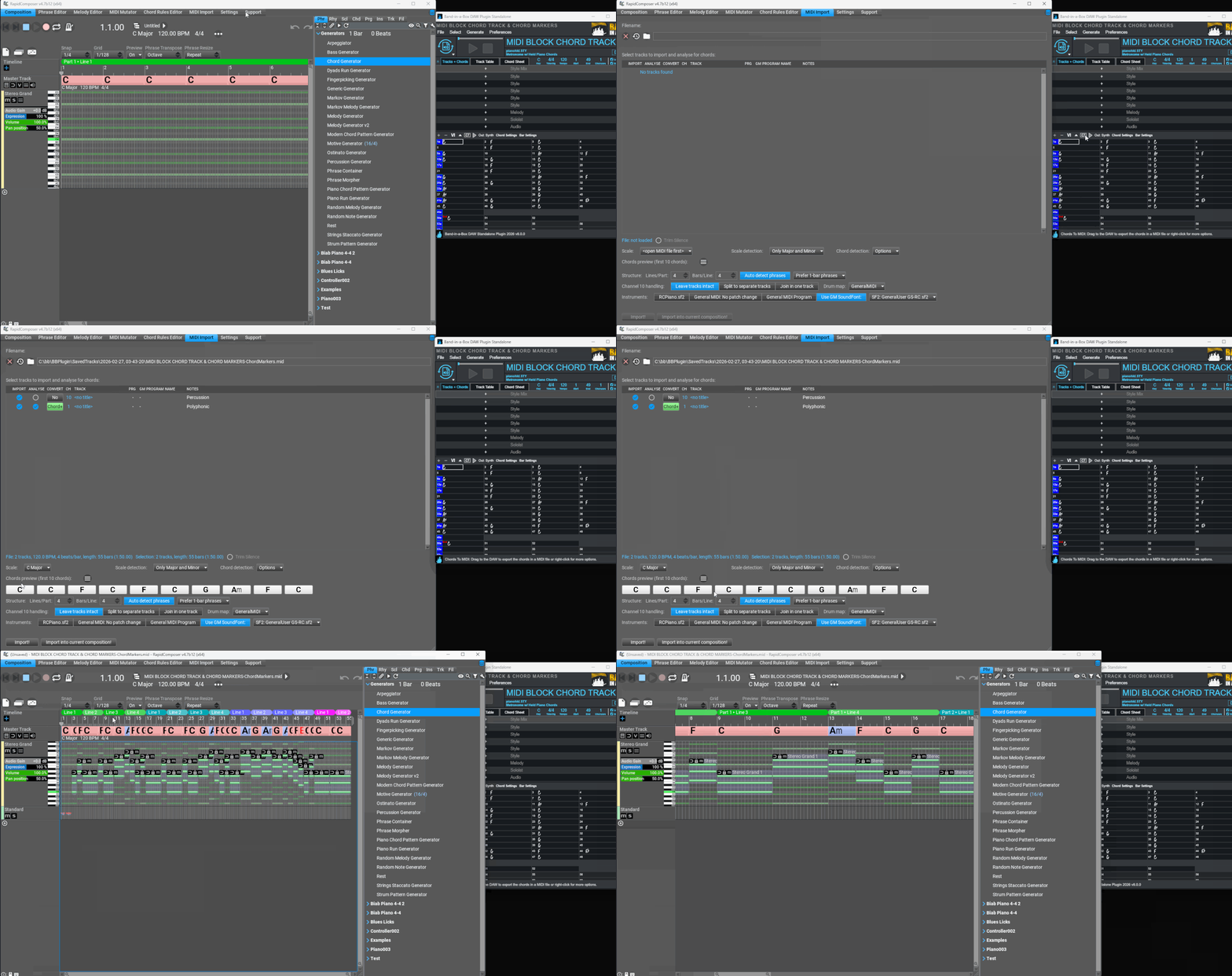
If I remember correctly RC should have midi chord marker, I think I asked for it, then you can just drag the midi out of RC into Reaper this will give the same chords in Reaper's markers or region timeline.
If I remember correctly RC should have midi chord marker, I think I asked for it, then you can just drag the midi out of RC into Reaper this will give the same chords in Reaper's markers or region timeline.
-
- KVRAF
- 1752 posts since 30 Nov, 2013
Hi ! Maybe someone can tell me ? Is it possible now to import an absolute mono midi file so that RC will detect the scale and set the scale or scales in the master track? If not, this is a very welcome request to Attila. Thank you.
-

- KVRian
- 975 posts since 21 Feb, 2015
Any Paypal option?
-
crossovercable crossovercable https://www.kvraudio.com/forum/memberlist.php?mode=viewprofile&u=329708
- KVRian
- 576 posts since 26 May, 2014
email Attila.
Here's a video of RCvst in Reaper giving playback control, once you get it in Reaper you have so many more options to do what you like, see GoTo Region Player below, just a simple script that can be customize to whatever you like.
Video Watch: https://www.dropbox.com/scl/fi/2l6oy4lz ... ku46q&dl=0
Video Download: https://www.dropbox.com/scl/fi/2l6oy4lz ... ku46q&dl=1
Drag Midi Chord Track into RC, or you can drag midi chord track out of RC into Reaper markers/regions:
GoTo Region Player Reaper:
-
shiningstarswwsj shiningstarswwsj https://www.kvraudio.com/forum/memberlist.php?mode=viewprofile&u=272346
- KVRer
- 18 posts since 8 Jan, 2012
Hey Attila,
I had an idea while working across multiple projects.
Would it be possible to implement section/parts based import from another RapidComposer project, or more generally an Import Tracks From Project feature? I’ve attached two mock-ups for reference to better explain the concept. I thought this might be a useful workflow improvement in RapidComposer.
For example:
Import only bars 9–17 from another project
Import only selected tracks or a section of the selected tracks
Import chord track only
Option to merge or place below selected track
It’s just a visual idea to show how the feature could work in the interface. Hope it helps illustrate the suggestion more clearly. This would make it much easier to reuse ideas, sections, alternate arrangements, or even harmonic experiments without copying entire project files.
Thanks again, Attila, for always being open to new ideas!
I had an idea while working across multiple projects.
Would it be possible to implement section/parts based import from another RapidComposer project, or more generally an Import Tracks From Project feature? I’ve attached two mock-ups for reference to better explain the concept. I thought this might be a useful workflow improvement in RapidComposer.
For example:
Import only bars 9–17 from another project
Import only selected tracks or a section of the selected tracks
Import chord track only
Option to merge or place below selected track
It’s just a visual idea to show how the feature could work in the interface. Hope it helps illustrate the suggestion more clearly. This would make it much easier to reuse ideas, sections, alternate arrangements, or even harmonic experiments without copying entire project files.
Thanks again, Attila, for always being open to new ideas!
You do not have the required permissions to view the files attached to this post.
-
crossovercable crossovercable https://www.kvraudio.com/forum/memberlist.php?mode=viewprofile&u=329708
- KVRian
- 576 posts since 26 May, 2014
If I remember correctly in RC settings there is an option to allow copy between instances, you should be able to copy most things from one project to another if you have more than one instance running.
-
 musicdevelopments musicdevelopments https://www.kvraudio.com/forum/memberlist.php?mode=viewprofile&u=223336
 - KVRAF
- Topic Starter
- 6004 posts since 9 Jan, 2010
Yes, PayPal is supported.
Thanks,
Attila
https://www.musicdevelopments.com
Home of RapidComposer, Melodya, MIDI Mutator and Syne
Summer Sale • June 3-15 • 40% off RapidComposer, Melodya, MIDI Mutator, Syne
Home of RapidComposer, Melodya, MIDI Mutator and Syne
Summer Sale • June 3-15 • 40% off RapidComposer, Melodya, MIDI Mutator, Syne
-
musicdevelopments musicdevelopments https://www.kvraudio.com/forum/memberlist.php?mode=viewprofile&u=223336
- KVRAF
- Topic Starter
- 6004 posts since 9 Jan, 2010
RapidComposer v6.1b3 is available!
This is the first version with the new UI engine.
This means smoother window resizing, fully replaced text editing and drag-and-drop, trackpad support also on Windows, and no more weird issues on macOS when working with the AU/VST3 plug-in windows, as well as less chance for a deadlock. In addition this version features a new rhythm generator that makes "son clave" based patterns used in hit songs by Ed Sheeran, Ariana Grande, Taylor Swift and others.
I need help with testing the following, please confirm if these work well:
- retina support on macOS
- multi-monitor usage
- trackpad usage on Windows laptops
Improvements:
This is the first version with the new UI engine.
This means smoother window resizing, fully replaced text editing and drag-and-drop, trackpad support also on Windows, and no more weird issues on macOS when working with the AU/VST3 plug-in windows, as well as less chance for a deadlock. In addition this version features a new rhythm generator that makes "son clave" based patterns used in hit songs by Ed Sheeran, Ariana Grande, Taylor Swift and others.
I need help with testing the following, please confirm if these work well:
- retina support on macOS
- multi-monitor usage
- trackpad usage on Windows laptops
Improvements:
- Implemented a new UI rendering engine with improved window resizing, drag-and-drop, and enhanced text editing.
- Added new rhythm generator: Clave Rhythm.
- Added a dedicated 'Drag Composition' button in the top-right corner with right-click settings.
- Tracks now include a 'Drag' button next to the track title for easier drag-and-drop. Ctrl-dragging the File button or track title is no longer required
- The STOP button remains active during Live mode, and can be used to stop playback
https://www.musicdevelopments.com
Home of RapidComposer, Melodya, MIDI Mutator and Syne
Summer Sale • June 3-15 • 40% off RapidComposer, Melodya, MIDI Mutator, Syne
Home of RapidComposer, Melodya, MIDI Mutator and Syne
Summer Sale • June 3-15 • 40% off RapidComposer, Melodya, MIDI Mutator, Syne
-
- KVRist
- 409 posts since 9 Oct, 2013 from uk
Thanks for the update Attila.!
As for testing, I have already emailed you with my findings about the new TrackPad support for Windows Laptops (after you sent me the pre-release). Lets see if there's other insight from users on this...
As for testing, I have already emailed you with my findings about the new TrackPad support for Windows Laptops (after you sent me the pre-release). Lets see if there's other insight from users on this...
System 1 - Win11; i9 13900HK miniPC; 64Gb; Iris XE graphics; Cubase 15.0.10; Studio Pro v8.0.3;UR44 i/o
System 2 - Win10; i7 4790; 16Gb; GTX750Ti; Cubase v14.0.41; WLab Pro v12.0.51; StudioOne v6.6.4
System 2 - Win10; i7 4790; 16Gb; GTX750Ti; Cubase v14.0.41; WLab Pro v12.0.51; StudioOne v6.6.4
-
- KVRian
- 1405 posts since 11 Nov, 2013
Hi Attila
I test the b3 and i use a 2560x1440 and scale 125% display resolution. when i make window in standalone larger as 1080 in width there is black space on right side only . i load in a simple test so it is no problem with too complex tracks or so. with the win 11 25 h2 rc now work correct with shared midi too . maybe you can also implement this feature with the grid. you answer it is easy to implement. I mean this at beginning of the thread
maybe it is possoble to add another live mode that C2 is Part 1 Line 1. C3 is Part 2 Line 1 C4 is Part 3 Line 1 c# depend on octave is then Line 2 . d Line 3 d# Line 4 . I have 8x8 pad. for such pads can also be a option 8 rows are 8 parts and colums can be 8 lines. for 4x4 pads can be 4 parts and 4 lines.
I test the b3 and i use a 2560x1440 and scale 125% display resolution. when i make window in standalone larger as 1080 in width there is black space on right side only . i load in a simple test so it is no problem with too complex tracks or so. with the win 11 25 h2 rc now work correct with shared midi too . maybe you can also implement this feature with the grid. you answer it is easy to implement. I mean this at beginning of the thread
maybe it is possoble to add another live mode that C2 is Part 1 Line 1. C3 is Part 2 Line 1 C4 is Part 3 Line 1 c# depend on octave is then Line 2 . d Line 3 d# Line 4 . I have 8x8 pad. for such pads can also be a option 8 rows are 8 parts and colums can be 8 lines. for 4x4 pads can be 4 parts and 4 lines.
You do not have the required permissions to view the files attached to this post.
win 11 64 25H2 ryzen 8600G (6*4.3 GHZ) 48 GB Ram