Mini - interactive sample browser

VST, AU, AAX, CLAP, etc. Plugin Virtual Instruments Discussion
Post Reply New Topic
RELATED
PRODUCTS
AudioMap Mini$35.00Buy

Post

1. this will come in the future
Thank you!
I'm trying to not clutter the GUI, where do you think it would fit?
Good question. I don't really know yet, I need to spend more time with Mini :ud:

One last question, if you don't mind : did you consider an intro price ?

Post

I'm trying to not clutter the GUI, where do you think it would fit?
Maybe in, the bottom right section of the GUI, which is empty?

Post

sinkmusic wrote: Sun Feb 22, 2026 2:17 pm One last question, if you don't mind : did you consider an intro price ?
To be frank, I think it is currently way underpriced for the amount of possibilities, the effort put in and the insane musical results one can get from it, especially with the additions and changes this week.
sinkmusic wrote: Sun Feb 22, 2026 2:21 pm Maybe in, the bottom right section of the GUI, which is empty?
That's fair, as a mute/solo button or a toggle :tu:

Post

Fantastic - great options, easy to use! Thanks!

Post

beeellecee wrote: Sun Feb 22, 2026 6:31 pm Fantastic - great options, easy to use! Thanks!
Happy to hear that!

Post

AudioMap wrote: Sun Feb 22, 2026 2:36 pm
sinkmusic wrote: Sun Feb 22, 2026 2:17 pm One last question, if you don't mind : did you consider an intro price ?
To be frank, I think it is currently way underpriced for the amount of possibilities, the effort put in and the insane musical results one can get from it, especially with the additions and changes this week.
Indeed, the price is fair. I need to try it a bit deeper, but I'm really considering buying it.
Do you have any roadmap for future updates?
Do you want to keep it simple or would you consider making it a more comprehensive sample manager (think Sononym / Sonikstation)?
AudioMap wrote: Sun Feb 22, 2026 2:36 pm
sinkmusic wrote: Sun Feb 22, 2026 2:21 pm Maybe in, the bottom right section of the GUI, which is empty?
That's fair, as a mute/solo button or a toggle :tu:
:tu:

Post

sinkmusic wrote: Mon Feb 23, 2026 4:38 pm Do you have any roadmap for future updates?
Do you want to keep it simple or would you consider making it a more comprehensive sample manager (think Sononym / Sonikstation)?
Yes! Thanks for asking, I do have a long list of todo items. The aim has been in instrument / sound design / exploration direction, specifically for Mini. An extended version would add more granular controls and options for power users. I just found it genuinely fun to open it, search for some keywords and just play. While Mini can be quite versatile, apart from sound similarity search, I'll probably leave the comprehensive/tagging features to software that does this best since I'm not trying to compete with them. Fresh musical results is what I'm definitely after and is the reason why this exists :)

Post

AudioMap wrote: Fresh musical results is what I'm definitely after and is the reason why this exists :)
:pray:

Post

Nice and nifty tool! I purchased a license last week after trying out the demo. Drag and drop also works with virtual instruments. Ik went through thousands of samples, found some nice ones and dropped them in Ultra and Falcon. Probably works for other instruments as well. I used Reaper for this. Very quick and fun way to audition and find the right samples and build new instruments.

Would it be possible to mark/select a sample as interesting or drag and drop it in separate folder which is something like a shortlist for a project? It should a copy of the original sample, just to leave the original one intact but still has all the meta data and location of the original one.

Still unclear to me how the play function works in Audiomap mini , may be a small tutorial or a Help file with instructions how to do certain things? Looking forward to see where this is going.

Post

Cepheus wrote: Mon Feb 23, 2026 10:51 pm Nice and nifty tool! I purchased a license last week after trying out the demo. Drag and drop also works with virtual instruments. Ik went through thousands of samples, found some nice ones and dropped them in Ultra and Falcon. Probably works for other instruments as well. I used Reaper for this. Very quick and fun way to audition and find the right samples and build new instruments.
Nice! Good to hear this :tu: Exactly, and you can Shift+Drag to make a selection to select multiple.
Cepheus wrote: Mon Feb 23, 2026 10:51 pm Would it be possible to mark/select a sample as interesting or drag and drop it in separate folder which is something like a shortlist for a project? It should a copy of the original sample, just to leave the original one intact but still has all the meta data and location of the original one.
If you are running the latest version, you can do that either by pressing F when hovering over a sample, or when making a multi-sample selection. This puts the samples into a "Favourites" folder, which you can solo/mute/DnD.
Cepheus wrote: Mon Feb 23, 2026 10:51 pm Still unclear to me how the play function works in Audiomap mini , may be a small tutorial or a Help file with instructions how to do certain things? Looking forward to see where this is going.
Sure, I'd recommend clicking the "?" button in the top right corner to bring up shortcuts, but maybe a PDF or a simple explanatory video would make sense. Ctrl+Drag creates a MIDI line, which maps your samples on your keyboard. If you are referring to the "P" button, that is to toggle audio preview when hovering over the dots.

Post

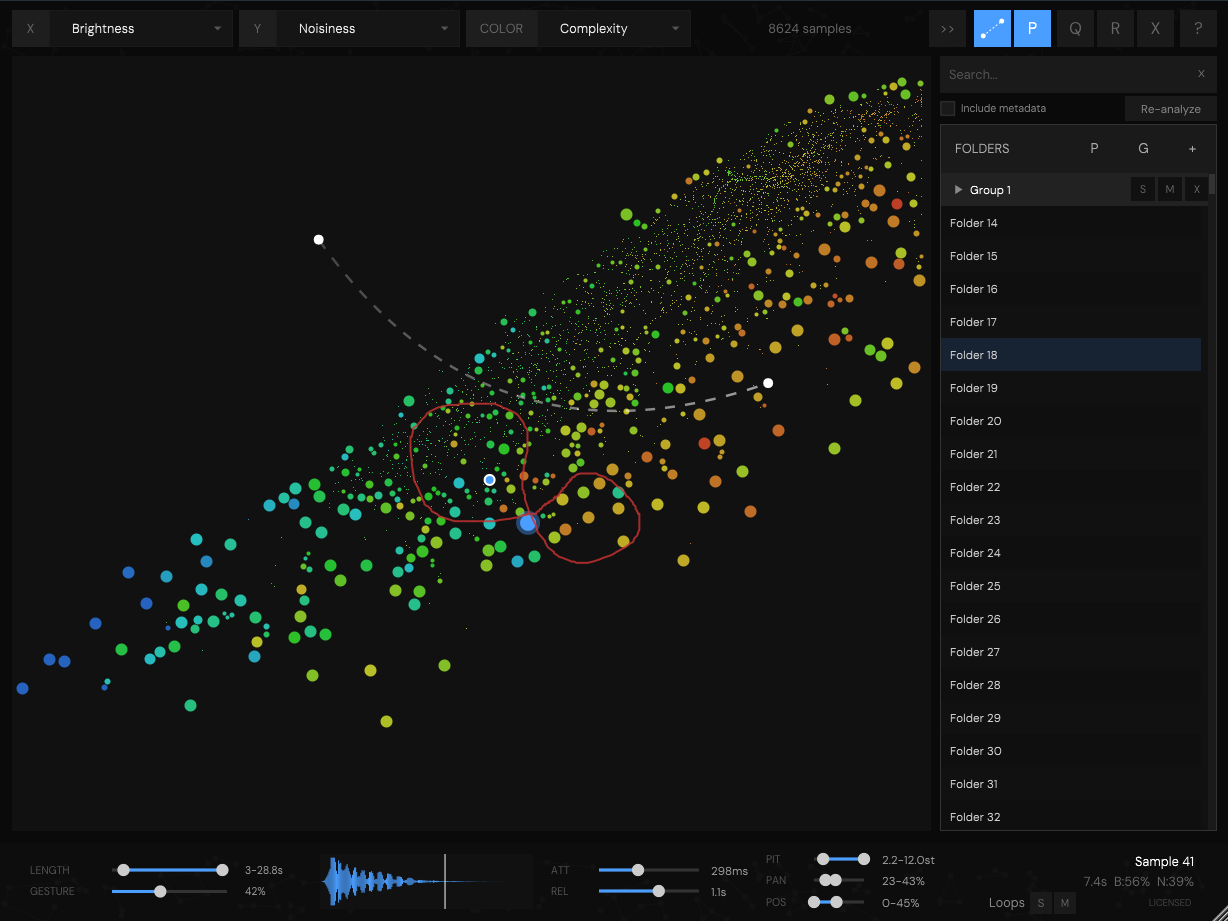
1.1.2 is out, so far updates since 1.1.0:
- UI improvements (layout, text, S/M/X)
- Loops Solo/Mute in footer to isolate looping samples
- Loops now play continuously on mouse hover
- Improved loop detection
- "Loading from cache..." on startup instead of analyzing text
- S/M/X hidden by default unless hovered on
- (and many more tweaks)

- some minor bugfixes, e.g. midi playback when having Length selected, and making playback possible when moving the Cursor X/Y parameters while having GUI closed.

I'm quite happy with the layout here. Icons are coming in the next few days.

1.1.1:
- XY Cursor automation parameters: CC2/CC3 control cursor position for sample triggering
- MIDI CC1 controls gesture position
- Cursor works without editor open (headless triggering from CC)
- Gesture position slider
- Folders panel toggle button (>>) to hide/show right panel
- Settings: "Mouse to Automation", "Remove 30s playback cap", "Cursor leave preview"
- Random Pitch, Pan, and Start Position controls
- Attack envelope slider (0-5000ms, log-scaled)
- Polyphony enabled by default
- Enter key confirms group name input

Image

Post

nice update, thank you!

Post

Just bought Mini! :party:

I have three questions :

1- How does it behave when two samples are identical ? I mean, are the dots 100 % overlaid on the map? Or is it a way to « unstack » / find / check duplicate samples ?
I wish that when such a thing happens, there would be a way to select the one we wish to keep (or the one we wish to trash to the bin, or make invisible).

2- Did you consider something like a « pool » somewhere on the GUI, where we could drag & drop samples and sort them so we could make a temporary kit (and then later bulk drag & drop to the DAW, or to a folder, or even save as into a new folder, etc) ?
It would be great for the workflow, as we wouldn’t have to leave the GUI, drag & drop, and then come back, etc. Also it would allow browsing in many folders but saving some samples in a "virtual basket" to use them or copy them altogether once the selection is made.

3- Is there any way to save samples as a new sample once the effects (attack, decay, pitch, etc) are applied ?

Post

sinkmusic wrote: Thu Feb 26, 2026 5:43 pm 1- How does it behave when two samples are identical ?

2- Did you consider something like a « pool » somewhere on the GUI, where we could drag & drop samples and sort them so we could make a temporary kit (and then later bulk drag & drop to the DAW, or to a folder, or even save as into a new folder, etc) ?

3- Is there any way to save samples as a new sample once the effects (attack, decay, pitch, etc) are applied ?
Ha, it is good to see that it sparks ideas.
1: they overlap. Can you point to a specific use case when that would be useful to have?
2: you can currently use F while hovering over a sample (or having a multi-selection) to put it to "Favourites" - having a pool would duplicate the functionality, so either extending the "Favourites" to be able to reorder, or switching to the pool solution - I'd be inclined to the first, otherwise it would mean a significant code rewrite. What musical background do you come from? I'm trying to keep Mini as lightweight as possible, so I'm carefully considering every feature addition.
3: Not in this version, but I've been considering resampling into buffers as users play, which worked on unreleased standalone version and I found using before for sure.

I think the strongest argument for all would be to remove any kind of resistance or slow the creative process down, which I'm all for. Being able to just play and enjoy music without having to think about hacky solutions to problems is something I'm certainly for :tu:

Post

The last Version is pretty good on Linux - i bought it too...it worth it - imho.

Post Reply

Return to “Instruments”