
VST controls on MUX panel

Official support for: mutools.com
Post Reply New Topic
RELATED
PRODUCTS

Post

Hi
Is it possible to insert a control from a VST witch is on my MUX modular panel, on the MUX panel ?
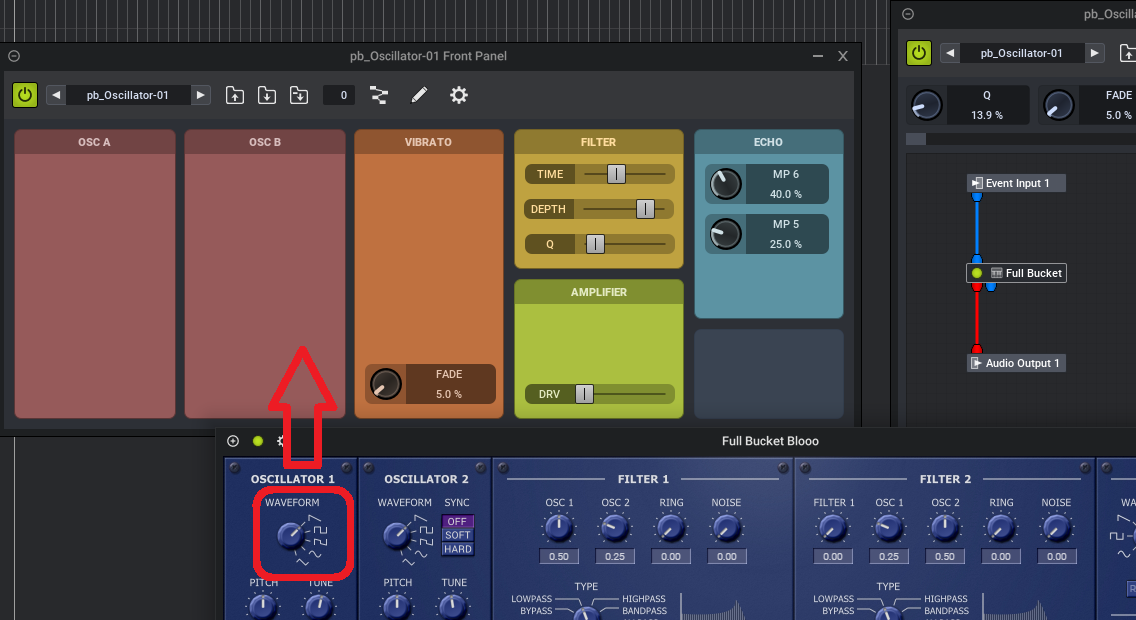
Image
http://www.dr-midik.fr/temp/fofo.png

Post

Yes. Take MDA ePiano, for example. Drop it into the MUX you're editing, open up the MDA ePiano front panel, open up the MUX front panel and go into edit mode, right-click "Add Parameter", then switch to MDA ePiano and pick the parameter.
Screenshot 2026-03-03 181755.png
For something with a custom GUI, use the "Edit in Generic Editor" option to open the plugin
Screenshot 2026-03-03 182025.png
You do not have the required permissions to view the files attached to this post.

Post

Thank you, I wasn't in panel edit mode, and I didn't think to watch in all entries.

For help all guys who search, in MuLab 10 :
- open VST interface
- click on "Tools" icon and select "Edit In Generic Editor"
- open MUX front panel
- select "Edit mode" icon
- right-click on Panel Edit mode > "Add Component" > "Parameter"
- on VST Generic Editor click on parameter you want

Many thanks to you.

Post

pascalb wrote: Tue Mar 03, 2026 7:08 pm Thank you, I wasn't in panel edit mode, and I didn't think to watch in all entries.

For help all guys who search, in MuLab 10 :
- open VST interface
- click on "Tools" icon and select "Edit In Generic Editor"
- open MUX front panel
- select "Edit mode" icon
- right-click on Panel Edit mode > "Add Component" > "Parameter"
- on VST Generic Editor click on parameter you want

Many thanks to you.
Also you might use another option:
- open MUX front panel
- on VST Generic Editor RIGHT-click on parameter you want
- choose "Drag" and drag this parameter to MUX front panel
or even
- simply left-click-hold-drag the parameter from Generic Editor to MUX front panel (needs right place to click on, may not work in some cases, needs some practice; but if you drag many ones sequentially it saves a lot of time)

Post

Thanks ortseam ! :tu:

Post

Quickest method is indeed to drag the parameter to the front panel. (not via "Add Parameter")
To drag a parameter click-drag its name. (or value text)

Also see attached screenshot specific to drag a plugin parameter.
Also see https://www.mutools.com/info/M10/docs/m ... ugins.html
specifically the section "Focused Plugin Parameter Control".
You do not have the required permissions to view the files attached to this post.

Post

I belived that it didn't work, I tried to drag with it knob... on the it works fine when gragging name, and it's easyer.
Thank you

Post

You can't drag the knob as the knob is used to change the parameter value ;)

Post Reply

Return to “MuTools”