
Zebra 3 Beta Bug Reports

Official support for: u-he.com
Post Reply New Topic
RELATED
PRODUCTS

Post

Image

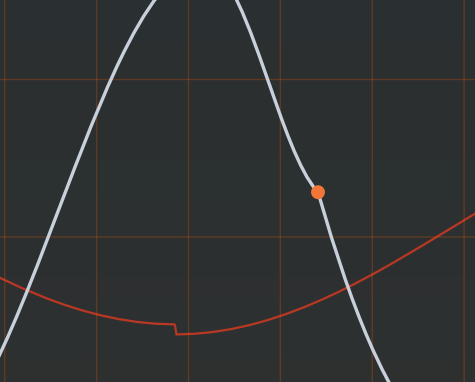
any design reason to create necessity to click cursor tool to move the selected dot around?

Post

stevenkeen wrote: Fri Apr 03, 2026 1:45 pm Intel MacPro, macOS Sonoma 14.8.3, Fender Studio Pro 8.x.x, VST3 version

I get DAW crashes when browsing presets. Seems sort of random, but rather consistent. I can go through 3-4, maybe 5 presets just fine, and then suddenly, the next one will crash the program (suing the Next preset arrow). Doesn't seem to be a pattern or tied to specific presets.
What revision number does your Zebra 3 beta have? Check if it's 20977 found here: viewtopic.php?t=628418

If it is 20977, please contact our support team. This must be an isolated issue.

If you have an earlier beta, simply click link above and install the newer version.

Post

eclipse_soundlab wrote: Fri Apr 03, 2026 2:24 pm any design reason to create necessity to click cursor tool to move the selected dot around?
The editor is designed with a very clear paradigm:

If you want to move a point, you need to click a point (likewise, if you click & drag a line, you edit the line, if you just click it, you straighten it, and so on)
If you click into free space, you deselect all point.
If you drag from free space, you get the selection tool.

We decided that it is crucial that multiple points can be selected quickly without holding a modifier key or changing the tool. Therefore, a selected point still needs to be hit in order to move it.

Post

Zebra3 does not react to Midi notes from my Midi controllers when using Reaper, I see the yellow square/spike indicating midi is sent, but I am hearing no sound. Using the Performance tab in the plugin UI however produces output, and notes in Reaper's Midi-items work too. Reproduced in both clap and vst3.
Zebralette3 however reacts to those very same controllers in Reaper (from all channels, send to channel 1).

In Ableton Live Lite11, Zebra3 reacts to those controllers.

Environment: Win10 x64, Reaper 7.67, Zebra3 beta 20977

Update: After reconnecting my audio interface, rebooting my machine and starting with a fresh Reaper project, both vst3 and clap work as expected. Just to check if it works, I loaded yesterdays project and there it still didn't. So this may be a corrupted state persisted in that project file, I guess.

Update2: happened today again. Loaded Zebra3 via track template, vst window took like 5 secs until the Zebra UI appeared. Once loaded, it did not react to controllers. Added an empty track, added Zebra3 as FX, same. Added another track, on that Zebra3 reacted to the controller as expected. May be a timing related issue that only happens on slower hardware, perhaps?

Post

Newest beta, Windows 11, Plugin Buddy, VST3

The ABCD knobs don't update on the UI when dragging or scrolling
Always Read the Manual!

Post

Zebra 3.0 Final Beta 21625 Win (VST3)

Hard crash FL Studio (latest) when closing and reopening the Zebra3 UI (random) while engine is running (music playing)

Post

Zebra 3.0 Final Beta 21625 Win

For better tracking here:

Single partial in precise math generates waveform including the next partial.
65a68b42-05b6-44d2-a359-176506922e95.png
You do not have the required permissions to view the files attached to this post.

Post

Not sure if this is intentional, but map-o-matic no longer allows selecting between morph sources.

Image

Post

PieBerger wrote: Wed Apr 08, 2026 1:38 pm Newest beta, Windows 11, Plugin Buddy, VST3

The ABCD knobs don't update on the UI when dragging or scrolling
You mean they don’t move on the GUI when you click and drag them with the mouse? And if so, are these four the only ones? Other parameters do react to the mouse?

Did you maybe create an automation lane for these parameters, if Plugin Buddy has automation (sorry, first time I heard of this host).

Or do you mean they don’t move when you use the assigned MIDI controller?

Could you try it in another VST3 host?
That QA guy from planet u-he.

Post

joradn wrote: Thu Apr 09, 2026 3:37 am Not sure if this is intentional, but map-o-matic no longer allows selecting between morph sources.
Oopsie, not intentional. :oops:
That QA guy from planet u-he.

Post

tasmaniandevil wrote: Thu Apr 09, 2026 8:43 am
PieBerger wrote: Wed Apr 08, 2026 1:38 pm Newest beta, Windows 11, Plugin Buddy, VST3

The ABCD knobs don't update on the UI when dragging or scrolling
You mean they don’t move on the GUI when you click and drag them with the mouse? And if so, are these four the only ones? Other parameters do react to the mouse?

Did you maybe create an automation lane for these parameters, if Plugin Buddy has automation (sorry, first time I heard of this host).

Or do you mean they don’t move when you use the assigned MIDI controller?

Could you try it in another VST3 host?
Correct, the ABCD knob positions don't update on the UI when dragging/scrolling. Every other knob and slider that's visible in the init patch i.e. Osc 1 & 2, Env 1 updates as expected, except for the PW and MW sliders. These are also linked to MIDI, so perhaps it's an idiosyncrasy with this particular host (which is a solution to host/use VST3 as standalone instruments).

I don't have another VST3 host on a Windows machine to compare to, but I will double check on my MacOS machines and get back to you.
Always Read the Manual!

Post

Zebra 3.0 Final Beta 21625 Win

Use the multiply tool in the MSEG editor to copy large amount of points can cause Zebra 3 to crash. The issue does not appear in the osc curve editor. I guess the safety check when point number exceeds upper limit is missing in the MSEG editor.

To reproduce the issue, create a simple geometry at say 1.05 and use the multiply tool to drag along x axis.

Post

loctune wrote: Sat Apr 11, 2026 6:04 am Use the multiply tool in the MSEG editor to copy large amount of points can cause Zebra 3 to crash.
Thanks. Confirmed.
That QA guy from planet u-he.

Post

I'm using Reaper on a debian based distro. In some situations the UI freezes for about 30 seconds. For example when I load up "Felt Grand 1" and click on Osc 1 on top of the grid. When I don't remove the instance I'm forced to finally quit the DAW.

Post

Zebra 3.0 Final Beta 21625 Win

UI Bug

Characters typed into the preset browser are initially shown in a different font. Once search is done it switch back to the normal font again.

Post Reply

Return to “u-he”