
Using MenuMagic v3 with Bandlab's Sonar

Official support for: agitatedstate.com
Post Reply New Topic
RELATED
PRODUCTS

Post

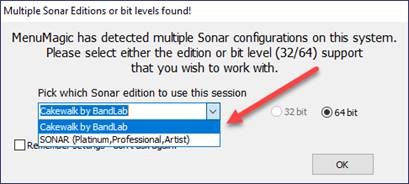
If you have the new Sonar by Bandlab and one of the legacy versions of Sonar (preBandlab versions such as Platinum) installed on your computer - the new Sonar will show up on your popup selection dialog as "Cakewalk by BandLab”. This is because “Cakewalk by BandLab” and "Sonar by BandLab" share the same plugin inventory. At some point I may fix this but as it doesn't affect functionality it is low priority.

• Start up MenuMagic v3
• Select “Cakewalk by BandLab”
Image
ImageCakewalk/Sonar Plugin Management Tools

Post

I have 5 copies of my plugin set up. I can not figure out how to copy the synth folder from v4 to v1 of this file.
Thanks for any help,
Max

Post

Hey, The Steven! I was one of the first True Believers of MenuMagic—glad to see you’re still at it!

I’ve met a lot more Cakewalk/Sonar users over the few years. Always pointed them your way…hope some of them made it to you!

I’m setting up a Win11 machine (with Cakewalk, of course 😏). I’ll look at v3 of MM as soon as I can, to see what it offers, since I’ll want to keep my older plug-in list for use in the new DAW, as I set off, re-installing all 1,242 plug-ins.

Thanks for your continued work on this!

Cheers!

Steve
Here's some of my stuff: https://soundcloud.com/shadowsoflife. If you hear something you like, I'm looking for collaborators.

Post

Sorry for the late reply - Hope that you're doing well.
If you copy over the MagicMenus folder to your new machine then reinstall it - all of your old setting should be preserved.

Work on the next version is temporarily on hold while I get my new dev maching setup and everything configured.
ImageCakewalk/Sonar Plugin Management Tools

Post

Sorry for the late reply - Hope that you're doing well.
If you copy over the MagicMenus folder to your new machine then reinstall it - all of your old setting should be preserved.

Work on the next version is temporarily on hold while I get my new dev maching setup and everything configured.

Best regards,
Steven
ImageCakewalk/Sonar Plugin Management Tools

Post

TheSteven wrote: Sun Apr 12, 2026 10:42 pm Sorry for the late reply - Hope that you're doing well.
If you copy over the MagicMenus folder to your new machine then reinstall it - all of your old setting should be preserved.

Work on the next version is temporarily on hold while I get my new dev maching setup and everything configured.

Best regards,
Steven
Thanks, hope you're doing well, too!

I don't know if you have the paid version of Sonar now (if not, I think there are some discounts still available somewhere), but while it was very generous of Cakewalk, they just added some 900 "new" plug-ins to Sonar. :neutral: Most of them are single-instrument plug-ins, with no adjustable parameters or controls, and one GUI that they all use. (It basically just shows a small keyboard with computer keyboard letters showing you how to play the synth if you don't have a MIDI controller.)

Again, this was very generous, but for those of us who've sorted our plug-ins into our own custom folders for the last 20 years (both for the VST2/VST3 file and library and the plug-in name and location in the DAW), it's going to take a plug-in manager like MenuMagic to "sort" everything the way we'd like it.

Steve
Here's some of my stuff: https://soundcloud.com/shadowsoflife. If you hear something you like, I'm looking for collaborators.

Post Reply

Return to “Agitated State”
