


That's probably intentional. Once you click the text input field, we embed an operating system text field in the UI, over which we have limited control, but which does offer reliable text input.loctune wrote: Sun Apr 12, 2026 8:49 pm Zebra 3.0 Final Beta 21625 Win
UI Bug
Characters typed into the preset browser are initially shown in a different font. Once search is done it switch back to the normal font again.
Zebra 3 Beta Bug Reports
-

- u-he
- Topic Starter
- 30255 posts since 8 Aug, 2002 from Berlin
-
eclipse_soundlab eclipse_soundlab https://www.kvraudio.com/forum/memberlist.php?mode=viewprofile&u=724571
- KVRist
- 91 posts since 6 Nov, 2024
>Assign MSEG 1 to OSC 1 warp mod.
>click a mini-wheel for adjusting the modulation range
= it will show MSEG 1 panel.
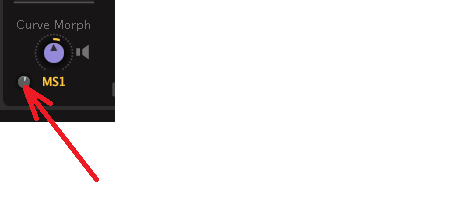
>click a mini-wheel for adjusting the modulation range
= it will show MSEG 1 panel.
-
tasmaniandevil tasmaniandevil https://www.kvraudio.com/forum/memberlist.php?mode=viewprofile&u=62450
- KVRAF
- 2182 posts since 22 Mar, 2005 from a planet called u-he
-
- KVRist
- 181 posts since 25 Oct, 2003
I like the new skin and it’s growing on me but I’m not gonna lie, the skin of Zebrallete 3 dark mode is a masterpiece. Love that keyboard and all the aesthetics! U-he makes some of the most appealing ui designs and Z3 looks a lot on the utilitarian side.
-

- KVRian
- 935 posts since 27 Apr, 2018
1.) Send bus makes signal mono (?)
2.) Sending signal from Main to send bus decreases volume
3.) Distortion wedge showed once behaviour, that left or right channel side was dropped for a fraction of a second in between of playing some notes. Can currently not reproduce.
4.) OSC editor is a mess. Border points should be able to get morph vectors also. There are strange behaviours that border points get split and then get mapped to points in the middle (nearest X and nearest X,Y), although the should get only mapped to the according point at the border. There is then no way to prevent it, which makes even easy usecases difficult till impossible. Once there was even a right border point mapped to the left border point through the whole curve (instead of staying at the border. Known?
5.) Preset saving often looses Author and it's needed to type it in again.
6.) Modulator Alternate alternates according to voices (which are used by unison), but should be according to played note (as described in the manual). -->strangely the mapper doesn't show this behaviour anymore. It was implemented in Bazille like that, that unison voices increment the mapper by the amount of voices, instead of notes. Was partly useful, but strange anyway. Should be able to set the behaviour anywhere, if voices or notes do increment.
7.) Double click on keyboard note holds note instead of playing two notes. Is this intended?
2.) Sending signal from Main to send bus decreases volume
3.) Distortion wedge showed once behaviour, that left or right channel side was dropped for a fraction of a second in between of playing some notes. Can currently not reproduce.
4.) OSC editor is a mess. Border points should be able to get morph vectors also. There are strange behaviours that border points get split and then get mapped to points in the middle (nearest X and nearest X,Y), although the should get only mapped to the according point at the border. There is then no way to prevent it, which makes even easy usecases difficult till impossible. Once there was even a right border point mapped to the left border point through the whole curve (instead of staying at the border. Known?
5.) Preset saving often looses Author and it's needed to type it in again.
6.) Modulator Alternate alternates according to voices (which are used by unison), but should be according to played note (as described in the manual). -->strangely the mapper doesn't show this behaviour anymore. It was implemented in Bazille like that, that unison voices increment the mapper by the amount of voices, instead of notes. Was partly useful, but strange anyway. Should be able to set the behaviour anywhere, if voices or notes do increment.
7.) Double click on keyboard note holds note instead of playing two notes. Is this intended?
-
- u-he
- Topic Starter
- 30255 posts since 8 Aug, 2002 from Berlin
Can't reproduce 1, 2, 3
4 - endpoints need to stay endpoints, they deliberately have no morph vectors
5 - that might have been a bug in previous betas where the author field would be wiped on init
6 - Zebra 3 does not have the Voice Stacking feature of Bazille, what do you mean by "unison" in this context?
7 - Yes, that's intentional, as a way to latch the note
4 - endpoints need to stay endpoints, they deliberately have no morph vectors
5 - that might have been a bug in previous betas where the author field would be wiped on init
6 - Zebra 3 does not have the Voice Stacking feature of Bazille, what do you mean by "unison" in this context?
7 - Yes, that's intentional, as a way to latch the note
-
- KVRist
- 126 posts since 9 Jun, 2024
Zebra 3 final final beta 21764 April 14
The MSEG crash with Multiply tool is gone, but add more points using the Add Points tool still triggers a crash.
To reproduce, draw a simple shape and use the multiply tool to add as much points as possible. Once the limit is hit, switch to the Add Point tool and add more points onto the curve. Keep adding points until you see the crash.
The MSEG crash with Multiply tool is gone, but add more points using the Add Points tool still triggers a crash.
To reproduce, draw a simple shape and use the multiply tool to add as much points as possible. Once the limit is hit, switch to the Add Point tool and add more points onto the curve. Keep adding points until you see the crash.
-
tasmaniandevil tasmaniandevil https://www.kvraudio.com/forum/memberlist.php?mode=viewprofile&u=62450
- KVRAF
- 2182 posts since 22 Mar, 2005 from a planet called u-he
-
- KVRian
- 935 posts since 27 Apr, 2018
Still there with latest beta. How can I provide a patch?
With the new beta the behaviour which I observed seems to be improved to the way better. But anyway some things are strange. When set to nearest X the top point of the left side falls immediately down to the lowest point of the left side and then moves up again:Urs wrote: Tue Apr 14, 2026 3:58 am 4 - endpoints need to stay endpoints, they deliberately have no morph vectors
OK, we'll see.Urs wrote: Tue Apr 14, 2026 3:58 am 5 - that might have been a bug in previous betas where the author field would be wiped on init
When you set unison in the wavetable OSC, e.g. to 2 or higher, alternate wasn't calculated according to new played note, but according to count of "voices" from this OSC, so each "voice" seemed to hold it's own alternate value.Urs wrote: Tue Apr 14, 2026 3:58 am 6 - Zebra 3 does not have the Voice Stacking feature of Bazille, what do you mean by "unison" in this context?
-->seems to be fixed with new beta
You do not have the required permissions to view the files attached to this post.
-
- KVRian
- 935 posts since 27 Apr, 2018
New bugs:
1.) Curved line is drawed cornerish
2.) Mouse pointer doesn't change precisely on the line
Edit: both behaviours seem to occur sporadic
1.) Curved line is drawed cornerish
2.) Mouse pointer doesn't change precisely on the line
Edit: both behaviours seem to occur sporadic
You do not have the required permissions to view the files attached to this post.
-
- KVRer
- 14 posts since 11 Mar, 2026
As an update to a problem of distortion during arpeggios that I reported a while back:
With the current beta, it seems this probably is limited to the above preset (there could be more, but not within the few dozen I tried) and it appears to be narrowed down to the overlap setting.
As a workaround that makes it easy for me since I was only clicking things to see what they did, rather from a genuine need to change something. I'm highlighting this only in case it's indicative of some problem I'm not aware of.
Essentially, the problem appears to be that using "overlay" on that specific preset bangs up the thread usage to max within a couple of notes being played rapidly. I can't say if this is Zebra related or Logic related, but I'm using a Roli Piano M on a fully updated MacBook M3 Pro with 18Gb ram.
With the current beta, it seems this probably is limited to the above preset (there could be more, but not within the few dozen I tried) and it appears to be narrowed down to the overlap setting.
As a workaround that makes it easy for me since I was only clicking things to see what they did, rather from a genuine need to change something. I'm highlighting this only in case it's indicative of some problem I'm not aware of.
Essentially, the problem appears to be that using "overlay" on that specific preset bangs up the thread usage to max within a couple of notes being played rapidly. I can't say if this is Zebra related or Logic related, but I'm using a Roli Piano M on a fully updated MacBook M3 Pro with 18Gb ram.
You do not have the required permissions to view the files attached to this post.
-

- KVRAF
- 27006 posts since 3 Feb, 2005 from in the wilds
Beta 21764
Bug:
Open the big editor and set the X grid to say 3. Then close the editor and the grid in the bottom pane ignores the change and is still set to the default 4.
Bug:
Open the big editor and set the X grid to say 3. Then close the editor and the grid in the bottom pane ignores the change and is still set to the default 4.
-
- KVRian
- 1074 posts since 17 Mar, 2005 from Bay Area
Just had another (the 3rd now, since the previous build) stuck note. Switching preset fixed it.
Was the preset "D-Sparkler". Win11, Cubase 15.
Edit: Yeah I can reproduce it. Found the source: its macro D "DeReverb". It isnt a stuck note, its a stuck reverb. ; )
I can load the preset, play a note, its fine.
Then I touch macro D and now the sound is stuck forever.
When I go to the FX page and power it off, the sound stops. Power it on, it comes back without pressing another note. Decay is at 80. I can make the forever note stop if I turn it down to around 50, but at 70+ it is forever.
Was the preset "D-Sparkler". Win11, Cubase 15.
Edit: Yeah I can reproduce it. Found the source: its macro D "DeReverb". It isnt a stuck note, its a stuck reverb. ; )
I can load the preset, play a note, its fine.
Then I touch macro D and now the sound is stuck forever.
When I go to the FX page and power it off, the sound stops. Power it on, it comes back without pressing another note. Decay is at 80. I can make the forever note stop if I turn it down to around 50, but at 70+ it is forever.
-
- KVRian
- 924 posts since 13 Jul, 2006
With final final beta, Zebra 3 crashes for me when I right-click a preset. Happens on Bitwig 6 or Reaper, Windows 11.
I have symlinked my presets into GDrive, so maybe that could cause some issues? It was working before (in last beta), though.
Not sure how to give a more detailed crash report, I couldn't find any relevant logs.
> Nevermind, I had to refresh the presets, now it's fine again.
I have symlinked my presets into GDrive, so maybe that could cause some issues? It was working before (in last beta), though.
Not sure how to give a more detailed crash report, I couldn't find any relevant logs.
> Nevermind, I had to refresh the presets, now it's fine again.
Find my (music) related software projects here: github.com/Fannon
-
tasmaniandevil tasmaniandevil https://www.kvraudio.com/forum/memberlist.php?mode=viewprofile&u=62450
- KVRAF
- 2182 posts since 22 Mar, 2005 from a planet called u-he
This is expected. Eight-Bit Conan uses the Yellow Filter, the one most heavy on CPU, which we recommend to mainly use in mono presets.IanFu wrote: Tue Apr 14, 2026 8:49 pm As an update to a problem of distortion during arpeggios that I reported a while back:
With the current beta, it seems this probably is limited to the above preset (there could be more, but not within the few dozen I tried) and it appears to be narrowed down to the overlap setting.
If you switch on Mono Overlap, you are allowing multiple voices, and this adds up quickly. If you want to play it with Overlap Mono activated, try reducing the Voices setting to two or three voices.
That QA guy from planet u-he.