


Zebra 3 performance controls reset to 0 when loading a project, UNLESS I link an internal midi cc knob via the Midi Out plugin.
Zebra 3 Teething Troubles
-
- KVRer
- 8 posts since 10 May, 2021
-
- KVRer
- 8 posts since 10 May, 2021
possible answer from the manual...
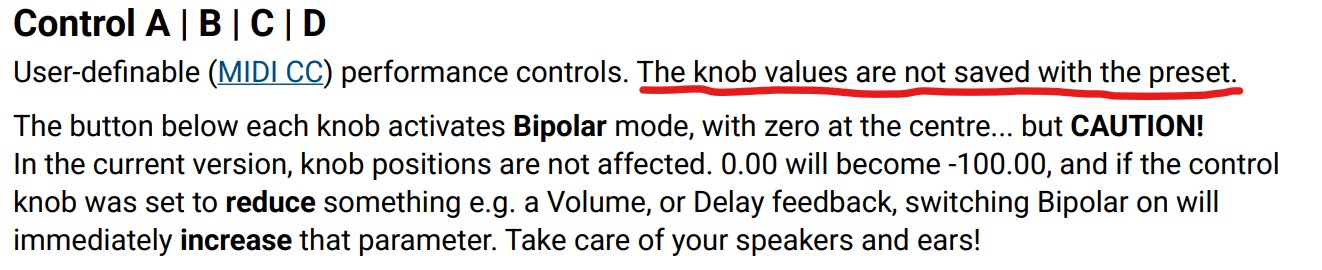
-
- KVRer
- 12 posts since 10 Aug, 2008 from San Francisco Bay Area
Pitch bend is not working correctly for me. I have some patches that even though the pitch bend slider in the perform section moves, no actual pitch bend happens. Does not matter what the bend is set to.
When I open templates such as simple modal, pitch bend works but it leaves the note at the original pitch and generates a new note that follows the pitch bend.
Sorry if these are known issues.
When I open templates such as simple modal, pitch bend works but it leaves the note at the original pitch and generates a new note that follows the pitch bend.
Sorry if these are known issues.
-
- KVRian
- 1044 posts since 17 Mar, 2005 from Bay Area
Something Ive been struggling with for a couple weeks, since around the RC1 release: Im seeing some pops/clicks in the audio again. I didnt have any pops/clicks on the first several beta versions back in december, january, etc, but when I think the last 2 or 3 beta and RC versions were released, I started getting a lot of this. (no other instruments or fx are doing this)
i9 12900KF CPU, 32GB RAM, win11, focusrite 18i20, Cubase 15, BWS 6
Often the ASIO meter for each DAW (Cubase15, BWS 6) does not show 100% peaks or average load. The Cubase meter doesnt register an overload or light up red, and the BWS meter shows low average load/peak, but I still hear this 'glitch' sound that I dont recognize. (some pops/clicks are recognizable as ground loops, CPU overloads, hyperthreading/dynamic clocking issues, GPU issues, etc. This sound I dont recognize. Sounds like a buffer underrun, but the data doesnt show it).
I can get this glitch sound when Z3 is merely loaded into the DAW and not playing. I add and play a single sample -- suddenly the sample's audio is glitching, and the Cubase15 ASIO graph shows "zebra3>SSL limiter>stereo out" as the source of the problem when im not actually playing Z3. (removing limiter doesnt change anything)
So I loaded up vienna ensemble to see if their host helps, and it helps a lot. Most of those glitches are gone, but I still get a very rare, brief 'bump' or 'glitch' sound in the audio that doesnt seem related to how many voices are playing, how much real CPU is being used (per Z3's internal meter, per DAW ASIO meters, per VEP usage meter), buffer settings, etc. I can mash 8 keys on a heavy preset and hear no glitch, see no overload, then I can hit one note on an average preset and hear a glitch. These glitches are being recorded into audio. I can use buffer 512 or 128 and get the same results.
Im working really hard to identify where this might be coming from, but Im coming up empty. Ive removed everything in the signal chain and have Z3 running alone(in VEP or inside a DAW), and VEP definitely reduces the problem by a large amount but the DAWs themselves seem to be unable to handle this. Should I try disabling speedstep and hyperthreading on my i9 CPU?? Forcing the CPU to lock at a higher power mode? Could use a little help. Thanks!
Presets being tested(these dont use the yellow filter):
Mars Colony
Magic Crystal Cave
Meditation Garden
LSD Lhasa
Most of these (and a handful more not listed) are, according to the Zebra3 internal meter, hardly using more than 5% CPU across all features. Some will spike up to 20, 30, 40%, but none appear to go over 50%, meanwhile Cubase and BWS are making these 'crrck' sounds. Magic Crystal Cave is using like 5% on average, but glitching.
Edit: I notice that increasing and decreasing interface buffer sizes does have an effect on this issue, but does not resolve. The glitch is definitely less with a 256 buffer than with a 128, but then my Elektron boxes get mad (they demand a 128 buffer size to sync properly). Also I was using 128 buffer for the last 6 months, hardly any troubles with the first 3-4 Zebra3 betas. This is something that began in the last 3-4 weeks.
Sorry this is so big. : / having a hard time explaining it without lengthy posts.
i9 12900KF CPU, 32GB RAM, win11, focusrite 18i20, Cubase 15, BWS 6
Often the ASIO meter for each DAW (Cubase15, BWS 6) does not show 100% peaks or average load. The Cubase meter doesnt register an overload or light up red, and the BWS meter shows low average load/peak, but I still hear this 'glitch' sound that I dont recognize. (some pops/clicks are recognizable as ground loops, CPU overloads, hyperthreading/dynamic clocking issues, GPU issues, etc. This sound I dont recognize. Sounds like a buffer underrun, but the data doesnt show it).
I can get this glitch sound when Z3 is merely loaded into the DAW and not playing. I add and play a single sample -- suddenly the sample's audio is glitching, and the Cubase15 ASIO graph shows "zebra3>SSL limiter>stereo out" as the source of the problem when im not actually playing Z3. (removing limiter doesnt change anything)
So I loaded up vienna ensemble to see if their host helps, and it helps a lot. Most of those glitches are gone, but I still get a very rare, brief 'bump' or 'glitch' sound in the audio that doesnt seem related to how many voices are playing, how much real CPU is being used (per Z3's internal meter, per DAW ASIO meters, per VEP usage meter), buffer settings, etc. I can mash 8 keys on a heavy preset and hear no glitch, see no overload, then I can hit one note on an average preset and hear a glitch. These glitches are being recorded into audio. I can use buffer 512 or 128 and get the same results.
Im working really hard to identify where this might be coming from, but Im coming up empty. Ive removed everything in the signal chain and have Z3 running alone(in VEP or inside a DAW), and VEP definitely reduces the problem by a large amount but the DAWs themselves seem to be unable to handle this. Should I try disabling speedstep and hyperthreading on my i9 CPU?? Forcing the CPU to lock at a higher power mode? Could use a little help. Thanks!
Presets being tested(these dont use the yellow filter):
Mars Colony
Magic Crystal Cave
Meditation Garden
LSD Lhasa
Most of these (and a handful more not listed) are, according to the Zebra3 internal meter, hardly using more than 5% CPU across all features. Some will spike up to 20, 30, 40%, but none appear to go over 50%, meanwhile Cubase and BWS are making these 'crrck' sounds. Magic Crystal Cave is using like 5% on average, but glitching.
Edit: I notice that increasing and decreasing interface buffer sizes does have an effect on this issue, but does not resolve. The glitch is definitely less with a 256 buffer than with a 128, but then my Elektron boxes get mad (they demand a 128 buffer size to sync properly). Also I was using 128 buffer for the last 6 months, hardly any troubles with the first 3-4 Zebra3 betas. This is something that began in the last 3-4 weeks.
Sorry this is so big. : / having a hard time explaining it without lengthy posts.
-
eclipse_soundlab eclipse_soundlab https://www.kvraudio.com/forum/memberlist.php?mode=viewprofile&u=724571
- KVRist
- 79 posts since 6 Nov, 2024
Situation:
>Utility 1 (on lane 4) is used as a signal branching from another lane.
>On lane 3, there is a signal with a comb filter (also split signal)
>Lanes 1, 2, and 4 are muted, so there is no signal present from them.
>Adjusting comb width (the comb on lane 3) changes the whole sound via Utility 1.
>When comb width is set above 0, it acts like a trigger for Utility 1 to dampen the signal with some weird interference (like a limiter, but without the pumping effect). The original comb signal is dampened, and a static "hollow bass signal" is turned up.
Reminder: Utility 1 is on muted lane 4 and the comb is not connected to it.
So it acts like unidirectional interference.
I don't have a preset, I reset it back after some fiddling.
But maybe if someone else reports an issue with the utility modules, a clearer picture of the problem will emerge.
>Utility 1 (on lane 4) is used as a signal branching from another lane.
>On lane 3, there is a signal with a comb filter (also split signal)
>Lanes 1, 2, and 4 are muted, so there is no signal present from them.
>Adjusting comb width (the comb on lane 3) changes the whole sound via Utility 1.
>When comb width is set above 0, it acts like a trigger for Utility 1 to dampen the signal with some weird interference (like a limiter, but without the pumping effect). The original comb signal is dampened, and a static "hollow bass signal" is turned up.
Reminder: Utility 1 is on muted lane 4 and the comb is not connected to it.
So it acts like unidirectional interference.
I don't have a preset, I reset it back after some fiddling.
But maybe if someone else reports an issue with the utility modules, a clearer picture of the problem will emerge.
-

- KVRAF
- 3228 posts since 10 Nov, 2013 from Germany
Does the Voice Allocation mode has any influence on this? Because this was changed during the Beta Period ...Milkman wrote: Thu Apr 30, 2026 9:30 pm Something Ive been struggling with for a couple weeks, since around the RC1 release: Im seeing some pops/clicks in the audio again. I didnt have any pops/clicks on the first several beta versions back in december, january, etc, but when I think the last 2 or 3 beta and RC versions were released, I started getting a lot of this. (no other instruments or fx are doing this)
i9 12900KF CPU, 32GB RAM, win11, focusrite 18i20, Cubase 15, BWS 6
Often the ASIO meter for each DAW (Cubase15, BWS 6) does not show 100% peaks or average load. The Cubase meter doesnt register an overload or light up red, and the BWS meter shows low average load/peak, but I still hear this 'glitch' sound that I dont recognize. (some pops/clicks are recognizable as ground loops, CPU overloads, hyperthreading/dynamic clocking issues, GPU issues, etc. This sound I dont recognize. Sounds like a buffer underrun, but the data doesnt show it).
I can get this glitch sound when Z3 is merely loaded into the DAW and not playing. I add and play a single sample -- suddenly the sample's audio is glitching, and the Cubase15 ASIO graph shows "zebra3>SSL limiter>stereo out" as the source of the problem when im not actually playing Z3. (removing limiter doesnt change anything)
So I loaded up vienna ensemble to see if their host helps, and it helps a lot. Most of those glitches are gone, but I still get a very rare, brief 'bump' or 'glitch' sound in the audio that doesnt seem related to how many voices are playing, how much real CPU is being used (per Z3's internal meter, per DAW ASIO meters, per VEP usage meter), buffer settings, etc. I can mash 8 keys on a heavy preset and hear no glitch, see no overload, then I can hit one note on an average preset and hear a glitch. These glitches are being recorded into audio. I can use buffer 512 or 128 and get the same results.
Im working really hard to identify where this might be coming from, but Im coming up empty.
-
- KVRian
- 1044 posts since 17 Mar, 2005 from Bay Area
Im trying different scenarios now to see if one thing or the other has an effect, but buffer sizes seem to be the only thing that influences it (more or less crackle).Chris-S wrote: Fri May 01, 2026 11:12 amDoes the Voice Allocation mode has any influence on this? Because this was changed during the Beta Period ...Milkman wrote: Thu Apr 30, 2026 9:30 pm Something Ive been struggling with for a couple weeks, since around the RC1 release: Im seeing some pops/clicks in the audio again. I didnt have any pops/clicks on the first several beta versions back in december, january, etc, but when I think the last 2 or 3 beta and RC versions were released, I started getting a lot of this. (no other instruments or fx are doing this)
i9 12900KF CPU, 32GB RAM, win11, focusrite 18i20, Cubase 15, BWS 6
Often the ASIO meter for each DAW (Cubase15, BWS 6) does not show 100% peaks or average load. The Cubase meter doesnt register an overload or light up red, and the BWS meter shows low average load/peak, but I still hear this 'glitch' sound that I dont recognize. (some pops/clicks are recognizable as ground loops, CPU overloads, hyperthreading/dynamic clocking issues, GPU issues, etc. This sound I dont recognize. Sounds like a buffer underrun, but the data doesnt show it).
I can get this glitch sound when Z3 is merely loaded into the DAW and not playing. I add and play a single sample -- suddenly the sample's audio is glitching, and the Cubase15 ASIO graph shows "zebra3>SSL limiter>stereo out" as the source of the problem when im not actually playing Z3. (removing limiter doesnt change anything)
So I loaded up vienna ensemble to see if their host helps, and it helps a lot. Most of those glitches are gone, but I still get a very rare, brief 'bump' or 'glitch' sound in the audio that doesnt seem related to how many voices are playing, how much real CPU is being used (per Z3's internal meter, per DAW ASIO meters, per VEP usage meter), buffer settings, etc. I can mash 8 keys on a heavy preset and hear no glitch, see no overload, then I can hit one note on an average preset and hear a glitch. These glitches are being recorded into audio. I can use buffer 512 or 128 and get the same results.
Im working really hard to identify where this might be coming from, but Im coming up empty.
Recently both Cubase and BWS had a couple updates, and this behavior began during one of those periods, as well.
-

- KVRAF
- 4197 posts since 23 May, 2004 from Bad Vilbel, Germany
Thanks for that. Also, it's unipolar 0° to 360°tumface wrote: Mon Apr 27, 2026 3:15 pm Possible redundant stuff in the manual, page 28:The Z3 final release has a dedicated knob for a constant phase offset, so I think the instructions to use a constant assignment via the mod matrix aren't needed anymore, right?Offset
Only available if the Renderer is set to Wavetable. Bipolar phase shift, -180° to +180°. For a static offset, use Constant as source in the modulation matrix.
-
- KVRist
- 31 posts since 11 Jun, 2017 from Los Angeles
In the editors when I double click to create a curve point and then click again on that point it often deletes the newly added point. Is this my error, or is it possible the mouse click time window is wrong (too long) and registering it as a delete command?
-
- KVRist
- 237 posts since 28 Mar, 2005 from Netherlands
I'm noticing dropouts of up to a second in Cubase 15 when changing presets while playback of my project is happening. It doesn't seem to overload the VST meter, but both the disk access and performance meters go completely blank till it "catches up" and I can hear audio again. Pretty distracting.

-

- u-he
- 30186 posts since 8 Aug, 2002 from Berlin
Repeatedly clicking on the same point registers as single click first, then double click, double click, double click... so with three clicks you basically double click a point in and double click it out again.jrgillam wrote: Sun May 03, 2026 1:17 am In the editors when I double click to create a curve point and then click again on that point it often deletes the newly added point. Is this my error, or is it possible the mouse click time window is wrong (too long) and registering it as a delete command?
(I thought I had already dealt with that, but maybe it was something similar, not sure)
-
- KVRian
- 1044 posts since 17 Mar, 2005 from Bay Area
After the news today about windows (win11) major MIDI update, and after reading all the details, listening to Jurgen Mossgraber talk about his experience with this update and all the bugs and issues, etc, I decided to wipe this win11 workstation and rebuild with the MIDI update, THEN reinstall devices and DAWs, and then give zebra3 another test after everything is stabilized. Our 'friends' over at M$ have stepped in it again, and I cant say Im doing honest testing until I can get win11 stabilized. Will post more testing results in a few days after a rebuild.
Any korg users in here, watch out. Remove those Korg USB midi drivers, try class compliant. We are seeing bluescreens, etc. All the Akai, Novation, etc etc etc, also.
Any korg users in here, watch out. Remove those Korg USB midi drivers, try class compliant. We are seeing bluescreens, etc. All the Akai, Novation, etc etc etc, also.
-
- KVRian
- 1044 posts since 17 Mar, 2005 from Bay Area
This has been exhausting, lol. I made a lengthy post about it all in the Bitwig subforum so I wont re-write all that here, but I will summarize:
-Windows11 can kiss my entire %$#%$#!
-8-9 hours is all it took to rebuilt from bare metal.
-all improvements to windows MIDI are offset by dozens of new issues, including even the main focusrite audio interface not coming online without some work.
-controller detection, etc, in Bitwig got worse
In the end, after fixing almost everything manually, Ive managed to build Bitwig and Cubase, Ive built a basic template and profile in each, loaded Zebra3 with dry signal chain, and Z3 seems to be performing *perfectly* now. No ASIO spikes. No pop/click/glitch sounds. Now it all sounds as good as it did previous to windows11's changes, and I *think* I can blame this on windows? Ill add more details if any come up, but I had a feeling this wouldnt be U-He's fault, beyond just having some heavy filters in there lol.
-Windows11 can kiss my entire %$#%$#!
-8-9 hours is all it took to rebuilt from bare metal.
-all improvements to windows MIDI are offset by dozens of new issues, including even the main focusrite audio interface not coming online without some work.
-controller detection, etc, in Bitwig got worse
In the end, after fixing almost everything manually, Ive managed to build Bitwig and Cubase, Ive built a basic template and profile in each, loaded Zebra3 with dry signal chain, and Z3 seems to be performing *perfectly* now. No ASIO spikes. No pop/click/glitch sounds. Now it all sounds as good as it did previous to windows11's changes, and I *think* I can blame this on windows? Ill add more details if any come up, but I had a feeling this wouldnt be U-He's fault, beyond just having some heavy filters in there lol.
-

- KVRAF
- 2246 posts since 10 Apr, 2002 from Saint Germain en Laye, France
Which version of Windows11 works and wich one does not work ?
I mean 23H2, 24H2, 25H2 ...

-
- KVRian
- 1044 posts since 17 Mar, 2005 from Bay Area
I can no longer say, as there have been too many win updates in the last 2 months to really unroll it all without doing a lot of research. The issues Im having on numerous DAWs on Win11 began about 2 months ago, right after I built it, and then became worse over time, resulting in performance problems, audio distortion, etc. Probably a dozen win updates have gone in over the time Ive been dealing with this. Sorry!! I wish I could point at a version and say "it started here" or something, but I cant. : /
What I can say for sure is, Zebra3 works perfectly now!! And this is one of the main purposes of my workstation at this moment in time -- running Z3 all day haha
This morning, after another late night, Im happy to say that I have 98% of the issues worked out. Everything is smooth, audio is pristine, MIDI is working ok. Devices turned back on today, attached to the system without any troubles WITHOUT their native drivers, using class compliant drivers and windows MIDI. Built a small track last night that seems to be going well, and Ive only had ONE bluescreen since! =P
(the bluescreen was Bitwig freezing hard while Kontakt was scanning libraries. Killing BWS after it froze bluescreened win11)