


Hi - might just be me of course (see sig for machine specs - system 1).
But this page isn't so friendly for seeing at a glance all the available download options here. Specifically, those areas with white-on-white text - same goes for the 'beta' page too...
Readable if you hover-drag over the text to highlight it.
website downloads page...
-
- KVRist
- 413 posts since 9 Oct, 2013 from uk
You do not have the required permissions to view the files attached to this post.
System 1 - Win11; i9 13900HK miniPC; 64Gb; Iris XE graphics; UR44 i/o; Cubase 15.0.30; Studio Pro v8.1; WLab Pro 13.0.20
System 2 - Win10; i7 4790; 16Gb; GTX750Ti; Cubase v14.0.41; WLab Pro v12.0.51; StudioOne v6.6.4
System 2 - Win10; i7 4790; 16Gb; GTX750Ti; Cubase v14.0.41; WLab Pro v12.0.51; StudioOne v6.6.4
-
- KVRAF
- 2554 posts since 27 May, 2005 from Stockholm
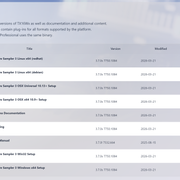
This is how it looks for me (in various browsers).
Sounds like you have some plug-in in your browser making things weird?
Sounds like you have some plug-in in your browser making things weird?
TX16Wx Software Sampler:
http://www.tx16wx.com/
http://www.tx16wx.com/
-
- KVRist
- Topic Starter
- 413 posts since 9 Oct, 2013 from uk
Ok, thanks for checking. Interesting...
Happy to see it's (probably just) me. Though, I am using latest MS Edge browser:-
Microsoft Edge
Microsoft Edge is up to date.
Version 150.0.4078.48 (Official build) (64-bit)
And the only 'plugins' I know I've installed are the ABP and uBlock 3rd party extensions. Tried fully disabling both for the whole site, but made no difference...
No worries; calling it case closed as far as I'm concerned...
[EDIT - For interests sake, tried on my low-life, 5-year old Lenovo 'IdeaPad 3' laptop (11th Gen Intel i3 processor, 4.00GB RAM and Intel UHD graphics, Win11, MS Edge browser up to date) and that shows the same webpage display as seen in OP..]. Weird indeed.
Happy to see it's (probably just) me. Though, I am using latest MS Edge browser:-
Microsoft Edge
Microsoft Edge is up to date.
Version 150.0.4078.48 (Official build) (64-bit)
And the only 'plugins' I know I've installed are the ABP and uBlock 3rd party extensions. Tried fully disabling both for the whole site, but made no difference...
No worries; calling it case closed as far as I'm concerned...
[EDIT - For interests sake, tried on my low-life, 5-year old Lenovo 'IdeaPad 3' laptop (11th Gen Intel i3 processor, 4.00GB RAM and Intel UHD graphics, Win11, MS Edge browser up to date) and that shows the same webpage display as seen in OP..]. Weird indeed.
System 1 - Win11; i9 13900HK miniPC; 64Gb; Iris XE graphics; UR44 i/o; Cubase 15.0.30; Studio Pro v8.1; WLab Pro 13.0.20
System 2 - Win10; i7 4790; 16Gb; GTX750Ti; Cubase v14.0.41; WLab Pro v12.0.51; StudioOne v6.6.4
System 2 - Win10; i7 4790; 16Gb; GTX750Ti; Cubase v14.0.41; WLab Pro v12.0.51; StudioOne v6.6.4