Mini - interactive sample browser

VST, AU, AAX, CLAP, etc. Plugin Virtual Instruments Discussion
Post Reply New Topic
RELATED
PRODUCTS
AudioMap Mini$35.00Buy

Post

Uncle E wrote: Mon Jun 22, 2026 7:42 pm
dieterlaser wrote: Mon Jun 22, 2026 7:15 pm it still works with one shots only, right? I wish I could just throw a whole field recording or a weird noise jam into it and let it splice and organize

coalescence can do that, but this interface looks nicer to me
I use Beatforge for things like that. Coalescence looks cool, does have have any plans to make a plugin version?
I think Dillon Bastan, the creator, is focussing on other things these days. But I don't know

Coalescene is pretty noice
M5 Pro, 64GB RAM, MOTU UltraLite mk5, OS Tahoe, Ableton 12

Post

dieterlaser wrote: Mon Jun 22, 2026 7:15 pm it still works with one shots only, right? I wish I could just throw a whole field recording or a weird noise jam into it and let it splice and organize

coalescence can do that, but this interface looks nicer to me
Mini is sample-agnostic, and splicing is not planned in the near future. If you want splicing, there are plenty of good options already - Coalescence is one of them, SKataRT if you are feeling adventurous, Concatenator by DataMind or Graphiti by Red Timbre Audio :tu:

On that note, a 1.3.3 has been released recently with refreshed UI (see first post), and with stability/consistency checks.

Post

AudioMap wrote: Tue Jun 23, 2026 8:30 am
dieterlaser wrote: Mon Jun 22, 2026 7:15 pm it still works with one shots only, right? I wish I could just throw a whole field recording or a weird noise jam into it and let it splice and organize

coalescence can do that, but this interface looks nicer to me
Mini is sample-agnostic, and splicing is not planned in the near future. If you want splicing, there are plenty of good options already - Coalescence is one of them, SKataRT if you are feeling adventurous, Concatenator by DataMind or Graphiti by Red Timbre Audio :tu:

On that note, a 1.3.3 has been released recently with refreshed UI (see first post), and with stability/consistency checks.
Thanks AudioMap - I really appreciate your product, especially the performance of playing samples.

Is DAW tempo synched playback (and/or DAW scale) on the cards for future development?

Thanks for all your updates.

Post

zeph wrote: Tue Jun 23, 2026 8:50 am Is DAW tempo synched playback (and/or DAW scale) on the cards for future development?
Yes to sync :tu:

Post

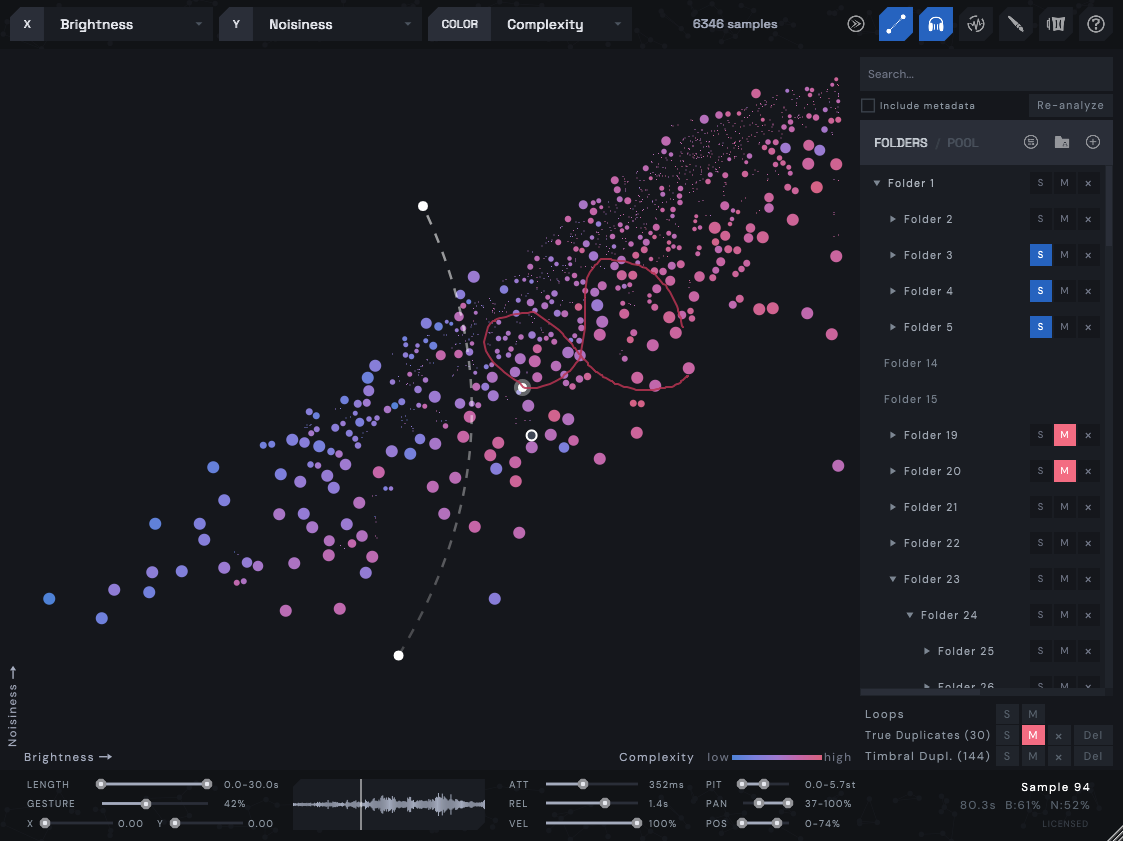
1.4.0 is now out! This is possibly one of the largest updates in quite some time, focused on pitch, capturing and optimizations.

Pitch & Key:
  • 4 new analysis axes: Chroma (most prominent pitch), Pitch (register of sample), Pitch Focus (how prominent pitch is), Harmonicity (same as pitch focus, but for multiple simultaneous notes)
  • New Filters panel + 3 playing modes:
    • Filter: only shows samples in the key
    • Harmonize: automatic retuning to a key
    • Shift: transpose the entire map relative to middle C
    • MIDI toggle: when on, Mini accepts incoming MIDI to affect Filter and Harmonize modes
    • Alt+Drag for per-sample retuning, Alt+DblClick to reset
    • Shift+Alt+Drag for per-sample volume change. Both Alt actions apply to multi-selections.
    • Shift+Alt+DblClick to reset
    • All analysis axes exposed as filters in Filters panel
Output capture:
  • Record performances in real-time as audio clips
  • Press C (or hit REC) to start/stop capturing
  • Takes show as clips, drag them to DAW or file manager
Playing & MIDI:
  • Attack and Release envelopes now apply to notes played on keyboard via MIDI line
  • Support for Sustain pedal
  • Support for pitch-bend with configurable range
Quantization & automation:
  • Quantize is now available for Gesture, Hover preview and Cursor (automation / CC / scrubbing) separately with own grids
  • Gesture sync to host tempo (1 / 2 / 4 / 8 bars)
  • Added automation for X / Y / Color axes, quantize grids, gesture sync
  • CC24 selects the key scale, CC25 selects the root, CC20-23 set quantization and gesture sync
Others:
  • Improved CPU performance during playback and analysis, reduced latency, UI polish
  • Faster analysis
  • "Avoid silent start positions" setting
Cross-platform & compatibility:
  • more in changelog
This version is backwards compatible, however, it is recommended to backup older plugin's cache before installing.

Image

Post Reply

Return to “Instruments”