Ableton Live | Max for Live | M4L | AMXD

Audio Plugin Hosts and other audio software applications discussion
Post Reply New Topic
RELATED
PRODUCTS
Live

Post

https://www.maxforlive.com/library/devi ... er-control
Image

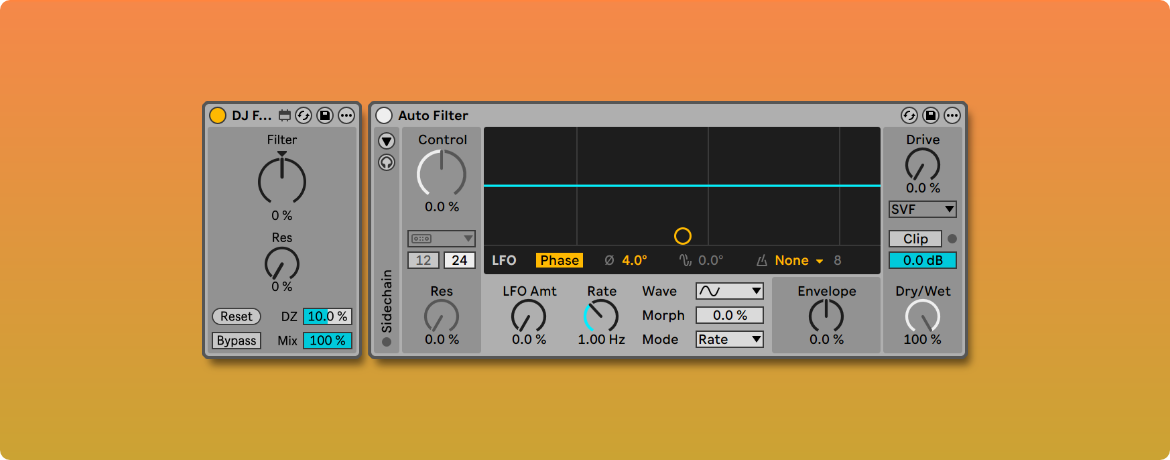
DJ Filter Control is a device designed to improve control over Auto Filter in live performances. To use it, simply load Auto Filter first and then DJ Filter Control before it. Some of the Auto Filter parameters will now be controlled from the device.

The device has a control (DZ) that allows you to apply a dead zone to the Filter knob, so that the effect doesn’t begin to apply until the knob has exceeded that range. This expands the neutral position of the knob, where the filter is disabled. And the Reset button returns the Filter knob to its default position.

Other controls such as resonance, bypass, or dry/wet have also been added to the device, so that they are available when controlling the device from Push controllers.
It refuses description, allowing only the vague approach of adjectives: dark, light, raw, angelic. Who or what is making these noises? Where are they coming from and what do they point to? What kind of entity can leave such a troubling sonic remnant?

Post

A new update for Amp Modeling Suite is here, free for existing owners.

The main improvements from the previous version are:

Expanded NAM A2 Support

The DSP engine has been revamped to fully support the latest NAM updates. For the most common model architectures, we use optimized inference code from NeuralAudio. We also now expose a model quality slider when the loaded .nam file supports it: a value of 0.0 corresponds to the slimmest model variant; 1.0 gets you the largest and most accurate version, leading to higher CPU usage.

Push Model Browsing

You can now use the top row of buttons on your Ableton Push to flip through gear folders and preset files. We’ve also implemented a smooth crossfade to avoid audible clicks when switching model. Push-enabled browsing is available on both Amp Modeler and Cab Loader.

Self-contained Folder Structure

Pack installation now consists in simply moving the whole Amp Modeling Suite folder to your User Library. Models and Cabinets are stored in the same path as the devices. If any of your projects or presets fail to find any device or capture file, you can use Ableton’s File Manager utility to automatically update your library.

You can see a video preview of all of these updates here:

Get the full suite at https://www.nyquistlimited.com, or the individual Amp Modeler device at https://nyquistlimited.gumroad.com/l/amp-modeler.

Thanks and enjoy the devices,

Nyquist Limited

Post

It's a basic LFO mapped to a LFO. Simple, but free and (IMHO) always useful

https://ldmdesign.gumroad.com/l/lfopro

Post Reply

Return to “Hosts & Applications (Sequencers, DAWs, Audio Editors, etc.)”