




from GS:
This really is a bread and butter tool and it sounds absolutely fantastic.
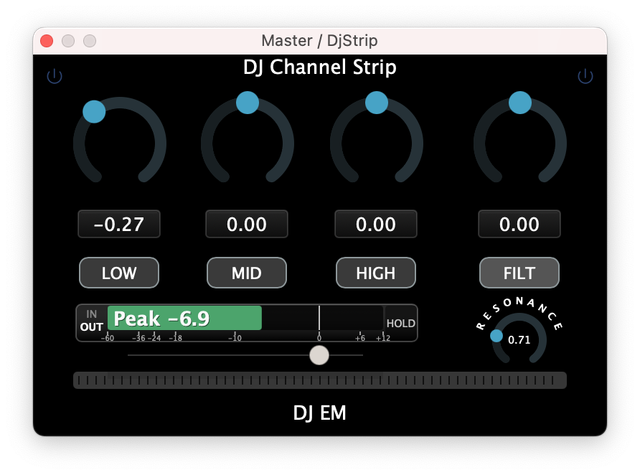
It's on sale now for 49 euros...
9 days trial (some limitations)
The Tooltips are the manual..
From the website: Https://bigrecs.com
This channel strip is designed as a permanent mixbus companion—delivering pristine sound, zero-latency performance, and a deeply refined control surface. From subtle tonal shaping to expressive transitions, everything responds musically and transparently.
It is a permanent *last slot* resident on any Masterbus in Hosts/DAWs and a permanent “all system sounds go through it” device when using it as a stand-alone app wiith a loopback. – Its that fast and sounds that good. Pure fun.
Take full control of the sound. It’s *basically* any DJ mixer EQ you know and are used to. Tweak it to fit your, or your venues, soundsystem.
Primarily designed for, and most enjoyable when used with controllers and mixers. – We love the NI Z1 for this – its tactile knobs make it easy to find and adjust controls, even in the dark

We chose to keep the GUI lean and efficient. Support for custom Skins may be introduced at a later date.
This Gem is so highly optimized that your CPU will barely notice it.
Motionrec – an integrated automation system built for both performance and precision motion capture.
Record and playback your motion captured from individual effect sequences, sounds, loops, tracks, full on mixes, gigs, the whole evening and the day after too;) – recall any motion onto any input. -See how those sequences sound on other tracks, enjoy motionrecs from your friends, favorite DJs (if shared), whatever. Capture the moment and replay it – anytime, anywhere, with anything.
Core Features
Performance Filter
* Exceptionally clean and articulate response
* Custom sweep curves for musical, controlled movement
* Designed for slow or fast expressive transitions and handling
Zero-Latency Architecture
* True 0 samples latency
* No phase shift, no visual delay
* Ideal for live use and system-wide loopback audio
⸻
Equalizer Section
* Adjustable frequency splits
* Variable band overlap
* Per-band attenuation control
* Slopes: 6 / 9 / 12 / 18 / 24 dB/oct
* Independent EQ / Filter power controls
* Dedicated killswitches for immediate cuts
⸻
Motionrec – Automation System
A refined automation environment designed for performance and workflow integration:
* Collapsible Motionrec panel
* Full DAW timeline synchronization /Standalone uses internal timeline
* Per-band automation (including filter)
Recording Modes
* Record all
* Record individual bands
Editing
* Delete all
* Delete individual automation lanes
* Per-band automation enable / disable
Data Handling
* Import / export automation data
* All automation saved and loaded as .More files
⸻
Metering & Feedback
* Input / Output / Hold metering
* Peak/RMS modes
* Discreet overload indicators
* Clean, focused visual feedback
⸻
Gain & Output Control
* 4 Auto Gain modes:
* RMS
* Peak
* RMS input limiting
* Peak input limiting
* Output stage:
* Hard clip
* Soft clip
* Off
⸻
Standalone Operation
* Loop length: 1–256 bars or custom time (hours/minutes)
* BPM detection
* MIDI learn support
⸻
Performance & Efficiency
* Highly CPU efficient
* Designed for continuous permanent mixbus use
* Clean, reliable sound under all conditions
Authorized for live use in real situations.
⸻
Factory Presets
DJ EM · X1 · X1+ · Rain · Eclair · Eclair Iso· Dnon · NaNuMork · 3D Lift · WohNzNzNz
(easy preset sharing via .DJS files )
⸻
What you get:
VST3, AU, Standalone app
(AAX soon, waiting for avid)
⸻
System Requirements
* Windows: 7 or newer
* macOS: 10.14 or newer
(10.13 may work, but not officially tested)
