EarthGuest Audio - DJ Channel Strip ! (VST3, AU, Standalone)

VST, AU, AAX, CLAP, etc. Plugin Virtual Effects Discussion
Post Reply New Topic
RELATED
PRODUCTS

Post

it really is very nice. :phones: :clap:

from GS:
This really is a bread and butter tool and it sounds absolutely fantastic.
Image
Image

It's on sale now for 49 euros...
9 days trial (some limitations)


The Tooltips are the manual..

From the website: Https://bigrecs.com

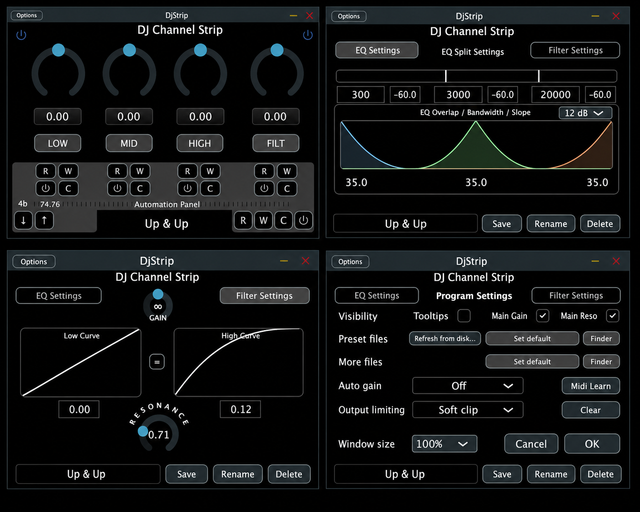
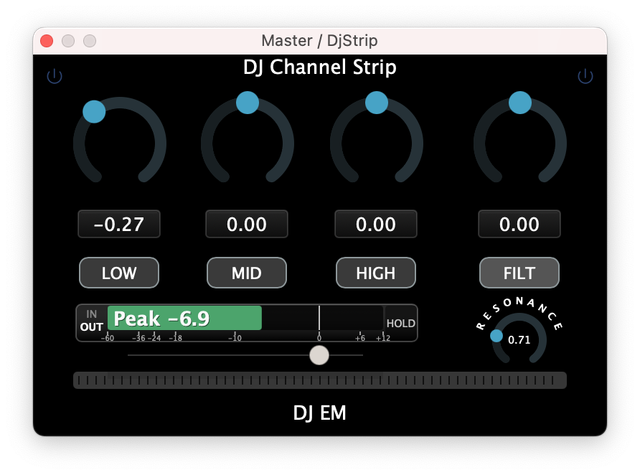
This channel strip is designed as a permanent mixbus companion—delivering pristine sound, zero-latency performance, and a deeply refined control surface. From subtle tonal shaping to expressive transitions, everything responds musically and transparently.

It is a permanent *last slot* resident on any Masterbus in Hosts/DAWs and a permanent “all system sounds go through it” device when using it as a stand-alone app wiith a loopback. – Its that fast and sounds that good. Pure fun.

Take full control of the sound. It’s *basically* any DJ mixer EQ you know and are used to. Tweak it to fit your, or your venues, soundsystem.

Primarily designed for, and most enjoyable when used with controllers and mixers. – We love the NI Z1 for this – its tactile knobs make it easy to find and adjust controls, even in the dark 😉

We chose to keep the GUI lean and efficient. Support for custom Skins may be introduced at a later date.

This Gem is so highly optimized that your CPU will barely notice it.

Motionrec – an integrated automation system built for both performance and precision motion capture.

Record and playback your motion captured from individual effect sequences, sounds, loops, tracks, full on mixes, gigs, the whole evening and the day after too;) – recall any motion onto any input. -See how those sequences sound on other tracks, enjoy motionrecs from your friends, favorite DJs (if shared), whatever. Capture the moment and replay it – anytime, anywhere, with anything.


Core Features

Performance Filter

* Exceptionally clean and articulate response
* Custom sweep curves for musical, controlled movement
* Designed for slow or fast expressive transitions and handling

Zero-Latency Architecture

* True 0 samples latency
* No phase shift, no visual delay
* Ideal for live use and system-wide loopback audio


Equalizer Section

* Adjustable frequency splits
* Variable band overlap
* Per-band attenuation control
* Slopes: 6 / 9 / 12 / 18 / 24 dB/oct
* Independent EQ / Filter power controls
* Dedicated killswitches for immediate cuts


Motionrec – Automation System

A refined automation environment designed for performance and workflow integration:

* Collapsible Motionrec panel
* Full DAW timeline synchronization /Standalone uses internal timeline
* Per-band automation (including filter)

Recording Modes

* Record all
* Record individual bands

Editing

* Delete all
* Delete individual automation lanes
* Per-band automation enable / disable

Data Handling

* Import / export automation data
* All automation saved and loaded as .More files


Metering & Feedback

* Input / Output / Hold metering
* Peak/RMS modes
* Discreet overload indicators
* Clean, focused visual feedback


Gain & Output Control

* 4 Auto Gain modes:
* RMS
* Peak
* RMS input limiting
* Peak input limiting
* Output stage:
* Hard clip
* Soft clip
* Off


Standalone Operation

* Loop length: 1–256 bars or custom time (hours/minutes)
* BPM detection
* MIDI learn support


Performance & Efficiency

* Highly CPU efficient
* Designed for continuous permanent mixbus use
* Clean, reliable sound under all conditions

Authorized for live use in real situations.


Factory Presets

DJ EM · X1 · X1+ · Rain · Eclair · Eclair Iso· Dnon · NaNuMork · 3D Lift · WohNzNzNz

(easy preset sharing via .DJS files )


What you get:

VST3, AU, Standalone app
(AAX soon, waiting for avid)


System Requirements

* Windows: 7 or newer
* macOS: 10.14 or newer
(10.13 may work, but not officially tested)
You do not have the required permissions to view the files attached to this post.
Last edited by kkvvrr on Mon Jul 20, 2026 8:17 am, edited 7 times in total.

Post

Hey:)

These are 100% Safe Files. Currently only Mac signed - windows needs an extra click or two at this point;)

Install Instructions:

Mac: Normal Installation

Win 7: Click “OK” when the pop-up appears > Continue with normal installation.

Win 10: Click on “More Info” when the windows defender pop-up appears, then > Run anyway> Click Yes > Continue with normal installation.


Please do check out the software... it really is beautiful.

Thanks! :)
Last edited by kkvvrr on Sat Jul 18, 2026 8:35 am, edited 3 times in total.

Post

DJ Channel Strip - Version 1.0.1 Released


MacOS & Windows:
- Fixed mapping for DAWs for the two controls (volume,resonance)
that could only be mapped from the Filter settings page

Enjoy =)

Post

DJ Channel Strip - Version 1.1.0 Released

MacOS
- App is now signed and notarized by Apple.


Enjoy =)

Post

49 eu? For this?

I may ask AI to code for free such simple plugin :-)

Post

Have you tried it?

Post

kkvvrr wrote: Sat Jul 18, 2026 2:38 pm Have you tried it?
I havent, but i dont need it yet since Kilohearts provide free 3 band eq and filter.

I have snap heap since forever when it used to be free, i have made dj strip inside it.

https://kilohearts.com/products/kilohearts_essentials

Post

Hey bud=)
Thanks for the interest=)

-Thats cool. I like KHS - Used to beta test for them (phaseplant, snapheap etc.)

This is a little different though;)

Give it a spin sometime if you like =)

This is a hands-on tool... Something you actively work with (always) ;) - Primarily built to be used as the "brains" behind any of your DJ Mixers or other controllers...

Those EQ points are not crossovers and the presets included already get you into a place you may be familiar with if you have tried other DJ Mixers...

DJ EM = DJM Mixer
X1 · X1+ = 2 Xone Mixers
Rain = Rane Mixer
Eclair · Eclair Iso = 2 Ecler Mixers
Dnon = Denon Mixer
NaNuMork = Numark Mixer
· 3D Lift · WohNzNzNz = Specials


The Filter is the best one knob filter out there... The proprietary Algos are very Elegant and of highest quality. (so fast, efficient and buttery smooth - no matter how you abuse it)
- Its basically "Hardware" from sound and feel.

- You can adjust the filter curves so they actually work for your music.

This is not a plugin that tries to hypnotize you ..lol... Its a "Use your ears" and sculpt the sound in a very meaningful way plugin.

The Sound is fantastic. The Gui was kept minimal , but meaningful. Keep it on screen and it wont bug you or fatigue you.. (There are hidden things you cant see now that let you concentrate on the sound energy and not visual markers. ( the power buttons change color when in the red, the main gui can be "minimal" or more revealing, the dB display only visible on main gui when changing volume... And so on and so on..
(Everything you see can be clicked - Use the Tooltips (its the manual...) - Hover over any control for an explanation)


You get quite a lot of "bang for your buck" in a very useful live situation kind of way... - It can and does make any music/sounds better thats going through it...

The code has been optimized so thoroughly, that you will have a hard time finding this quality with such a low CPU drain anywhere else.. ( barely noticable;) )

Just have a go...;) demo is 9 days... Use it on your tracks, or incoming external feeds..(0 latency)... you might like the direct control and the professional sound it delivers.. )

There are so many situations where it just works (very nicely btw)

My Tip : Set the output to "soft clipper" , set your bands and knobs (statically or dynamically) see how much more you can get out of anything... Abuse the volume, actively sculpt your sound for the now - It may hit differently the next day- you will be ready to put it back into good sound territory;)

You may be surprised how something this "seemingly" simple can make such a big impact on your music...


Have a go... let us know if you like what you hear =)

&

Have fun
=)

Post Reply

Return to “Effects”