


How to set up a sidechain? (vocoder plugin)
-
Peter Widdicombe Peter Widdicombe https://www.kvraudio.com/forum/memberlist.php?mode=viewprofile&u=336849
- KVRian
- 1206 posts since 29 Aug, 2014
Do you have the "run audio engine while stopped" enabled ?
Waveform 13; Win10 desktop/8 Gig; Win11 Laptop; MPK261; VFX+disfunctional ESQ-1
-
- KVRist
- Topic Starter
- 128 posts since 26 May, 2020 from Norway
I hadn't heard about that one before (found it within "Options") and indeed -the mic works whenever I press "Play", and it stops working again when I stop the DAW.
The strange thing is that this option was already enabled. In case it was "stuck" somehow I disabled that feature, then enabled it again but it still won't let the mic through without the DAW playing.
The strange thing is that this option was already enabled. In case it was "stuck" somehow I disabled that feature, then enabled it again but it still won't let the mic through without the DAW playing.
-

- KVRAF
- 4891 posts since 3 Jan, 2003 from Vancouver
Try disabling (or removing) the vocoder plugin and see if your mic audio goes through. It might be the plugin itself turning off input when the DAW isn't playing/recording.
Surely there must be consensus by now...
-
- KVRist
- Topic Starter
- 128 posts since 26 May, 2020 from Norway
You're right!
The TAL Vocoder plugin (referred to earlier in this thread) works both in "play", "rec" or "stop" mode of the DAW.
The XILS V+ on the other hand only lets through teh mic when the DAW is in "play" or "rec" mode. As soon as I stop the DAW I get no audio through (although MIDI still works to control the same vocoder -it also has strings and voice sounds you can play via MIDI). And of course I have to have recording enabled for the track with the mic input or else I won't hear anything regardless!
i'm going to contact the XILS developers about it and see what they have to say.
UPDATE: problem solved!
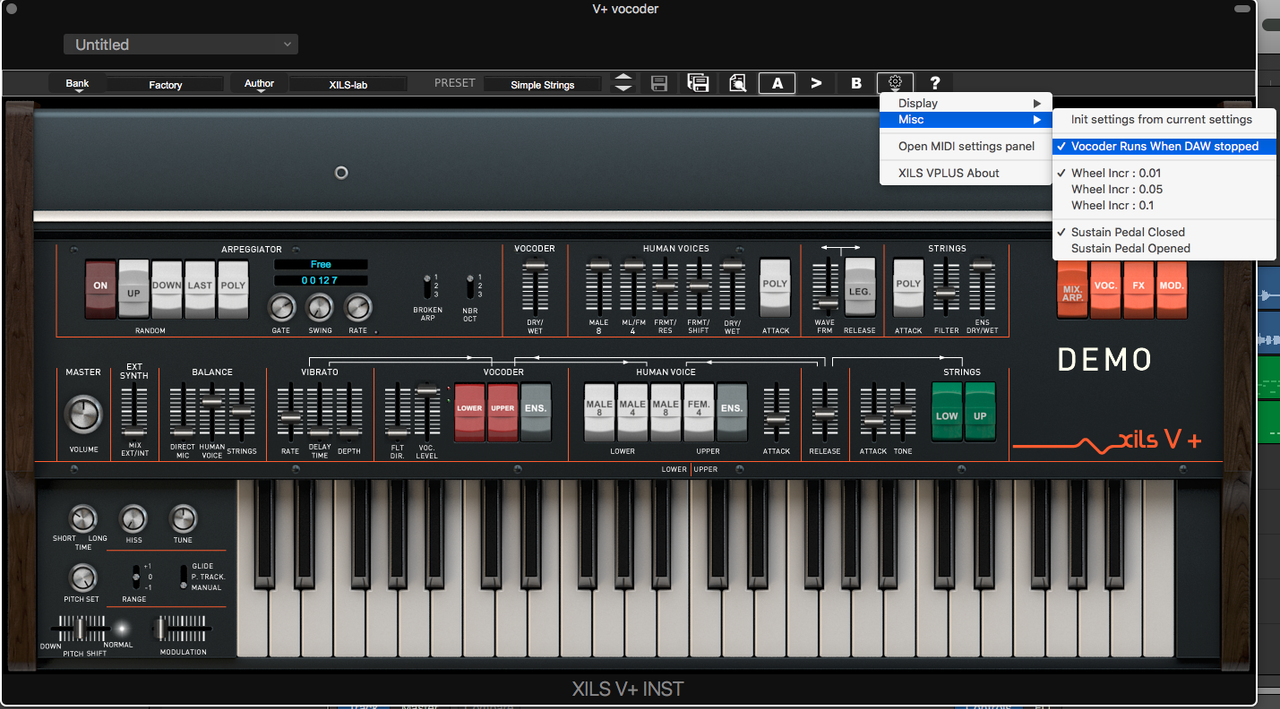
According to the developers there's an option in the vocoder plugin itself for allowing it to work even when the DAW is stopped. Works great now.
The TAL Vocoder plugin (referred to earlier in this thread) works both in "play", "rec" or "stop" mode of the DAW.
The XILS V+ on the other hand only lets through teh mic when the DAW is in "play" or "rec" mode. As soon as I stop the DAW I get no audio through (although MIDI still works to control the same vocoder -it also has strings and voice sounds you can play via MIDI). And of course I have to have recording enabled for the track with the mic input or else I won't hear anything regardless!
i'm going to contact the XILS developers about it and see what they have to say.
UPDATE: problem solved!
According to the developers there's an option in the vocoder plugin itself for allowing it to work even when the DAW is stopped. Works great now.