


I'm trying out a demo of the Xils Lab V+ vocoder plugin but have trouble figuring out how to make the mic input work. The mic is already attached to my audio interface and works fine (I've tried it on a separate audio track).
According to the plugin's user manual I believe I need to use a "sidechain" input for the mic (it's a little sparse on details and basically refers to each DAW being different on this). The original vocoder the plugin is based on (Roland VP-330) has a built in synth sound source (strings) in addition allowing for external sound sources, but I'd like to try the built-in sound source first, to make things simple.
So do I set the mic up on one track and the vocoder plugin on a separate track, or does it all go on the same track? And where is a track's sidechain input?
How to set up a sidechain? (vocoder plugin)
-
Peter Widdicombe Peter Widdicombe https://www.kvraudio.com/forum/memberlist.php?mode=viewprofile&u=336849
- KVRian
- 1206 posts since 29 Aug, 2014
Waveform does allow multiple inputs to a track, but you have to specify that in the input section at the bottom (default is 1). Set to 2, and you will see 2 chevron input selectors instead of the usual 1 on that track - audio and MIDI, in this case.
So you have choices - and see which works out.
1. Multiple input - audio + midi
2. MIDI input, and audio on a separate track with "route audio from track..." and specify your audio track that you want to use.
This works directly with another VST doing similar (MIDI Choir); but if you want to pre-record the audio then use the track method.
So you have choices - and see which works out.
1. Multiple input - audio + midi
2. MIDI input, and audio on a separate track with "route audio from track..." and specify your audio track that you want to use.
This works directly with another VST doing similar (MIDI Choir); but if you want to pre-record the audio then use the track method.
Waveform 13; Win10 desktop/8 Gig; Win11 Laptop; MPK261; VFX+disfunctional ESQ-1
-
- KVRian
- 524 posts since 16 Mar, 2017
Look at the properties panel along the bottom for a "Sidechain Source" option; it takes its input from another track:
Note that if your bottom panel is collapsed you will either need to expand it or click on the wrench icon to see this in a popup.
You can bring the mic in through the other track, or if you don't need the primary audio input of the plugin otherwise, you could use a rack to route the audio into the sidechain input of the plugin:
Note that if your bottom panel is collapsed you will either need to expand it or click on the wrench icon to see this in a popup.
You can bring the mic in through the other track, or if you don't need the primary audio input of the plugin otherwise, you could use a rack to route the audio into the sidechain input of the plugin:
You do not have the required permissions to view the files attached to this post.
-
- KVRist
- Topic Starter
- 128 posts since 26 May, 2020 from Norway
I'm obviously doing something wrong here as I can't find any "sidechain" option for it in Waveform. Here's a screenshot which shows what comes up when I click on the plugin's properties:
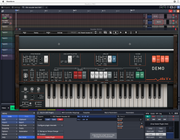
As you can see, audio from the mic works (track 1).
Click on the screenshot to see a bigger version of the screenshot.
As you can see, audio from the mic works (track 1).
Click on the screenshot to see a bigger version of the screenshot.
-

- KVRAF
- 4891 posts since 3 Jan, 2003 from Vancouver
If Waveform can "see" the plugin's sidechain audio input it will show up on the top bar like this:
You do not have the required permissions to view the files attached to this post.
Surely there must be consensus by now...
-
- KVRist
- Topic Starter
- 128 posts since 26 May, 2020 from Norway
The gray "left/right arrow" icon is there on mine (just like in your screenshot), but there's nothing more, and when I click it it says "This plugin is sandboxed, use the actions or properties panel to adjust plugin channel and sidechain settings".
But as you can see from my previous screenshot there are no sidechain settings to be found (or at least I can't find them) within the properties section. How do I access the "Actions" panel?
I'm on a Mac if that matters (a quick search for your Vocodex plugin appears to reveal it's Windows only).
EDIT: OK, I figured out how to turn off "sandboxing" in Waveform, but there's still no sidechain option to be found. Has anyone used this specific plugin with Waveform (or with any other DAW for that matter)?
But as you can see from my previous screenshot there are no sidechain settings to be found (or at least I can't find them) within the properties section. How do I access the "Actions" panel?
I'm on a Mac if that matters (a quick search for your Vocodex plugin appears to reveal it's Windows only).
EDIT: OK, I figured out how to turn off "sandboxing" in Waveform, but there's still no sidechain option to be found. Has anyone used this specific plugin with Waveform (or with any other DAW for that matter)?
-
- KVRAF
- 4891 posts since 3 Jan, 2003 from Vancouver
Which version of Waveform are you using? I'm pretty sure the free version doesn't have the Actions panel, but I've never used it so I'm not sure.
I downloaded the TAL-Vocoder to test because it's free and has a Mac and Windows version and I confirmed that sidechain is much easier to do with the plugin not sandboxed, but... I hate vocoders. They only do one thing and it feels like you need to earn a degree before you can figure out how to get them to do that one thing. They seem needlessly complex to me. This isn't the 60s. Make your vocoders easier.
EDIT: TAL-Vocoder does its own carrier but needs MIDI notes. I tried to send audio from a synth into it as a carrier but it doesn't seem to work that way.
And looking around I'm shocked at how expensive vocoders tend to be. Sound like a kazoo for just $149 and iLok!
Anyways, good luck to you. Stick enough things places and something might make a noise.
By the way, I recommend using a Rack for a vocoder. That should actually show the inputs. It will also allow you to use an audio input that only goes through the vocoder. I honestly don't know how to keep the audio (vocal) part from playing unaffected without using a Rack.
I downloaded the TAL-Vocoder to test because it's free and has a Mac and Windows version and I confirmed that sidechain is much easier to do with the plugin not sandboxed, but... I hate vocoders. They only do one thing and it feels like you need to earn a degree before you can figure out how to get them to do that one thing. They seem needlessly complex to me. This isn't the 60s. Make your vocoders easier.
EDIT: TAL-Vocoder does its own carrier but needs MIDI notes. I tried to send audio from a synth into it as a carrier but it doesn't seem to work that way.
And looking around I'm shocked at how expensive vocoders tend to be. Sound like a kazoo for just $149 and iLok!
Anyways, good luck to you. Stick enough things places and something might make a noise.
By the way, I recommend using a Rack for a vocoder. That should actually show the inputs. It will also allow you to use an audio input that only goes through the vocoder. I honestly don't know how to keep the audio (vocal) part from playing unaffected without using a Rack.
You do not have the required permissions to view the files attached to this post.
Surely there must be consensus by now...
-
- KVRist
- Topic Starter
- 128 posts since 26 May, 2020 from Norway
I'm on the paid version of 11.1.0 (Mac).
I haven't used the rack feature of Waveform before (I'm still relatively new to DAWs) but I gave it a go. It shows up there, but it doesn't appear to have any sidechain inputs. I'm stumped!
I also have the TAL vocoder (2.1.3), but haven't tried it until now. The strange thing is that it actually does show a sidechain button (unlike the Xils V+) at the top within Waveform!
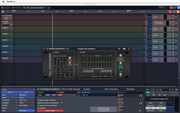
So I'm going to try and see if the TAL vocoder works before attempting the V+ vocoder demo.
I'm obviously not too familiar with all this (DAWs and plugins), but according to the options I get when clicking on the TAL vocoder's "sidechain" button I get to choose between the 8 tracks in Tracktion, so it makes sense to choose track 1 which is the mic, and turn on the "SC" (sidechain?) button.
But I don't think the mic reaches the vocoder as its "clip" LED doesn't light up regardless of the level. I've tried all sorts of setups without any success.
I have a MIDI synth attached, with both audio and MIDI enabled for it in Tracktion. It appears that the TAL vocoder has a built-in carrier signal (like the Roland VP-330, but unlike the SVC-350 which I understand it's meant to model), so with that in mind I should only need to have a mic plugged into its modulator input, right?
But obviously something's gone wrong here.
I haven't used the rack feature of Waveform before (I'm still relatively new to DAWs) but I gave it a go. It shows up there, but it doesn't appear to have any sidechain inputs. I'm stumped!
I also have the TAL vocoder (2.1.3), but haven't tried it until now. The strange thing is that it actually does show a sidechain button (unlike the Xils V+) at the top within Waveform!
So I'm going to try and see if the TAL vocoder works before attempting the V+ vocoder demo.
I'm obviously not too familiar with all this (DAWs and plugins), but according to the options I get when clicking on the TAL vocoder's "sidechain" button I get to choose between the 8 tracks in Tracktion, so it makes sense to choose track 1 which is the mic, and turn on the "SC" (sidechain?) button.
But I don't think the mic reaches the vocoder as its "clip" LED doesn't light up regardless of the level. I've tried all sorts of setups without any success.
I have a MIDI synth attached, with both audio and MIDI enabled for it in Tracktion. It appears that the TAL vocoder has a built-in carrier signal (like the Roland VP-330, but unlike the SVC-350 which I understand it's meant to model), so with that in mind I should only need to have a mic plugged into its modulator input, right?
But obviously something's gone wrong here.
-
- KVRAF
- 4891 posts since 3 Jan, 2003 from Vancouver
TAL-Vocoder has a built-in carrier but it requires MIDI notes. Here's how I set it up in a Rack. Track 3 has MIDI chords. Track 4 has audio (my voice). Note that when you're using a Rack you don't need to care about sidechain because it shows you all the inputs.
You do not have the required permissions to view the files attached to this post.
Surely there must be consensus by now...
-
- KVRAF
- 4891 posts since 3 Jan, 2003 from Vancouver
If you want to use your own synth as carrier, you can use the left/right setup where audio in the left input is carrier and audio in the right is modulator.
I have no idea what the SC button does. As far as I can tell it doesn't do anything.
I have no idea what the SC button does. As far as I can tell it doesn't do anything.
Surely there must be consensus by now...
-

- KVRian
- 766 posts since 25 Jul, 2010 from Northern Ireland
It's also possible to have a MIDI clip and audio clip sit on top of each other in the same track, I've used this with Glitch-2 to change presets with MIDI while still playing the same Audio clip, maybe a bit clunky but it's an option. Obviously It can be done with sends etc.
-
- KVRist
- Topic Starter
- 128 posts since 26 May, 2020 from Norway
It works! 
I followed your example, Pough, and it works just as you described (using one track with a pre-recorded MIDI sequence, another track with pre-recorded speech).
Clearly I'm a novice and don't understand how it all works, so I need to spend some time with this before I give the Xils V+ vocoder a shot, but for starters: how do I set up the vocoder to "play it live"? That is, play MIDI while speaking into the mic?
I've got the MIDI track covered (I just removed the recorded sequence, so now it accepts new "live" input), but I'm having trouble with the speech track. I've removed the pre-recorded speech audio and have the track selected to the correct audio input from my audio interface, but it's only heard when I enable recording for that track. I believe I've run into this problem before and there was an easy fix but I'm at loss for where to look.
Once I figure all this out I'll see if I can get the V+ vocoder to work using the same method as I've learnt here (creating a "rack" with the plugin so I can connect it as intended).
Mikoatkvr: I'm not sure what you mean by changing presets with MIDI. You mean sending program change from the keyboard for different plugin presets?
I followed your example, Pough, and it works just as you described (using one track with a pre-recorded MIDI sequence, another track with pre-recorded speech).
Clearly I'm a novice and don't understand how it all works, so I need to spend some time with this before I give the Xils V+ vocoder a shot, but for starters: how do I set up the vocoder to "play it live"? That is, play MIDI while speaking into the mic?
I've got the MIDI track covered (I just removed the recorded sequence, so now it accepts new "live" input), but I'm having trouble with the speech track. I've removed the pre-recorded speech audio and have the track selected to the correct audio input from my audio interface, but it's only heard when I enable recording for that track. I believe I've run into this problem before and there was an easy fix but I'm at loss for where to look.
Once I figure all this out I'll see if I can get the V+ vocoder to work using the same method as I've learnt here (creating a "rack" with the plugin so I can connect it as intended).
Mikoatkvr: I'm not sure what you mean by changing presets with MIDI. You mean sending program change from the keyboard for different plugin presets?
-
- KVRAF
- 4891 posts since 3 Jan, 2003 from Vancouver
Waveform's MIDI inputs and audio inputs behave differently. MIDI passes through even without the input armed for record. Audio doesn't - it only passes audio through when it's armed. At least, that's how mine is working. I don't know if there are settings somewhere to change that behavior.
Surely there must be consensus by now...
-
- KVRist
- Topic Starter
- 128 posts since 26 May, 2020 from Norway
That's frustrating to keep in mind all the time.
I was hoping enabling "Live input monitoring" (properties section for the track) would do it, but no.
I like to keep things simple.
I was hoping enabling "Live input monitoring" (properties section for the track) would do it, but no.
I like to keep things simple.
-
- KVRist
- Topic Starter
- 128 posts since 26 May, 2020 from Norway
It works (again)! 
I got the XILS V+ vocoder to work in Waveform using a similar setup method to that with the TAL vocoder (creating a "rack" and putting the plugin there, then wiring it up in a similar way to the TAL vocoder):
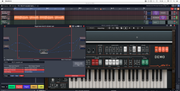
In the screenshot I have track 1 configured for my MIDI keyboard.
Track 2 contains a pre-recorded speech sample, and I have it all looped for testing. So now I can play the keyboard live and control the vocoded output from the speech sample.
But I want to replace the audio speech sample with my own voice (mic input) so I can play it all "live". I assumed it was a matter of just deleting the speech samples (the mic is already configured correctly for that track and I can see the audio coming in), but for some reason there's no audio coming into the vocoder, not even if I enable REC for that track.
What am I doing wrong?
I got the XILS V+ vocoder to work in Waveform using a similar setup method to that with the TAL vocoder (creating a "rack" and putting the plugin there, then wiring it up in a similar way to the TAL vocoder):
In the screenshot I have track 1 configured for my MIDI keyboard.
Track 2 contains a pre-recorded speech sample, and I have it all looped for testing. So now I can play the keyboard live and control the vocoded output from the speech sample.
But I want to replace the audio speech sample with my own voice (mic input) so I can play it all "live". I assumed it was a matter of just deleting the speech samples (the mic is already configured correctly for that track and I can see the audio coming in), but for some reason there's no audio coming into the vocoder, not even if I enable REC for that track.
What am I doing wrong?