


Viper|1.2.2 update with bugfixes and new skin
-
- KVRian
- Topic Starter
- 1238 posts since 29 Sep, 2004
The last skin is done, I just need to add one more feature before I finalize the update and release it. In a few weeks it should be finished
http://www.adamszabo.com/ - Synths, soundsets and music
-
- KVRAF
- 2989 posts since 5 Nov, 2014
Nord Lead has left the chatEchoes in the Attic wrote: Wed Jun 16, 2021 10:44 pm I'm looking forward to those skins too. I know it's silly, but I don't like red plugins for some reason. Same with Diva.


-
- KVRer
- 4 posts since 13 Sep, 2008
Thank you! This is very good news indeed!adamtrance wrote: Thu Jul 08, 2021 7:41 am The last skin is done, I just need to add one more feature before I finalize the update and release it. In a few weeks it should be finished
-

- GRRRRRRR!
- 17757 posts since 14 Jun, 2001 from Somewhere you're not!
I just got a new laptop and after getting everything installed, Viper and JP6K don't show up in Studio One. I've installed the redistributable, as per the install instructions, but they still don't show up. They installed perfectly on my other machine so I'm not sure why there is a problem now.
NOVAkILL : Legion GO, AMD Z1x, 16GB RAM, Win11 | Audient EVO 8 | Lumi Keys | Studio Pro 8
Korg Odyssey, bx-oberhausen, Proxima, PolyMax, GR8, JP6K, Union, Atomika,
Invader 2, Flow Motion, Olga, TRK 01, Thorn, Spire, VG Iron
Korg Odyssey, bx-oberhausen, Proxima, PolyMax, GR8, JP6K, Union, Atomika,
Invader 2, Flow Motion, Olga, TRK 01, Thorn, Spire, VG Iron
-

- Banned
- 3564 posts since 22 Aug, 2019
In the filter section, shouldn't it say Vel>Env and Vel>Reso instead of Env>Vel and Reso>Vel respectively?
It doesn't seem to say which GUI size is currently selected. Usually there is a check mark next to such menu items. In the preset overview there is a check mark next to the selected patch the way it should be.
It doesn't seem to say which GUI size is currently selected. Usually there is a check mark next to such menu items. In the preset overview there is a check mark next to the selected patch the way it should be.
-
- GRRRRRRR!
- 17757 posts since 14 Jun, 2001 from Somewhere you're not!
S'OK, Adam, I sorted the problem out myself. It was the spaces you put in the DLL names. As soon as I got rid of them, they started showing up.
NOVAkILL : Legion GO, AMD Z1x, 16GB RAM, Win11 | Audient EVO 8 | Lumi Keys | Studio Pro 8
Korg Odyssey, bx-oberhausen, Proxima, PolyMax, GR8, JP6K, Union, Atomika,
Invader 2, Flow Motion, Olga, TRK 01, Thorn, Spire, VG Iron
Korg Odyssey, bx-oberhausen, Proxima, PolyMax, GR8, JP6K, Union, Atomika,
Invader 2, Flow Motion, Olga, TRK 01, Thorn, Spire, VG Iron
-
- KVRian
- Topic Starter
- 1238 posts since 29 Sep, 2004
It depends on how hard it is to implement. I have never looked at it before, but could be something for the future.shaboogen wrote: Sat Jul 10, 2021 5:33 am Hey Adam, love Viper.
Is MPE support on your roadmap for some point in future?
Thanks
Haha good catch! I dont know why I didnt notice this before! It indeed needs to be changed since the Velocity is controlling them and not the other way arounde-crooner wrote: Sun Jul 25, 2021 5:35 pm In the filter section, shouldn't it say Vel>Env and Vel>Reso instead of Env>Vel and Reso>Vel respectively?
It doesn't seem to say which GUI size is currently selected. Usually there is a check mark next to such menu items. In the preset overview there is a check mark next to the selected patch the way it should be.
 Regarding the gui scale check mark, you can drag the corner of the plugin to get values between those predefined percentages, then where would the check mark go?
Thanks for letting me know. You mean the space in "Viper (64)"? So "Viper(64)" works? Now that is messed up! It works in every other DAW why doesnt Studio One like spaces? Makes no sense.BONES wrote: Sun Jul 25, 2021 9:23 pm S'OK, Adam, I sorted the problem out myself. It was the spaces you put in the DLL names. As soon as I got rid of them, they started showing up.
http://www.adamszabo.com/ - Synths, soundsets and music
-
- GRRRRRRR!
- 17757 posts since 14 Jun, 2001 from Somewhere you're not!
It works fine on my other two devices, it's just this new one, so it's probably not a Studio One problem. Very strange indeed (and a measure of how desperate I got over the weekend that I solved it).
NOVAkILL : Legion GO, AMD Z1x, 16GB RAM, Win11 | Audient EVO 8 | Lumi Keys | Studio Pro 8
Korg Odyssey, bx-oberhausen, Proxima, PolyMax, GR8, JP6K, Union, Atomika,
Invader 2, Flow Motion, Olga, TRK 01, Thorn, Spire, VG Iron
Korg Odyssey, bx-oberhausen, Proxima, PolyMax, GR8, JP6K, Union, Atomika,
Invader 2, Flow Motion, Olga, TRK 01, Thorn, Spire, VG Iron
-
- KVRAF
- 5664 posts since 7 Feb, 2013
I never ever had such a problem with Viper 64 and Studio One
Bones, I think Studio One might have blacklisted Viper for whatever reason, so when you renamed Viper dll S1 decided it was some new plugin.
Did you try resetting the balcklist and rescanning plugins?
Bones, I think Studio One might have blacklisted Viper for whatever reason, so when you renamed Viper dll S1 decided it was some new plugin.
Did you try resetting the balcklist and rescanning plugins?
You may think you can fly ... but you better not try
-
- GRRRRRRR!
- 17757 posts since 14 Jun, 2001 from Somewhere you're not!
According to Plugin Manager, nothing was blacklisted but I reset it and rescanned anyway. As you can imagine, by the time I thought to try and remove the spaces, I had tried everything I could possibly think of, plus all the suggestions from here, half-a-dozen times. And, BTW, thanks to all who offered suggestions, I appreciate your efforts.
NOVAkILL : Legion GO, AMD Z1x, 16GB RAM, Win11 | Audient EVO 8 | Lumi Keys | Studio Pro 8
Korg Odyssey, bx-oberhausen, Proxima, PolyMax, GR8, JP6K, Union, Atomika,
Invader 2, Flow Motion, Olga, TRK 01, Thorn, Spire, VG Iron
Korg Odyssey, bx-oberhausen, Proxima, PolyMax, GR8, JP6K, Union, Atomika,
Invader 2, Flow Motion, Olga, TRK 01, Thorn, Spire, VG Iron
-
- Banned
- 3564 posts since 22 Aug, 2019
In Sylenth1 it looks like thisadamtrance wrote: Mon Jul 26, 2021 7:16 am Regarding the gui scale check mark, you can drag the corner of the plugin to get values between those predefined percentages, then where would the check mark go?
You do not have the required permissions to view the files attached to this post.
-
- KVRian
- Topic Starter
- 1238 posts since 29 Sep, 2004
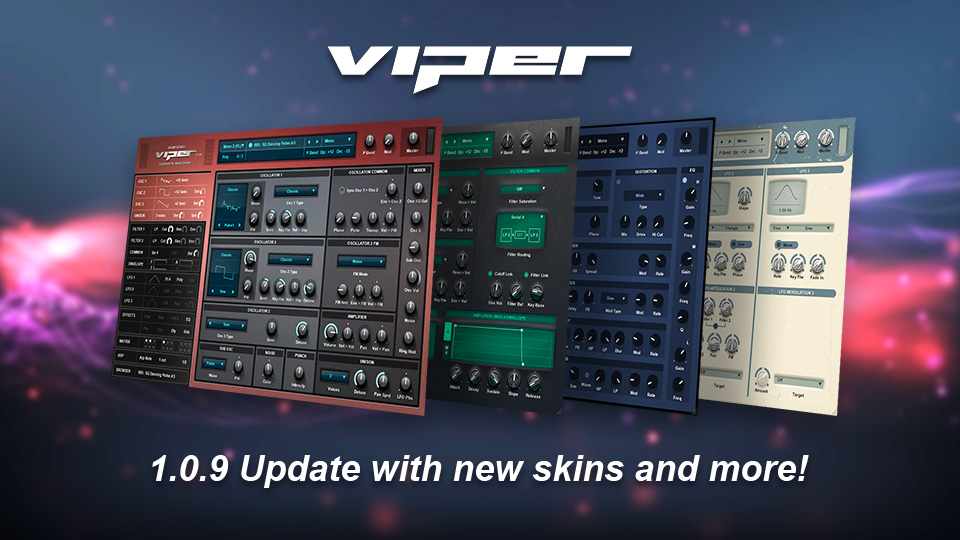
Viper has been updated to version 1.0.9 with these new features:
• New skins
• New Analog filter in Filter 1
• New "Enable Tooltip" function in main menu (displays help text when hovering over controls after a few seconds)
• New "Restore Preset" function
• Improved filters
• More informative window about missing wavs
• Faster initialization of presets
• Show GUI scaling when resizing from corner
• Automations use lower CPU
• Arpeggiator uses slightly less CPU
• Fixed bug in Arpeggiator redrawing
• Fixed small bugs in LFO, Envelope and Matrix
• Lots of other bug fixes
To get the update simply download Viper again from your receipt.
There is also an August discount for this month, use the code AUG2021 until the 31st of August to get 20% off of any purchase!
Those wanting the Virus skins can download them from here: https://www111.zippyshare.com/v/FcxFcJxe/file.html
Enjoy!

http://www.adamszabo.com/ - Synths, soundsets and music
-
- KVRian
- Topic Starter
- 1238 posts since 29 Sep, 2004
How bout this? https://www.sendspace.com/file/kjx1wb
http://www.adamszabo.com/ - Synths, soundsets and music