
DrivenByMoss: Bitwig extension for many hardware controllers (version 26.6.1)

Post Reply New Topic
RELATED
PRODUCTS
Bitwig Studio 6$399.00Buy Maschine

Post

moss wrote: Fri Jan 15, 2021 7:25 pm
artsense wrote: Thu Jan 14, 2021 1:45 pm
artsense wrote: Thu Dec 24, 2020 5:19 pm hey Moss,

p.s. is there any way to control brightness of side buttons? or at least make them brighter by default?
Image
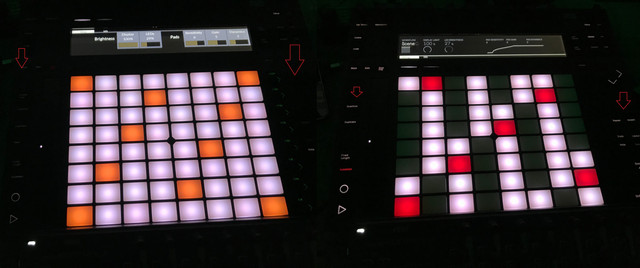
still have this problem..
side buttons are too dark on low LEDs levels..
on high LEDs levels situation is better, but then LEDs are so bright that blowing my head..
im working with connected power adapter.
side buttons are much brighter in ableton on low LEDs level
As I wrote before, I have no idea what to do about it. I already checked the Ableton docs and also checked the Push scripts in Ableton. Furthermore, it does not happen on my device.
what is you firmware of Push2?
im on Firmware 1.0 Build 71
side buttons are much brighter in Ableton 10.1.30.. just re-checked

Post

artsense wrote: Wed Jan 20, 2021 9:23 am
moss wrote: Fri Jan 15, 2021 7:25 pm
artsense wrote: Thu Jan 14, 2021 1:45 pm
artsense wrote: Thu Dec 24, 2020 5:19 pm hey Moss,

p.s. is there any way to control brightness of side buttons? or at least make them brighter by default?

Image
still have this problem..
side buttons are too dark on low LEDs levels..
on high LEDs levels situation is better, but then LEDs are so bright that blowing my head..
im working with connected power adapter.
side buttons are much brighter in ableton on low LEDs level
As I wrote before, I have no idea what to do about it. I already checked the Ableton docs and also checked the Push scripts in Ableton. Furthermore, it does not happen on my device.
what is you firmware of Push2?
im on Firmware 1.0 Build 71
side buttons are much brighter in Ableton 10.1.30.. just re-checked
Same Firmware version here.

Post

hi I'm new here how would you set up a motor fader with flexy?

Post

danelooo wrote: Wed Jan 20, 2021 3:00 pm hi I'm new here how would you set up a motor fader with flexy?
That is not supported. The most devices with motor faders use good old MCU (which is supported by DrivenByMoss as well) or something proprietary like Eucon.
Which device do you use?

Post

Io station 24c is basically a faderportv2 with soundcard. I would like to a map a couple of button that aren't mapped. Thanks for the quick reply

Post

danelooo wrote: Thu Jan 21, 2021 10:14 am Io station 24c is basically a faderportv2 with soundcard. I would like to a map a couple of button that aren't mapped. Thanks for the quick reply
Try the MCU implementation of DrivenByMoss with it. Since it has 1 fader you might need to enable the "only 1 fader" setting.
The function buttons can be configured in the settings too. Other buttons are fixed, so you might need to experiment a bit which one of the different MCU modes of the device works best (Cubase, Ableton, ...).

Post

all ready tried logic mcu and hui version with no results i will let you know if i have any luck with cubase or ableton version

Post

danelooo wrote: Thu Jan 21, 2021 11:37 am all ready tried logic mcu and hui version with no results i will let you know if i have any luck with cubase or ableton version
What do you mean by "no result"? If it was not working at all you did something wrong. It could only be that the mappings were wrong.

Post

moss wrote: Wed Jan 20, 2021 10:41 am
artsense wrote: Wed Jan 20, 2021 9:23 am
moss wrote: Fri Jan 15, 2021 7:25 pm
artsense wrote: Thu Jan 14, 2021 1:45 pm
artsense wrote: Thu Dec 24, 2020 5:19 pm hey Moss,

p.s. is there any way to control brightness of side buttons? or at least make them brighter by default?

Image
still have this problem..
side buttons are too dark on low LEDs levels..
on high LEDs levels situation is better, but then LEDs are so bright that blowing my head..
im working with connected power adapter.
side buttons are much brighter in ableton on low LEDs level
As I wrote before, I have no idea what to do about it. I already checked the Ableton docs and also checked the Push scripts in Ableton. Furthermore, it does not happen on my device.
what is you firmware of Push2?
im on Firmware 1.0 Build 71
side buttons are much brighter in Ableton 10.1.30.. just re-checked
Same Firmware version here.
I have the same problem here, maybe the problem is only solved on Ableton? Not sure if the Bitwig API would allow for control over such a specific thing.
http://www.youtube.com/reflekshun
Music Producer / Audio Engineer

Post

I have been practicing using push4bitwig to do live sets building songs from scratch using loops. It's a pretty great experience so far, the workflow has a lot to learn and improve but it's getting easier each time I try it. Thought I should post here since this is only possible with the script that Moss works on!

http://www.youtube.com/reflekshun
Music Producer / Audio Engineer

Post

reflekshun wrote: Thu Jan 21, 2021 10:49 pm
moss wrote: Wed Jan 20, 2021 10:41 am
artsense wrote: Wed Jan 20, 2021 9:23 am
moss wrote: Fri Jan 15, 2021 7:25 pm
artsense wrote: Thu Jan 14, 2021 1:45 pm
artsense wrote: Thu Dec 24, 2020 5:19 pm hey Moss,

p.s. is there any way to control brightness of side buttons? or at least make them brighter by default?

Image
still have this problem..
side buttons are too dark on low LEDs levels..
on high LEDs levels situation is better, but then LEDs are so bright that blowing my head..
im working with connected power adapter.
side buttons are much brighter in ableton on low LEDs level
As I wrote before, I have no idea what to do about it. I already checked the Ableton docs and also checked the Push scripts in Ableton. Furthermore, it does not happen on my device.
what is you firmware of Push2?
im on Firmware 1.0 Build 71
side buttons are much brighter in Ableton 10.1.30.. just re-checked
Same Firmware version here.
I have the same problem here, maybe the problem is only solved on Ableton? Not sure if the Bitwig API would allow for control over such a specific thing.
As I wrote above I do not see this issue on my Push and therefore have no idea what to do about this (already re-checked the official Ableton Push 2 documentation).

Post

reflekshun wrote: Thu Jan 21, 2021 10:53 pm I have been practicing using push4bitwig to do live sets building songs from scratch using loops. It's a pretty great experience so far, the workflow has a lot to learn and improve but it's getting easier each time I try it. Thought I should post here since this is only possible with the script that Moss works on!

Really nice and great performance! Would love to see a video where you explain how you use the Push.

Post

moss wrote: Fri Jan 22, 2021 9:25 am
reflekshun wrote: Thu Jan 21, 2021 10:53 pm I have been practicing using push4bitwig to do live sets building songs from scratch using loops. It's a pretty great experience so far, the workflow has a lot to learn and improve but it's getting easier each time I try it. Thought I should post here since this is only possible with the script that Moss works on!

Really nice and great performance! Would love to see a video where you explain how you use the Push.
Thanks very much! And thank you also for your hard work over the years. I do intend on making such a video. I will want to get my workflow down more solid first, but I think it would be super cool to share such a workflow with everyone so more people can use it in this way.

There are also some technical Bitwig challenges to work through which I will try to communicate with the community and also the Bitwig team to see if we can solve some of those issues to unlock more cool and unique live music workflows that other daws haven't tapped into yet :)
http://www.youtube.com/reflekshun
Music Producer / Audio Engineer

Post

moss wrote: Fri Jan 22, 2021 9:00 am
reflekshun wrote: Thu Jan 21, 2021 10:49 pm
moss wrote: Wed Jan 20, 2021 10:41 am
artsense wrote: Wed Jan 20, 2021 9:23 am
moss wrote: Fri Jan 15, 2021 7:25 pm
artsense wrote: Thu Jan 14, 2021 1:45 pm

still have this problem..
side buttons are too dark on low LEDs levels..
on high LEDs levels situation is better, but then LEDs are so bright that blowing my head..
im working with connected power adapter.
side buttons are much brighter in ableton on low LEDs level
As I wrote before, I have no idea what to do about it. I already checked the Ableton docs and also checked the Push scripts in Ableton. Furthermore, it does not happen on my device.
what is you firmware of Push2?
im on Firmware 1.0 Build 71
side buttons are much brighter in Ableton 10.1.30.. just re-checked
Same Firmware version here.
I have the same problem here, maybe the problem is only solved on Ableton? Not sure if the Bitwig API would allow for control over such a specific thing.
As I wrote above I do not see this issue on my Push and therefore have no idea what to do about this (already re-checked the official Ableton Push 2 documentation).
This behavior is only evident on lower brightness settings for me. On max brightness the panels are fine. As you turn the brightness down, the side buttons will fade very quickly, but the pads will stay relatively bright.

One reason to turn down brightness is that the push2 pad lights show up VERY bright on cameras, so turning those down to a good level for cameras means basically turning off the side button backlights if that makes sense. Anyway i'm not losing any sleep over this!
http://www.youtube.com/reflekshun
Music Producer / Audio Engineer

Post

Hi Moss, I have Novation Launchkey 49 MkII and Arturia Beatstep Pro. These are not listed as supported model in 3.2.5+. Is it OK (and recommended) to use the latest version? I am using latest version of Bitwig. Also, is there a link to documentation for LK 49 MkII and BS Pro? I found it for MkIII, but not MkII. Thank you, Todd
https://www.reverbnation.com/toddsilva
Ryzen 9 5950x with 64G, i7 5820K with 32G DDR4, networked using AudioGridder, Bitwig, NI, U-he, and Arturia soft synths to name a few
Eurorack system https://www.modulargrid.net/e/racks/view/432465

Post Reply

Return to “Controller Scripting”