


+1 for left title align
when you scroll long sequences (naturally from left to right) you're able to see their names before you scroll to half of the sequence.
Double click -> add new part finally works under Linux (tested v.3.0.10), which is good sign of compatibility. I like double click idea. Indeed I wasn't using pencil/selection switch often.
M3 Tests
-
- KVRist
- 185 posts since 12 Nov, 2009
-

- KVRian
- 1372 posts since 21 May, 2004 from Serbia
I think the new align method is way better than the old one.
It's actually aligning to the middle of the visible portion of a part, so as long as a part is visible, the name is visible too.
It's actually aligning to the middle of the visible portion of a part, so as long as a part is visible, the name is visible too.
-

- KVRAF
- Topic Starter
- 13863 posts since 24 Jun, 2008 from Europe
When pasting parts/notes, the paste position is not defined by the playback cursor, but rather by the mouse cursor (snapped to grid)!gemada wrote: I mean this:

-
- KVRAF
- Topic Starter
- 13863 posts since 24 Jun, 2008 from Europe
True point. It's on the whishlist. I've extended the note on the whishlist with some aspects you highlight here.jpumphandle wrote:Just some thoughts on parts since each seems to have its own properties.
In the drop down (right click) for parts there is no Delete option as there is for a sequence. The only way to delete is to highlight and press delete.
e.g. it may not be obvious where a part begins and ends (precisely) as the properties can only be estimated. I would welcome a Part Properties item in the right click drop down menu. start, end, loop, etc. Can't tell exactly where this example (2nd track on Rack B) starts ....
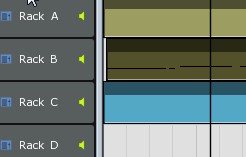
-
- KVRAF
- Topic Starter
- 13863 posts since 24 Jun, 2008 from Europe
This could happen if you have mapped a MIDI knob to more than 1 parameter.Bonteburg wrote:I recorded a filter sequence named 'Filter' for EXfade Looper VSTi using a knob on my Oxygen 61. It recorded O.K. but a second sequence named 'Filter (2)' appeared and its parametre is the pan knob of some RMIV pad (without doing anything).
Then each mapped parameter is recorded separately, which is logical as the map settings could differ per parameter, e.g. different range.
What do you mean with this?The dummy sequence is looped (as opposed to the proper one).
Eventually also tell me how i can repeat the odd situation.
Thanks Bonte!
-
- KVRAF
- Topic Starter
- 13863 posts since 24 Jun, 2008 from Europe
So on your system, in MU.LAB 3.0.11, the problem occurs as well with recording audio as with recording MIDI?Bonteburg wrote:I have to admit I didn't get around to do it yet
That said, I can't bring myself to believe it's memory related, as it doesn't happen in Renoise and Ardour, nor indeed when I record MU.LAB's output into Audio Hijack -in which case MU.LAB , Audio Hijack and Quicktime (to provide a click track) put an even greater load on the RAM.
Actually, I think it's kind of similar to the MIDI-recording gap I was talking about - a momentary hang up, imprinted on the recording (you don't hear it whilst recording/ playing, only in the final file).

Or only when recording audio?
Is the problem occurring more if CPU load is higher?
Could you please also try this:
1) Quit MU.LAB
2) Edit Settings/Mulab.txt
3) Ensure the line "AudioFileStreamBlockSize=1000"
4) Save Mulab.txt and try again
Does this helps?
If its better but not yet good enough, try 2000.
The value is the size of the record buffer in milliseconds. Default=500.
-
- KVRAF
- Topic Starter
- 13863 posts since 24 Jun, 2008 from Europe
Finetuned in the next version, thanks for mentioning.Bonteburg wrote:Bug: You can't edit the metronome ('no parameters').
Edit: it's still doable if you go to the deep editor and tinker a little.
-
- KVRAF
- Topic Starter
- 13863 posts since 24 Jun, 2008 from Europe
Since MU.LAB 3.0.10 the sequence name is always visible.dwsel wrote:+1 for left title align
when you scroll long sequences (naturally from left to right) you're able to see their names before you scroll to half of the sequence.
That's good news!Double click -> add new part finally works under Linux (tested v.3.0.10), which is good sign of compatibility. I like double click idea. Indeed I wasn't using pencil/selection switch often.

FYI: Since MU.LAB 3.0.11 you can also use [Ctrl]+leftclick to draw new parts/notes. Use the way you like most.
-
TheGuysanIdiot TheGuysanIdiot https://www.kvraudio.com/forum/memberlist.php?mode=viewprofile&u=213066
- KVRist
- 308 posts since 10 Aug, 2009 from United Kingdom
[Jo] - "Since MU.LAB 3.0.10 the sequence name is always visible".
I also like the centered text. Indeed the sequence names are always visible, unlike M2 left positioned name system. Took a short time for it to grow on me. Now I really like it, very clever.
OZ
I also like the centered text. Indeed the sequence names are always visible, unlike M2 left positioned name system. Took a short time for it to grow on me. Now I really like it, very clever.
OZ
-
- Hun #3
- 4265 posts since 25 Mar, 2002 from A quaint little village just south of Hamburg, Germany
No CPU trouble here! I'll try and play with said settings a little.mutools wrote:So on your system, in MU.LAB 3.0.11, the problem occurs as well with recording audio as with recording MIDI?
Or only when recording audio?
Is the problem occurring more if CPU load is higher?
Could you please also try this:
1) Quit MU.LAB
2) Edit Settings/Mulab.txt
3) Ensure the line "AudioFileStreamBlockSize=1000"
4) Save Mulab.txt and try again
Does this helps?
If its better but not yet good enough, try 2000.
The value is the size of the record buffer in milliseconds. Default=500.
-
- Hun #3
- 4265 posts since 25 Mar, 2002 from A quaint little village just south of Hamburg, Germany
Jo,
I just recorded 3 tracks of guitar for 30-something bars and nothing happened, which is a novelty. I did not change the Block Size settings, meaning to conduct a 'default setting' test to demonstrate the issue. Maybe there was a bug of some kind and some other little thing you changed in 30.0.11 made it disappear (though I can't say how likely this would be).
I'll do some further testing with ridiculously low settings to try and achieve the glitch effect.

I just recorded 3 tracks of guitar for 30-something bars and nothing happened, which is a novelty. I did not change the Block Size settings, meaning to conduct a 'default setting' test to demonstrate the issue. Maybe there was a bug of some kind and some other little thing you changed in 30.0.11 made it disappear (though I can't say how likely this would be).
I'll do some further testing with ridiculously low settings to try and achieve the glitch effect.
No no, I meant to say that the gap-before-MIDI-recording bug strikes me as oddly similar to the audio stutter bug. That said, the MIDI bug also seems to have disappeared. Will do some testing though.mutools wrote:So on your system, in MU.LAB 3.0.11, the problem occurs as well with recording audio as with recording MIDI?
-
- KVRian
- 620 posts since 27 Jul, 2001 from france
I was just tring this with a empty sequence part.mutools wrote:What kind of part are you trying to extend to the left? Audio or Sequence part?pquenin wrote:When you put your mouse at the beginning of a part the arrow changes into a pen but if you use the pen to extend the part to the left, nothing happen. The same thing for a note is OK : the note is extended to the right. It's OK also in the multisaple editor.
So it must be a bug he he !
Note that the extend-to-the-left feature always tries to keep the current content at the same position.
So if you have an audio part that already plays the audio from the start, extending such audio part to the left doesn't have any effect as the part is already playing from the start. Maybe an timed-auto-hide alert should be given in such case to avoid confusion?
PQ
free software at : http://pquenin.free.fr/pqnaudio
free music at : http://www.soundclick.com/thepqueninproject
free software at : http://pquenin.free.fr/pqnaudio
free music at : http://www.soundclick.com/thepqueninproject
-

- KVRAF
- 9091 posts since 28 May, 2005 from Netherneverlands
A strange request, I'm not even sure it's possible. It could probably be a unique feature in comparison with other daws, but..
Could it be possible to calculate and show the amount of cpu usage per Rack? So a little cpu meter bar in every rack?
If even possible, I'm not asking to implement this right now, but I thought it would be an interesting and clever little idea..
Could it be possible to calculate and show the amount of cpu usage per Rack? So a little cpu meter bar in every rack?
If even possible, I'm not asking to implement this right now, but I thought it would be an interesting and clever little idea..
No band limits, aliasing is the noise of freedom!
-
- KVRAF
- 9091 posts since 28 May, 2005 from Netherneverlands
When I double click on the grid in a track outside of the area between the loop pointers I only get a "open/new sequence" list after dragging an area right after the double click.
When I double click on the area within the range of the loop pointers I don't have to drag an area to do this.
Is this supposed to be?
I took me a while to understand the difference of behavior. Especially since I was used to not having to drag (only double click) withing the pointers area. I first thought it was a bug not showing the menu right after the double click outside the loop point area
When I double click on the area within the range of the loop pointers I don't have to drag an area to do this.
Is this supposed to be?
I took me a while to understand the difference of behavior. Especially since I was used to not having to drag (only double click) withing the pointers area. I first thought it was a bug not showing the menu right after the double click outside the loop point area
No band limits, aliasing is the noise of freedom!
-
- KVRAF
- 9091 posts since 28 May, 2005 from Netherneverlands
I also got some crashes lately in M3, but I had forgotten to turn on the logging 
It just crashed while opening a different session when I had another session on sometimes, or for instance when I was closing the application. And I belief it crashed when changing presets in a synth too (I thought it was Vember Audio Surge).
I'm now trying to remember myself to always turn logging on when after starting the application, so I can show the log file after a possible crash
Anyone else having crashes with the latest beta's or just me??? Might be interesting info for Jo to get an idea of how stable it is yet
EDIT: Ahhh it crashed again while opening a different session when I had another session on. But.. log file only shows this :
:
 It's a session where I use one synth (Zebra2) in rack A and one synth (MicroTonic) in rack B. Both only have one little sequence in the track yet.. So it's only a short loop actually.
When I have this session open and I choose in the menu for open session or open recent session, MU.LAB instantly crashes I do see the "opening a new session will close this session" dialog screen just before the crash.
I guess it can't be Zebra2 or MicroTonic as these are very widely used instruments, so other users would have reported this earlier?
After restarting MU.LAB it askes to load the autosaved version of the latest session, but then another session then the one I had openen when it crashed opens.
It just crashed while opening a different session when I had another session on sometimes, or for instance when I was closing the application. And I belief it crashed when changing presets in a synth too (I thought it was Vember Audio Surge).
I'm now trying to remember myself to always turn logging on when after starting the application, so I can show the log file after a possible crash
Anyone else having crashes with the latest beta's or just me??? Might be interesting info for Jo to get an idea of how stable it is yet
EDIT: Ahhh it crashed again while opening a different session when I had another session on. But.. log file only shows this
: EDIT2: Ahh I narrowed it down to one particular session02:06:20:888 Started Logging
02:06:21:918 MS Windows Home Edition
02:06:21:918 MU.LAB UL 3.0.11
02:06:21:918 /C:/Program Files/MULAB/MULAB.exe
02:06:31:738 Save Session OK
02:06:41:884 Open Session will close this session, OK?<answer=Y>
It's a session where I use one synth (Zebra2) in rack A and one synth (MicroTonic) in rack B. Both only have one little sequence in the track yet.. So it's only a short loop actually.When I have this session open and I choose in the menu for open session or open recent session, MU.LAB instantly crashes
I do see the "opening a new session will close this session" dialog screen just before the crash.I guess it can't be Zebra2 or MicroTonic as these are very widely used instruments, so other users would have reported this earlier?
After restarting MU.LAB it askes to load the autosaved version of the latest session, but then another session then the one I had openen when it crashed opens.
No band limits, aliasing is the noise of freedom!