
Redundant group master channel in TrackBank

Post Reply New Topic
RELATED
PRODUCTS

Post

Say you have a blank project, four channels in total: Inst1, Inst2, Send1 and Master. In a controller script, you define a TrackBank for 8 channels. The four channels correspond to index 0 to 3 in the trackBank. You add valueObservers for the volume of each channel. The basic code is this (full script on Github):

Code: Select all

var trackBank = host.createTrackBank(8, 0, 0);
for (var i = 0; i<8; i++) {
    (function(channelIndex) {
        trackBank.getChannel(channelIndex).getVolume().addValueObserver(128, function(newValue) {
            println('Channel ' + channelIndex + ' changed value: ' + newValue);
        });
    })(i);
}
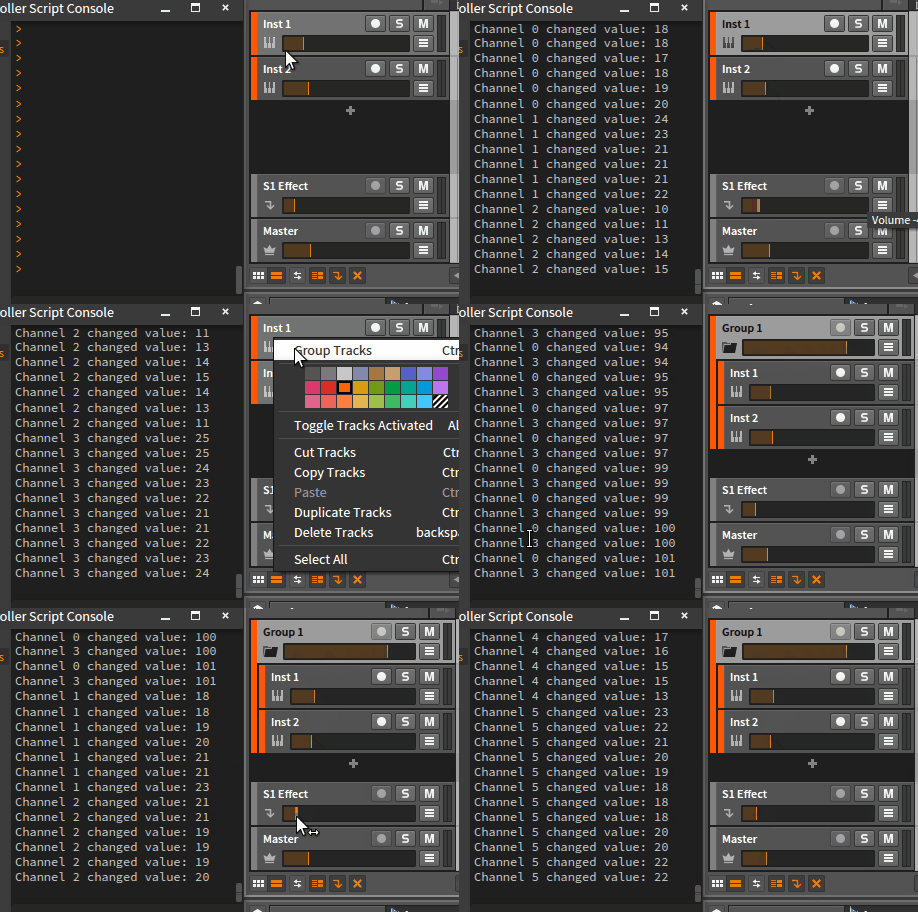
Now you group Inst1+Inst2, so you see five channels in total: Group1, Inst1, Inst2, Send1 and Master.
By mouse, you then change the volume of Group1 (index 0 in the trackBank)
=> Expected: only the volume-observer of Channel 0 is firing
=> Actual: observers of Channel 0 and Channel 3 (!) are firing synchronously
Image

Channel 3 is none of the 5 channels visible in the GUI, but it behaves like a clone of the Group 1 (index 0). This is not volume-specific, but applies to all channel-values like pan, sends.

I don't see the sense in channel 3. Any ideas?

Edit: I learned from lem8r that Channel 3 represents the "Group 1 Master" which becomes visible ONLY after "entering" the group (Right-click Group1 -> Enter Group). It makes no sense having it in the TrackBank outside of that view level though.
Last edited by BufoBufo on Thu Dec 10, 2015 10:58 pm, edited 7 times in total.

Post

Got a reply from Bitwig that I'm not really happy with:
thank you for your e-mail, but that is actually the Master of the Group and its own content track - both are linked. That is done for technical reasons, as far as i know.
Still I don't see the point in having Channel 3 in the TrackBank. De facto, it makes me lose one hardware fader to a useless channel clone which appears nowhere in the GUI, anyway.

I asked Bitwig if there's a way to exclude such channels from a TrackBank.. hope it is possible.
Last edited by BufoBufo on Thu Dec 10, 2015 11:01 pm, edited 1 time in total.

Post

Little bump one month later.. still hoping for a solution :help:

Post

I'm experiencing same trouble with my controller script.
Only solution right now is to use createMainTrackBank() instead of createTrackBank().
But you will also need createEffectTrackBank() to be able to access FX tracks.

Post

I thought about it first, but that of course would require to implement the two respective "modes" in the controller script, plus even a third mode only to access the master channel, i.e. main mode, fx mode, master mode. Sounds like horror to me usability-wise, so I personally would rather do without group tracks completely than having to switch my controller between three modes just to access all channels.

Sad thing is, I don't even know whether this is considered a bug (or at least a problem) at Bitwig.
Maybe you can try your luck and ask, too. I haven't got any feedback since Nov 05.

Post

Try to right-click on a group and select "Enter Group" you will see actual master track inside the group.

Post

Oh cool, I didn't know yet it's possible to "enter a group", thank you! Nice feature!

So your advice finally answers my question what the mysterious "Channel 3" in my example actually is - it's the "Group 1 Master" which is visible only after entering the group, right? That explains also why it appears *after* the two grouped tracks.

Hence, all Bitwig would have to do is include that "Group 1 Master" in a TrackBank _only_ when the group is actually entered but *not* in default project view. Hope they are reading this :)

Thanks again for the enlightenment!

Post Reply

Return to “Controller Scripting”