


1. I honestly like the new theme for the most part, but where's the colour pallete editor? I'm OK with most of the new colours except for some things that don't make enough contrast to be easily seen, notably the Ladspa plugin field values. They're light blue on grey/blue blackground, really difficult to see Compare this to the way it looks in T5 Dark numbers on solid light background. Much easier to see, isn't it?
2. Another question about Ladspa plugins. How do I reset the field values to 0 (zero)? This is especially important for some plugins like TAP equalizer because bands with 0dB gain/attenuation will not use any CPU
I've tried ctrl+click, shift+click, double click and middle click with no luck. What's the right way?
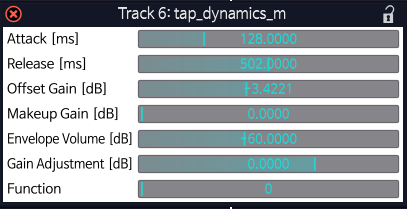
3. Another Ladspa question. Some ladspa plugins like Tap dynamics, Zamcomp (ladspa) and Invada compressor (ladspa) have live meter indicators displaying things like output level and attenuation ammount. In Tracktion these meters display as fields the user can change the value of, as if they were plugin parameters. Changing the value of these fields has no effect obviously but it's really confusing, and just wrong. These are supposed to be live meters. If the plugin is closed and reopened while there's audio being processed by it the values of these fields will update, but they will not change live while the plugin is opened as it should be.
As an example look at how Tap dynamics looks in another ladspa host like Ardour. Notice "Envelope volume" and "Gain adjustment" are live meters and not user-changable parameters Now look at the same plugin in Tracktion. Now "Envelope volume" and "Gain adjustment" are not meters and look like parameters which is not right
4. The previous question is an important issue and I think it something should be done about it, but alternatively LV2 plugin support could be added. I was a bit excited when I downloaded T7 because I thought it might support LV2 but this is not the case. Is this on the roadmap?
5. I'm thankful it's still posible to hide all the panels but I don't want the hiding/showing animations. They're slow and I have to wait a bit to able to see the panels. This is distracting and results in a slower workpace because I cannot hide/show them as often. Not to mention they look choppy on my low end laptop wihch makes them even more distracting. I'd be much better without them as in T5: instant, time efficient, non distractive panel hiding and showing.
So how do I disable these animations?
6. Do I still have to drag with the mouse when I want to insert a specific plugin? Is there not a way to type the name of a plugin and then double click or right click to insert on the selected track, before/after the selected plugin or before/after the selected fader? Having to drag it all the way from the browser panel to the mixer panel is not too fast nor comfortable, even if both panels are on the same side.
And the problem with "Add new plugin" right click option is that I cannot filter by name and I have to look for it manually which is even slower.
7. For the life of me I haven't been able to figure how to stretch clips with the mouse. I've been always told by the top bar of Tracktion that if I drag the edge arrow while holding the ALT key it will stretch the clip. However it has no effect when I try it. It just changes the end time of the clip without doing any stretching, as if I wasn't pressing the Alt key. I've tried with both the left and right Alt keys with no luck. What am I missing?
8. There's a problem with latency settings. It seems to affect level meters and waveforms too. As in, if I set the Audio buffer size to something very high like 4096 or more samples and then I place the cursor on the very beginning of a fast transient sound like a snare hit and play from there, I will miss some of the beginning of the sound and the level meter on that track will react later than what I hear.
If I set the audio buffer size to a lower setting I will hear more of the transient/attack of the snare hit and the level meter will be more in synch with what I hear.
I think this should not happen at all. The waveforms and level meters should be perfectly in synch no matter the audio buffer size setting.
9. Project management in T5 and T7 seem to be linked. If I add or close a project in T7 it will also be added or closed in T5 and viceversa. I can understand why to make it this way but I've had some compatibility problems and wonder if there's a way to keep project management in T5 and T7 separated?
That's it. Some of these questions may have been asked before in which case I'd be happy to be redirected to other threads. Other questions might have been better put in an independent thread in which case I'm OK with a mod moving them or asking me to move them. I was just collecting all my questions decided to post them all together.
I'm mostly concerned about 1, 2, 3 and 8 but I appreciate if anyone has an answer to any of the questions no matter if it's only one of them.
Thanks in advance to whoever reads this long post.