



hehehe, as most of my customer support is about installing and finding Zebra's presets, this thread might hopefully help troubleshooting while I work on a better solution for future Zebra distributions.
First of all I want to apologize to everybody whom my insufficient description had caused some hassle

installing presets
this is what it should look like:
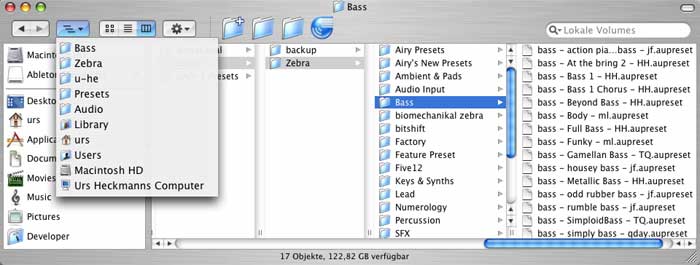
To make the presets accessible via Zebra's built in bank/preset manager, the folders that came with Zebra have to reside next to each other in the folder Library/Audio/Presets/u-he/Zebra/ in your personal Home directory.
Zebra wants them in your Home directory and not globally, because this way it can be sure that you have writing privileges, in order to be able to save presets. Otherwise it might require you to enter an Administrator password!
Also, Zebra does not care about subfolders inside of the banks. This has several reasons. For one thing, it speeds things up. Each time you switch a bank, Zebra will scan the directory and build a list of current presets. Then, it avoids hassle. I want you to always know where you are, and I'm scared about people accidentally putting aliases/symbolic links of directories into subfolders which might cause infinite circular structures and whatsoever.
Then, by a simple 2-level hierarchy, Zebra can easily deal with Midi commands for Bank Select and Program Change. There is no "Subbank Select" instruction in Midi. So, Zebra would have to either expand all presets inside subfolders into one list of Programs anyway, or Program Changes to subfolders would interfer with Bank Select statements. Either way, I think it would be more confusing than helpful.
Handling presets
As of now, it is highly recommended to use Zebra's built in preset management.
For one reason, some host applications have shortcomings in that respect, and in fact I coded the preset management to overcome these shortcomings. Logic for example makes only 180 out of 520 presets accessible, because it ignores presets with long filenames. But I think a preset name like "bass - I Like Big Bottoms And Jiggle Tops mw [bit].aupreset" is a cool thing.
A popular request is "please make the preset manager available on the Synthesis page". I will not do that in the near future. - I know that some people - including me - can spend hours in the depths of Zebra's Synthesis stuff, tweaking a crazy patch, experimenting, having fun. If the preset manager was available on that page, a single click could destroy your work. It would happen to me quite often, i.e. when I mouse around while I simultaneously play notes on a keyboard. Hence, it is intentionally on another page. - I will change that only if I find a good solution, like an Undo history that doesn't bring down performance.
Some people do use Midi Program Changes within songs, to switch between presets and save Zebra instances. While I can understand that very well, I unfortunately have to discourage you from doing so. The Midi stuff was added as a comfortable way to switch between presets while you're looking for a sound, or - even more so - when you're on stage and don't want to use a mouse between two songs.
Changing presets in Zebra isn't a trivial task, performance wise. It involves parsing XML data, creating and handling almost one thousand Core Audio parameter events, updating hundreds of user interface elements (even those that are not displayed) and - worst of all - calculating up to thousands of variables. - this costs time of course, and unfortuantely, even on my little G5 I have seen it done in more than half a second occasionally. Hence, changing a preset usually causes a performance peak that can lead to drop outs or CoreAudio overloads

Nevertheless, using Program Changes is cool and comfortable, but it has never been intended to be used in a song

For those who want to save memory consumption and stuff, with each update, from Public Beta, to 1.0 to 1.5pre and 1.5, I managed to slightly minimize Zebra's greedyness, and I think it's now way below 1MB per instance.
The only major performance hunger that Zebra has while you do not play a note, is when effects are turned on and/or effects parameters are controlled by voice modulators (lfo, envelope, etc.). I'm currently investigating ways to minimize this or to bring it down to zero completely. Then, you can have hundreds of Zebras grazing lazily in the sun, without any loss in cpu while you do not use them.
So much for now, I'm back to coffee and vst stuff

Hope this helps,
 Urs
Urs