Another 'noob' Roli/Repro question.

Official support for: u-he.com
Post Reply New Topic
RELATED
PRODUCTS

Post

How do I assign one of the faders to act as the modulation wheel? I can't seem to find anything in the manual that explains why it isn't as simple as assigning right-fader to cc1, within Dashboard.
When I do this, any manipulation of the right-fader scrolls through a set amount of source options within mod-matrix slot 1.

I can't spend much time getting to the root of the issue in Dashboard because of a (I assume) bug which causes a conflict (Whole screen flashes, every few seconds) whenever it is open at the same time as Logic Pro :scared:

It also seems like a lot of stress getting it to work in Kontakt libraries; Specifically with Spitfire.

And I know this isn't specific to my issue with Repro, but is it possible to set the Seaboard up so it defaults to mod-wheel control for every synth/library I use, in the same way as my NI M32 etc?

Any help would be greatly appreciated :tu:

Post

It works for me :
Roli dashboard:
Middle fader : CC1
Save dashboard presets .
Perhaps, you could use a midi monitor tool and see what happens...( check mpe and multi channels option too, check if your daw doesn't have cc1 map to ...)
Best
YY

Post

Whywhy wrote: Mon Feb 03, 2020 5:28 am It works for me :
Roli dashboard:
Middle fader : CC1
Save dashboard presets .
Perhaps, you could use a midi monitor tool and see what happens...( check mpe and multi channels option too, check if your daw doesn't have cc1 map to ...)
Thanks for getting back to me.

I followed your instructions, setting up the Dashboard exactly as you said (Same as I had it, pretty much), and downloaded a midi-monitoring tool.

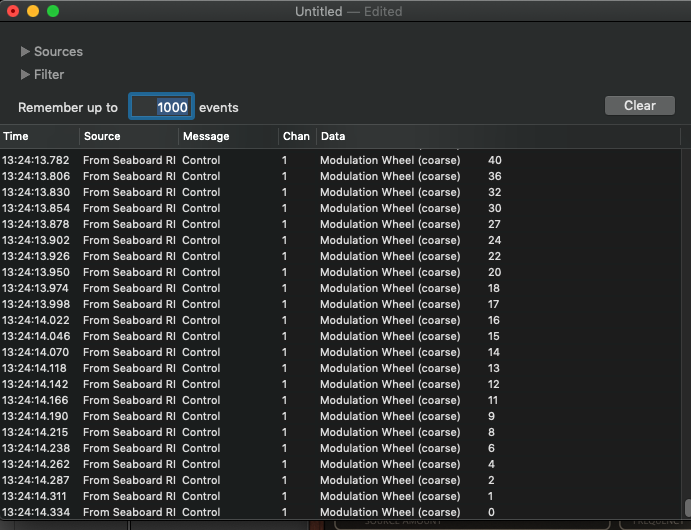
The readout from the tool suggests that everything is fine coming out of the Seaboard:

Image
Here's a video-grab which shows the peculiar behaviour:

https://vimeo.com/388989874

In the first part of the video, I am using the mod-wheel assignment from the Seaboard, and the latter half of the video shows me using the mod-wheel on the NI M32.

You can see from Logic's transport bar, that there is no detection from the Roli controller using CC1. And though I didn't think to record it, logic definitely picks up CC107, which is default mapped to the left-most fader.

What I don't understand is, if Logic can't detect it at all, why it is causing Repro's Mod-Matrix to be manipulated.

I appreciate this is likely not a Repro issue, so maybe it should be moved elsewhere.

Thanks for the help :tu:

Post

Hmmm...More strangeness!

Just loaded up Albion Tundra in Kontakt and tried assigning the Roli CC1 slider to 'Dynamics'. After the assignment it reads CC# 0. But, expectedly, from the M32 it captures it as CC# 1.

And still nothing is registered in Logic :scared:

Post

I don't use Logic, I can't help.
Perhaps something into the logic environment, with the midi port...
If you use midi learn, what happend?
Best
YY

Post

Whywhy wrote: Mon Feb 03, 2020 1:47 pm I don't use Logic, I can't help.
Perhaps something into the logic environment, with the midi port...
If you use midi learn, what happend?
Repro, specifically, doesn't seem to allow midi learn for the modulation wheel (I could be missing something).

Of course, that wouldn't solve the issue regarding Logic not picking up the signal. Nor would it explain why Tundra, via Kontakt, reads CC 1 as CC 0, yet reads CC 107 (From Seaboard's left-fader), with Logic also receiving the signal.

Might try removing the Seaboard from Logic, and reinstalling Dashboard.

Thanks again!

Post

el-bo (formerly ebow) wrote: Mon Feb 03, 2020 2:18 pm Repro, specifically, doesn't seem to allow midi learn for the modulation wheel (I could be missing something).
FYI In case it helps: I could MIDI-learn the mod wheel here (Mac, Ju-X Hosting AU).

Post

Howard wrote: Tue Feb 04, 2020 10:35 am
el-bo (formerly ebow) wrote: Mon Feb 03, 2020 2:18 pm Repro, specifically, doesn't seem to allow midi learn for the modulation wheel (I could be missing something).
FYI In case it helps: I could MIDI-learn the mod wheel here (Mac, Ju-X Hosting AU).
Thanks!

By MIDI-Learn, do you mean with the actual MIDI-Learn section of the interface. When I try it, the mod-wheel isn't shown (No red outline) as a learnable source. How do i learn that?

I did manage to get it to work if I used the 'Add' in MIDI table using "Last Clicked Control". But that has to be set on a patch-by-patch basis, and still won't respond to CC 1, from my Roli (Clearly there is something else going on, there.

Cheers :tu:

Post

el-bo (formerly ebow) wrote: Tue Feb 04, 2020 11:29 am By MIDI-Learn, do you mean with the actual MIDI-Learn section of the interface. When I try it, the mod-wheel isn't shown (No red outline) as a learnable source. How do i learn that?
You're trying to make the Mod Wheel a target. The Mod Wheel is a source.

EDIT: What I mean by that is - the Mod Wheel on the GUI is an indicator, a MIDI monitor for the MIDI Mod Wheel, that also lets you fake Mod Wheel messages on-screen. It is not a controllable plugin parameter like, say, filter cutoff.
Cheers
Rob
u-he | Support | FAQ | Patch Library

Post

#rob wrote: Tue Feb 04, 2020 3:45 pm
el-bo (formerly ebow) wrote: Tue Feb 04, 2020 11:29 am By MIDI-Learn, do you mean with the actual MIDI-Learn section of the interface. When I try it, the mod-wheel isn't shown (No red outline) as a learnable source. How do i learn that?
You're trying to make the Mod Wheel a target. The Mod Wheel is a source.

EDIT: What I mean by that is - the Mod Wheel on the GUI is an indicator, a MIDI monitor for the MIDI Mod Wheel, that also lets you fake Mod Wheel messages on-screen. It is not a controllable plugin parameter like, say, filter cutoff.
Thanks!

The edit makes things clearer, but I'm still at a loss to know what I have to do to get this working :shrug:

Post

Howard wrote: Tue Feb 04, 2020 10:35 am
el-bo (formerly ebow) wrote: Mon Feb 03, 2020 2:18 pm Repro, specifically, doesn't seem to allow midi learn for the modulation wheel (I could be missing something).
FYI In case it helps: I could MIDI-learn the mod wheel here (Mac, Ju-X Hosting AU).
Hi Howard,

Can you tell me how you did it?

Thanks.

Post

I wrote that before I read Rob's enlightening comment "You're trying to make the Mod Wheel a target. The Mod Wheel is a source." So what I meant was this: I can use MIDI CC 1 as a source for MIDI-learning any parameter. I never though of the on-screen mod wheel as a potential target for anything other than CC1, to which it automatically reacts anyway… if you are using a proper MIDI keyboard and not a slab of wavy rubber :hihi:

BTW doesn't the Seaboard have a "regular MIDI" mode?

Post

Howard wrote: Fri Feb 07, 2020 2:41 pm I wrote that before I read Rob's enlightening comment "You're trying to make the Mod Wheel a target. The Mod Wheel is a source." So what I meant was this: I can use MIDI CC 1 as a source for MIDI-learning any parameter. I never though of the on-screen mod wheel as a potential target for anything other than CC1, to which it automatically reacts anyway… if you are using a proper MIDI keyboard and not a slab of wavy rubber :hihi:

BTW doesn't the Seaboard have a "regular MIDI" mode?
I get the idea of source and target. I was trying to replace the synths inbuilt mod-wheel with another controller, rather than trying to use it as a destination ;)

And while I know you were kidding with your "proper MIDI keyboard" comment, there are definitely keyboards that don't have mod-wheels. I'm sure I'm not the only person who has wanted to accomplish this.

I do have a couple of 'proper' controllers. One is not suitable for my current set-p, and the other (NI M32) has touch-strips, which I find really bad. It's not that I really like the Seaboard's strips much better, but at least where they are positioned makes them a bit more useable, for me.

And yes, the Seaboard does also work as a normal, proper MIDI controller. However, there seems to be some issue I'm having that is not interpreting the CC 1 data from the Roli as mod-wheel data :scared:

Anyway, I have a solution. I have found i can use the 'Modifier' (Logic Midi Plugin) to reassign MIDI events to various target behaviours. Works fine. And I've managed to set it up with the sliders on my Akai MIDIMIX, which are a much better option.

Success!

Cheers :tu:

Post

hm i don't recall having issues with seaboard sending CC1. will try tomorrow in studio.

i've used Logic's modifiers before u-he synths allowed CtrlA and CtrlB reasignment to reasign roli's default cc74 slide.
Image

Post

Ploki wrote: Fri Feb 07, 2020 10:41 pm hm i don't recall having issues with seaboard sending CC1. will try tomorrow in studio.

i've used Logic's modifiers before u-he synths allowed CtrlA and CtrlB reasignment to reasign roli's default cc74 slide.
I haven’t even started with the CtrlA/B stuff yet :scared: Baby steps :tu:

Anyway, thanks! You are using the same combo, so could hold the key to getting this sorted. I’m of the feeling that something is set up wrong in Logic, as monitoring MIDI sows that the Seaboard is sending out CC#1.

Thanks again.

Post Reply

Return to “u-he”