


Hi,I just got the Axe pack & got it up & running with Logic.I was pretty impressed with the tones, only thing a bit lost in the maze there, which I will eventually find my way through.Wasn't impressed with the blue skin though.I tried to change it but in the drop down there is only the default skin listed.Are there any other skins provided?
Also wish there was an easier way to find what those amps with different names were supposed to model.Is there any reference of the amp model list ?
Tube Warmer question:On The Brian's Rhapsody there seems to a Tube warmer the Master strip.I'm not sure where that effect comes from as tried to locate but couldn't find.There is also a sort of flanger on the tone but checking on the FX strip I just see a reverb! Are there other effects hidden somewhere else?
The factory tons are amazing, but is there a User tone exchange site? I am sure users have come up with greater tones.
More questions will follow later but if someone can answer this I would appreciate.Thanks a lot.
Axe Pack Skin change & more new bee questions
-
 Blue Cat Audio Blue Cat Audio https://www.kvraudio.com/forum/memberlist.php?mode=viewprofile&u=39981
 - KVRAF
- 6335 posts since 8 Sep, 2004 from Paris (France)
Thank you for choosing our plug-in. Glad that you like it!
There is currently no other skin for Axiom, so I am afraid you are stuck with the current look and feel! But you can still select different look and feels for the amp section (see the Destructor manual: there are 1600 different styles available).
As explained in the manual, the goal of Destructor is not to replicate existing gear, so the names only refer to gear that inspired us to create the presets. And sometimes they are just a mix of several types of possible amps, so there is no amp model list: they are all unique simulations.
"Tube Warmer": if you open it, you will see that it's just an instance of the plug-in. You can rename any plug-in instance, so it's usually a good idea to select a name that is self explanatory instead of the default plug-in name. The "flangy" sound that is very specific to Brian's tone is actually produced here by the comb filters that are built into Destructor. Just open the Pre and Post sections of the amp simulation and you will see their shape.
Glad that you like the default presets. There is a presets area for both Axiom and Destructor on the website. There is also a thread on the forum.
There is currently no other skin for Axiom, so I am afraid you are stuck with the current look and feel! But you can still select different look and feels for the amp section (see the Destructor manual: there are 1600 different styles available).
As explained in the manual, the goal of Destructor is not to replicate existing gear, so the names only refer to gear that inspired us to create the presets. And sometimes they are just a mix of several types of possible amps, so there is no amp model list: they are all unique simulations.
"Tube Warmer": if you open it, you will see that it's just an instance of the plug-in. You can rename any plug-in instance, so it's usually a good idea to select a name that is self explanatory instead of the default plug-in name. The "flangy" sound that is very specific to Brian's tone is actually produced here by the comb filters that are built into Destructor. Just open the Pre and Post sections of the amp simulation and you will see their shape.
Glad that you like the default presets. There is a presets area for both Axiom and Destructor on the website. There is also a thread on the forum.
-
- KVRer
- Topic Starter
- 6 posts since 10 May, 2020
Thanks a lot for the reply.Really enjoying the plugin & I must say there has been some real good planning behind it.The fact that I can load other 3rd party plugins is a very broad minded thought & an excellent idea.However I think this will definitely be my go to guitar amp plugin although I won almost every other amp plugin !Yea the plugin skin looks a bit amateur so you could probably work on it to look pro.Blue Cat Audio wrote: Mon May 11, 2020 11:51 am Thank you for choosing our plug-in. Glad that you like it!
There is currently no other skin for Axiom, so I am afraid you are stuck with the current look and feel! But you can still select different look and feels for the amp section (see the Destructor manual: there are 1600 different styles available).
As explained in the manual, the goal of Destructor is not to replicate existing gear, so the names only refer to gear that inspired us to create the presets. And sometimes they are just a mix of several types of possible amps, so there is no amp model list: they are all unique simulations.
"Tube Warmer": if you open it, you will see that it's just an instance of the plug-in. You can rename any plug-in instance, so it's usually a good idea to select a name that is self explanatory instead of the default plug-in name. The "flangy" sound that is very specific to Brian's tone is actually produced here by the comb filters that are built into Destructor. Just open the Pre and Post sections of the amp simulation and you will see their shape.
Glad that you like the default presets. There is a presets area for both Axiom and Destructor on the website. There is also a thread on the forum.
Here are a few more questions :
How do you remove an effect? The + sing adds ,but then if I want to delete that block, I am unable to do so?
Also what's the difference between the input strip & the Pre FX slots.Is it all the same?
What is the Spread know below the Master? Is it a Stereo spread?
Does the Master strip come after the Post FX towards the end of the rig? If I add a 3rd party FX on Pre or Post will it pass through the Master?
What is the best way to ad a 3rd party amp plugin on the rig? So far I tried on the Post & Pre FX blocks.I tried replacing the amp directly but clicking on it takes me only to the factory presets.
Maybe a good idea not to relate the amp modules to a particular brand or model, but then say I'm hunting for a particular Fender amp sim it would be easier to go directly to it.If not most guys would purchase a fender amp plugin.I think sellers are making a lot of profit that way! Just my thoughts.
-
Blue Cat Audio Blue Cat Audio https://www.kvraudio.com/forum/memberlist.php?mode=viewprofile&u=39981
- KVRAF
- 6335 posts since 8 Sep, 2004 from Paris (France)
- How do you remove an effect?
Just click on the effect and select " No plug-In", or drag and drop it into the system trash.
- input strip & the Pre FX slots.Is it all the same?
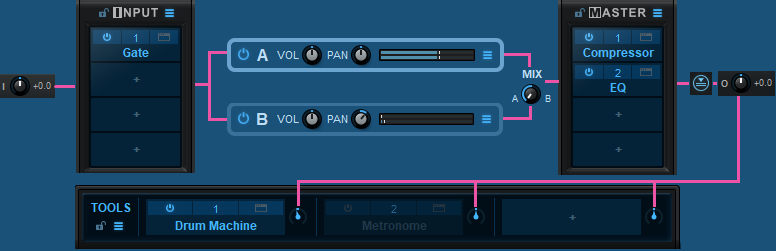
Since there are two channels (A and B), they are a but different: input effects are processed before separating into the A and B channels (more details on the routing picture below).
- What is the Spread know below the Master? Is it a Stereo spread?
Yes it's stereo spread.
Does the Master strip come after the Post FX towards the end of the rig? If I add a 3rd party FX on Pre or Post will it pass through the Master?
Yes (see the routing pic below or the manual for more info)
Blue Cat's Axiom Audio Signal Flow:
Just click on the effect and select " No plug-In", or drag and drop it into the system trash.
- input strip & the Pre FX slots.Is it all the same?
Since there are two channels (A and B), they are a but different: input effects are processed before separating into the A and B channels (more details on the routing picture below).
- What is the Spread know below the Master? Is it a Stereo spread?
Yes it's stereo spread.
Does the Master strip come after the Post FX towards the end of the rig? If I add a 3rd party FX on Pre or Post will it pass through the Master?
Yes (see the routing pic below or the manual for more info)
You cannot replace the amp directly in its slot (it is fully integrated). But you can bypass it and load a plug-in in the pre or post fx slots instead.What is the best way to ad a 3rd party amp plugin on the rig? So far I tried on the Post & Pre FX blocks.I tried replacing the amp directly but clicking on it takes me only to the factory presets.
Blue Cat's Axiom Audio Signal Flow:
-
- KVRer
- Topic Starter
- 6 posts since 10 May, 2020
Thanks for the awesome response ! You guys rock!Blue Cat Audio wrote: Tue May 12, 2020 1:37 pm - How do you remove an effect?
Just click on the effect and select " No plug-In", or drag and drop it into the system trash.
- input strip & the Pre FX slots.Is it all the same?
Since there are two channels (A and B), they are a but different: input effects are processed before separating into the A and B channels (more details on the routing picture below).
- What is the Spread know below the Master? Is it a Stereo spread?
Yes it's stereo spread.
Does the Master strip come after the Post FX towards the end of the rig? If I add a 3rd party FX on Pre or Post will it pass through the Master?
Yes (see the routing pic below or the manual for more info)
You cannot replace the amp directly in its slot (it is fully integrated). But you can bypass it and load a plug-in in the pre or post fx slots instead.What is the best way to ad a 3rd party amp plugin on the rig? So far I tried on the Post & Pre FX blocks.I tried replacing the amp directly but clicking on it takes me only to the factory presets.
Blue Cat's Axiom Audio Signal Flow:
BTW is there a Bogner Ecstasy 101B type sim on any of the amps? I'm looking for one.I found presets on this site I can download.But do users share their presets anywhere? Haven't heard much from users here on this.
Thanks.
-
Blue Cat Audio Blue Cat Audio https://www.kvraudio.com/forum/memberlist.php?mode=viewprofile&u=39981
- KVRAF
- 6335 posts since 8 Sep, 2004 from Paris (France)
There is a presets sharing thread here. The presets usually end up in the download section of the website. I don't think I have ever seen presets for this particular model yet.
-
- KVRer
- Topic Starter
- 6 posts since 10 May, 2020
Thanks .I was able to find some good stuff there.But wish users could participate more.
I have a quick question on one of the presets called " Dual Amp-Single cabs" on the Guitar -Drive list.Love the tone & wanted to add a delay on the post FX section.When I did I wasn't getting stereo repeats but the repeats were all panned to left mono.Anyway around this to get a stereo delay?
Thanks
I have a quick question on one of the presets called " Dual Amp-Single cabs" on the Guitar -Drive list.Love the tone & wanted to add a delay on the post FX section.When I did I wasn't getting stereo repeats but the repeats were all panned to left mono.Anyway around this to get a stereo delay?
Thanks
-
Blue Cat Audio Blue Cat Audio https://www.kvraudio.com/forum/memberlist.php?mode=viewprofile&u=39981
- KVRAF
- 6335 posts since 8 Sep, 2004 from Paris (France)
Oh that's because the channel A and B are hard panned (left and right). To apply to delay to both, just add it to the "Master" slots.
-
- KVRer
- Topic Starter
- 6 posts since 10 May, 2020
Thanks.Honestly speaking when it comes to overall,Blue Cat is the best I can say.I own most of the top ones out there.Some of the cons is the overall look of the plugin, names of the amp to somehow relate to the ones being modeled ( if they are intended to do so) & good marketing strategy .I've used Blue Cat plugins previously & always thought it's not a pro level company & never anticipated that you guys would shine on guitar plugins ! You could also work on a plugin that can copy the model of other amps like Bias does.Also some unique features that are not available on other plugins such as a plugin version of the Gamechanger Audio Plus Pedal may be some excellent ways to get more users.You can also add more presets.The Late replies seems to be a great delay but doesn't seem user friendly.It takes a bit more time than other delay plugins to figure it out.
Axiom has a great future though.Thanks.
Axiom has a great future though.Thanks.
-
Blue Cat Audio Blue Cat Audio https://www.kvraudio.com/forum/memberlist.php?mode=viewprofile&u=39981
- KVRAF
- 6335 posts since 8 Sep, 2004 from Paris (France)
Thanks! Glad that you like it. Late Replies is indeed a bit complex, but that's the price to pay for the flexibility and power.