Waveform 11.2.4 is available as beta

Discussion about: tracktion.com
RELATED
PRODUCTS

Post

More bug fixes, tweaks, etc.

Code: Select all

11.2.4:
- Shortcuts:        Added a toggleShowClipTakes action
- Clips:            Ensured inputs remain active when deleting clips and their source files
- Zooming:          Ensured zooming horizontally centres around the edit cursor if visible
- Zooming:          Ensured zooming doesn't snap to a moving playhead
- UI:               Removed 'Add Loops' setting that was obsolete
- MIDI:             Disable 'MIDI Step' while recording or else double notes get added
- MIDI:             Newly recorded MIDI notes will follow the note colour setting
- UI:               Removed option for spacebar to always controls transport [macOS/Windows]
- Racks:            Added Rack Macro parameters to the quick control menu
- UI:               Removed the "Apply" button from the search browser

11.2.3:
- Automation:       Fixed small rounding error in automation
- Bugs:             Fixed basic audio operations from converting all files to wav, even when source format was writable
- UI:               Fixed text, aux, patch bay plugins not hiding their UI when Waveform minimized
- MIDI:             Fixed crash right clicking on MIDI note for the first time
- Bugs:             Fixed dragging automation point to time 0 deleting the point
- UI:               Fixed 'input follows selection' losing armed state
- UI:               Added option for spacebar to always controls transport [macOS/Windows]
- UI:               Using enter key in action popups now closes the popup
- MIDI:             Popup MIDI toolbar now applies to the selected clip / note, rather than clip mouse is over
- Engine:           [Experimental] Fixed a problem with some plugins going silent in Edits with plugins with latency
- Clips:            Fixed a problem deleting clips and their source material on Windows
- Authorisation:    Added an "Unlock" button to the "Maintenance" settings page if the app is in a trial period so you can upgrade
- UI:               Fixed the plugin CPU values reported by the resource monitor for non-Rack plugins
- Settings:         Fixed changng the legacy/Artisan plugin options menu items

11.2.2:
- UI:               Resorted internal plugins
- Step clips:       Fixed crash deleting step clip while it's being edited in MIDI Editor panel
- UI:               Added option "Show extra slip handles on clip headers"
- UI:               Avoided resetting the view position when the playhead stops if "return to start" is enabled
- UI:               Fixed the plugin CPU values reported by the resource monitor
- UI:               Fix updating tab after renaming edit
- Step clips:       Fixed crash deleting last pattern section
- Shortcuts:        Added a toggleFloatingPropertiesPanel action

Post

Awesome, thank you very much !

Post

BR: I already posted this Problem in earlier Beta Thread. My Waves GUIs are scrambled and mirrored. It works with 11.1.0

Waveform 11.2.4, on Mac OS 10.15.7 Catalina, iMac i5 late 2013, Audio Interface Yamaha AG06

Any Ideas?
You do not have the required permissions to view the files attached to this post.
I don’t speak English, but this very well :D

Post

Michl71 wrote: Thu Dec 03, 2020 5:54 pm BR: I already posted this Problem in earlier Beta Thread. My Waves GUIs are scrambled and mirrored. It works with 11.1.0
We are aware of the issue. It is because of the version of the macOS SDK we build against now. Not sure how to work around the issue.

Post

FigBug wrote: Thu Dec 03, 2020 5:24 pm More bug fixes, tweaks, etc.

Code: Select all

11.2.2:
- Step clips:       Fixed crash deleting step clip while it's being edited in MIDI Editor panel
- Step clips:       Fixed crash deleting last pattern section
Thank you, these were giving me such a headache! And I assumed Racks were the issue.
Linux version?

Post

Thank you very much !
Orion, Bitwig, Tracktion, Mixbus :party: :tu: :clap:
Win 10, intel i7, ram 20 steinberg UR22mkII :wink:

Post

Is it possible to allow multiple rows of quick actions in the Quick Actions Panel/bar? I know I can do it in the Quick Actions popout window, but that gets in the way of wherever I put it.
Linux version?

Post

Some buggules:

# When I drag an Arp preset onto a track I get a clip-like outline, but nothing happens when I drop it.

# When I drag a 4OSC preset onto a track's output section, a 4OSC instance is inserted with the instrument settings usually, but not always, correct; I have yet to see it come up with the preset instrument name at the top of the 4OSC dialog — the field is blank. (Which differs from 10.4.7, where it's blank but gets a * change symbol.)

# typo: 4OSC Basic Lead 5 is missing a space in its name so it's out of alphabetical order.


FR: an option (if there isn't one already) for dragging the box in the Overview such that it doesn't move the playback head, just the field of view.

Post

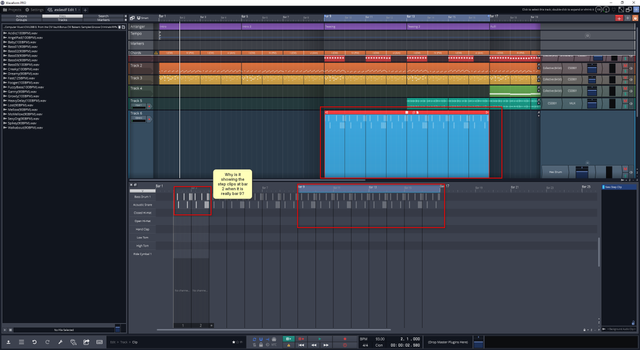
Hi I think I found a bug or it may not I'm not sure but I'll mention it. I have a step clip that starts at bar 9 and I have clicked into it step editor but it only shows the editable steps for bars 2 and 4. it can be seen from this picture. I've been continually finding that the midi editor pane is getting confused over location of editable steps.

Image

EDIT:
I was able to fix this by use of the slip edit so I'm guessing I must have accidently slipp edited the step clips editable start position moving it to a position way before the clip start.

Post

On Windows "Save Key-Mappings..." and "Load Key-Mappings..." don't work.

Post

ForrestH wrote: Fri Dec 04, 2020 6:56 am Some buggules:

# When I drag an Arp preset onto a track I get a clip-like outline, but nothing happens when I drop it.

# When I drag a 4OSC preset onto a track's output section, a 4OSC instance is inserted with the instrument settings usually, but not always, correct; I have yet to see it come up with the preset instrument name at the top of the 4OSC dialog — the field is blank. (Which differs from 10.4.7, where it's blank but gets a * change symbol.)

# typo: 4OSC Basic Lead 5 is missing a space in its name so it's out of alphabetical order.


FR: an option (if there isn't one already) for dragging the box in the Overview such that it doesn't move the playback head, just the field of view.
1. That's preset is actually for the arp plugin. I should make it so it doesn't look valid to drag it to a track.

2. Is it just the name that's missing? Every time I do it, the controls look correct.

3. This will be fixed in next beta.

4. Grab the box by the top or bottom border and then drag.

Post

Cheve wrote: Sat Dec 05, 2020 11:56 pm On Windows "Save Key-Mappings..." and "Load Key-Mappings..." don't work.
Can you give more details, I can't reproduce.

Post

In Settings > Keyboard Shortcuts, the buttons at the bottom labeled "Save Key-Mappings..." and "Load Key-Mappings..." do nothing when you click them.
I can't load my key mappings. I can't save new ones.

FigBug wrote: Sun Dec 06, 2020 4:13 am
Cheve wrote: Sat Dec 05, 2020 11:56 pm On Windows "Save Key-Mappings..." and "Load Key-Mappings..." don't work.
Can you give more details, I can't reproduce.

Post

Cheve wrote: Sun Dec 06, 2020 1:16 pm In Settings > Keyboard Shortcuts, the buttons at the bottom labeled "Save Key-Mappings..." and "Load Key-Mappings..." do nothing when you click them.
I can't load my key mappings. I can't save new ones.
Super weird. What version of windows? All other save / load dialog boxes work?

Post

Cheve wrote: Sun Dec 06, 2020 1:16 pm In Settings > Keyboard Shortcuts, the buttons at the bottom labeled "Save Key-Mappings..." and "Load Key-Mappings..." do nothing when you click them.
I can't load my key mappings. I can't save new ones.

FigBug wrote: Sun Dec 06, 2020 4:13 am
Cheve wrote: Sat Dec 05, 2020 11:56 pm On Windows "Save Key-Mappings..." and "Load Key-Mappings..." don't work.
Can you give more details, I can't reproduce.
Maybe related https://forum.juce.com/t/windows-native ... ible/42888

Post Reply

Return to “Tracktion”