


Hi, I have re-guitar and destructor but not really used them much at all. Also an old G&L Skyhawk - which is like an update to the Strat. I also have a Dinky Sustainiac guitar which is normally what I would use for infinite sustain - it is a wonderful guitar but not available for a few months so I am looking for preset settings that will give me as smooth and as long a sustain as possible from the Blue Cat fx and the Skyhawk. Some sort of distortion I imagine, but I am not at all familiar with what the FX can do
Suggestions for a preset that can get me started please !
SOLVED Preset suggestions needed for smooth long sustain from the Blue Cat fx and a G&L Skyhawk
-
- Banned
- 2524 posts since 4 Jul, 2019
-
- Banned
- Topic Starter
- 2524 posts since 4 Jul, 2019
I found the preset browser - which I had not seen before and searched for a preset called "sustain" and found something useful. Then, using the new Tone Map feature I explored around that. The Tone Map is very useful
-
 Blue Cat Audio Blue Cat Audio https://www.kvraudio.com/forum/memberlist.php?mode=viewprofile&u=39981
 - KVRAF
- 6345 posts since 8 Sep, 2004 from Paris (France)
Glad that you were able to find your tone!
-
- Banned
- Topic Starter
- 2524 posts since 4 Jul, 2019
I thought I did this and then next time I couldn't. Is there a way to select something as a preset and then see neighbouring sounds in the tone map to some extent automatically ?
I am sure this happened the first time but I could not figure out how to do that today, I had to add each preset individually to the map
-
Blue Cat Audio Blue Cat Audio https://www.kvraudio.com/forum/memberlist.php?mode=viewprofile&u=39981
- KVRAF
- 6345 posts since 8 Sep, 2004 from Paris (France)
Maybe you already had an existing tone map selected and just added the preset to it?
-
- Banned
- Topic Starter
- 2524 posts since 4 Jul, 2019
Are the existing tone maps? Like presets? That would be goodBlue Cat Audio wrote: Tue Jul 13, 2021 9:13 am Maybe you already had an existing tone map selected and just added the preset to it?
-
Blue Cat Audio Blue Cat Audio https://www.kvraudio.com/forum/memberlist.php?mode=viewprofile&u=39981
- KVRAF
- 6345 posts since 8 Sep, 2004 from Paris (France)
Yes there are indeed a couple of built-in tone maps for each type of preset. Just click on the menu ("hamburger") icon that is located at the top left of the tone map view to access the tone maps menu:
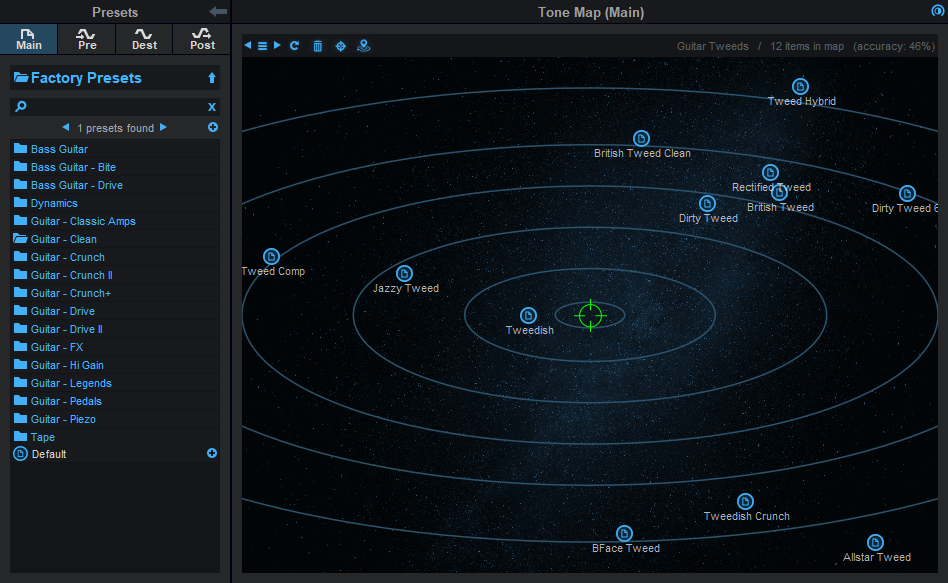
You can also switch between these existing tone maps using the arrow icons, and save your favorites too.
You can also switch between these existing tone maps using the arrow icons, and save your favorites too.
-
- Banned
- Topic Starter
- 2524 posts since 4 Jul, 2019
Fantastic! Thanks so much for all your helpBlue Cat Audio wrote: Tue Jul 13, 2021 9:24 am Yes there are indeed a couple of built-in tone maps for each type of preset. Just click on the menu ("hamburger") icon that is located at the top left of the tone map view to access the tone maps menu:
You can also switch between these existing tone maps using the arrow icons, and save your favorites too.