How can i send midi from one master channel to multiple tracks? It seems to work with some instruments like the synth that waveform came with 4OSC (eg. img 2) but not with others (eg. img 1)like Serum, Kontakt etc.
I have the following configuration. Track 1 gets midi notes from Keyboard, Track 2 (Piano) has the Route Midi from Track 1 on the input . Track 3 (Bass) gets it's input from Track 2 (Piano) and so on...
But as you can see with VST's the midi signal is sent from track 1 only to the next track (2) and the chain signal stops there. WIth waveforms official Synth 4OSC this routing seems to work just fine. (1 sends to 2; 2 sends to 3; 3 sends to 4; etc...)
How can I send the same midi signal (from a single midi clip, or the keyboard) to multiple tracks if I use VSTs?
Correct Way to route/send MASTER MIDI to multiple Tracks
-

- KVRAF
- 4891 posts since 3 Jan, 2003 from Vancouver
One way to do it is to use a Rack. Put all the VSTs in one Rack with the MIDI in routed to all of them and route their audio outputs to various tracks.
You do not have the required permissions to view the files attached to this post.
Surely there must be consensus by now...
-
- KVRAF
- 4891 posts since 3 Jan, 2003 from Vancouver
If you don't want to put your VST in the Rack you can use the Rack just to route the MIDI.
You do not have the required permissions to view the files attached to this post.
Surely there must be consensus by now...
-
- KVRian
- 1272 posts since 11 Apr, 2002 from Nashville, TN
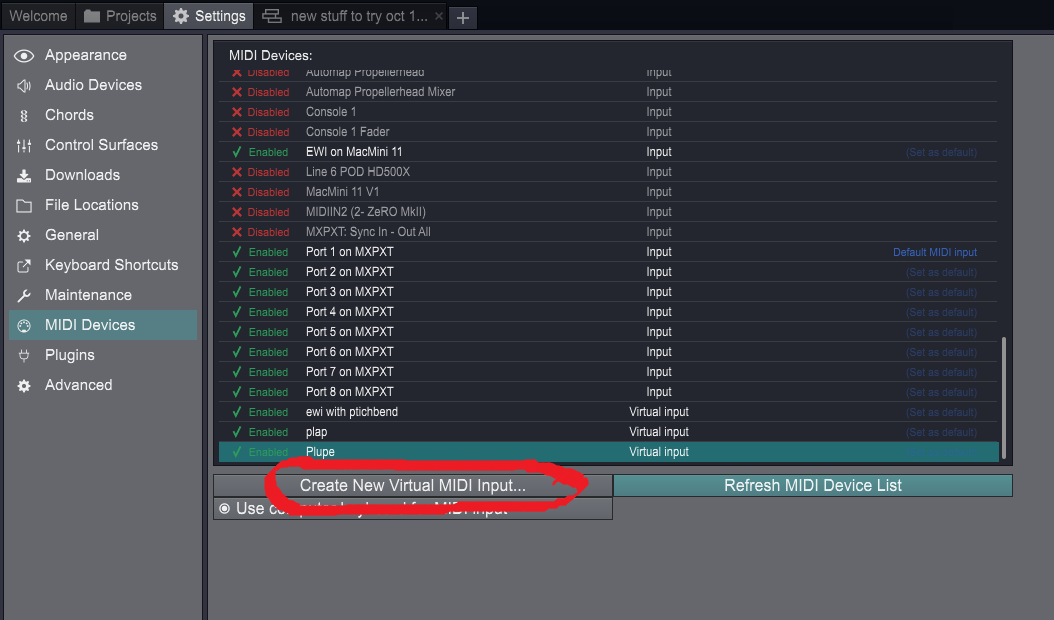
Or you can create as many Virtual MIDI Input devices as you need in the MIDI settings. Just make sure your master keyboard is selected as an input for each.