
Waveform Feature Request

Discussion about: tracktion.com
RELATED
PRODUCTS

Post

I watched The latest live stream about waveform. The developers invited users to make suggestions that will improve the user experience....

here goes :tu:

1. The samplers (Micro-sampler/Multi-sampler) should have play back features eg. Polyphonic mode, Monophonic mode.
It would also be nice if one shot mode had Attack Decay Release controls.
Processor AMD PRO A10-8750B R7, 12 Compute Cores 4C+8G 3.60 GHz
Installed RAM 32.0 GB (30.9 GB usable)
System type 64-bit operating system, x64-based processor

https://soundclick.com/guerillagenus

Post

Thanks for suggestions, will add them to our bug tracker

Post

Hi, it would be good to hold Ctrl automatically open fx with
connected right angle pin plugin, thanks.
Orion, Bitwig, Tracktion, Mixbus :party: :tu: :clap:
Win 10, intel i7, ram 20 steinberg UR22mkII :wink:

Post

Some other features I'd like to see on Waveform xx:
1) Mute / Solo for automation tracks / possibility to draw automation tracks with a pencil
2) Random generators for Bassline, chords and arpeggios (with possibility of composing complex patterns).
3) Customizable track color on a color palette.
4) Some mixing and mastering assistants ...
5) Addition of new musical scales.
Thanks for your hard work. Alberto.

Post

Here are mine ;-)
Consistent mouse/keyboard/modifiers navigation in the Edit Tab and MIDI Editor.
Multiple Timelines (time and Beat at the same time for soundtrack composing).
– Connecting the Chord track with the MIDI Chord Companion.
Different chord inversion and chord "players" (different forms for piano, guitar, open chords, and so on).
A robust presets manager. It's almost done, but please add Pattern Generator and Grooves presets to the new browser too. Also custom folders with *.fxb, *.fxp. would be handy. And VST3 presets, please! (Is it possible?) In short: anything that has presets should be on one place.
MIDI Editor Tools modifiers! Click – select/deselect note, shift + click – select/deselect more notes, ctrl + click – delete note, ctrl + click on empty space + drag – draw a new note, alt + click – slice note, shift + alt + click a note – slice a long note into multiple notes of the same length. So many functions and you can have still only the first tool (the arrow) active. No need to change the tools. The same apply for the Edit tab, just change "notes" for "clips" PLEASE, this would be a HUGE timesaver!
Fractional steps in Step Clips. For fast hi-hat rolls for example. (Additionally with the ability to specify if the fractions are linear or exponential for "glitch/stutter" effects.)
Step Clip names and Pattern names on Step Clips in the Edit Tab. Now it's visible only on higher zoom values.
– Ability to change the default Track height.
– Plain MIDI Sends/Returns.
Nondestructive MIDI modifiers. The newly introduced Randomize Velocity/Pitch/Start/Length would be great as independent MIDI plugins/modifiers, which would mangle the data, but you could still have the original clips unaltered.
Easier transferring Edits into new Projects. Now I have Idea 1–Idea 5 (for example) and I would like to transfer them into their own Projects and start expanding those ideas.

I know, I know! :-D But I think some of these ideas are quite useful and some of them could even be done easily (I hope).
Waveform 12 Pro, Cubase Pro 13, Windows 11, i7-13700H

Post

I can add another one after today's struggle. If it's possible: after sandboxed plugins crash, could Waveform let us know, which plugin caused the issue? I had to exchange a faulty synth. But I had to turn them all off, and then start turning them on back again one by one and wait cca 10 seconds for the crash every time (in this case).
Waveform 12 Pro, Cubase Pro 13, Windows 11, i7-13700H

Post

- Automation clips that function like any other clip but contain automation data. And the ability to change the destination of an automation track (what parameter it automates)

- Per-track step clip divisions. In case you want the kick in triplets and cymbals in 4/4, etc.

- I'd expand on the "transferring edits into new projects". I'd like to see a feature where you can select an area of an edit and click "split marked region a new edit". So if you have a section of a song and decide you want to split it off into a new song, you could split it off from the rest of the track.
Linux version?

Post

Never seen the first feature you mentioned in any DAW. It's a great idea!
Waveform 12 Pro, Cubase Pro 13, Windows 11, i7-13700H

Post

Reaper has a similar method to store automation clips etc, [ see video ] , This would be an excellent addition to Waveform.


Post

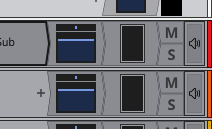
I noticed on the track rows in the arranger that the angled seperators seperating the meter module look very jagged and is more apperent in light mode. It's a very small UI thing but it feels like it should be smoother to me?

Image

Post

UnionS8 wrote: Sat Apr 16, 2022 7:58 am Never seen the first feature you mentioned in any DAW. It's a great idea!
I'm pretty sure FL Studio actually does have all of these features. Automation clips that can be moved/copied/pasted/split/etc. like audio/MIDI clips, and you can change the destination of an automation track after it's been created. I could be wrong.

Making automation function like any other track not only makes automation much more flexible, it also makes it more intuitive. Instead of learning a new system, you can extrapolate from a system you already understand.

And editing automation would be so much easier! Currently, it's a unique and clunky system relative to the rest of waveform. Moving automation is a real annoyance, so much so that I avoid doing it whenever possible. Even clearing automation from a section is needlessly frustrating. It's even more noticeable because editing clips is so fast and easy with audio or MIDI. I'm whipping around, slicing and dicing clips left and right, and then I come to a screeching halt trying to get automation right.
Linux version?

Post

Two more new features ...
1) Possibility of drawing a modulation in the modifier with the pencil;
2) Ability to save the values ​​set in a modifier as a preset. Thanks.

Post

UnionS8 wrote: Mon Apr 11, 2022 9:57 pm Here are mine ;-)

Multiple Timelines (time and Beat at the same time for soundtrack composing).
This would be super helpful. This is something I miss from my Cakewalk Sonar days. You could have 4 timelines at once.

Post

As others have said I would like to be able to edit automation as I edit midi clips such as fl studio allows you to do. I find the current system of automation very slow compared to how fast the workflow of everything else is in waveform please consider adding automation clips in the near future.

Post

A few GUI suggestions:
- Different colour/shade for Instrument plugins (VSTi).
(Have I mentioned that the colour editor until T6 was dope? 😇)
- Rounded button corners look nicer to me than angled corners.
MacBook Pro i7 - 16 GB RAM
10.13.6 (High Sierra)
Tracktion 2, 3, 4, 5, 6, 7, W8, W9, W10 Pro, W11 Pro, W11.5 Pro, W12 Pro
Logic Pro X
ProTools 9, 10, 11

Post Reply

Return to “Tracktion”