Introducing ARIA ONE — Full-Spectrum Hearing Test, Correction Engine, AI Presets, Cross-Device Sync

VST, AU, AAX, CLAP, etc. Plugin Virtual Effects Discussion
Post Reply New Topic
RELATED
PRODUCTS

Post

Introducing ARIA ONE — Personalized Audio Application Suite

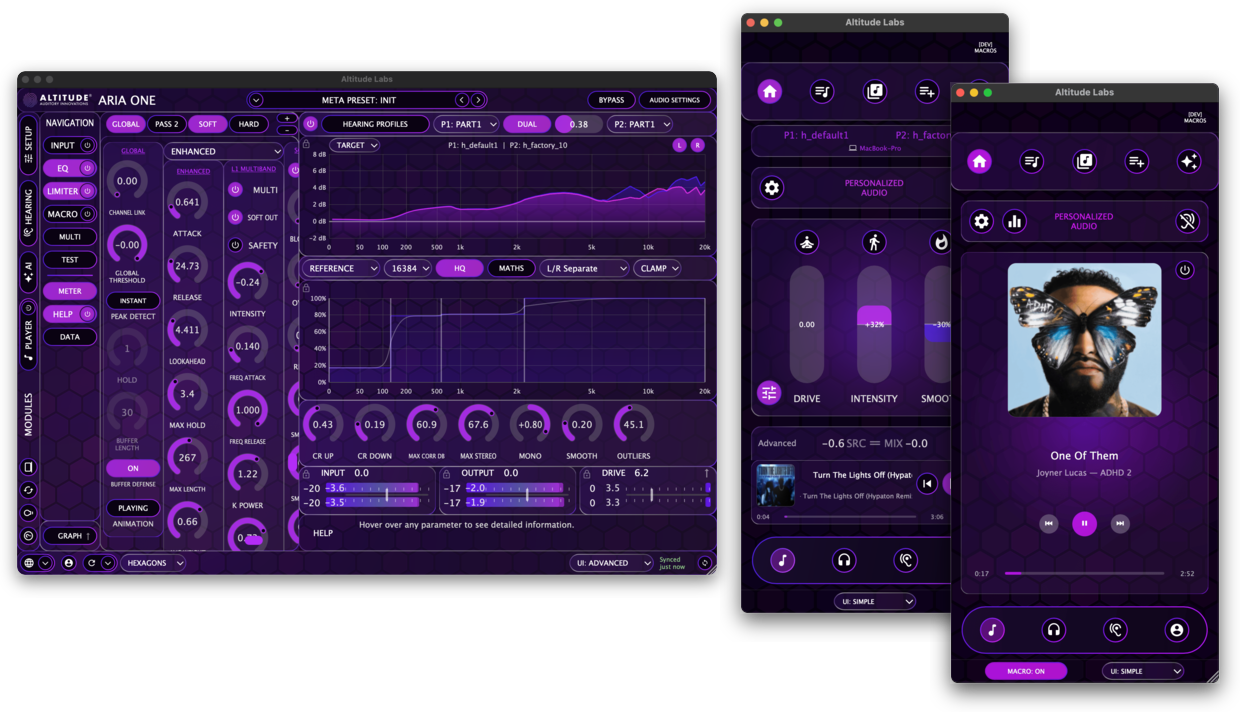
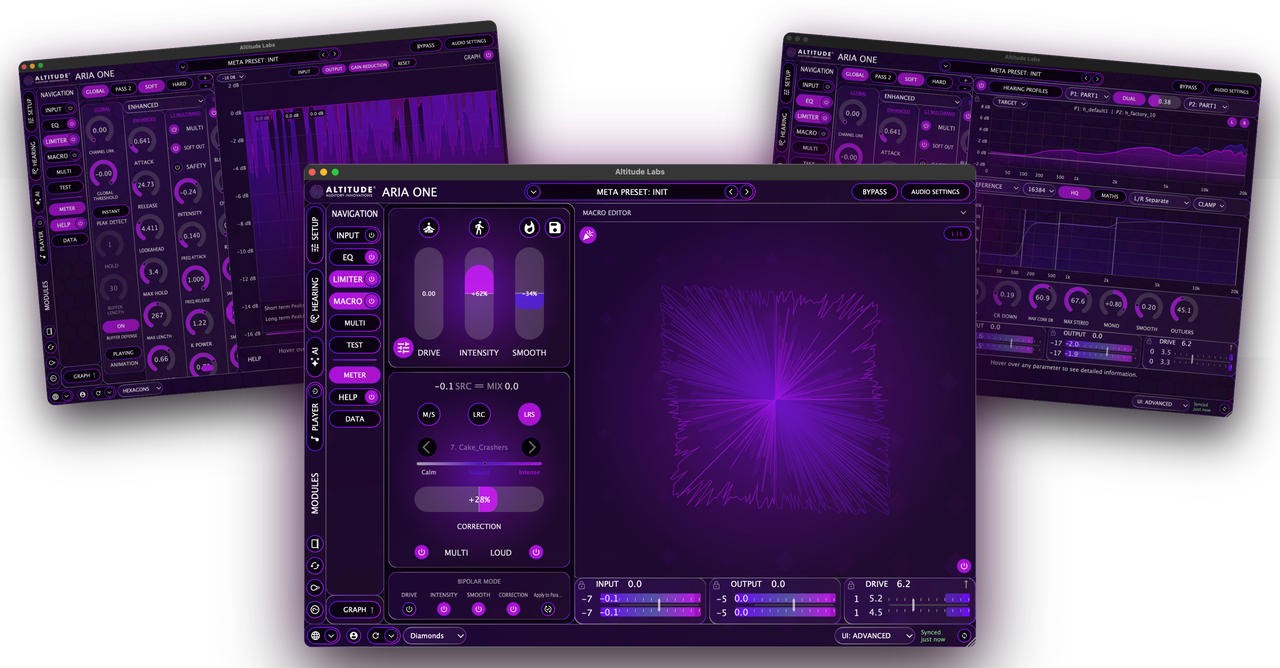
ARIA ONE is a multi-platform audio application suite built around your hearing. It consolidates a full-spectrum hearing test, high-resolution hearing correction, a dual-pass modular multi-algorithm lookahead limiter, AI-assisted preset personalization, cross-device sync, and a built-in audio player into one interconnected system across macOS, Windows, iOS, and Android.

The hearing test runs inside ARIA ONE itself, measuring up to 37 frequencies per ear between 125 Hz and 20 kHz. Those results drive the correction engine, limiter behavior, preset generation, and device-specific listening states from onboarding forward.

This post is a high-level summary of the system. The follow-up posts in this thread go deeper into each area — find the ones that interest you.
Image

───────────────────────────────────────

ONBOARDING

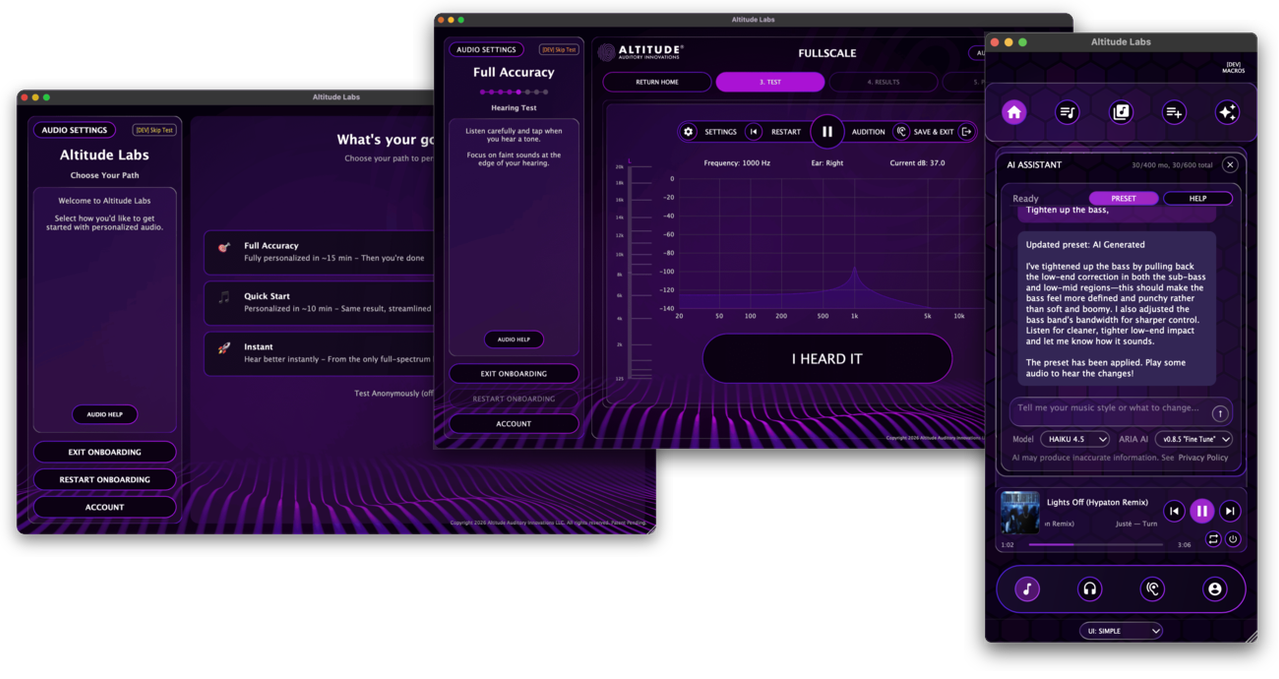
ARIA ONE walks you through a guided onboarding flow the first time you launch. Three starting paths:
  • Instant — age-matched profile, listening in under a minute, no testing required
  • Quick Results — real hearing test, skips calibration steps for faster results
  • Full Accuracy — calibrated setup using your specific headphones for maximum precision
At the end of onboarding, ARIA ONE introduces you to ARIA AI and generates your first AI-created preset based on your hearing profile — you audition the result immediately and can continue refining from there.

───────────────────────────────────────

ECOSYSTEM AND SHARED ARCHITECTURE

ARIA ONE is the connected center of the Altitude Audio ecosystem. FullScale provides the hearing test layer — embedded inside ARIA ONE on desktop and available as a standalone app on macOS, Windows, iOS, and Android. Hearing data from any FullScale path feeds back into the same system.

The limiter engine shares architecture and preset logic with the broader Altitude product line through the local preset library. Limiter presets, adaptive input states, and related subpresets built or refined in one product are available in others that share the same architecture.

ARIA Studio is the offline, production-focused branch of the workflow. ARIA ONE can export Full Preset and EQ Full states to ARIA Studio as a one-way copy — ARIA Studio does not import states back into ARIA ONE.

Crossfeed is integrated directly into the listening chain as a dedicated module.

───────────────────────────────────────

HEARING CORRECTION AND SOUND PERSONALIZATION

The correction engine offers both FIR convolution and SOS cascaded biquad filter paths built from your hearing profile.
  • Three correction modes: Mid/Side, Left-Right Linked, and Left-Right Decoupled
  • Profile blending: mix multiple hearing profiles or merge a personal result with a factory profile
  • Macro control: four knobs and two toggles mapped to any combination of DSP parameters through custom response curves — each macro addresses up to 24 parameters
  • Input adaptive gain: levels incoming audio before the limiter regardless of source volume
───────────────────────────────────────

ARIA AI

ARIA AI is built into ARIA ONE and works from your hearing profile, your current DSP state, and your listening goals.
  • Preset generation and refinement — describe what you want in natural language and the AI builds or adjusts your preset
  • Setup and help — ask about controls, workflows, or what you are looking at
  • Generated tutorials — saved, replayable walkthroughs built around your specific question
  • Multiple agent styles — different reasoning and edit depths for different tasks
ARIA AI is available in both Simple View and Advanced View and requires Cloud Mode.

───────────────────────────────────────

DEVICE SYNC AND DEVICE CONTROL

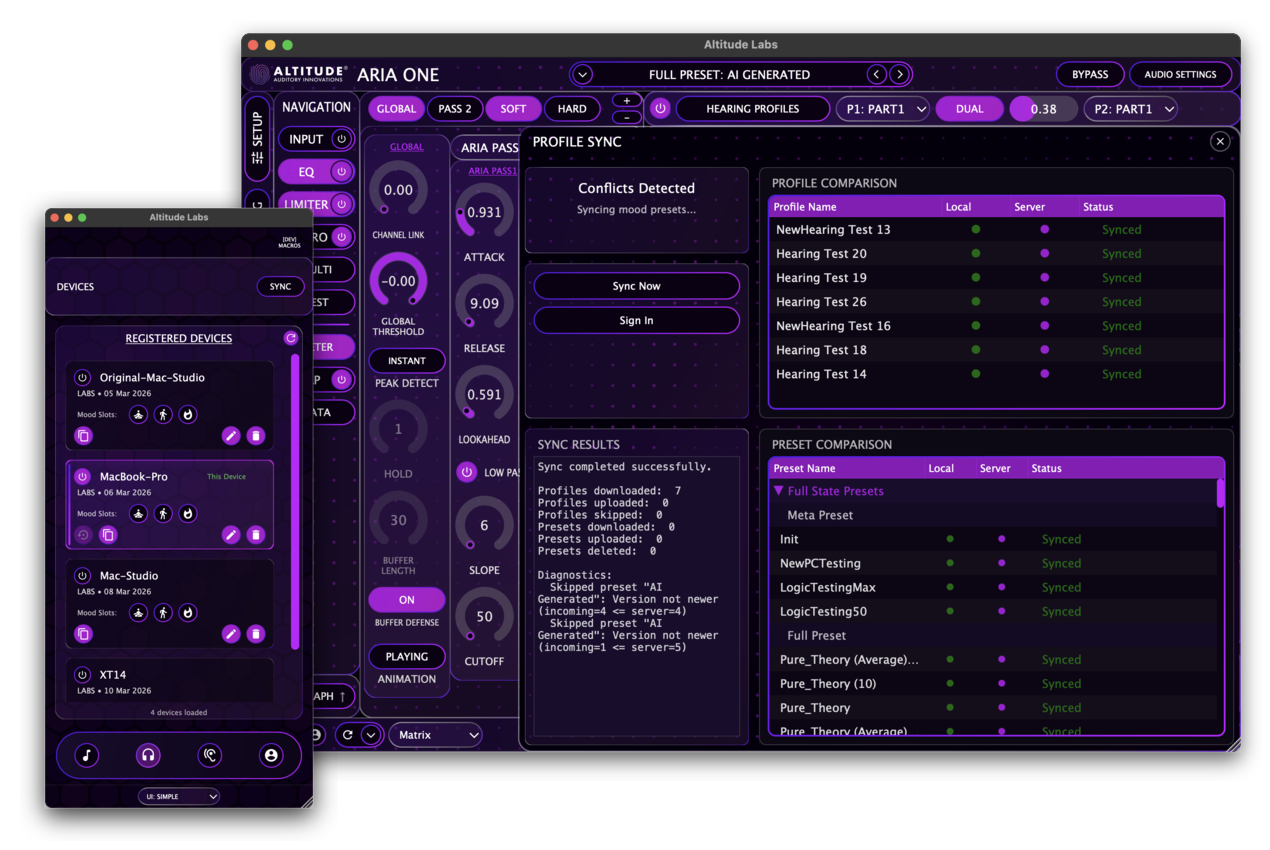
Hearing profiles, presets, and listening states sync across all registered devices in Cloud Mode. Each device maintains its own set of three mood preset slots — full DSP state recalls. The typical workflow is to build and refine presets in Advanced View on desktop, then push those states out to your phone or other devices so each endpoint has tuned listening ready to go. You can also check out another device's state, audition and edit its presets locally, and commit changes back.

───────────────────────────────────────

AUDIO PLAYER AND MOBILE

ARIA ONE includes a built-in audio player that routes playback directly through the correction and limiting chain. In standalone mode on desktop, system audio can also be routed through ARIA ONE using a Virtual Audio Device. The mobile applications on iOS and Android run the same DSP engine in a streamlined player-focused layout without the Advanced View interface.

───────────────────────────────────────

SIMPLE VIEW AND ADVANCED VIEW

ARIA ONE has two operating surfaces on the same engine.

Advanced View
  • 400+ parameters across the full signal chain
  • Eight standalone graphing and analysis windows
  • Module-level control, AI access, sync and device management
  • Complete signal chain visibility
Simple View
  • Three mood state buttons — Calm, Natural, Intense — each a full DSP state recall
  • Four macro controls and one-tap favorites
  • Built-in playback in a mobile-compatible layout
Both views share the same hearing profile, presets, sync state, and underlying processing.

───────────────────────────────────────

CLOUD MODE AND LOCAL MODE

Cloud Mode enables sync, AI features, and cross-device continuity. Local Mode keeps the entire workflow private and offline on a single machine with no cloud dependency. This is a per-machine choice made during setup and is permanent for that installation. Automatic sync is in place and will notify you if a sync failure occurs. Manual batch sync is available as a fallback.

───────────────────────────────────────

AVAILABILITY
  • macOS: Ventura 13+ — VST3, AUv3, Standalone
  • Windows: Windows 11 — VST3, Standalone
  • iOS: Free through TestFlight
  • Android: In review with Google
  • AAX: On the roadmap
  • Sample rates: 44.1 kHz to 192 kHz
  • Virtual Audio Device: supported in standalone mode
Sign in with an Altitude Audio account to use ARIA ONE. Each account can activate up to five machines. Five free AI credits are included with every account.

───────────────────────────────────────

Website: https://altitude.audio/aria-one
User Manual: https://altitude.audio/aria-one/manual
Post

Start Your Way — Onboarding, FullScale, and Hearing-Driven Entry Paths

ARIA ONE walks you through a guided onboarding flow on first launch. You choose how deep to go on day one, and the system adapts to whatever hearing context it has.

───────────────────────────────────────

THREE STARTING PATHS

Instant uses an age-matched characteristic profile so you can hear the system immediately without any testing. You are listening in a minute. You can come back and take the full hearing test later.

Quick Results runs the actual hearing test but skips the calibration setup steps. You get real measured data faster.

Full Accuracy is the complete path — calibrated setup using your specific headphones for the most precise hearing profile. If your headphones or earbuds are in the supported device list, the calibrated path uses device-specific frequency-response data. If they are not listed, the expedited route still produces a measured result.

All three paths lead into the same system. The difference is how much real hearing context ARIA ONE has to work with on day one.

Image

───────────────────────────────────────

THE ONBOARDING FLOW

Onboarding moves through a guided sequence: path selection, sound check, setup and calibration (if testing), the hearing test itself, results review, a live audition of your personalized sound with the AI assistant, and a final step where you choose Simple View or Advanced View as your starting interface.

───────────────────────────────────────

FULLSCALE INSIDE ARIA ONE

The hearing test is FullScale, embedded directly into the ARIA ONE workflow. It measures up to 37 frequencies per ear from 125 Hz to 20 kHz. You can launch it during onboarding or come back to it later from the Hearing section of the app.

A completed hearing test produces multiple sub-profiles based on different psychoacoustic models — Full, Part1, Bark, ERB, and Part2. These give the correction engine different perspectives on your hearing data, and you can select or blend between them inside the EQ module.

───────────────────────────────────────

WHAT HAPPENS AFTER ONBOARDING

At the end of the onboarding flow, ARIA ONE first generates a Pure Theory preset — a baseline preset derived directly from your hearing data without AI. Then it introduces you to ARIA AI and generates an improved AI-created preset on top of that baseline. You audition both and can continue refining from there. The system also generates an initial set of mood states for your device — Calm, Natural, and Intense — each a full DSP state recall built from your profile and the factory limiter characters.

From that point forward, hearing data is driving correction, limiter behavior, preset generation, and device-specific listening states.

───────────────────────────────────────

ONE CAVEAT

FullScale inside ARIA ONE is a sound personalization listening tool. It is not being presented as a medical diagnostic or treatment tool.

Post

Two Interfaces, One System — Simple View, Advanced View, and the Built-In Player

ARIA ONE has two operating surfaces on the same engine. You can switch between them at any time without losing your hearing profile, presets, or sync state.

───────────────────────────────────────

ADVANCED VIEW

Image

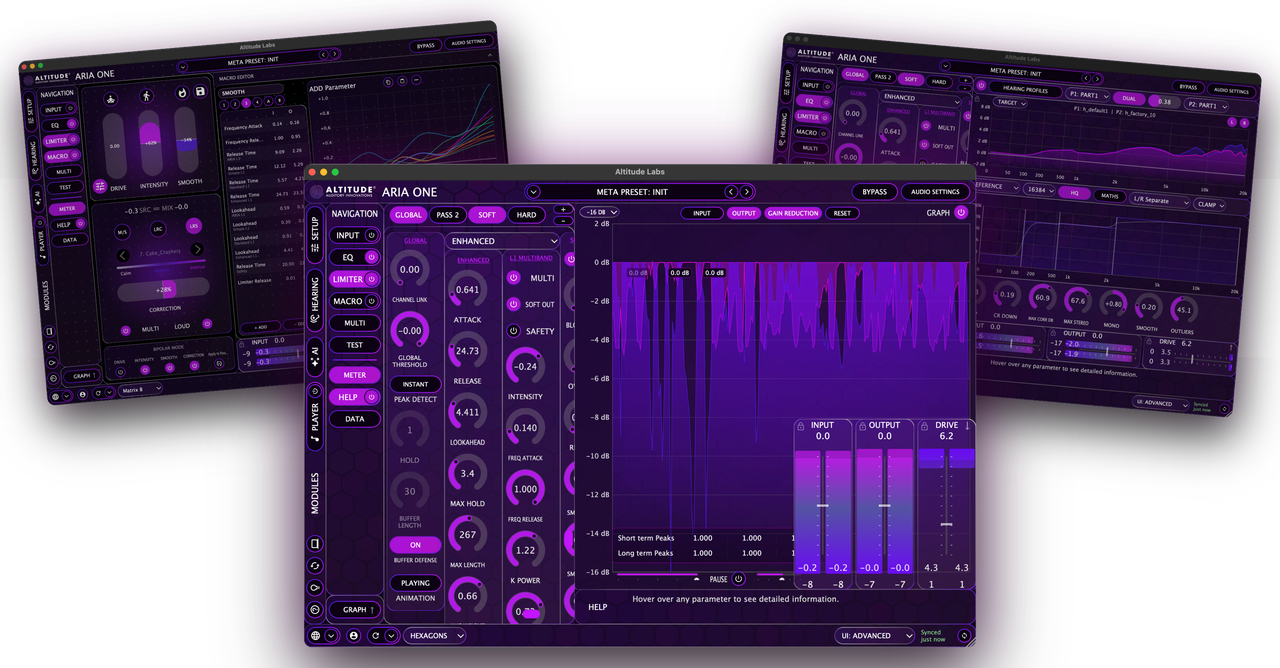
Advanced View exposes 400+ parameters across the full signal chain: hearing correction, limiter configuration, macro assignment, crossfeed, input adaptive gain, multiband behavior, and eight standalone graphing and analysis windows. AI access, the player, sync, and device management all slide out from within the same interface.

───────────────────────────────────────

SIMPLE VIEW

Simple View is the compact daily-listening surface. It is built around three mood state buttons — Calm, Natural, and Intense — each a full DSP state recall tied to the current device. Four macro controls, one-tap favorites, and a built-in player sit alongside quick hearing-processing access in a mobile-compatible layout.

───────────────────────────────────────

SHARED STATE

Both views run on the same system. Presets, hearing profiles, player state, device state, and sync state are shared. A preset built in Advanced View is the same preset recalled in Simple View.

───────────────────────────────────────

BUILT-IN PLAYER

ARIA ONE includes a built-in audio player that routes playback directly through the correction and limiting chain. It supports common formats including WAV, FLAC, AIFF, and OGG. The player has transport controls, a library browser, a playback queue, and track history.

The player exists to make the DSP accessible for demo, casual listening, and everyday use — particularly on mobile. A production-grade player across all four platforms is possible with this architecture, should the demand be there. Though personally, I would be more interested in building a personalized streaming service on top of it.

On desktop in standalone mode, system audio can also be routed through ARIA ONE using a Virtual Audio Device, so the DSP chain applies to any audio source on the machine. In plugin mode, routing belongs to the host.

───────────────────────────────────────

MOBILE

The mobile applications on iOS and Android use the Simple View layout in a streamlined player-focused form factor. They run the same DSP engine without the Advanced View interface.

Post

Core Signal Engine — Hearing Correction, Macros, Crossfeed, Adaptive Gain, and Limiting

ARIA ONE combines hearing correction, macro control, crossfeed, input adaptive gain, and a dual-pass limiter architecture into one configurable signal chain.

───────────────────────────────────────

HEARING CORRECTION

Image

The correction engine uses your hearing profile from FullScale to build a personalized correction state.
  • Two filter paths: FIR convolution (higher precision) and SOS cascaded biquad (lower CPU). Both are built in so you can hear the difference and choose.
  • Three correction modes: Mid/Side, Left-Right Combined, and Left-Right Separate — plus smoothing, correction limits, stereo handling, filter size, and low-frequency mode controls.
  • Profile blending: load two hearing profiles and blend between them — mix a personal result with a factory profile, combine two personal results, or fine-tune the correction balance.
  • Multiple sub-profiles: each hearing test produces Full, Part1, Bark, ERB, and Part2 variants based on different psychoacoustic models. Select or blend between them inside the EQ module.
  • Eight multi-band editors: reference curve, profile blend, mid channel, side channel, left-right pan, left gain, right gain, and correction amount — each with up to five bands and adjustable crossover frequencies.
───────────────────────────────────────

MACRO CONTROL

Four macro knobs and two toggles map to any combination of DSP parameters through custom response curves. Each macro addresses up to 24 parameters, and the mappings are entirely user-defined. Macros work as a non-destructive overlay — experiment freely without altering your saved preset, and bake adjustments into your parameters when you are ready.

In Simple View, macros are the primary control surface. In Advanced View, they let you build higher-level control structures on top of the full engine.

───────────────────────────────────────

CROSSFEED

Crossfeed is a dedicated headphone-listening module with its own panel and signal chain placement.
  • Blends a controlled amount of left and right channel information
  • Controls for center focus, stereo width, high-frequency compensation, and internal regulation
  • Configurable chain placement — post-DSP or pre-limiter
  • Configurable internal oversampling rates and SRC filter quality
───────────────────────────────────────

INPUT ADAPTIVE GAIN

An input adaptive gain stage levels incoming audio before the limiter regardless of source volume. This keeps the limiter operating in its intended range across different source material. The interface and parameter storage are complete, with content-aware adaptive behavior arriving in a future update.

───────────────────────────────────────

LIMITER

The dynamics engine uses a dual-sidechain architecture. Two independent sidechains analyze the signal in parallel — the first computes gain reduction from the input, the second analyzes how the signal would look after Pass 1 and computes a second reduction. Both reductions are combined and applied to the original signal in a single stage, giving the analytical benefits of cascaded limiting without the cumulative artifacts of literally chaining two processors.

Four algorithm families per sidechain slot:
  • ARIA PASS1 — transparent peak control with configurable envelope filtering
  • SIMPLE — efficient musical limiting with soft knee
  • STANDARD — content-adaptive timing with auto-envelope detection
  • ENHANCED — maximum control with running averages and deep analysis windows
Optional multiband processing adds four-band frequency-dependent limiting with configurable crossover reconstruction. A full safety chain — soft safety for adaptive output management and hard safety as a final brick-wall at 0 dBFS — sits at the end of the path.

───────────────────────────────────────

PRESET SYSTEM

ARIA ONE uses a hierarchical preset structure:
  • Meta Presets — complete state: EQ, limiter, and macro configuration in one file
  • Full Presets — EQ and limiter without macros
  • Subpresets — individual states for EQ, limiter type, limiter column, macro, and adaptive input
  • Mood presets — behave like Meta Presets in Simple View, full state recalls including macro configuration
Limiter and adaptive input presets are shared with the broader Altitude product line through the local preset library.

───────────────────────────────────────

MONITORING AND VALIDATION

ARIA ONE includes eight standalone graphing and analysis windows:
  • Vectorscope
  • Polar sample
  • Polar level
  • Spectrum analyzer
  • Waveform display
  • Metering
  • Loudness metering
  • Mobile preview
Waveform, FFT, loudness, phase, and stereo views let you see and hear the effects of the correction and limiting chain while you work. Blackout mode turns off the entire interface while audio processing continues, freeing CPU and GPU resources for critical listening or live use.

Post

Device States and Continuity — Mood Presets, Sync, and Cloud vs Local Mode

ARIA ONE keeps device-specific listening states and syncs them across your registered devices. Each device maintains its own tuned listening context.

───────────────────────────────────────

MOOD PRESET SLOTS

Each device has three mood preset slots — Calm, Natural, and Intense. Each slot holds a full DSP state recall for that device. Switching moods is a complete state swap across the correction, limiter, macros, and all associated parameters.

ARIA ONE generates an initial mood set from your hearing profile and factory limiter characters during onboarding. From there you can save your current state into a mood slot, regenerate individual slots, copy moods between devices, or generate a new Calm/Natural/Intense set from your current working state.

Image

───────────────────────────────────────

DEVICE-SPECIFIC CONTEXT

Each endpoint carries its own listening setup. Your laptop does not have to match your desktop. One set of headphones does not have to map to the same state as another. Different playback devices, rooms, headphones, and use cases can each have their own tuned states.

The typical workflow is to build and refine presets in Advanced View on desktop, then push those states out to your phone or other devices through the sync system.

───────────────────────────────────────

CHECKOUT AND COMMIT

You can check out another device's state, work on it locally, and commit changes back. Select a registered device, download its mood presets to your current machine, audition and adjust them, then save or regenerate against that device. The target device picks up those changes on its next sync.

Live real-time parameter control between devices over websocket relay — similar in concept to OSC or BT MIDI — is already built but not yet enabled. Similarly, automatic endpoint-specific state sync is built but held back while we validate the foundation of the sync system in real-world use. Both will be enabled once we are confident in the core sync behavior.

───────────────────────────────────────

CLOUD MODE VS LOCAL MODE

Cloud Mode enables the connected workflow: hearing profile sync, preset sync, device registration, mood-state continuity, AI features, and cross-device behavior. The server holds the source of truth for your account. Presets, hearing profiles, and device-state changes reconcile back to that shared account view. Automatic sync is in place and will notify you if a sync failure occurs. Manual batch sync through the Sync Panel is available as a fallback if needed.

Local Mode keeps the entire workflow on the current machine. No cloud connectivity after sign-in. No sync, no AI, no cross-device behavior. This is a per-machine choice made during setup and is permanent for that installation.

Post

ARIA AI Inside ARIA ONE — Presets, Help, and Generated Tutorials

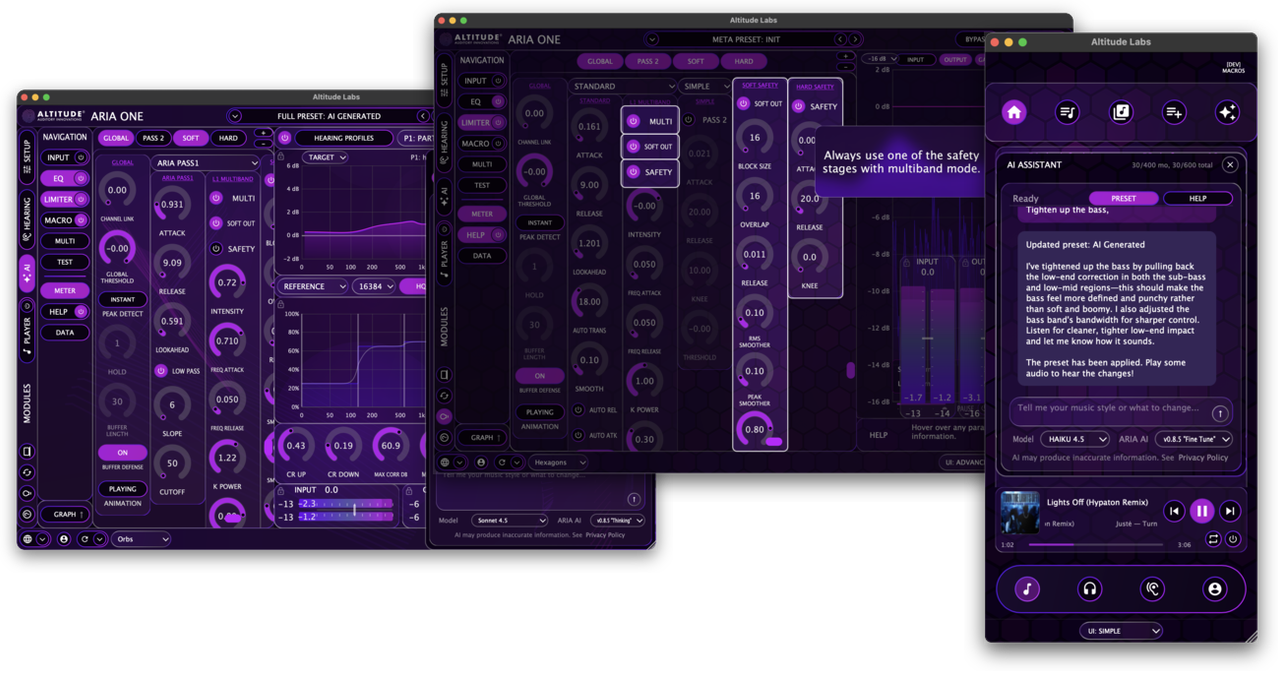
ARIA AI is built into ARIA ONE and is accessible from both Simple View and Advanced View. It works from your hearing profile, your current DSP state, and the listening goal you describe.

Image

───────────────────────────────────────

PRESET GENERATION AND REFINEMENT

ARIA AI generates and refines presets based on natural-language requests. Ask for more warmth, more clarity, less fatigue, stronger bass, a softer presentation — the AI works from your actual hearing data and current parameter state to produce a result. Each generation overwrites and loads the AI_Generated preset as a live workspace. If you like your current state, save it before asking the AI for changes. If you like what the AI produces, save it — the AI_Generated preset will be overwritten on the next generation.

During onboarding, ARIA AI generates your first personalized preset. After that, it remains available for ongoing refinement as your preferences evolve or your listening context changes.

───────────────────────────────────────

MULTIPLE AGENT STYLES

ARIA ONE includes multiple AI agent styles with different scopes of work. Some are suited to broad one-pass changes, some to smaller refinement moves, and some to deeper multi-pass reasoning. You choose the agent style based on what kind of edit you want.

───────────────────────────────────────

SETUP AND HELP

ARIA AI answers setup questions, explains controls and workflows, and points you toward the right part of the interface. It reduces the learning curve on a system with 400+ parameters by letting you ask about what you are looking at instead of searching through documentation.

───────────────────────────────────────

GENERATED TUTORIALS

ARIA ONE can generate saved, replayable tutorial material inside the app. Tutorial playback is split between bundled Walkthroughs — included guidance covering major workflows — and Custom Tutorials generated around the specific task or question you ask. Custom Tutorials are account-specific — only you can see them — and are saved for replay later in your language.

Tutorials move through real controls and panels, demonstrating actual workflows rather than describing them statically.

───────────────────────────────────────

CLOUD MODE AND CREDITS

ARIA AI requires Cloud Mode and connectivity. Five free credits are included with every account. Each successful AI delivery consumes one credit. Additional credit packs are available. In Local Mode, the AI layer is not available.

───────────────────────────────────────

LOCALIZATION

ARIA ONE's interface, AI responses, and generated tutorials are available in multiple languages. The language setting applies to both the UI and AI-generated content, so tutorials and help are delivered in the language you choose.

Post

If I read all that in one go, I would probably need an AI eye correction plugin. 👁️😉👁️‍🗨️.

Good luck with the project!

Post Reply

Return to “Effects”